Ensures a reliable and secure connection between the transmitter and receiver.


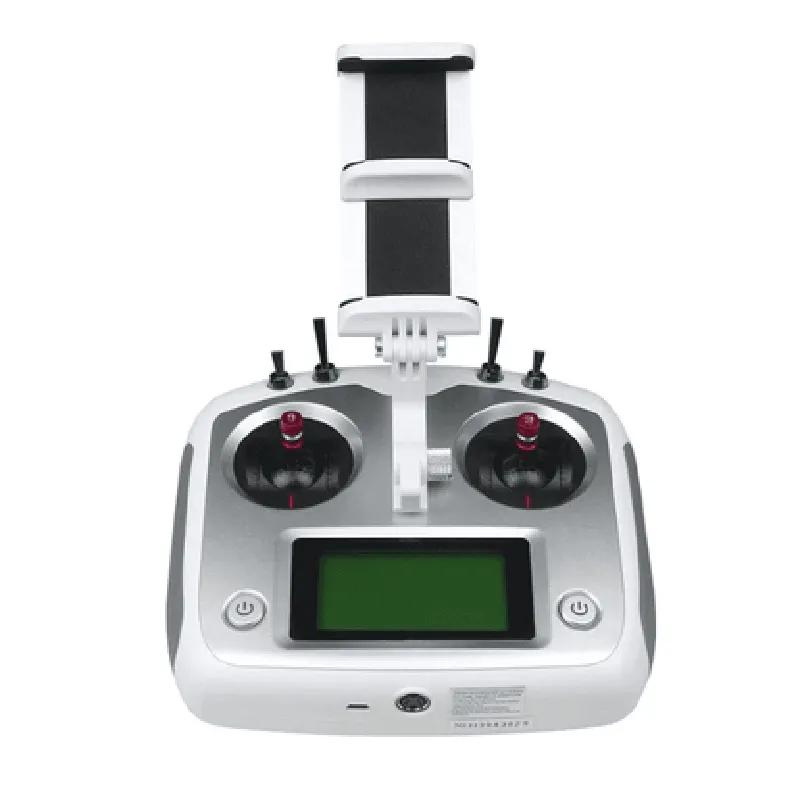
Ensures a reliable and secure connection between the transmitter and receiver.
Features a comfortable, ergonomic design with a non-slip grip, making it easy to operate for extended periods.
Provides clear visibility of system settings, model data, and real-time telemetry data.
Stores up to 20 model settings, allowing for quick switching between different devices or configurations.
Displays real-time data, including voltage, temperature, and signal strength.
Receiver (FS-IA10B)
The FS-IA10B receiver is a compact, high-sensitivity unit that pairs with the FS-i6S transmitter, providing a reliable connection for remote control operations.
Small size and lightweight construction make it ideal for use in tight spaces or weight-sensitive applications.
| High-Sensitivity | Offers exceptional sensitivity, ensuring a strong signal even at extended ranges. |
| 10-Channel Capability | Supports up to 10 channels, allowing for complex system control or multiple device operation. |
| Error-Free Data Transmission | Ensures accurate and reliable data transmission between the transmitter and receiver. |
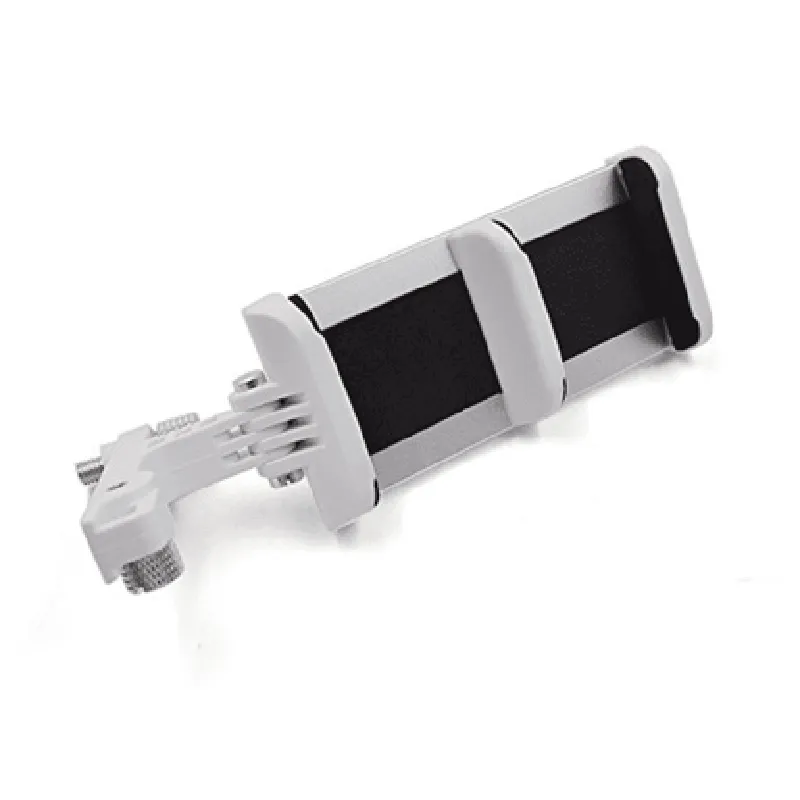
Mobile Holder
The included mobile holder allows for convenient attachment of a smartphone or tablet to the transmitter, providing a more immersive control experience.
Accommodates devices of various sizes, ensuring a secure and comfortable fit.
Durable design provides a stable platform for attached devices.
Simple, tool-free installation process makes it easy to attach or detach devices.
Alerts the user when the transmitter's battery voltage falls below a set threshold.
| Fail-Safe Function | Automatically returns devices to a preset state in the event of signal loss or interference. |
Supports select smartphone apps for expanded functionality and real-time data monitoring.
2.4GHz
Up to 2km (dependent on environment and obstacles)
-105dBm
4 x AA batteries (transmitter), 2 x 1.5V batteries (receiver)
| Transmitter | 185 x 125 x 60mm, Receiver: 40 x 23 x 12mm |
| The FS-i6S Remote Control 2.4G 10CH AFHDS with FS-IA10B Receiver and Mobile Holder is suitable for a wide range of applications, including |
Robotics and automation
Drone and UAV systems
Model aircraft and helicopters
RC cars and boats
Industrial control systems
The FS-i6S Remote Control 2.4G 10CH AFHDS with FS-IA10B Receiver and Mobile Holder offers a reliable, feature-rich, and customizable solution for remote control operations. Its advanced AFHDS technology, 10-channel capability, and compact receiver design make it an ideal choice for a variety of applications.
FS-i6S Remote Control 2.4G 10CH AFHDS with FS-IA10B Receiver and Mobile HolderOverviewThe FS-i6S is a 2.4GHz 10-channel remote control system that utilizes the Advanced Frequency Hopping Digital System (AFHDS) protocol for reliable and interference-resistant communication. This system consists of the FS-i6S transmitter and the FS-IA10B receiver, which provides a robust and secure connection for various IoT applications.Technical SpecificationsOperating Frequency: 2.4 GHz
Number of Channels: 10
Modulation: GFSK
Transmission Power: 20 dBm
Receiver Sensitivity: -90 dBm
Operating Range: Up to 1.5 km (Line of Sight)
Power Supply: 4 x AA batteries (transmitter), 5V DC (receiver)Code Examples### Example 1: Basic Control using ArduinoThis example demonstrates how to use the FS-i6S remote control to control a simple robotic car using an Arduino board.Transmitter Code (FS-i6S)
```c
// Define the control channels
#define CH1 0 // Channel 1: Forward/Backward
#define CH2 1 // Channel 2: Left/Right
#define CH3 2 // Channel 3: Speed controlvoid setup() {
// Initialize the FS-i6S transmitter
FS_i6S.begin();
}void loop() {
// Read the joystick values
int joys_x = analogRead(A0); // X-axis
int joys_y = analogRead(A1); // Y-axis// Map the joystick values to channel values
int ch1_val = map(joys_y, 0, 1023, 0, 180);
int ch2_val = map(joys_x, 0, 1023, 0, 180);// Set the channel values
FS_i6S.setChannel(CH1, ch1_val);
FS_i6S.setChannel(CH2, ch2_val);// Send the data
FS_i6S.send();
delay(20);
}
```
Receiver Code (Arduino)
```c
#define CH1 0 // Channel 1: Forward/Backward
#define CH2 1 // Channel 2: Left/Rightvoid setup() {
// Initialize the FS-IA10B receiver
FS_IA10B.begin();
}void loop() {
// Receive the data
FS_IA10B.recv();// Get the channel values
int ch1_val = FS_IA10B.getChannel(CH1);
int ch2_val = FS_IA10B.getChannel(CH2);// Control the robotic car
if (ch1_val > 90) {
// Move forward
digitalWrite(MOTOR_FW, HIGH);
} else if (ch1_val < 90) {
// Move backward
digitalWrite(MOTOR_BW, HIGH);
} else {
// Stop
digitalWrite(MOTOR_FW, LOW);
digitalWrite(MOTOR_BW, LOW);
}if (ch2_val > 90) {
// Turn right
digitalWrite(MOTOR_RIGHT, HIGH);
} else if (ch2_val < 90) {
// Turn left
digitalWrite(MOTOR_LEFT, HIGH);
} else {
// Stop
digitalWrite(MOTOR_RIGHT, LOW);
digitalWrite(MOTOR_LEFT, LOW);
}
}
```
### Example 2: PID Control using Raspberry Pi and PythonThis example demonstrates how to use the FS-i6S remote control to control a quadcopter using a Raspberry Pi and Python.Transmitter Code (FS-i6S)
```python
import pid
from fs_i6s import FS_i6S# Initialize the FS-i6S transmitter
fs_i6s = FS_i6S()# Define the control channels
CH1 = 0 # Channel 1: Pitch
CH2 = 1 # Channel 2: Roll
CH3 = 2 # Channel 3: Yawwhile True:
# Read the joystick values
joys_x = analogRead(A0) # X-axis
joys_y = analogRead(A1) # Y-axis# Map the joystick values to channel values
ch1_val = map(joys_y, 0, 1023, 0, 180)
ch2_val = map(joys_x, 0, 1023, 0, 180)# Set the channel values
fs_i6s.setChannel(CH1, ch1_val)
fs_i6s.setChannel(CH2, ch2_val)# Send the data
fs_i6s.send()
time.sleep(0.02)
```
Receiver Code (Raspberry Pi)
```python
import pid
from fs_ia10b import FS_ia10b# Initialize the FS-IA10B receiver
fs_ia10b = FS_ia10b()# Define the PID controllers
pid_pitch = pid.PID(Kp=1.5, Ki=0.5, Kd=0.2)
pid_roll = pid.PID(Kp=1.5, Ki=0.5, Kd=0.2)
pid_yaw = pid.PID(Kp=1.5, Ki=0.5, Kd=0.2)while True:
# Receive the data
fs_ia10b.recv()# Get the channel values
ch1_val = fs_ia10b.getChannel(CH1)
ch2_val = fs_ia10b.getChannel(CH2)
ch3_val = fs_ia10b.getChannel(CH3)# Calculate the PID outputs
pitch_out = pid_pitch.update(ch1_val)
roll_out = pid_roll.update(ch2_val)
yaw_out = pid_yaw.update(ch3_val)# Control the quadcopter motors
motor_front_left.setSpeed(pitch_out + roll_out - yaw_out)
motor_front_right.setSpeed(pitch_out - roll_out + yaw_out)
motor_back_left.setSpeed(pitch_out + roll_out + yaw_out)
motor_back_right.setSpeed(pitch_out - roll_out - yaw_out)
```
These examples demonstrate the basic usage of the FS-i6S remote control system in various contexts. The provided code snippets can be modified and expanded to suit specific IoT applications.