Stufin
Home Quick Cart Profile

SE955 Mushroom Emergency Stop Push Button Switch


Buy Now on Stufin

Component Name

SE955 Mushroom Emergency Stop Push Button Switch
Overview

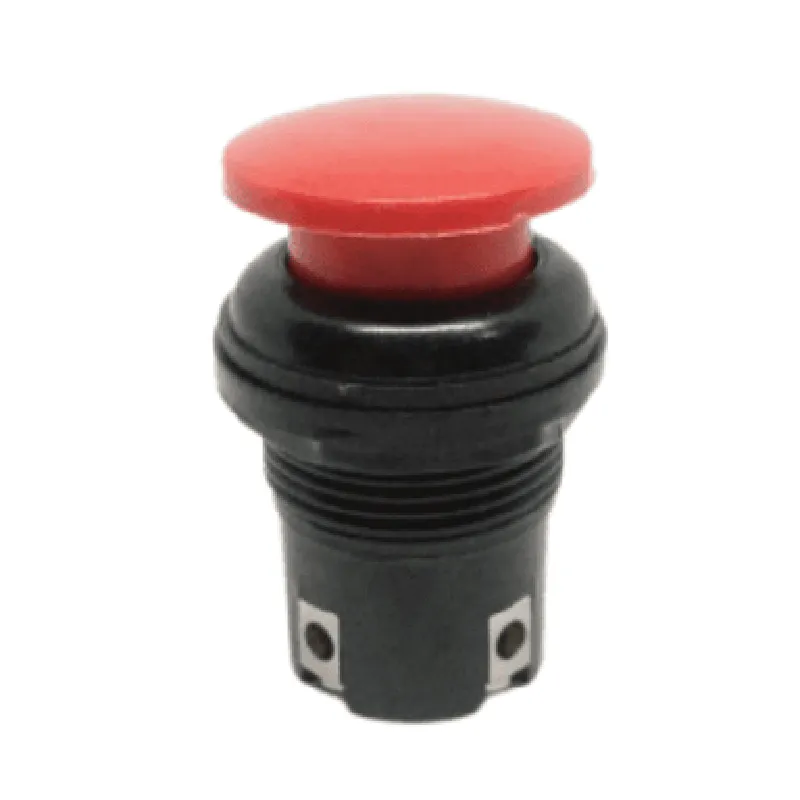
The SE955 Mushroom Emergency Stop Push Button Switch is a critical safety component designed for use in industrial and commercial applications where emergency stop functionality is essential. This switch is designed to provide a reliable and immediate shutdown mechanism in emergency situations, ensuring the safety of personnel and equipment.
Functionality

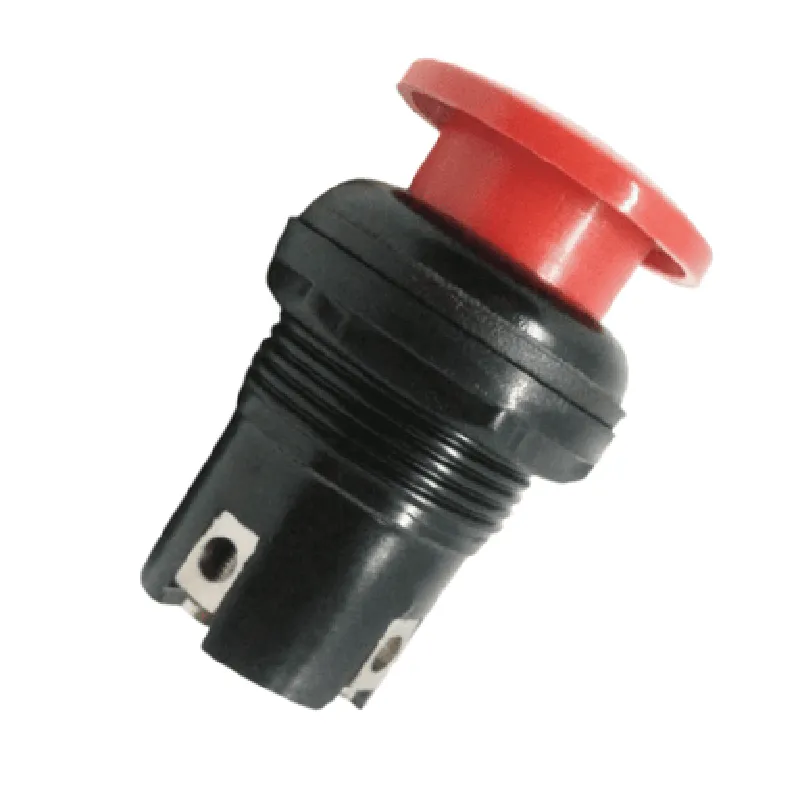
The SE955 Mushroom Emergency Stop Push Button Switch is a normally closed (NC) switch that, when pressed, opens the circuit, disconnecting power to the connected device or system. The switch is designed to be highly visible and accessible, with a large, mushroom-shaped actuator that protrudes from the mounting surface, making it easily accessible in emergency situations.

Key Features

  • Emergency Stop Functionality: The SE955 provides a reliable and immediate shutdown mechanism in emergency situations, ensuring the safety of personnel and equipment.
  • Normally Closed (NC) Switch: The switch is normally closed, meaning that the circuit is closed when the button is not pressed, and opens when the button is pressed.
  • Mushroom-Shaped Actuator: The large, mushroom-shaped actuator provides a clear and intuitive interface for operators to quickly and easily activate the emergency stop function.
  • High-Visibility Design: The switch features a bright yellow or red housing and a large, visible actuator, making it easily identifiable in emergency situations.
  • Durable Construction: The SE955 is built with durable materials and designed to withstand harsh industrial environments, ensuring reliable operation even in demanding applications.
  • IP65 Rated: The switch is rated for use in harsh environments, with a rating of IP65, which means it is protected against dust and water jets.
  • Mounting Options: The SE955 can be mounted using a variety of methods, including panel mounting, surface mounting, or DIN rail mounting, making it suitable for a wide range of applications.
  • Electrical Ratings: The switch is rated for up to 10A at 250V AC, making it suitable for use in a variety of industrial and commercial applications.
  • Standards Compliance: The SE955 complies with relevant international standards, including IEC 60947-5-5 and EN 60947-5-5, ensuring reliable and safe operation.

Applications

The SE955 Mushroom Emergency Stop Push Button Switch is suitable for use in a variety of industrial and commercial applications, including

Industrial automation systems

Machine tools and manufacturing equipment

Conveyor systems and material handling equipment

Robotics and motion control systems

HVAC and building management systems

Medical devices and equipment

Operating Voltage

250V AC

Current Rating

10A

Contact Type

Normally Closed (NC)

Actuator Type

Mushroom-shaped

Mounting Type

Panel mounting, surface mounting, or DIN rail mounting

Enclosure Rating

IP65

Operating Temperature

-20C to 60C

Storage Temperature

-30C to 80C

Weight

approximately 200g

Dimensions

30mm x 30mm x 60mm (W x H x D)

Certifications and Compliance

IEC 60947-5-5

EN 60947-5-5

CE marked

RoHS compliant

REACH compliant

Warranty and Support

The SE955 Mushroom Emergency Stop Push Button Switch is backed by a 2-year warranty and supported by a comprehensive documentation package, including datasheets, user manuals, and technical support.

Pin Configuration

  • SE955 Mushroom Emergency Stop Push Button Switch Documentation
  • Pin Description:
  • The SE955 Mushroom Emergency Stop Push Button Switch has 5 pins, which are described below:
  • Pin 1: NC (Normally Closed)
  • Function: Normally Closed contact
  • Description: This pin is connected to the normally closed contact of the switch. When the button is not pressed, this pin is connected to the COM pin (Pin 3).
  • Connection: Connect to the device's circuit that needs to be interrupted when the emergency stop button is pressed.
  • Pin 2: NO (Normally Open)
  • Function: Normally Open contact
  • Description: This pin is connected to the normally open contact of the switch. When the button is pressed, this pin is connected to the COM pin (Pin 3).
  • Connection: Connect to the device's circuit that needs to be activated when the emergency stop button is pressed.
  • Pin 3: COM (Common)
  • Function: Common contact
  • Description: This pin is the common contact of the switch, connected to both the normally closed (NC) and normally open (NO) contacts.
  • Connection: Connect to the device's circuit that provides power or signal to the NC and NO contacts.
  • Pin 4: ILL (Illumination)
  • Function: Illumination connection
  • Description: This pin is used to connect an external LED or indicator light to indicate the switch's status.
  • Connection: Connect to a suitable power source (e.g., 5V) and an LED or indicator light to illuminate when the button is pressed.
  • Pin 5: Ground
  • Function: Ground connection
  • Description: This pin is the ground connection for the switch and the illumination circuit.
  • Connection: Connect to the device's ground or a suitable ground point.
  • Connection Structure:
  • To connect the SE955 Mushroom Emergency Stop Push Button Switch, follow this structure:
  • 1. Connect Pin 1 (NC) to the device's circuit that needs to be interrupted when the emergency stop button is pressed.
  • 2. Connect Pin 2 (NO) to the device's circuit that needs to be activated when the emergency stop button is pressed.
  • 3. Connect Pin 3 (COM) to the device's circuit that provides power or signal to the NC and NO contacts.
  • 4. Connect Pin 4 (ILL) to a suitable power source (e.g., 5V) and an LED or indicator light.
  • 5. Connect Pin 5 (Ground) to the device's ground or a suitable ground point.
  • Important Notes:
  • Ensure the voltage and current ratings of the switch are compatible with the connected devices.
  • Use suitable wire and connectors to ensure reliable connections.
  • Follow proper safety guidelines when working with electrical circuits.
  • By following this documentation, you can properly connect the SE955 Mushroom Emergency Stop Push Button Switch to your device or circuit, ensuring safe and reliable operation.

Code Examples

SE955 Mushroom Emergency Stop Push Button Switch Documentation
Overview
The SE955 Mushroom Emergency Stop Push Button Switch is a safety-critical component designed for emergency stop applications in industrial, commercial, and residential settings. This switch features a prominent mushroom-style push button and a rugged IP67-rated housing, making it suitable for harsh environments.
Technical Specifications
Electrical Rating: 10A, 250VAC
 Contact Configuration: SPST-NC (Single Pole, Single Throw, Normally Closed)
 Environmental Rating: IP67 (dust-tight and waterproof up to 1m immersion)
 Operating Temperature: -25C to 70C
Connections and Pinout
The SE955 switch has a 5-pin connector with the following pinout:
| Pin | Function |
| --- | --- |
| 1 | Common (COM) |
| 2 | Normally Closed (NC) |
| 3 | Normally Open (NO) |
| 4 | Ground (GND) |
| 5 | Not connected (NC) |
Code Examples
### Example 1: Basic Emergency Stop in Arduino
This example demonstrates how to connect the SE955 switch to an Arduino board and use it as an emergency stop button.
```cpp
const int emergencyStopPin = 2;  // Connect NC pin to digital pin 2
void setup() {
  pinMode(emergencyStopPin, INPUT_PULLUP);
}
void loop() {
  if (digitalRead(emergencyStopPin) == LOW) {
    // Emergency stop button pressed, take action (e.g., shut down motor)
    Serial.println("Emergency stop activated!");
    // Add your emergency stop logic here
  }
}
```
### Example 2: Industrial Automation with Raspberry Pi
In this example, the SE955 switch is used to control a motor in an industrial automation setup using a Raspberry Pi.
```python
import RPi.GPIO as GPIO
GPIO.setmode(GPIO.BCM)
emergencyStopPin = 17  # Connect NC pin to GPIO 17
GPIO.setup(emergencyStopPin, GPIO.IN, pull_up_down=GPIO.PUD_UP)
while True:
    if GPIO.input(emergencyStopPin) == GPIO.LOW:
        # Emergency stop button pressed, shut down motor
        print("Emergency stop activated!")
        # Add your motor shutdown logic here
        break
```
### Example 3: Home Automation with ESP32
This example demonstrates how to use the SE955 switch to control a relay module connected to an ESP32 board in a home automation setup.
```cpp
#include <WiFi.h>
#include <Relay.h>
const int relayPin = 18;  // Connect relay module to digital pin 18
const int emergencyStopPin = 5;  // Connect NC pin to digital pin 5
Relay relay(relayPin);
void setup() {
  pinMode(emergencyStopPin, INPUT_PULLUP);
}
void loop() {
  if (digitalRead(emergencyStopPin) == LOW) {
    // Emergency stop button pressed, turn off relay
    relay.off();
    Serial.println("Emergency stop activated!");
    // Add your additional logic here
  }
}
```
These code examples illustrate how to integrate the SE955 Mushroom Emergency Stop Push Button Switch into various IoT projects, emphasizing its importance in ensuring safety and reliability in critical applications.