The module contains a built-in relay that can be used to switch on/off external devices such as lights, motors, valves, and other electrical loads. The relay can be controlled using a digital signal from a microcontroller or other digital devices.


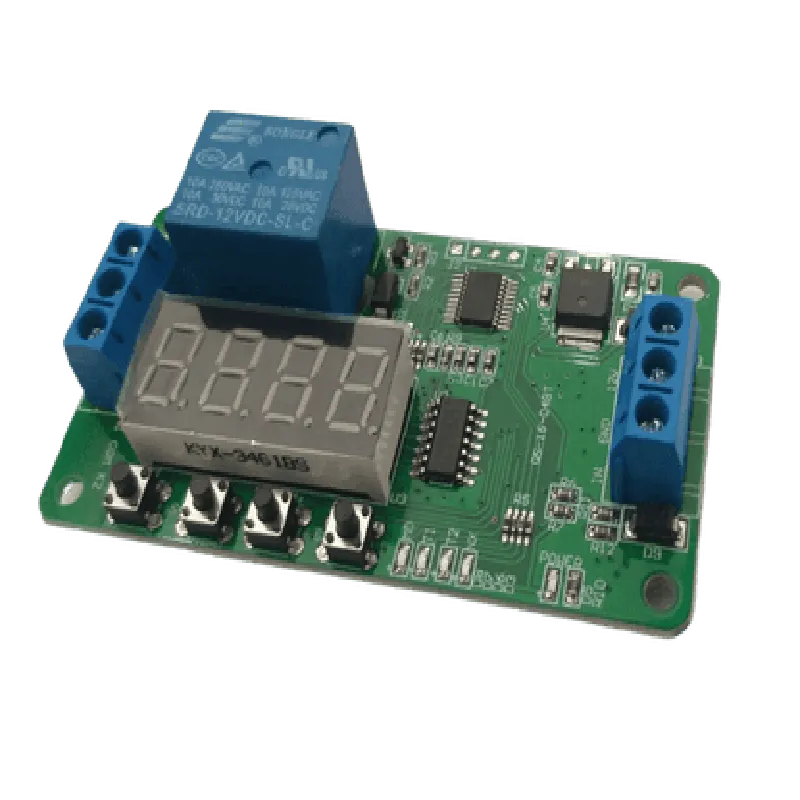
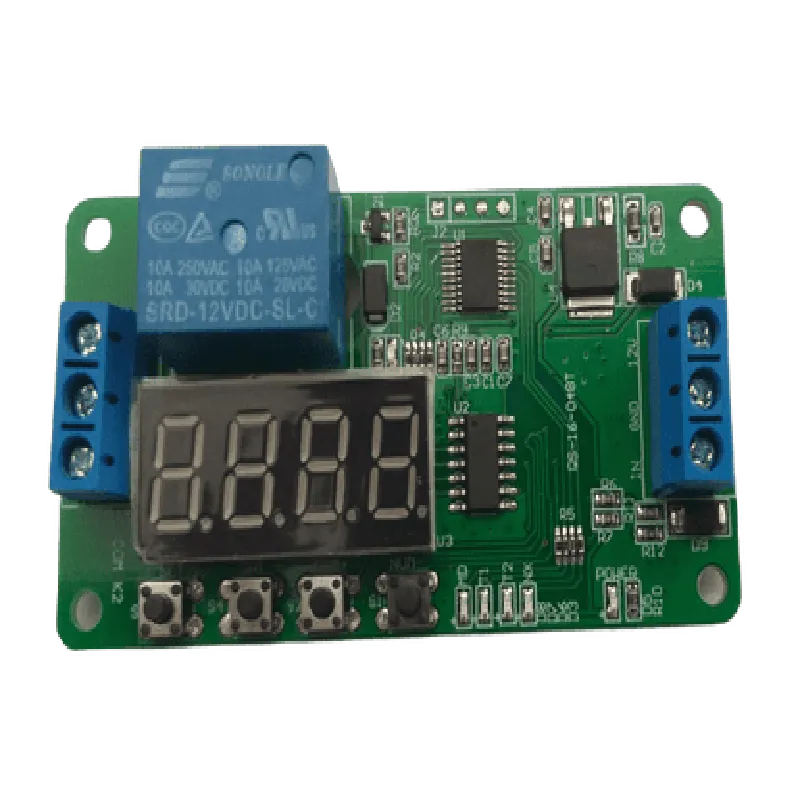
The module contains a built-in relay that can be used to switch on/off external devices such as lights, motors, valves, and other electrical loads. The relay can be controlled using a digital signal from a microcontroller or other digital devices.
The module features an integrated delay timer that allows users to set a specific time delay (0-99 seconds) before the relay switch is activated or deactivated. This feature is useful for applications that require a delay between the trigger signal and the relay action.
The module can amplify weak digital signals from microcontrollers or other devices, ensuring reliable switching of the relay even at long distances.
Key Features
| High-Power Relay | The module features a high-power relay that can handle currents up to 10A and voltages up to 250V AC/30V DC. |
The delay time can be adjusted using the onboard potentiometer, allowing users to set a delay between 0-99 seconds.
The module supports multiple trigger modes, including pulse, toggle, and latch.
The module features two indicator LEDs that provide visual feedback on the relay status (on/off) and the delay timer status (active/inactive).
| Input/Output Isolation | The module provides electrical isolation between the input and output signals, ensuring safe and reliable operation. |
Technical Specifications
5V DC
250V AC/30V DC
10A
0-99 seconds (adjustable)
Pulse, Toggle, Latch
Digital signal (TTL level)
Relay switch (SPDT)
50mm x 35mm x 20mm
25g
Applications
| The Multifunction Delay Relay Switch Module is suitable for a wide range of IoT applications, including |
Automation and control systems
Home security systems
Industrial control systems
Robotics and mechatronics projects
Energy management systems
Smart home devices
Conclusion
The Multifunction Delay Relay Switch Module is a versatile and feature-rich IoT component that provides a wide range of switching and delay functionalities. Its compact design, high-power relay, and adjustable delay time make it an ideal solution for various automation and control applications. With its easy-to-use interface and technical specifications, this module is suitable for both technical professionals and informed hobbyists.
Multifunction Delay Relay Switch Module DocumentationOverviewThe Multifunction Delay Relay Switch Module is a versatile IoT component that enables users to control and switch AC/DC loads with precision timing. This module features a relay switch, a built-in delay timer, and manual override functionality, making it an essential component in various IoT applications, such as home automation, industrial control, and robotics.Technical SpecificationsInput Voltage: 5V DC
Output Voltage: 250V AC/30V DC
Max Current: 10A
Delay Time: 0-99 seconds (adjustable)
Trigger Modes: High-level trigger, low-level trigger, and manual override
Dimensions: 55mm x 45mm x 20mmPinoutVCC: 5V DC power input
GND: Ground
IN: Input signal (high-level or low-level trigger)
OUT: Relay switch output
SET: Delay time set button
RST: Reset buttonCode Examples### Example 1: Basic Relay Switch Control using ArduinoIn this example, we will use an Arduino board to control the Multifunction Delay Relay Switch Module. We will set the delay time to 5 seconds and then trigger the relay switch using a digital output.```cpp
const int relayPin = 2; // Digital output pin for relay control
const int setPin = 4; // Delay time set button pin
const int rstPin = 5; // Reset button pinvoid setup() {
pinMode(relayPin, OUTPUT);
pinMode(setPin, OUTPUT);
pinMode(rstPin, OUTPUT);
// Set delay time to 5 seconds
digitalWrite(setPin, HIGH);
delay(5000);
digitalWrite(setPin, LOW);
}void loop() {
// Trigger relay switch
digitalWrite(relayPin, HIGH);
delay(5000); // Wait for 5 seconds
digitalWrite(relayPin, LOW);
delay(5000); // Wait for 5 seconds
}
```### Example 2: Home Automation using ESP32 and MQTTIn this example, we will use an ESP32 board to control the Multifunction Delay Relay Switch Module over the internet using MQTT protocol. We will create a simple home automation system that turns on a light bulb connected to the relay switch when a specific MQTT topic is published.```cpp
#include <WiFi.h>
#include <PubSubClient.h>const char ssid = "your_wifi_ssid";
const char password = "your_wifi_password";
const char mqttServer = "your_mqtt_broker_ip";
const char topic = "home/automation/light";WiFiClient espClient;
PubSubClient client(espClient);const int relayPin = 2; // Digital output pin for relay controlvoid setup() {
Serial.begin(115200);
// Connect to WiFi
WiFi.begin(ssid, password);
while (WiFi.status() != WL_CONNECTED) {
delay(1000);
Serial.println("Connecting to WiFi...");
}
Serial.println("Connected to WiFi");
Serial.println("Connecting to MQTT broker...");
// Connect to MQTT broker
client.setServer(mqttServer, 1883);
while (!client.connected()) {
client.connect("ESP32Client");
delay(1000);
Serial.println("Connecting to MQTT broker...");
}
Serial.println("Connected to MQTT broker");
// Subscribe to MQTT topic
client.subscribe(topic);
}void loop() {
if (client.connected()) {
client.loop();
}
// Check for incoming MQTT messages
if (client.available()) {
char message[64];
int len = client.readBytes(message, 64);
message[len] = '';
if (strcmp(message, "ON") == 0) {
// Turn on light bulb
digitalWrite(relayPin, HIGH);
} else if (strcmp(message, "OFF") == 0) {
// Turn off light bulb
digitalWrite(relayPin, LOW);
}
}
delay(100);
}
```### Example 3: Industrial Automation using Raspberry Pi and PythonIn this example, we will use a Raspberry Pi board to control the Multifunction Delay Relay Switch Module in an industrial automation context. We will create a Python script that reads data from a temperature sensor and triggers the relay switch when the temperature exceeds a certain threshold.```python
import RPi.GPIO as GPIO
import time# Set up GPIO mode
GPIO.setmode(GPIO.BCM)# Set up relay pin as output
relay_pin = 17
GPIO.setup(relay_pin, GPIO.OUT)# Set up temperature sensor pin as input
temp_pin = 23
GPIO.setup(temp_pin, GPIO.IN)while True:
# Read temperature data from sensor
temp_data = GPIO.input(temp_pin)
if temp_data > 30: # Threshold temperature (C)
# Trigger relay switch
GPIO.output(relay_pin, GPIO.HIGH)
time.sleep(5) # Wait for 5 seconds
GPIO.output(relay_pin, GPIO.LOW)
time.sleep(1) # Check temperature every second
```These examples demonstrate the versatility of the Multifunction Delay Relay Switch Module in various IoT applications. By controlling the relay switch with precision timing, users can create complex automation systems that interact with the physical world.