Up to 25.5W


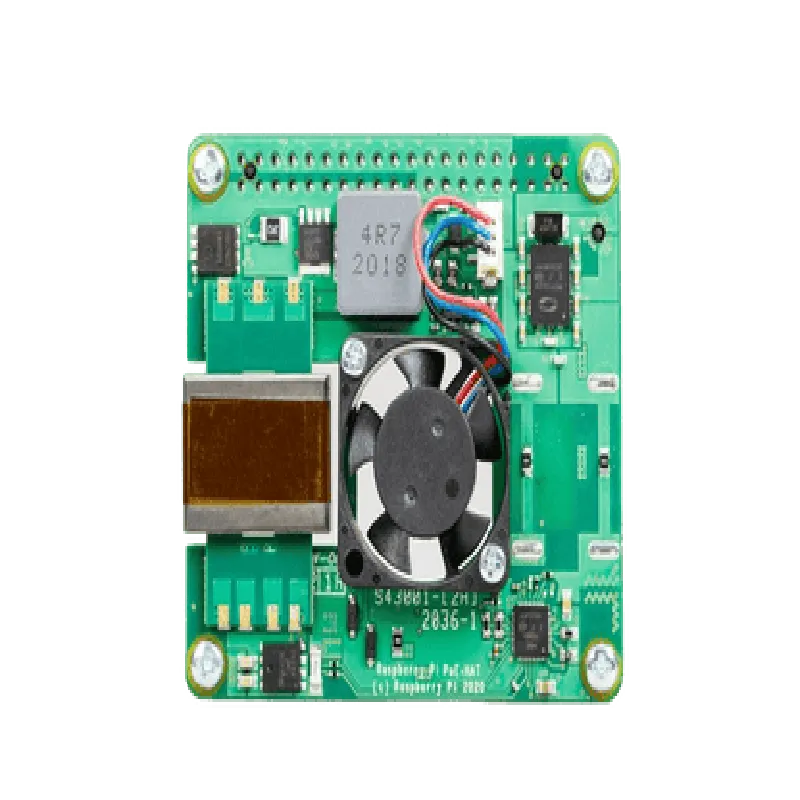

Up to 25.5W
IEEE 802.3af
37V-57V (PoE)
5V (Raspberry Pi)
>85%
0C to 50C
65mm x 56.5mm x 13.5mm
Applications
| The Raspberry PI POE+ Hat is ideal for various IoT projects, including |
Industrial automation and monitoring systems
Smart home and building automation applications
Remote surveillance and security systems
IoT gateways and edge computing devices
Digital signage and kiosk installations
By providing a convenient and reliable power-over-Ethernet solution, the Raspberry PI POE+ Hat simplifies IoT project development and deployment, making it an excellent choice for engineers, developers, and hobbyists alike.
Raspberry Pi POE+ Hat for 3B+ and Pi 4 DocumentationOverviewThe Raspberry Pi POE+ Hat is a Power over Ethernet (PoE) add-on board designed for the Raspberry Pi 3B+ and Pi 4 models. This hat enables the Raspberry Pi to receive power and communicate over a single Ethernet cable, making it ideal for IoT and network-based projects.Technical SpecificationsCompatible with Raspberry Pi 3B+ and Pi 4 models
Supports IEEE 802.3af PoE standard
Maximum power output: 25.5W
Operating temperature range: 0C to 50C
Dimensions: 65mm x 56.5mm x 12.5mmGetting StartedTo use the Raspberry Pi POE+ Hat, follow these steps:1. Connect the hat to the Raspberry Pi 3B+ or Pi 4 using the 40-pin GPIO header.
2. Connect the Ethernet cable to the hat and the other end to a PoE-enabled switch or injector.
3. Power on the Raspberry Pi and ensure it is configured to use the PoE hat as the power source.Code Examples### Example 1: Basic Networking with PoEThis example demonstrates how to use the Raspberry Pi POE+ Hat for basic networking activities:```python
import os
import socket# Get the IP address of the Raspberry Pi
ip_address = os.popen('ip addr show eth0 | grep "inet " | awk '{print $2}' | cut -d/ -f1').read().strip()# Create a socket object
sock = socket.socket(socket.AF_INET, socket.SOCK_STREAM)# Bind the socket to the IP address and port 8080
sock.bind((ip_address, 8080))# Listen for incoming connections
sock.listen(1)print("Listening on port 8080...")while True:
# Accept incoming connections
conn, addr = sock.accept()
print("Connected by", addr)# Handle incoming data
data = conn.recv(1024)
if not data:
break
conn.sendall(data)# Close the connection
conn.close()sock.close()
```### Example 2: IoT Sensor Monitoring with PoEThis example demonstrates how to use the Raspberry Pi POE+ Hat for IoT sensor monitoring using a temperature and humidity sensor (e.g., DHT11):```python
import Adafruit_DHT
import time# Setup the DHT11 sensor
DHT_SENSOR = Adafruit_DHT.DHT11
DHT_PIN = 17while True:
# Read temperature and humidity data from the sensor
humidity, temperature = Adafruit_DHT.read_retry(DHT_SENSOR, DHT_PIN)# Print the data
print("Temp={0:0.1f}C Humidity={1:0.1f}%".format(temperature, humidity))# Send the data to a remote server (e.g., using HTTP or MQTT)
# Implement your own data transmission logic here# Wait for 1 minute before taking the next reading
time.sleep(60)
```Troubleshooting and FAQsQ: How do I configure my PoE switch or injector to work with the Raspberry Pi POE+ Hat?
A: Refer to the documentation of your PoE switch or injector for configuration instructions.
Q: Can I use the Raspberry Pi POE+ Hat with other Raspberry Pi models?
A: No, the Raspberry Pi POE+ Hat is specifically designed for the Raspberry Pi 3B+ and Pi 4 models.Important NotesEnsure that your PoE switch or injector is compatible with the IEEE 802.3af PoE standard.
Avoid overloading the Raspberry Pi POE+ Hat with excessive power consumption.
Always follow proper safety precautions when working with electrical components.