Stufin
Home Quick Cart Profile

SIM900A GSM/GPRS Module


Buy Now on Stufin

Component Name

SIM900A GSM/GPRS Module
Description

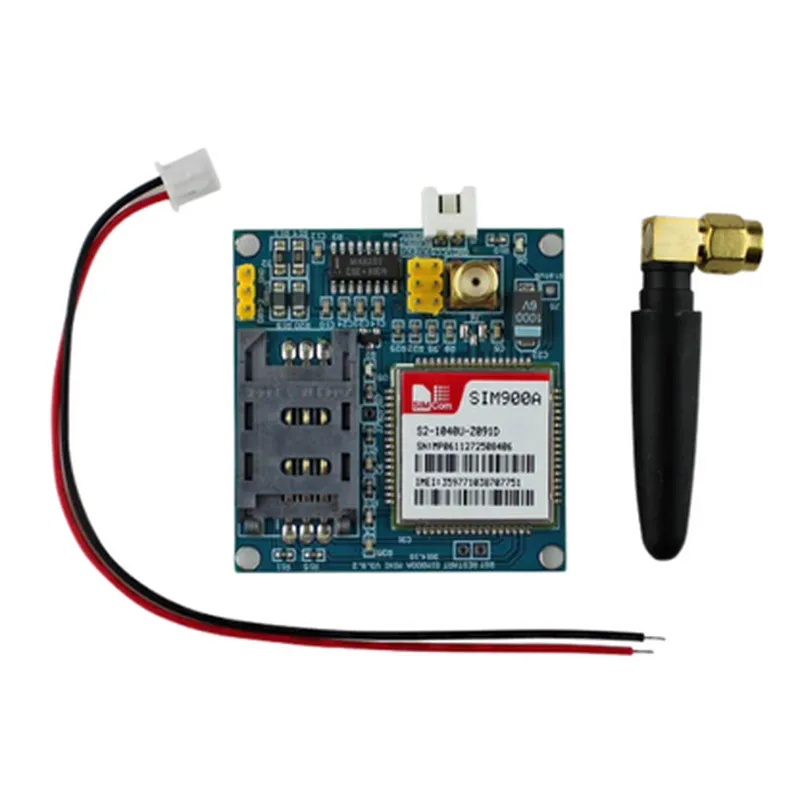
The SIM900A GSM/GPRS Module is a compact, quad-band cellular module that enables wireless communication capabilities for various IoT applications. This module is based on the popular SIM900A chipset, which provides a robust and reliable platform for machine-to-machine (M2M) and mobile Internet of Things (IoT) communications.
Functionality

The SIM900A GSM/GPRS Module is designed to provide wireless communication capabilities for IoT devices, allowing them to connect to the internet and transmit data using GSM/GPRS networks. The module can operate in various modes, including

Data Mode

Enables data transmission and reception over GPRS networks.

Voice Mode

Supports voice calls and SMS messaging.

Fax Mode

Facilitates fax transmission and reception.

Key Features

  • Quad-Band Support: The module operates on four frequency bands (850/900/1800/1900 MHz), ensuring global compatibility and roaming capabilities.
  • GPRS Class 10: Supports GPRS Class 10, providing high-speed data transmission rates of up to 85.6 kbps.
  • GSM Phase 2/2+: Compliant with GSM Phase 2/2+ standards, ensuring compatibility with a wide range of GSM networks.
  • SIM Card Interface: Features a built-in SIM card interface, allowing for easy integration with a SIM card.
  • UART Interface: Uses a UART (Universal Asynchronous Receiver-Transmitter) interface for communication with the host device.
  • Power Management: Incorporates a power-saving design, with a low-power idle mode and automatic power-on/off control.
  • Analog Audio Interface: Supports an analog audio interface for voice calls and audio applications.
  • RTC (Real-Time Clock) and Backup Battery: Includes a built-in RTC and backup battery, ensuring continued operation during power outages.
  • AT Command Set: Supports a comprehensive AT command set, enabling easy configuration and control of the module's functions.
  • Compact Size: Measuring only 24mm x 24mm x 3mm, the module is ideal for use in space-constrained IoT devices.

Frequency Bands

850/900/1800/1900 MHz

GPRS DataTransmission

Up to 85.6 kbps

Power Consumption

1.5A (peak), 3mA (idle)

Operating Temperature

-40C to +85C

Supply Voltage

3.2V to 4.8V

Dimensions

24mm x 24mm x 3mm

Applications

The SIM900A GSM/GPRS Module is suitable for a wide range of IoT applications, including

Telemetry Systems

Remote monitoring and data transmission for industrial automation, smart grids, and environmental monitoring.

M2M CommunicationsWireless communication for machine-to-machine applications, such as fleet management and industrial control systems.

Wearable Devices

Enables wireless connectivity for wearable devices, such as smartwatches and fitness trackers.

Smart Home Automation

Provides wireless connectivity for smart home devices, such as security systems and home automation systems.

Pin Configuration

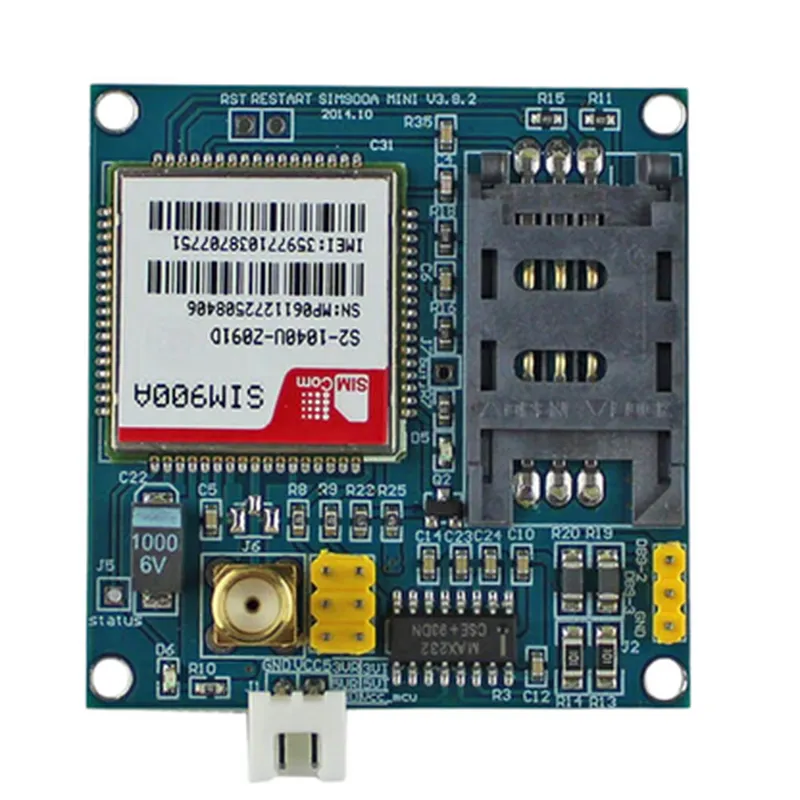
  • SIM900A GSM/GPRS Module Pinout Explanation
  • The SIM900A GSM/GPRS Module is a popular wireless communication module used for IoT projects. It has a total of 24 pins, each with a specific function. Here's a detailed explanation of each pin, along with connection guidelines:
  • Power Pins
  • 1. VCC (Pin 1): Input power supply pin. Connect to a 4.5V to 5.5V DC power source.
  • 2. GND (Pin 2): Ground pin. Connect to the circuit's ground.
  • GSM/GPRS Interface
  • 3. TXD (Pin 3): Transmit Data pin. Connect to the RX (receive) pin of the microcontroller or serial communication module.
  • 4. RXD (Pin 4): Receive Data pin. Connect to the TX (transmit) pin of the microcontroller or serial communication module.
  • 5. DTR (Pin 5): Data Terminal Ready pin. Typically connected to the RTS (request to send) pin of the microcontroller.
  • 6. RTS (Pin 6): Request to Send pin. Typically connected to the DTR (data terminal ready) pin of the microcontroller.
  • SIM Card Interface
  • 7. SIM_CLK (Pin 7): SIM card clock pin. Connect to the clock pin of the SIM card holder.
  • 8. SIM_IO (Pin 8): SIM card I/O pin. Connect to the I/O pin of the SIM card holder.
  • 9. SIM_RST (Pin 9): SIM card reset pin. Connect to the reset pin of the SIM card holder.
  • 10. SIM_VCC (Pin 10): SIM card power supply pin. Connect to the power supply pin of the SIM card holder.
  • Status Indicators
  • 11. NETLIGHT (Pin 11): Network status indicator pin. Outputs a digital signal indicating the network status.
  • 12. STAT (Pin 12): Status indicator pin. Outputs a digital signal indicating the module's status.
  • Audio Interface
  • 13. MICP (Pin 13): Microphone positive pin. Connect to the positive terminal of the microphone.
  • 14. MICN (Pin 14): Microphone negative pin. Connect to the negative terminal of the microphone.
  • 15. SPKP (Pin 15): Speaker positive pin. Connect to the positive terminal of the speaker.
  • 16. SPKN (Pin 16): Speaker negative pin. Connect to the negative terminal of the speaker.
  • Antenna Interface
  • 17. ANT (Pin 17): Antenna pin. Connect to the GSM antenna.
  • Unused Pins
  • 18. NC (Pin 18): No connection pin. Do not connect.
  • 19. NC (Pin 19): No connection pin. Do not connect.
  • 20. NC (Pin 20): No connection pin. Do not connect.
  • Debug Interface
  • 21. DBG_TXD (Pin 21): Debug transmit data pin. Connect to the receive pin of the serial communication module or microcontroller.
  • 22. DBG_RXD (Pin 22): Debug receive data pin. Connect to the transmit pin of the serial communication module or microcontroller.
  • Reset Pins
  • 23. PWR_KEY (Pin 23): Power key pin. Connect to a push-button or a digital output from the microcontroller to control the module's power.
  • 24. RESET (Pin 24): Reset pin. Connect to a push-button or a digital output from the microcontroller to reset the module.
  • Connection Structure
  • When connecting the SIM900A module to your microcontroller or other components, ensure the following:
  • Use a suitable power supply (4.5V to 5.5V DC) and connect it to the VCC pin.
  • Connect the GND pin to the circuit's ground.
  • Use a serial communication module or microcontroller with a UART interface to connect to the TXD and RXD pins.
  • Connect the SIM card to the SIM card holder and ensure proper connections to the SIM_CLK, SIM_IO, and SIM_RST pins.
  • Use a suitable antenna and connect it to the ANT pin.
  • Connect the audio components (microphone and speaker) to the MICP, MICN, SPKP, and SPKN pins.
  • Leave the NC pins unconnected.
  • Use the DBG_TXD and DBG_RXD pins for debugging purposes, if necessary.
  • Connect the PWR_KEY pin to a push-button or a digital output from the microcontroller to control the module's power.
  • Connect the RESET pin to a push-button or a digital output from the microcontroller to reset the module.
  • Remember to follow proper connection guidelines and wiring diagrams to ensure reliable communication and operation of the SIM900A module.

Code Examples

SIM900A GSM/GPRS Module Documentation
Overview
The SIM900A is a GSM/GPRS module that allows devices to communicate over cellular networks. It is a widely used module in IoT projects, providing a simple and cost-effective way to enable cellular connectivity. This documentation provides an overview of the SIM900A module, its features, and code examples demonstrating its usage in various contexts.
Features
Quad-band GSM/GPRS support
 SMS, Fax, and Data transmission capabilities
 Support for TCP/IP and UDP protocols
 Integrated antenna and SIM card holder
 Power supply: 5V to 24V
 Communication interfaces: UART, SPI, and I2C
Pinout
The SIM900A module has a total of 24 pins, with the following key pins:
VCC (5V to 24V)
 GND
 RX (UART input)
 TX (UART output)
 RST (Reset pin)
 PWR (Power on/off pin)
 SIM card holder
Code Examples
### Example 1: Sending an SMS using the SIM900A module with an Arduino board
This example demonstrates how to send an SMS using the SIM900A module with an Arduino board.
```cpp
#include <SoftwareSerial.h>
#define SIM900A_RX 10
#define SIM900A_TX 11
SoftwareSerial sim900a(SIM900A_RX, SIM900A_TX);
void setup() {
  Serial.begin(9600);
  sim900a.begin(9600);
// Wait for the SIM900A module to boot up
  delay(3000);
// Check if the SIM900A module is ready
  while (!sim900a.available()) {
    delay(100);
  }
// Send the SMS
  sendSMS("1234567890", "Hello, this is an SMS sent from the SIM900A module!");
}
void loop() {}
void sendSMS(const char number, const char message) {
  sim900a.print("AT+CMGF=1
");
  delay(100);
  sim900a.print("AT+CMGS=""");
  sim900a.print(number);
  sim900a.println("""");
  delay(100);
  sim900a.print(message);
  delay(100);
  sim900a.println((char)26);
  delay(100);
}
```
### Example 2: Establishing a GPRS connection using the SIM900A module with a Raspberry Pi
This example demonstrates how to establish a GPRS connection using the SIM900A module with a Raspberry Pi.
```python
import serial
import time
# Initialize the serial connection
sim900a = serial.Serial('/dev/ttyUSB0', 9600, timeout=1)
# Wait for the SIM900A module to boot up
time.sleep(3)
# Check if the SIM900A module is ready
while not sim900a.inWaiting():
    time.sleep(0.1)
# Set the APN and establish a GPRS connection
sim900a.write(b'AT+SAPBR=3,1,"CONTYPE","GPRS"
')
time.sleep(1)
sim900a.write(b'AT+SAPBR=3,1,"APN","internet"
')
time.sleep(1)
sim900a.write(b'AT+SAPBR=1,1
')
time.sleep(1)
# Check if the GPRS connection is established
while not sim900a.inWaiting():
    time.sleep(0.1)
print("GPRS connection established!")
```
Note: In this example, you need to replace `/dev/ttyUSB0` with the actual serial port of your SIM900A module.
### Example 3: Receiving data using the SIM900A module with a microcontroller (PIC18F452)
This example demonstrates how to receive data using the SIM900A module with a microcontroller (PIC18F452).
```c
#include <p18f452.h>
#define SIM900A_RX RB0
#define SIM900A_TX RB1
void main() {
    TRISB = 0x01; // Set RB0 as input (RX) and RB1 as output (TX)
while (1) {
        // Wait for data to be received
        while (!RCIF) {
            continue;
        }
// Read the received data
        char data = RCREG;
// Process the received data
        // ...
// Send an acknowledgement
        TXREG = 'A';
        while (!TRMT) {
            continue;
        }
    }
}
```
Note: In this example, you need to configure the PIC18F452 microcontroller to communicate with the SIM900A module using the UART protocol.