

Stufin
Home Quick Cart Profile

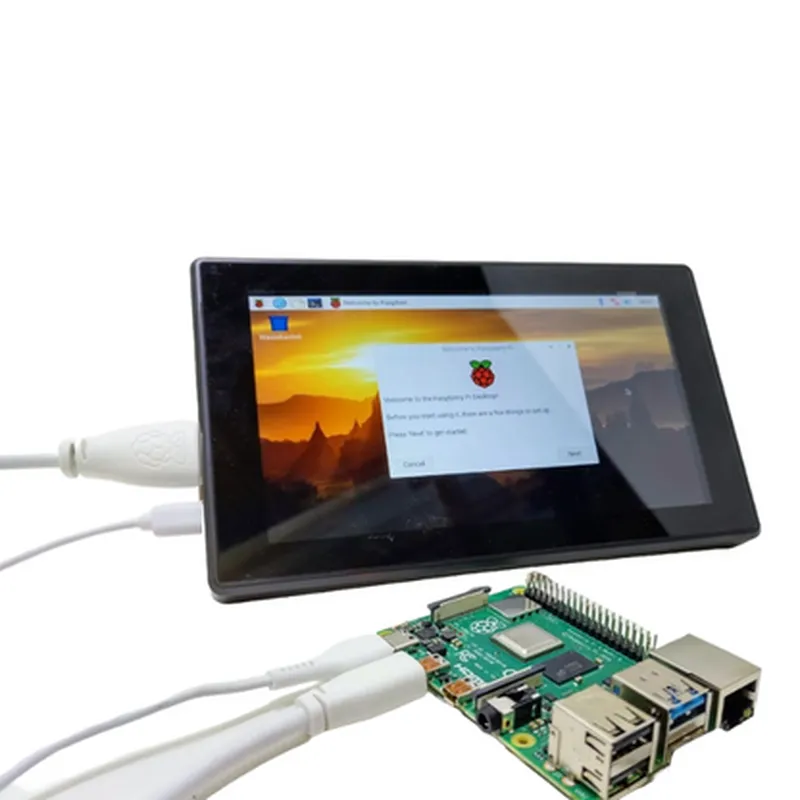
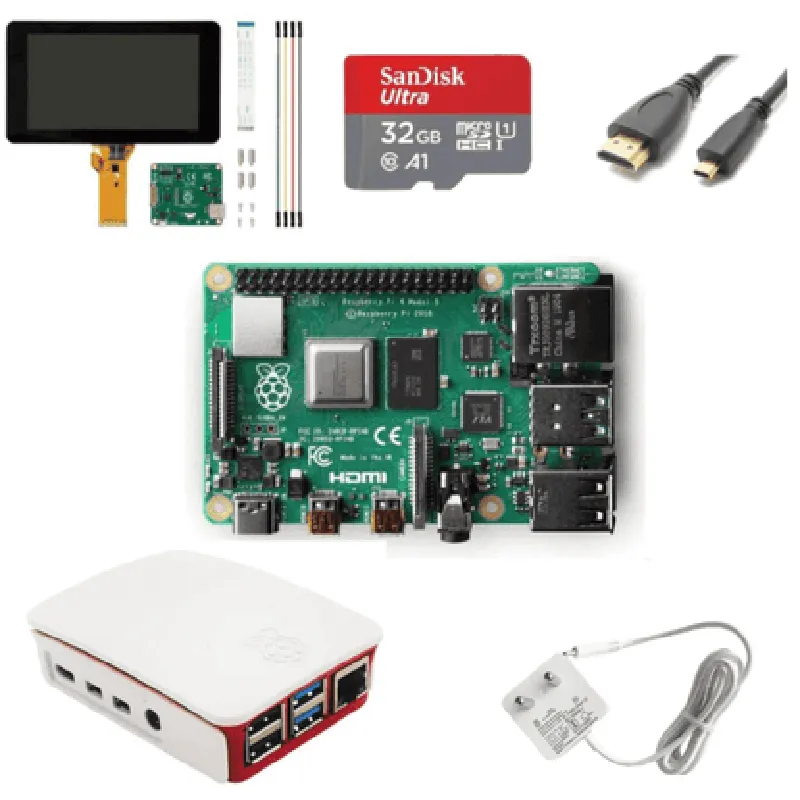
Build Your Own Computer with Raspberry Pi 4 Model B 4GB Ram Desktop Kit

Buy Now on Stufin

Component Name

Build Your Own Computer with Raspberry Pi 4 Model B 4GB Ram Desktop Kit

Overview

The Build Your Own Computer with Raspberry Pi 4 Model B 4GB Ram Desktop Kit is a comprehensive package that allows users to build and customize their own compact and powerful computer using the Raspberry Pi 4 Model B single-board computer. This kit is designed for individuals who want to explore the world of computing, programming, and DIY projects, providing an affordable and flexible platform for learning and innovation.

Functionality

  • Learning programming languages: Python, Scratch, and other languages can be learned and practiced on the Raspberry Pi.
  • Creating IoT projects: The kit is ideal for building IoT projects, such as home automation, robotics, and sensor-based applications.
  • Media center and streaming: The Raspberry Pi can be used as a media center for streaming videos, music, and images.
  • Gaming: Emulation of classic games and playing retro games is possible on the Raspberry Pi.
  • General computing: The kit can be used for everyday computing tasks, such as browsing the internet, checking email, and creating documents.
The Raspberry Pi 4 Model B is a single-board computer that can function as a full-fledged desktop computer, capable of running a variety of operating systems, including Windows, Linux, and Raspbian. The kit allows users to build a custom computer that can be used for

Key Features

  • Raspberry Pi 4 Model B:

Quad-core Cortex-A72 CPU (1.5 GHz)

4GB LPDDR4 RAM

Dual-band 802.11ac wireless LAN

Bluetooth 5.0

Gigabit Ethernet

2x USB 3.0, 2x USB 2.0

HDMI 2.0 (4K @ 60Hz)

MicroSD card slot

  • Desktop Kit Components:

High-quality plastic case

Power adapter (5V, 3A)

Heat sink for improved cooling

HDMI cable

MicroSD card (pre-loaded with Raspbian OS)

Quick-start guide

  • Additional Features:

Support for dual 4K displays

Improved thermal design for reduced overheating

Support for PoE (Power over Ethernet)

Compatibility with Raspberry Pi accessories and peripherals

Technical Specifications

Processor

Broadcom BCM2711B0 quad-core Cortex-A72

Frequency

1.5 GHz

RAM

4GB LPDDR4

Storage

MicroSD card slot

Operating System

Raspbian OS (pre-loaded), compatible with Windows, Linux, and other operating systems

Networking

Dual-band 802.11ac wireless LAN, Bluetooth 5.0, Gigabit Ethernet

Interfaces

2x USB 3.0, 2x USB 2.0, HDMI 2.0, 3.5mm audio jack, microSD card slot

Power

5V, 3A power adapter

Dimensions

85mm x 56mm x 17mm (case only)

Certifications and Compliance

CE, FCC, and RoHS compliant

Meets EU and US safety standards for electronic devices

Warranty and Support

1-year limited warranty

Dedicated community support and online resources

Extensive documentation and tutorials available

The Build Your Own Computer with Raspberry Pi 4 Model B 4GB Ram Desktop Kit is an excellent choice for anyone looking to explore the world of computing, programming, and DIY projects. With its powerful processor, ample storage, and versatile connectivity options, this kit provides a solid foundation for building custom computer projects that cater to various needs and applications.

Pin Configuration

  • Raspberry Pi 4 Model B 4GB RAM Desktop Kit Pinout Guide
  • The Raspberry Pi 4 Model B is a powerful single-board computer that offers a wide range of connectivity options. The 4GB RAM Desktop Kit is a popular variant that provides ample memory for demanding applications. In this guide, we will explore the pins on the Raspberry Pi 4 Model B and explain how to connect them.
  • GPIO Header (J8 - 40 pins)
  • The GPIO (General Purpose Input/Output) header is a 40-pin connector that provides access to the Raspberry Pi's GPIO pins. These pins can be used for a variety of purposes, including digital input/output, analog-to-digital conversion, and communication protocols like I2C, SPI, and UART.
  • Here's a breakdown of the pins on the GPIO header:
  • 1. 3V3 (Pin 1): 3.3V power output
  • Connect to: Devices that require a 3.3V power supply
  • 2. 5V (Pin 2): 5V power output
  • Connect to: Devices that require a 5V power supply
  • 3. 5V (Pin 3): 5V power output
  • Connect to: Devices that require a 5V power supply
  • 4. GND (Pin 4): Ground
  • Connect to: Ground pins on devices or breadboards
  • 5. GND (Pin 5): Ground
  • Connect to: Ground pins on devices or breadboards
  • 6. GPIO02 (Pin 6): GPIO 2
  • Connect to: Devices that require a digital input/output, such as sensors or LEDs
  • 7. GPIO03 (Pin 7): GPIO 3
  • Connect to: Devices that require a digital input/output, such as sensors or LEDs
  • 8. GND (Pin 8): Ground
  • Connect to: Ground pins on devices or breadboards
  • 9. GPIO17 (Pin 9): GPIO 17
  • Connect to: Devices that require a digital input/output, such as sensors or LEDs
  • 10. GPIO23 (Pin 10): GPIO 23
  • Connect to: Devices that require a digital input/output, such as sensors or LEDs
  • 11. GPIO24 (Pin 11): GPIO 24
  • Connect to: Devices that require a digital input/output, such as sensors or LEDs
  • 12. GND (Pin 12): Ground
  • Connect to: Ground pins on devices or breadboards
  • 13. GPIO10 (Pin 13): GPIO 10 (SPI MOSI)
  • Connect to: SPI devices, such as SPI flash memories or displays
  • 14. GPIO09 (Pin 14): GPIO 9 (SPI MISO)
  • Connect to: SPI devices, such as SPI flash memories or displays
  • 15. GPIO11 (Pin 15): GPIO 11 (SPI CLK)
  • Connect to: SPI devices, such as SPI flash memories or displays
  • 16. GND (Pin 16): Ground
  • Connect to: Ground pins on devices or breadboards
  • 17. GPIO05 (Pin 17): GPIO 5
  • Connect to: Devices that require a digital input/output, such as sensors or LEDs
  • 18. GPIO06 (Pin 18): GPIO 6
  • Connect to: Devices that require a digital input/output, such as sensors or LEDs
  • 19. GPIO13 (Pin 19): GPIO 13
  • Connect to: Devices that require a digital input/output, such as sensors or LEDs
  • 20. GND (Pin 20): Ground
  • Connect to: Ground pins on devices or breadboards
  • 21. GPIO26 (Pin 21): GPIO 26
  • Connect to: Devices that require a digital input/output, such as sensors or LEDs
  • 22. GPIO20 (Pin 22): GPIO 20
  • Connect to: Devices that require a digital input/output, such as sensors or LEDs
  • 23. GPIO21 (Pin 23): GPIO 21
  • Connect to: Devices that require a digital input/output, such as sensors or LEDs
  • 24. GND (Pin 24): Ground
  • Connect to: Ground pins on devices or breadboards
  • 25. GPIO19 (Pin 25): GPIO 19
  • Connect to: Devices that require a digital input/output, such as sensors or LEDs
  • 26. GPIO16 (Pin 26): GPIO 16
  • Connect to: Devices that require a digital input/output, such as sensors or LEDs
  • 27. GPIO15 (Pin 27): GPIO 15
  • Connect to: Devices that require a digital input/output, such as sensors or LEDs
  • 28. GND (Pin 28): Ground
  • Connect to: Ground pins on devices or breadboards
  • 29. GPIO18 (Pin 29): GPIO 18
  • Connect to: Devices that require a digital input/output, such as sensors or LEDs
  • 30. GND (Pin 30): Ground
  • Connect to: Ground pins on devices or breadboards
  • 31. GPIO12 (Pin 31): GPIO 12
  • Connect to: Devices that require a digital input/output, such as sensors or LEDs
  • 32. GPIO07 (Pin 32): GPIO 7
  • Connect to: Devices that require a digital input/output, such as sensors or LEDs
  • 33. GPIO08 (Pin 33): GPIO 8
  • Connect to: Devices that require a digital input/output, such as sensors or LEDs
  • 34. GND (Pin 34): Ground
  • Connect to: Ground pins on devices or breadboards
  • 35. GPIO14 (Pin 35): GPIO 14 (TXD)
  • Connect to: UART devices, such as serial terminals or GPS modules
  • 36. GPIO15 (Pin 36): GPIO 15 (RXD)
  • Connect to: UART devices, such as serial terminals or GPS modules
  • 37. GND (Pin 37): Ground
  • Connect to: Ground pins on devices or breadboards
  • 38. GPIO04 (Pin 38): GPIO 4
  • Connect to: Devices that require a digital input/output, such as sensors or LEDs
  • 39. GPIO22 (Pin 39): GPIO 22
  • Connect to: Devices that require a digital input/output, such as sensors or LEDs
  • 40. GND (Pin 40): Ground
  • Connect to: Ground pins on devices or breadboards
  • Other Connectors
  • 1. USB 3.0 (J1 - 2x USB 3.0 ports)
  • Connect to: USB devices, such as keyboards, mice, and flash drives
  • 2. USB 2.0 (J2 - 2x USB 2.0 ports)
  • Connect to: USB devices, such as keyboards, mice, and flash drives
  • 3. Ethernet (RJ45 port)
  • Connect to: Ethernet cables for networking
  • 4. HDMI 0 (HDMI port)
  • Connect to: HDMI displays or projectors
  • 5. HDMI 1 (HDMI port)
  • Connect to: HDMI displays or projectors
  • 6. Audio Jack (3.5mm audio jack)
  • Connect to: Speakers, headphones, or microphones
  • 7. Camera (CSI camera connector)
  • Connect to: CSI cameras, such as the Raspberry Pi Camera v2
  • 8. Display (DSI display connector)
  • Connect to: DSI displays, such as the Raspberry Pi Touch Display
  • Power Connector
  • 1. Micro-USB (Power input)
  • Connect to: A 5V power supply, such as a USB wall adapter or battery pack
  • Remember to always use caution when working with the Raspberry Pi's GPIO pins, as they can be easily damaged by incorrect connections or excessive voltage. It's also essential to ensure that your power supply can provide enough current to power your Raspberry Pi and any connected devices.
  • By following this guide, you should be able to connect your Raspberry Pi 4 Model B to various devices and start exploring the exciting world of IoT development!

Code Examples

Component Documentation: Build Your Own Computer with Raspberry Pi 4 Model B 4GB Ram Desktop Kit
Overview
The Raspberry Pi 4 Model B 4GB Ram Desktop Kit is a compact, credit-card sized single-board computer (SBC) designed for building custom desktop computers. This kit includes the Raspberry Pi 4 Model B board, a 4GB RAM module, and other essential components to get started with building your own desktop computer.
Technical Specifications
Processor: Broadcom BCM2711B0 quad-core Cortex-A72 (ARMv8) 64-bit SoC
 RAM: 4GB LPDDR4-2400 SDRAM
 Storage: MicroSD card slot for boot and storage
 Networking: Dual-band 802.11ac wireless LAN, Bluetooth 5.0, and Gigabit Ethernet
 Graphics: Broadcom VideoCore VI GPU
 Operating System: Supports various OSes, including Raspberry Pi OS, Ubuntu, and Windows 10 IoT
Code Examples
### Example 1: Python Script for GPIO Control
In this example, we'll use the Raspberry Pi's GPIO pins to blink an LED connected to Pin 17.
Hardware Requirements:
Raspberry Pi 4 Model B 4GB Ram Desktop Kit
 Breadboard
 LED
 220 resistor
 Jumper wires
Python Code:
```python
import RPi.GPIO as GPIO
import time
# Set up GPIO mode
GPIO.setmode(GPIO.BCM)
# Set up Pin 17 as an output
GPIO.setup(17, GPIO.OUT)
try:
    while True:
        # Blink the LED
        GPIO.output(17, GPIO.HIGH)
        time.sleep(1)
        GPIO.output(17, GPIO.LOW)
        time.sleep(1)
except KeyboardInterrupt:
    # Clean up GPIO when exiting
    GPIO.cleanup()
```
Example 2: Node.js Script for Web Interface
In this example, we'll create a simple web interface to control the Raspberry Pi's GPIO pins using Node.js and the Express.js framework.
Hardware Requirements:
Raspberry Pi 4 Model B 4GB Ram Desktop Kit
 Breadboard
 LED
 220 resistor
 Jumper wires
Node.js Code:
```javascript
const express = require('express');
const app = express();
const gpio = require('rpi-gpio');
// Set up GPIO mode
gpio.setup(17, gpio.DIR_OUT);
app.get('/', (req, res) => {
  res.send(`
    <html>
      <head>
        <title>Raspberry Pi GPIO Control</title>
      </head>
      <body>
        <h1>Raspberry Pi GPIO Control</h1>
        <form>
          <input type="submit" value="Toggle LED" />
        </form>
      </body>
    </html>
  `);
});
app.post('/toggle', (req, res) => {
  // Toggle the LED
  gpio.write(17, gpio.HIGH);
  setTimeout(() => {
    gpio.write(17, gpio.LOW);
  }, 1000);
  res.send('LED toggled!');
});
app.listen(3000, () => {
  console.log('Server started on port 3000');
});
```
Note: Make sure to install the `rpi-gpio` package using `npm install rpi-gpio` before running the Node.js script.
These examples demonstrate the Raspberry Pi 4 Model B 4GB Ram Desktop Kit's versatility in various contexts, from simple GPIO control to web-based interfaces.