Stufin
Home Quick Cart Profile

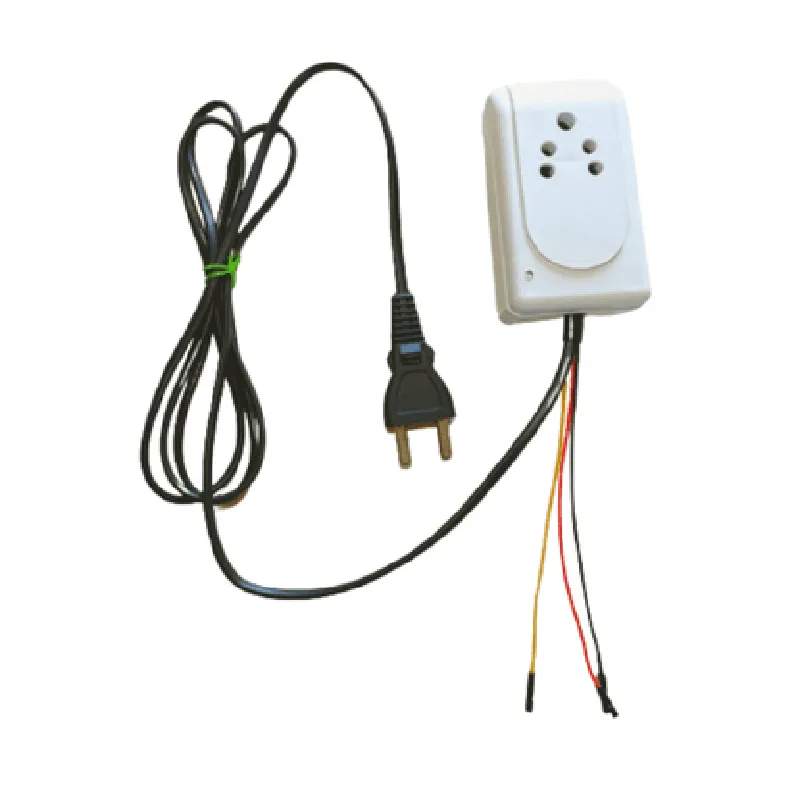
Witty Fox Smart Plug - Digital Relay


Buy Now on Stufin

Component Name

Witty Fox Smart Plug - Digital Relay
Description

The Witty Fox Smart Plug - Digital Relay is an innovative Internet of Things (IoT) device designed to transform traditional household appliances into smart devices, enhancing home automation and remote control capabilities. This compact, Wi-Fi-enabled smart plug combines a digital relay with advanced features, allowing users to monitor, control, and schedule their appliances remotely using a smartphone or tablet.
Functionality

  • Remote Control: Remotely turn on/off connected appliances using a mobile app, ensuring convenience and energy efficiency.
  • Scheduling: Set customized schedules to automate appliance operation, such as turning on lights or coffee makers at specific times.
  • Real-time Monitoring: Receive real-time updates on appliance status, ensuring peace of mind when away from home.
  • Energy Monitoring: Track energy consumption in real-time, helping users identify areas for energy efficiency improvement.
  • Voice Control: Compatible with popular voice assistants, such as Amazon Alexa and Google Assistant, for hands-free control.

Key Features

  • Wi-Fi Connectivity: Seamlessly connects to existing Wi-Fi networks (2.4GHz) for reliable and fast communication.
  • Digital Relay: Supports a maximum load of 15A, 1800W, and is compatible with a wide range of devices, including lights, fans, and small appliances.
  • Overheat Protection: Built-in overheat protection ensures the smart plug automatically cuts power to the connected device in case of excessive heat.
  • Surge Protection: Protects connected devices from voltage spikes and surges, ensuring prolonged lifespan and reduced risk of damage.
  • Compact Design: Small form factor allows for discreet installation and easy placement in tight spaces.
  • Flexible Compatibility: Suitable for use with a wide range of devices, including lamps, TVs, computers, and more.
  • Easy Setup: Quickly set up and configure the smart plug using a mobile app, with no hub or bridge required.
  • Multi-Platform Support: Compatible with both iOS and Android devices, ensuring universal accessibility.
  • SSL Encryption: Ensures secure data transmission and protects user information with advanced encryption protocols.
  • Firmware Updates: Supports over-the-air (OTA) firmware updates, ensuring the smart plug stays up-to-date with the latest features and security patches.

Operating Temperature

0C to 40C (32F to 104F)

Operating Humidity

10% to 90% RH (non-condensing)

Wi-Fi Frequency2.4GHz
Wi-Fi ProtocolIEEE 802.11 b/g/n

Power Input

100-240V AC, 50/60Hz

Power Output

15A, 1800W

Certifications

UL, ETL, FCC, CE, and RoHS compliant

Length

60mm (2.36 inches)

Width

40mm (1.57 inches)

Height

25mm (0.98 inches)

Color Options

White

Black

Warranty

1-year limited warranty

Dedicated customer support team for assistance and troubleshooting

The Witty Fox Smart Plug - Digital Relay is an ideal solution for users seeking to enhance their home automation experience, offering a unique blend of convenience, energy efficiency, and remote control capabilities.

Pin Configuration

  • Witty Fox Smart Plug - Digital Relay Pinout Guide
  • The Witty Fox Smart Plug - Digital Relay is a versatile IoT component that allows users to control and monitor devices remotely. The relay module has a set of pins that enable connections to various devices and microcontrollers. Here is a detailed explanation of each pin, along with guidance on how to connect them:
  • Pinout Structure:
  • The Witty Fox Smart Plug - Digital Relay has a total of 6 pins, arranged in two rows of 3 pins each. The pinout structure is as follows:
  • Row 1:
  • 1. VCC (Positive Power Supply)
  • Function: Provides power to the relay module.
  • Recommended Voltage: 5V DC
  • Connection: Connect to the positive terminal of a 5V DC power source.
  • 2. GND (Ground)
  • Function: Provides a common ground connection for the relay module.
  • Connection: Connect to the negative terminal of the power source and/or the ground pin of a microcontroller or other devices.
  • 3. IN (Input/Signal)
  • Function: Receives the control signal from a microcontroller or other devices to control the relay.
  • Connection: Connect to a digital output pin of a microcontroller or other devices that sends a control signal (typically 0-5V DC).
  • Row 2:
  • 1. NO (Normally Open)
  • Function: The normally open contact of the relay, which is connected to the load.
  • Connection: Connect to one terminal of the load you want to control (e.g., a lamp, fan, or other device).
  • 2. COM (Common)
  • Function: The common contact of the relay, which is connected to the power source.
  • Connection: Connect to the other terminal of the power source (e.g., the positive terminal of a wall adapter).
  • 3. NC (Normally Closed)
  • Function: The normally closed contact of the relay, which is not used in this configuration.
  • Connection: Leave this pin unconnected.
  • Connection Example:
  • To control a lamp using the Witty Fox Smart Plug - Digital Relay, follow these connections:
  • VCC: Connect to the positive terminal of a 5V DC power source (e.g., a wall adapter).
  • GND: Connect to the negative terminal of the power source and/or the ground pin of a microcontroller (e.g., Arduino).
  • IN: Connect to a digital output pin of a microcontroller (e.g., Arduino's digital pin 2).
  • NO: Connect to one terminal of the lamp.
  • COM: Connect to the other terminal of the power source (e.g., the positive terminal of the wall adapter).
  • NC: Leave this pin unconnected.
  • Important Notes:
  • Make sure to use a suitable power source and load according to the relay's specifications.
  • Use a flyback diode (e.g., 1N4007) across the relay's coil to protect the microcontroller and other devices from back-EMF.
  • Ensure proper isolation between the relay's control circuit and the load circuit to prevent electrical shock or other safety hazards.
  • By following these pinout connections and guidelines, you can successfully integrate the Witty Fox Smart Plug - Digital Relay into your IoT projects and control devices remotely.

Code Examples

Witty Fox Smart Plug - Digital Relay Documentation
Overview
The Witty Fox Smart Plug - Digital Relay is a Wi-Fi enabled smart plug that allows remote control and monitoring of electrical devices via a mobile app or web interface. This smart plug features a digital relay that can be controlled programmatically, making it an ideal component for IoT projects.
Hardware Specifications
Wi-Fi connectivity (2.4GHz)
 Digital relay output (max 10A, 250VAC)
 Microcontroller: ESP8266
 Power supply: 100-240VAC, 50-60Hz
 Dimensions: 60 x 40 x 30 mm
Software Specifications
Compatible with iOS and Android devices
 Supports HTTP and Websocket protocols
 Firmware upgradeable via OTA (Over-the-Air)
Programming Interface
The Witty Fox Smart Plug - Digital Relay can be controlled using the following programming interfaces:
HTTP API: Send HTTP requests to control the relay and retrieve its status.
 Websocket API: Establish a WebSocket connection to receive real-time updates on the relay's status.
Code Examples
### Example 1: Controlling the Relay using HTTP API (Python)
In this example, we will demonstrate how to control the relay using the HTTP API in Python.
```python
import requests
# Set the IP address and API key of your Witty Fox Smart Plug
ip_address = "192.168.1.100"
api_key = "your_api_key_here"
# Turn on the relay
response = requests.get(f"http://{ip_address}/relay?state=1&apikey={api_key}")
if response.status_code == 200:
    print("Relay turned on")
else:
    print("Error turning on relay")
# Turn off the relay
response = requests.get(f"http://{ip_address}/relay?state=0&apikey={api_key}")
if response.status_code == 200:
    print("Relay turned off")
else:
    print("Error turning off relay")
```
### Example 2: Receiving Real-time Updates using Websocket API (JavaScript)
In this example, we will demonstrate how to establish a WebSocket connection to receive real-time updates on the relay's status using JavaScript.
```javascript
const WebSocket = require('ws');
// Set the IP address and API key of your Witty Fox Smart Plug
const ip_address = "192.168.1.100";
const api_key = "your_api_key_here";
// Establish a WebSocket connection
const ws = new WebSocket(`ws://${ip_address}/ws?apikey=${api_key}`);
ws.on('message', (message) => {
  console.log(`Received message: ${message}`);
  const relayState = JSON.parse(message).relay;
  if (relayState === 1) {
    console.log("Relay is on");
  } else {
    console.log("Relay is off");
  }
});
ws.on('error', (error) => {
  console.log(`Error occurred: ${error}`);
});
ws.on('close', () => {
  console.log("WebSocket connection closed");
});
```
### Example 3: Home Automation using IFTTT (Webhook)
In this example, we will demonstrate how to use IFTTT (If This Then That) to create a home automation scenario using the Witty Fox Smart Plug.
```markdown
IFTTT Recipe:
This: "Sun sets" ( Weather service trigger )
That: "Turn on living room lamp" ( Witty Fox Smart Plug webhook action )
Webhook URL: `http://{ip_address}/relay?state=1&apikey={api_key}`
```
In this example, when the sun sets, IFTTT will send an HTTP request to the Witty Fox Smart Plug's webhook URL, turning on the living room lamp.