Stufin
Home Quick Cart Profile

M5Stack ESP32 Basic Core IoT Development Kit V2.6


Buy Now on Stufin

Component Name

M5Stack ESP32 Basic Core IoT Development Kit V2.6
Overview

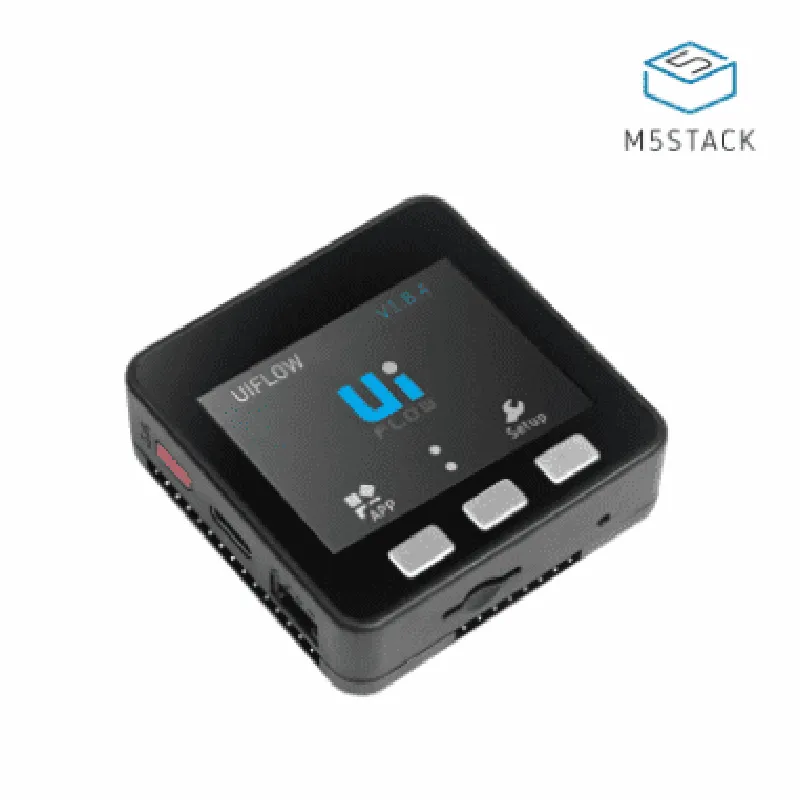
The M5Stack ESP32 Basic Core IoT Development Kit V2.6 is a powerful and compact Internet of Things (IoT) development platform based on the popular ESP32 microcontroller. This kit is designed to provide a comprehensive and user-friendly environment for developers, makers, and enthusiasts to create innovative IoT projects. The M5Stack ESP32 Basic Core IoT Development Kit V2.6 is an upgraded version of the previous model, offering improved performance, additional features, and enhanced usability.
Key Features

  • ESP32 Microcontroller:

Dual-core 32-bit LX6 microprocessor with 520 KB SRAM and 4MB Flash

Operating frequency

160 MHz to 240 MHz

Integrated Wi-Fi and Bluetooth 4.2 (BR/EDR and BLE) modules

  • Hardware Features:

2.4-inch (240x320) IPS LCD display with capacitive touch

3-axis accelerometer (BMA423) for motion detection and gesture recognition

Micro-USB interface for programming and power supply

2 x 10-pin GPIO headers (compatible with M5Stack modules)

Power management IC (AXP192) for efficient power consumption

External antenna for improved Wi-Fi and Bluetooth connectivity

  • Software Features:

Compatible with MicroPython, C++, and other programming languages

Supports various IoT protocols, including Wi-Fi, Bluetooth, HTTP, FTP, and more

Supports popular IoT platforms, such as AWS IoT, Google Cloud IoT Core, and Microsoft Azure IoT Hub

  • Expansion Capabilities:

Compatible with M5Stack modules, including GPS, LoRa, RFID, and more

Supports external peripherals, such as cameras, sensors, and actuators

  • Power Management:

Battery holder for 2 x 18650 batteries (not included)

Power-saving features, including low-power modes and sleep modes

  • Dimensions and Weight:

Dimensions

54 x 54 x 25 mm

Weight

approximately 50 grams

Functionality

  • Wireless communication: The kit enables wireless communication using Wi-Fi, Bluetooth, and other protocols.
  • Sensor integration: The kit can be connected to various sensors, such as temperature, humidity, and motion sensors.
  • Microcontrollers: The ESP32 microcontroller at the heart of the kit provides a powerful platform for IoT development.
  • Display and user interface: The kit features a 2.4-inch IPS LCD display with capacitive touch, allowing for interactive user interfaces.
  • IoT platform integration: The kit supports popular IoT platforms, enabling developers to integrate their projects with cloud-based services.
The M5Stack ESP32 Basic Core IoT Development Kit V2.6 is designed for a wide range of IoT applications, including

Target Applications

  • IoT prototyping and development
  • Smart home automation
  • Wearable devices
  • Robotics and autonomous systems
  • Industrial automation and monitoring
  • Environmental monitoring and tracking

Conclusion

The M5Stack ESP32 Basic Core IoT Development Kit V2.6 is a versatile and feature-rich platform for IoT development. With its powerful ESP32 microcontroller, versatile hardware features, and comprehensive software support, this kit is an ideal choice for developers, makers, and enthusiasts looking to create innovative IoT projects.

Pin Configuration

  • M5Stack ESP32 Basic Core IoT Development Kit V2.6 Pinout Guide
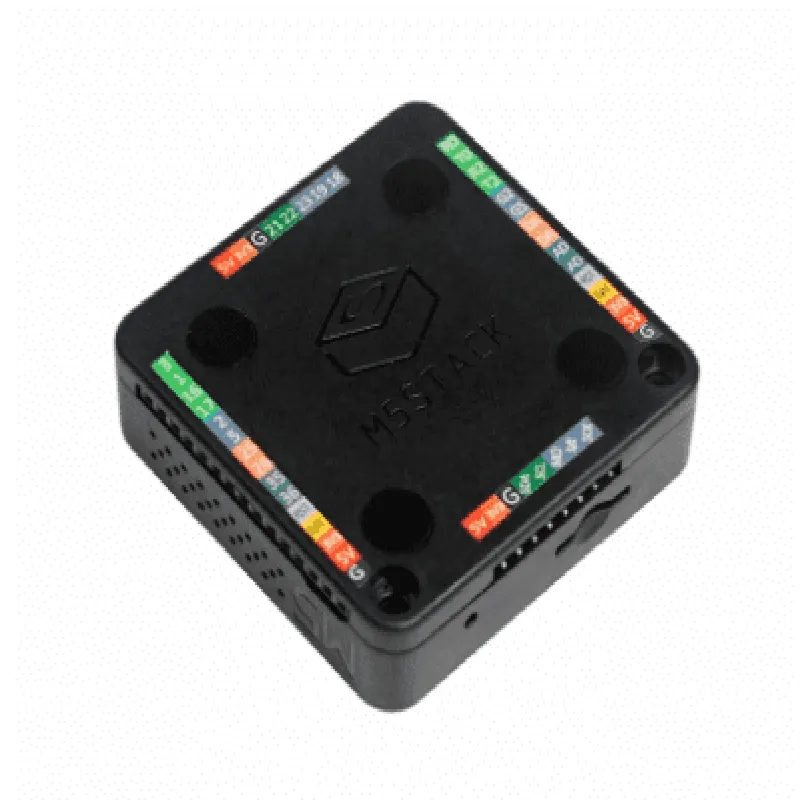
  • The M5Stack ESP32 Basic Core IoT Development Kit V2.6 is a powerful and versatile microcontroller board based on the ESP32 system-on-chip (SoC). The board features a wide range of peripherals and interfaces, making it suitable for various IoT development projects. In this guide, we will explore the pinout of the M5Stack ESP32 Basic Core IoT Development Kit V2.6, explaining each pin's function and how to connect them.
  • Pinout Structure:
  • The M5Stack ESP32 Basic Core IoT Development Kit V2.6 has a total of 36 pins, arranged in two rows of 18 pins each. The pinout is divided into several sections, including:
  • GPIO (General Purpose Input/Output) pins
  • Power pins
  • Communication pins
  • Special function pins
  • Debug pins
  • Pinout Description:
  • Here is a point-by-point explanation of each pin on the M5Stack ESP32 Basic Core IoT Development Kit V2.6:
  • GPIO Pins (1-16, 19-34):
  • GPIO0 (Pin 1): General-purpose input/output pin. Can be used as an input or output.
  • GPIO1 (Pin 2): General-purpose input/output pin. Can be used as an input or output.
  • GPIO2 (Pin 3): General-purpose input/output pin. Can be used as an input or output. Also used as the onboard LED control pin.
  • GPIO3 (Pin 4): General-purpose input/output pin. Can be used as an input or output.
  • GPIO4 (Pin 5): General-purpose input/output pin. Can be used as an input or output.
  • GPIO5 (Pin 6): General-purpose input/output pin. Can be used as an input or output.
  • GPIO12 (Pin 7): General-purpose input/output pin. Can be used as an input or output.
  • GPIO13 (Pin 8): General-purpose input/output pin. Can be used as an input or output.
  • GPIO14 (Pin 9): General-purpose input/output pin. Can be used as an input or output.
  • GPIO15 (Pin 10): General-purpose input/output pin. Can be used as an input or output.
  • GPIO16 (Pin 11): General-purpose input/output pin. Can be used as an input or output.
  • GPIO17 (Pin 19): General-purpose input/output pin. Can be used as an input or output.
  • GPIO18 (Pin 20): General-purpose input/output pin. Can be used as an input or output.
  • GPIO19 (Pin 21): General-purpose input/output pin. Can be used as an input or output.
  • GPIO20 (Pin 22): General-purpose input/output pin. Can be used as an input or output.
  • GPIO21 (Pin 23): General-purpose input/output pin. Can be used as an input or output.
  • GPIO22 (Pin 24): General-purpose input/output pin. Can be used as an input or output.
  • GPIO23 (Pin 25): General-purpose input/output pin. Can be used as an input or output.
  • Power Pins:
  • VIN (Pin 26): Input voltage pin. Can be used to power the board with an external power source.
  • 3V3 (Pin 27): 3.3V output pin. Provides a regulated 3.3V power supply for external components.
  • GND (Pin 28 and 33): Ground pins. Used as a reference point for the board's ground potential.
  • 5V (Pin 29): 5V output pin. Provides a regulated 5V power supply for external components.
  • Communication Pins:
  • TXD0 (Pin 30): UART0 transmit pin. Used for serial communication.
  • RXD0 (Pin 31): UART0 receive pin. Used for serial communication.
  • TXD1 (Pin 32): UART1 transmit pin. Used for serial communication.
  • RXD1 (Pin 34): UART1 receive pin. Used for serial communication.
  • Special Function Pins:
  • EN (Pin 35): Enable pin. Used to enable or disable the onboard voltage regulator.
  • BOOT (Pin 36): Boot mode pin. Used to put the board into boot mode for programming.
  • Debug Pins:
  • IO34 (Pin 14): Used for debugging and programming the board.
  • Important Notes:
  • The M5Stack ESP32 Basic Core IoT Development Kit V2.6 operates at 3.3V, and all GPIO pins are not 5V tolerant. Ensure that external components are compatible with 3.3V logic levels.
  • When using the board with a external power source, make sure to connect the VIN pin to the power source's positive terminal, and the GND pin to the power source's negative terminal.
  • Be cautious when using the GPIO pins to avoid damaging the board or external components.
  • By understanding the pinout of the M5Stack ESP32 Basic Core IoT Development Kit V2.6, you can unlock the full potential of this powerful IoT development board and create innovative projects.

Code Examples

M5Stack ESP32 Basic Core IoT Development Kit V2.6 Documentation
Overview
The M5Stack ESP32 Basic Core IoT Development Kit V2.6 is a versatile and powerful Internet of Things (IoT) development board based on the ESP32 microcontroller. It integrates Wi-Fi, Bluetooth, and a range of peripherals, making it an ideal choice for IoT projects.
Key Features
ESP32 microcontroller with Wi-Fi and Bluetooth capabilities
 4MB of flash memory and 520KB of SRAM
 USB-C interface for programming and power supply
 Built-in Lipo battery charging and management system
 LCD display (IPS 2.0 inch 320x240 px)
 Support for various protocols, including Wi-Fi, Bluetooth, HTTP, FTP, and more
 Compatible with MicroPython, Arduino, and other programming environments
Code Examples
### Example 1: Wi-Fi Connection and HTTP Request
In this example, we will demonstrate how to connect to a Wi-Fi network and send an HTTP request using the M5Stack ESP32 Basic Core IoT Development Kit V2.6.
Code
```python
import wifi
import urequests
# Initialize Wi-Fi
wifi.init()
# Connect to Wi-Fi network
wifi.connect("your_wifi_ssid", "your_wifi_password")
# Check Wi-Fi connection status
if wifi.isconnected():
    print("Connected to Wi-Fi")
# Send HTTP request
    response = urequests.get("http://example.com")
    print(response.text)
else:
    print("Failed to connect to Wi-Fi")
```
Explanation
1. Import the `wifi` and `urequests` modules.
2. Initialize the Wi-Fi module.
3. Connect to a Wi-Fi network using the `connect()` method.
4. Check the Wi-Fi connection status using the `isconnected()` method.
5. Send an HTTP request using the `urequests.get()` method.
### Example 2: LCD Display and Button Handling
In this example, we will demonstrate how to use the built-in LCD display and buttons on the M5Stack ESP32 Basic Core IoT Development Kit V2.6.
Code
```python
import m5
# Initialize LCD display
m5.begin()
# Set LCD backlight to 50%
m5.lcd.set_brightness(50)
# Display text on LCD
m5.lcd.print("M5Stack ESP32 Basic Core", 0, 0)
# Define button handling function
def button_handler():
    if m5.BtnA.ispressed():
        print("Button A pressed")
    elif m5.BtnB.ispressed():
        print("Button B pressed")
    elif m5.BtnC.ispressed():
        print("Button C pressed")
# Register button handling function
m5 BtnA.onpressed(button_handler)
m5.BtnB.onpressed(button_handler)
m5.BtnC.onpressed(button_handler)
# Infinite loop
while True:
    # Update LCD display
    m5.lcd.update()
```
Explanation
1. Import the `m5` module.
2. Initialize the LCD display using the `begin()` method.
3. Set the LCD backlight to 50% using the `set_brightness()` method.
4. Display text on the LCD using the `print()` method.
5. Define a button handling function to handle button press events.
6. Register the button handling function using the `onpressed()` method for each button.
7. Update the LCD display in an infinite loop using the `update()` method.
These examples demonstrate the basic functionality of the M5Stack ESP32 Basic Core IoT Development Kit V2.6. With this board, you can create more complex IoT projects, such as home automation systems, wearables, and sensor-based applications.