Brushed DC (BO) motor


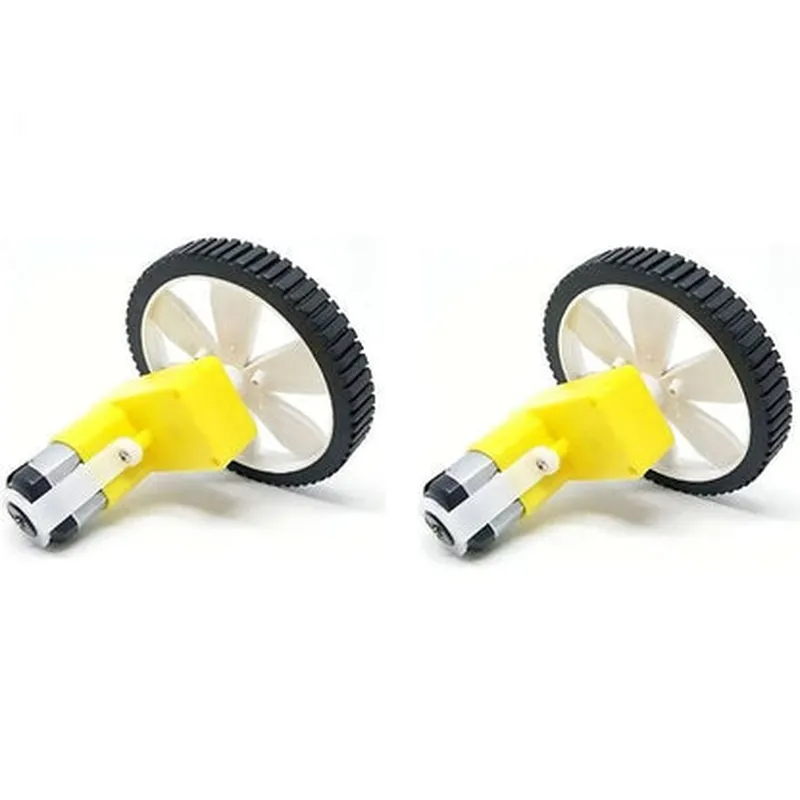
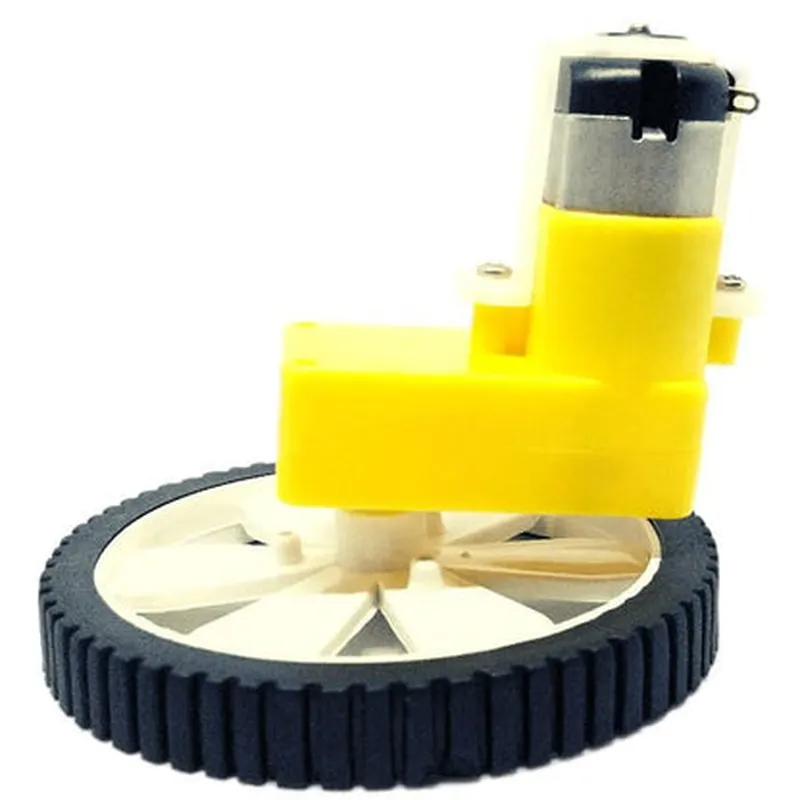
Brushed DC (BO) motor
60 RPM
12V DC (nominal)
100mA (nominal)
1.2W
6mm
24mm
Compact L-shape design for easy installation and space-saving integration
Ideal for robotics, automation, and other IoT projects where space is limited
High torque output for efficient and reliable performance
60 RPM speed for smooth and precise motion control
Includes two wheels with a diameter of 42mm and a width of 12mm
Wheels are securely attached to the motor shaft using a screw and nut mechanism
Wheels are designed for smooth and quiet operation
Includes two identical motors with wheels, ideal for projects that require dual motor functionality
Functionality
| The Single Shaft L-Shaped 60 RPM BO Motor with Wheel is designed to provide efficient and reliable motion control for a wide range of IoT applications. The motor's high torque and speed capabilities make it suitable for applications such as |
Robotics and automation
Drone and UAV systems
IoT projects requiring precision motion control
Industrial automation and control systems
The motor's L-shape design and compact size make it easy to integrate into tight spaces, while the included wheel assembly provides a convenient and efficient way to transfer motion to a larger diameter wheel or gear.
Technical Specifications
-20C to 60C
-30C to 70C
20% to 80% RH
120g (per motor)
42mm x 24mm x 24mm (L x W x H)
Certifications and Compliance
RoHS compliant
CE certified
Warranty and Support
1-year limited warranty
Technical support available through email and online forums
Ordering Information
LS60RPMBO-2SET
2 motors with wheels, screws, and nuts
Ships within 24 hours of ordering
Component Documentation: Single Shaft L-Shaped 60 RPM BO Motor with Wheel (2 sets)OverviewThe Single Shaft L-Shaped 60 RPM BO Motor with Wheel (2 sets) is a compact and efficient DC motor designed for IoT applications. It features a single shaft L-shaped design, 60 RPM rotation speed, and comes with two sets of wheels. This motor is ideal for robotics, automation, and movement-based projects.Technical SpecificationsMotor Type: Brushed DC Motor
Rotation Speed: 60 RPM
Voltage: 6V-12V DC
Current: 100-200mA
Torque: 1.5 kg-cm
Shaft Type: Single Shaft L-Shaped
Wheel Diameter: 42mm (2 sets)
Operating Temperature: -20C to 80C
Dimensions: 60mm x 30mm x 25mm (L x W x H)Code ExamplesHere are three code examples demonstrating how to use the Single Shaft L-Shaped 60 RPM BO Motor with Wheel (2 sets) in different contexts:Example 1: Basic Motor Control with ArduinoThis example shows how to control the motor using an Arduino board. Connect the motor to digital pins 9 and 10, and use the `motor` library to control the motor's speed and direction.```cpp
#include <Motor.h>Motor motor(9, 10); // Initialize motor on digital pins 9 and 10void setup() {
motor.setSpeed(50); // Set initial motor speed to 50%
}void loop() {
motor.forward(); // Move motor forward
delay(2000);
motor.stop(); // Stop motor
delay(1000);
motor.backward(); // Move motor backward
delay(2000);
motor.stop(); // Stop motor
delay(1000);
}
```Example 2: Line Follower Robot using Raspberry PiThis example demonstrates how to use the motor to create a line follower robot using a Raspberry Pi. Connect the motor to the Raspberry Pi's GPIO pins, and use the `RPi.GPIO` library to control the motor.```python
import RPi.GPIO as GPIO
import time# Initialize GPIO pins for motor control
GPIO.setmode(GPIO.BCM)
motor_forward = 17
motor_backward = 23
GPIO.setup(motor_forward, GPIO.OUT)
GPIO.setup(motor_backward, GPIO.OUT)while True:
# Read sensor data to determine motor direction
sensor_data = read_sensor_data()
if sensor_data == "left":
GPIO.output(motor_backward, GPIO.HIGH)
GPIO.output(motor_forward, GPIO.LOW)
elif sensor_data == "right":
GPIO.output(motor_backward, GPIO.LOW)
GPIO.output(motor_forward, GPIO.HIGH)
else:
GPIO.output(motor_backward, GPIO.LOW)
GPIO.output(motor_forward, GPIO.LOW)
time.sleep(0.1)
```Example 3: IoT-Based Obstacle Avoidance Robot using ESP32This example shows how to use the motor to create an IoT-based obstacle avoidance robot using an ESP32 board. Connect the motor to the ESP32's digital pins, and use the `WiFi` library to connect to a Wi-Fi network and the `ESP32PWM` library to control the motor's speed.```cpp
#include <WiFi.h>
#include <ESP32PWM.h>const char ssid = "your_wifi_ssid";
const char password = "your_wifi_password";// Initialize motor pins
int motor_pin1 = 18;
int motor_pin2 = 19;void setup() {
Serial.begin(115200);
WiFi.begin(ssid, password);
while (WiFi.status() != WL_CONNECTED) {
delay(1000);
Serial.println("Connecting to WiFi...");
}
Serial.println("Connected to WiFi");
ESP32PWM::allocateTimer(0);
ESP32PWM::attachPin(motor_pin1, 0);
ESP32PWM::attachPin(motor_pin2, 0);
}void loop() {
// Read sensor data to determine motor direction and speed
int distance = read_ultrasonic_sensor();
if (distance < 20) {
ESP32PWM::setDutyCycle(motor_pin1, 50);
ESP32PWM::setDutyCycle(motor_pin2, 50);
} else {
ESP32PWM::setDutyCycle(motor_pin1, 0);
ESP32PWM::setDutyCycle(motor_pin2, 0);
}
delay(50);
}
```These code examples demonstrate how to use the Single Shaft L-Shaped 60 RPM BO Motor with Wheel (2 sets) in various IoT applications.