0.5 mGauss/LSB


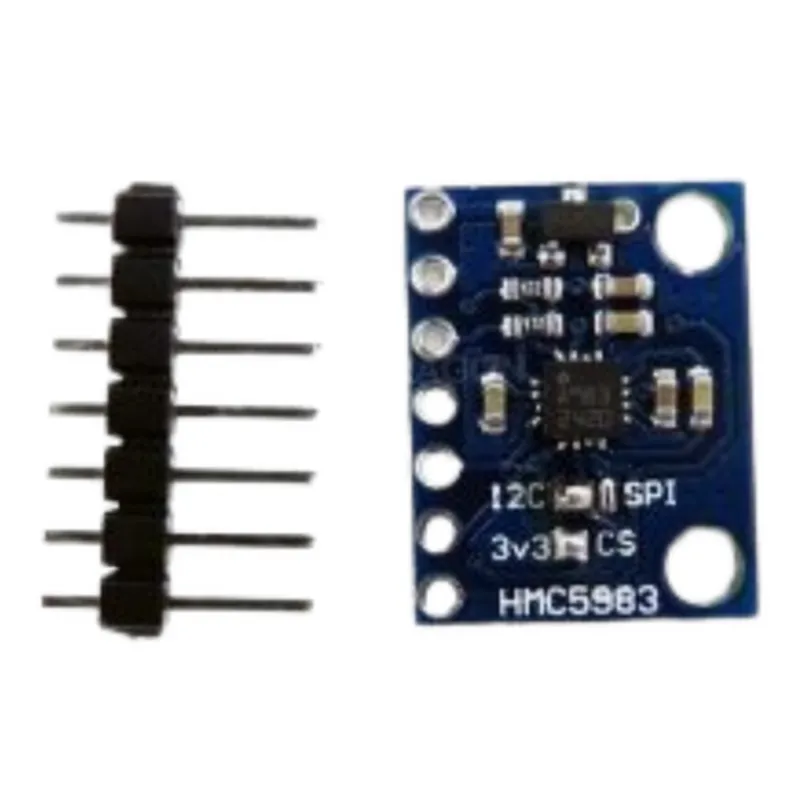
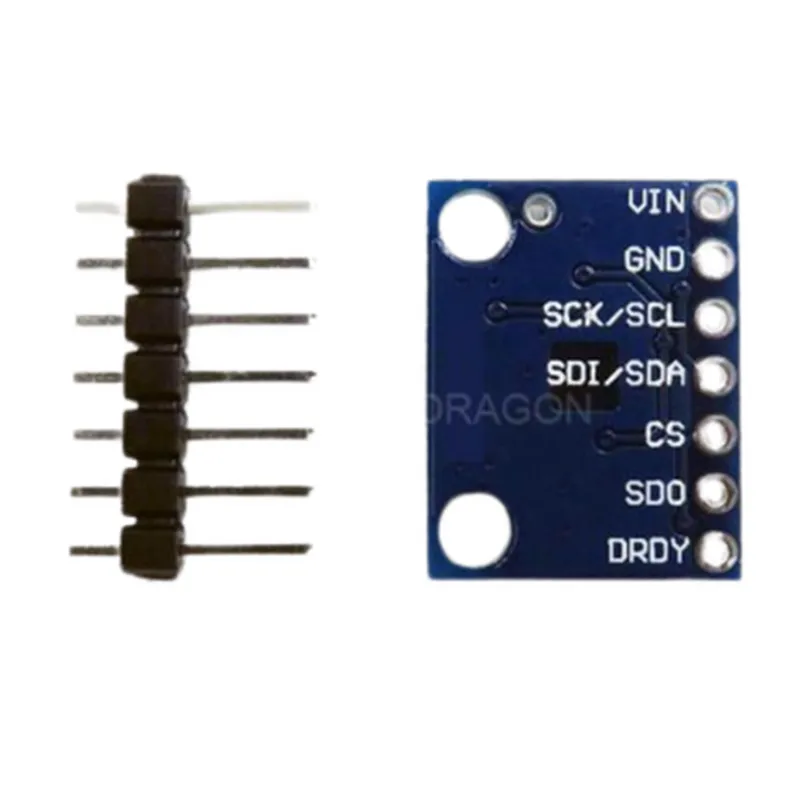
0.5 mGauss/LSB
8 Gauss
14-bit
Up to 30 Hz
3.3V or 5V
I2C (up to 400 kHz)
-40C to 85C
-50C to 150C
12mm x 12mm
Application Ideas
Electronic compasses and navigation systems
Robotics and autonomous systems
Industrial automation and process control
Geomagnetic field measurement and monitoring
Medical devices and diagnostic equipment
Conclusion
The HMC5983 3-Axis 3DOF Compass Magnetometer Module is a highly accurate and compact magnetic sensor module suitable for a wide range of applications. Its low power consumption, high sensitivity, and digital output make it an ideal component for designers and engineers working on projects that require accurate magnetic field measurements.
HMC5983 3-Axis 3DOF Compass Magnetometer Module DocumentationOverviewThe HMC5983 is a 3-axis, 3 degrees of freedom (3DOF) compass magnetometer module designed to provide accurate and reliable magnetic field measurements. This module is suitable for a wide range of applications, including robotics, navigation, and IoT devices.Technical SpecificationsOperating voltage: 3.0V to 5.5V
Communication protocol: I2C
Measurement range: 8.1 Gauss (x, y, z axes)
Resolution: 14 bits (0.2 mGauss/LSB)
Sensitivity: 1300 LSB/Gauss
Operating temperature: -40C to 85CPinoutThe HMC5983 module has a standard 5-pin interface:VCC: Power supply (3.0V to 5.5V)
GND: Ground
SCL: I2C clock line
SDA: I2C data line
DRDY: Data ready interrupt pin (active low)Code Examples### Example 1: Basic I2C Communication using ArduinoThis example demonstrates how to read the magnetic field values from the HMC5983 module using an Arduino board.
```c
#include <Wire.h>#define HMC5983_ADDRESS 0x1E // default I2C addressvoid setup() {
Wire.begin();
Serial.begin(9600);
}void loop() {
uint8_t xData, yData, zData;// Read magnetic field values
Wire.beginTransmission(HMC5983_ADDRESS);
Wire.write(0x03); // Register address for magnetic field values
Wire.endTransmission();
Wire.requestFrom(HMC5983_ADDRESS, 6);xData = Wire.read() << 8;
xData |= Wire.read();
yData = Wire.read() << 8;
yData |= Wire.read();
zData = Wire.read() << 8;
zData |= Wire.read();// Print magnetic field values
Serial.print("X: ");
Serial.print(xData, DEC);
Serial.print(" uT, Y: ");
Serial.print(yData, DEC);
Serial.print(" uT, Z: ");
Serial.print(zData, DEC);
Serial.println(" uT");delay(500);
}
```
### Example 2: Calculating Heading using Python and Raspberry PiThis example demonstrates how to calculate the heading angle from the magnetic field values using a Raspberry Pi and Python.
```python
import smbus
import math# Define I2C bus and HMC5983 address
bus = smbus.SMBus(1)
address = 0x1Edef read_mag_data():
# Read magnetic field values
data = bus.read_i2c_block_data(address, 0x03, 6)
x = (data[0] << 8) | data[1]
y = (data[2] << 8) | data[3]
z = (data[4] << 8) | data[5]
return x, y, zdef calculate_heading(x, y, z):
# Calculate heading angle in radians
heading_rad = math.atan2(y, x)
# Convert to degrees
heading_deg = math.degrees(heading_rad)
return heading_degwhile True:
x, y, z = read_mag_data()
heading = calculate_heading(x, y, z)
print("Heading: {:.2f} degrees".format(heading))
time.sleep(0.5)
```
### Example 3: Using the HMC5983 with ESP32 and MicroPythonThis example demonstrates how to read the magnetic field values from the HMC5983 module using an ESP32 board and MicroPython.
```python
import machine
import utime# Define I2C pins and HMC5983 address
i2c = machine.I2C(scl=machine.Pin(22), sda=machine.Pin(21))
address = 0x1Edef read_mag_data():
# Read magnetic field values
data = i2c.readfrom_mem(address, 0x03, 6)
x = (data[0] << 8) | data[1]
y = (data[2] << 8) | data[3]
z = (data[4] << 8) | data[5]
return x, y, zwhile True:
x, y, z = read_mag_data()
print("X: {}, Y: {}, Z: {}".format(x, y, z))
utime.sleep_ms(500)
```
These code examples demonstrate the basic I2C communication and magnetic field value reading from the HMC5983 module. You can modify and extend these examples to suit your specific application requirements.