Stufin
Home Quick Cart Profile

Raspberry Pi 4 Case With FAN - Model H4


Buy Now on Stufin

Component Name

Raspberry Pi 4 Case With FAN - Model H4
Description

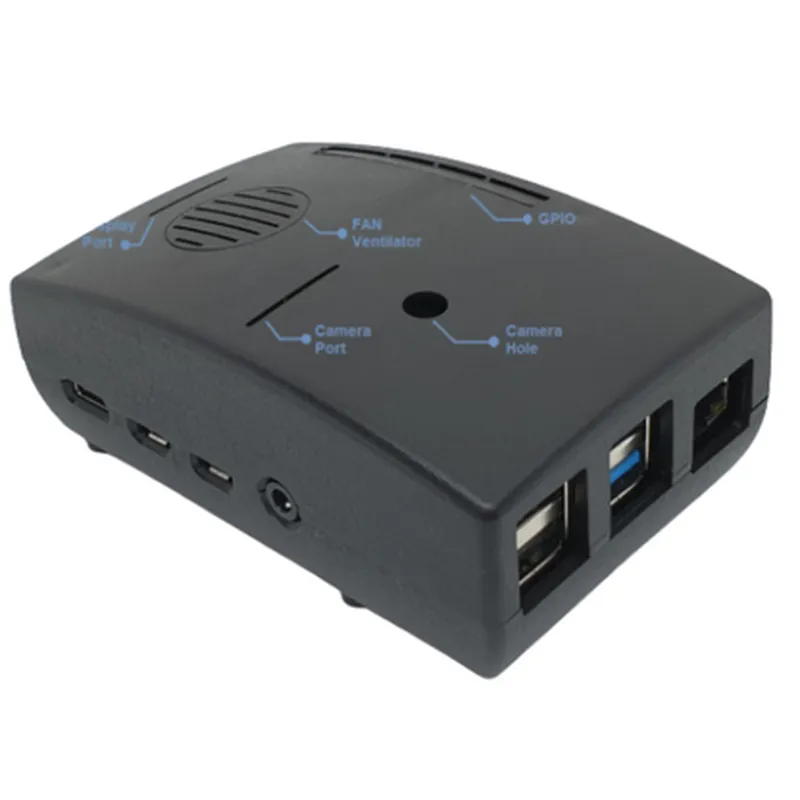
The Raspberry Pi 4 Case With FAN - Model H4 is a specially designed enclosure for the Raspberry Pi 4 single-board computer. This case provides a robust and efficient way to protect and cool the Raspberry Pi 4, ensuring reliable operation in a variety of environments. The Model H4 case is engineered to meet the specific needs of Raspberry Pi 4 users, offering a unique combination of features that make it an ideal choice for IoT projects, prototyping, and other applications.
Functionality

  • Protect the Raspberry Pi 4 from physical damage, dust, and other environmental factors.
  • Dissipate heat generated by the Raspberry Pi 4 board, ensuring stable operation and reducing the risk of overheating.
  • Provide a secure and stable mounting platform for the Raspberry Pi 4 board.
The primary function of the Raspberry Pi 4 Case With FAN - Model H4 is to provide a protective and cooling enclosure for the Raspberry Pi 4 board. The case is designed to

Key Features

  • Aluminum Construction: The case is made from high-quality aluminum, providing excellent heat dissipation and a durable structure.
  • Built-in FAN: The case features a built-in fan that actively cools the Raspberry Pi 4 board, ensuring efficient heat dissipation and stable operation.
  • Ventilation System: The case is designed with a sophisticated ventilation system, allowing for optimal airflow and heat dissipation.
  • Easy Installation: The case features a simple and intuitive design, making it easy to install and remove the Raspberry Pi 4 board.
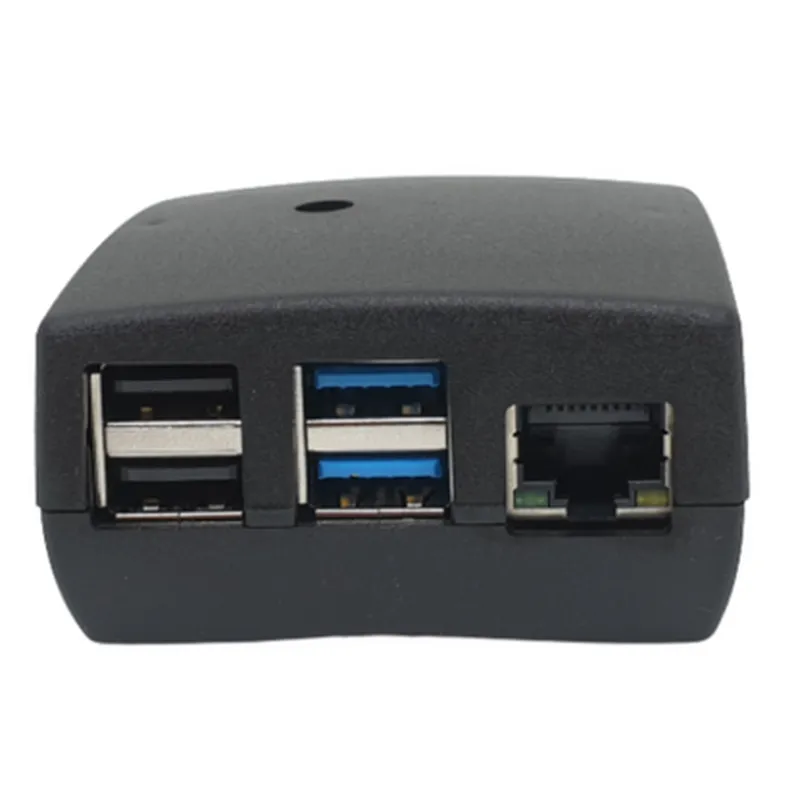
  • Access to Ports and Connectors: The case provides easy access to all Raspberry Pi 4 ports and connectors, including USB, HDMI, and Ethernet.
  • Compact Design: The case is designed to be compact and space-efficient, making it ideal for IoT projects, prototyping, and other applications where space is limited.
  • Mounting Options: The case provides multiple mounting options, including wall-mounting and DIN rail mounting, for flexibility and convenience.
  • LEDIndicator: The case features an LED indicator that shows the fan's operational status, providing a visual indication of the cooling system's performance.

Material

Aluminum

Dimensions

95 x 65 x 35 mm (3.74 x 2.56 x 1.38 in)

Weight

220 g (7.76 oz)

Fan Specifications

+ Fan TypeDC Brushless Fan
+ Voltage5V
+ Current0.5A
+ Speed2500 RPM (max)
+ Airflow15.4 CFM (max)

Operating Temperature

-20C to 60C (-4F to 140F)

Compatibility

Raspberry Pi 4 Model B, Raspberry Pi 4 Model B+

Conclusion

The Raspberry Pi 4 Case With FAN - Model H4 is a high-quality enclosure designed to provide optimal protection, cooling, and mounting for the Raspberry Pi 4 single-board computer. Its unique combination of features, including a built-in fan, ventilation system, and compact design, make it an ideal choice for IoT projects, prototyping, and other applications.

Pin Configuration

  • Raspberry Pi 4 Case With FAN - Model H4 Pinout Guide
  • The Raspberry Pi 4 Case With FAN - Model H4 is a comprehensive enclosure designed to house and cool the Raspberry Pi 4 single-board computer. The case features a built-in fan for efficient heat dissipation and provides access to all GPIO pins on the Raspberry Pi 4. This guide explains the pins on the Raspberry Pi 4 Case With FAN - Model H4, one by one, and provides a step-by-step connection guide.
  • GPIO Pinout:
  • The Raspberry Pi 4 has a 40-pin GPIO header, which is divided into two rows of 20 pins each. The pins are numbered from 1 to 40, with the even-numbered pins on the bottom row and the odd-numbered pins on the top row.
  • Row 1 (Top Row):
  • 1. 3.3V Power: Pin 1 provides a stable 3.3V power supply for external components.
  • 2. GPIO2: Pin 3 is a general-purpose input/output pin, configurable as an input or output.
  • 3. GPIO3: Pin 5 is a general-purpose input/output pin, configurable as an input or output.
  • 4. GPIO4: Pin 7 is a general-purpose input/output pin, configurable as an input or output.
  • 5. GPIO14 (TXD): Pin 8 is the transmit data pin for the UART interface.
  • 6. GPIO15 (RXD): Pin 10 is the receive data pin for the UART interface.
  • 7. GPIO17: Pin 11 is a general-purpose input/output pin, configurable as an input or output.
  • 8. GPIO18: Pin 12 is a general-purpose input/output pin, configurable as an input or output.
  • 9. GPIO27: Pin 13 is a general-purpose input/output pin, configurable as an input or output.
  • 10. GPIO22: Pin 15 is a general-purpose input/output pin, configurable as an input or output.
  • 11. GPIO23: Pin 16 is a general-purpose input/output pin, configurable as an input or output.
  • 12. GPIO24: Pin 18 is a general-purpose input/output pin, configurable as an input or output.
  • 13. GPIO10 (SPI MOSI): Pin 19 is the master-out-slave-in pin for the SPI interface.
  • 14. GPIO9 (SPI MISO): Pin 21 is the master-in-slave-out pin for the SPI interface.
  • 15. GPIO25: Pin 22 is a general-purpose input/output pin, configurable as an input or output.
  • 16. GPIO11 (SPI SCK): Pin 23 is the clock pin for the SPI interface.
  • 17. GPIO8 (SPI CE0): Pin 24 is the chip enable pin 0 for the SPI interface.
  • 18. GPIO7: Pin 26 is a general-purpose input/output pin, configurable as an input or output.
  • Row 2 (Bottom Row):
  • 1. GND: Pin 2 provides a ground connection for external components.
  • 2. GPIO28: Pin 4 is a general-purpose input/output pin, configurable as an input or output.
  • 3. GPIO29: Pin 6 is a general-purpose input/output pin, configurable as an input or output.
  • 4. GPIO30: Pin 9 is a general-purpose input/output pin, configurable as an input or output.
  • 5. GPIO31: Pin 14 is a general-purpose input/output pin, configurable as an input or output.
  • 6. GPIO5: Pin 17 is a general-purpose input/output pin, configurable as an input or output.
  • 7. GPIO6: Pin 18 is a general-purpose input/output pin, configurable as an input or output.
  • 8. GPIO12: Pin 20 is a general-purpose input/output pin, configurable as an input or output.
  • 9. GPIO13: Pin 25 is a general-purpose input/output pin, configurable as an input or output.
  • 10. GPIO19: Pin 27 is a general-purpose input/output pin, configurable as an input or output.
  • 11. GPIO16: Pin 28 is a general-purpose input/output pin, configurable as an input or output.
  • 12. GPIO26: Pin 30 is a general-purpose input/output pin, configurable as an input or output.
  • 13. GPIO20: Pin 32 is a general-purpose input/output pin, configurable as an input or output.
  • 14. GPIO21: Pin 33 is a general-purpose input/output pin, configurable as an input or output.
  • 15. 3.3V Power: Pin 34 provides a stable 3.3V power supply for external components.
  • 16. 5V Power: Pin 35 provides a stable 5V power supply for external components.
  • 17. GND: Pin 36 provides a ground connection for external components.
  • 18. GND: Pin 38 provides a ground connection for external components.
  • 19. GPIO0 (ID_SD): Pin 40 is used for ID_SD functionality ( Reserved for future use).
  • Fan Connection:
  • The Raspberry Pi 4 Case With FAN - Model H4 has a built-in fan for cooling the Raspberry Pi 4. The fan is connected to the GPIO header as follows:
  • Fan Power: Pin 2 (GND) and Pin 4 (5V Power) on the GPIO header provide power to the fan.
  • Fan Control: Pin 14 (GPIO14/TXD) on the GPIO header is used to control the fan's speed.
  • Connecting the Pins:
  • When connecting devices to the GPIO pins, ensure you use the correct pin numbers and voltage levels to avoid damage to the Raspberry Pi 4 or the connected devices. Follow these steps:
  • 1. Identify the pin number and its corresponding function (e.g., GPIO2, 3.3V Power, or GND).
  • 2. Use a jumper wire or a suitable connector to connect the device to the corresponding GPIO pin.
  • 3. Ensure the voltage level of the connected device matches the voltage level of the GPIO pin (3.3V or 5V).
  • 4. Verify the connections and the device's functionality before powering on the Raspberry Pi 4.
  • Important Safety Notes:
  • Always handle the Raspberry Pi 4 and its components with care to avoid static electricity damage.
  • Ensure proper ventilation and cooling to prevent overheating.
  • Follow proper safety precautions when working with electricity and electronic components.
  • By following this guide, you can safely and correctly connect devices to the GPIO pins on the Raspberry Pi 4 Case With FAN - Model H4, enabling you to create innovative IoT projects and applications.

Code Examples

Raspberry Pi 4 Case With FAN - Model H4 Documentation
Overview
The Raspberry Pi 4 Case With FAN - Model H4 is a high-quality enclosure designed specifically for the Raspberry Pi 4 single-board computer. This case provides excellent heat dissipation, thanks to its built-in fan, ensuring optimal performance and longevity of the Raspberry Pi 4. The case is designed for ease of use, with easy access to all ports and connections.
Features
Compatible with Raspberry Pi 4 Model B
 Built-in 5V fan for efficient heat dissipation
 Easy access to all ports and connections
 High-quality ABS material construction
 Simple assembly and disassembly
Technical Specifications
Dimensions: 92mm x 65mm x 34mm
 Weight: 120g
 Material: ABS
 Fan Voltage: 5V
 Fan Speed: 2500 RPM  10%
 Noise Level: 25 dB  3 dB
Code Examples
Example 1: Python Script to Control the Fan
This example demonstrates how to control the fan using a Python script on the Raspberry Pi 4.
```
import RPi.GPIO as GPIO
import time
# Set up GPIO mode
GPIO.setmode(GPIO.BCM)
# Define the fan pin
fan_pin = 17
# Set up the fan pin as an output
GPIO.setup(fan_pin, GPIO.OUT)
try:
    while True:
        # Turn the fan on
        GPIO.output(fan_pin, GPIO.HIGH)
        time.sleep(5)
        # Turn the fan off
        GPIO.output(fan_pin, GPIO.LOW)
        time.sleep(5)
except KeyboardInterrupt:
    GPIO.cleanup()
```
Example 2: Systemd Service to Run the Fan at Boot
This example demonstrates how to create a systemd service to run the fan at boot on the Raspberry Pi 4.
Create a file `/etc/systemd/system/raspberrypi-fan.service` with the following contents:
```
[Unit]
Description=Raspberry Pi Fan Service
After=multi-user.target
[Service]
ExecStart=/usr/bin/python /home/pi/fan_control.py
Restart=always
[Install]
WantedBy=multi-user.target
```
Create a file `/home/pi/fan_control.py` with the following contents:
```
import RPi.GPIO as GPIO
# Set up GPIO mode
GPIO.setmode(GPIO.BCM)
# Define the fan pin
fan_pin = 17
# Set up the fan pin as an output
GPIO.setup(fan_pin, GPIO.OUT)
# Turn the fan on
GPIO.output(fan_pin, GPIO.HIGH)
while True:
    time.sleep(1)
```
Enable and start the service:
```
sudo systemctl enable raspberrypi-fan.service
sudo systemctl start raspberrypi-fan.service
```
Example 3: Bash Script to Monitor Temperature and Control the Fan
This example demonstrates how to create a bash script to monitor the temperature of the Raspberry Pi 4 and control the fan accordingly.
Create a file `/home/pi/temp_monitor.sh` with the following contents:
```
#!/bin/bash
while true
do
    temp=$(vcgencmd measure_temp | egrep -o '[0-9.]+')
    if [ $temp -gt 55 ]
    then
        echo "Fan on"
        gpio write 17 1
    else
        echo "Fan off"
        gpio write 17 0
    fi
    sleep 5
done
```
Make the script executable and add it to the cron job to run at boot:
```
chmod +x /home/pi/temp_monitor.sh
sudo crontab -e
```
Add the following line to the cron job:
```
@reboot /home/pi/temp_monitor.sh
```
Notes
Make sure to install the necessary dependencies, such as RPi.GPIO, before running the examples.
 Ensure proper wiring of the fan to the Raspberry Pi 4 GPIO pins.
 Modify the code examples as needed to suit your specific use case.
I hope this documentation helps you get started with the Raspberry Pi 4 Case With FAN - Model H4!