Stufin
Home Quick Cart Profile

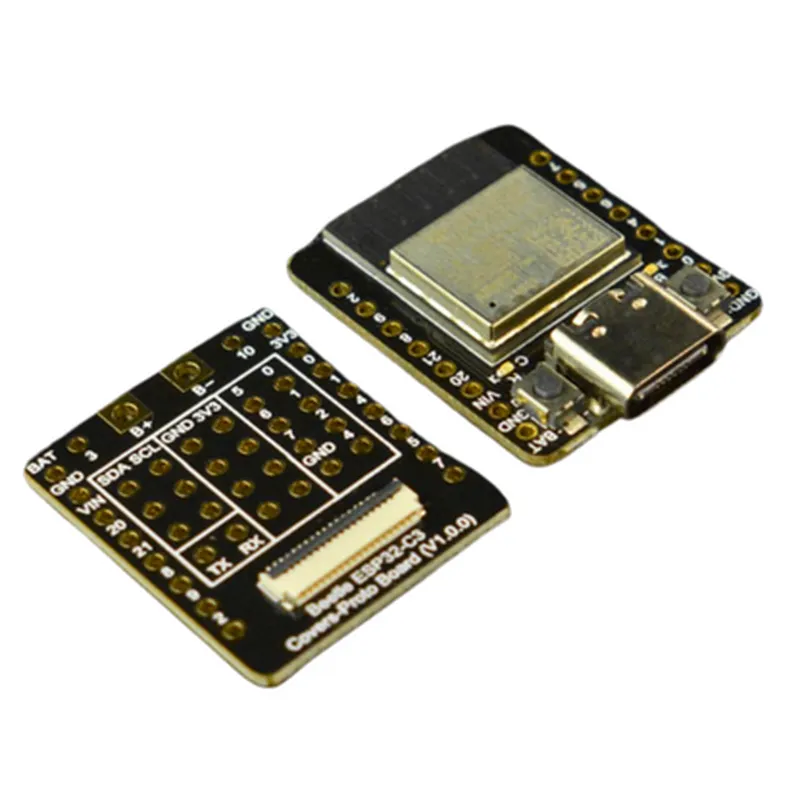
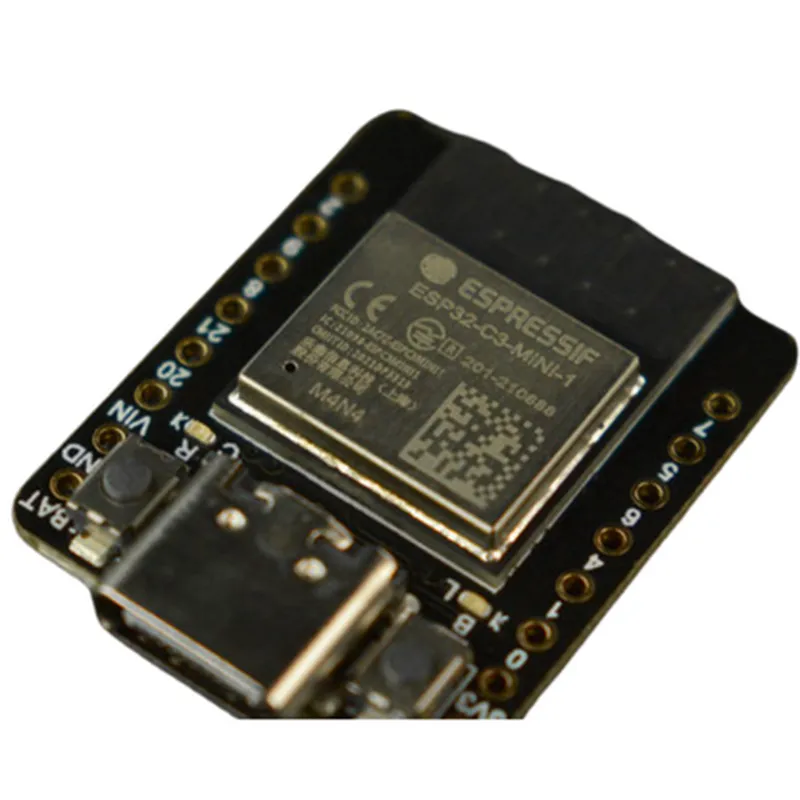
Beetle ESP32 - C3 (RISC-V Core Development Board)

Buy Now on Stufin

Component Name

Beetle ESP32-C3 (RISC-V Core Development Board)

Overview

The Beetle ESP32-C3 is a microcontroller development board based on the ESP32-C3 system-on-a-chip (SoC), which integrates a RISC-V core, Wi-Fi, and Bluetooth capabilities. This board is designed for IoT development, prototyping, and proof-of-concept projects, offering a robust and feature-rich platform for building connected devices.

Functionality

  • Wireless Connectivity: The board provides dual-mode Wi-Fi and Bluetooth 5.0 connectivity, allowing devices to connect to the internet, communicate with other devices, and exchange data seamlessly.
  • Microcontroller: The ESP32-C3 SoC features a dual-core RISC-V processor, operating at a clock speed of up to 160 MHz, providing a powerful and efficient processing platform for IoT applications.
  • Peripherals: The board includes a range of peripherals, such as USB, UART, SPI, I2C, I2S, and GPIO, enabling users to connect various sensors, actuators, and interfaces.
  • Development: The Beetle ESP32-C3 is designed for prototyping and development, featuring an onboard USB-to-UART bridge for easy programming and debugging.
The Beetle ESP32-C3 board is a versatile development platform that enables users to create a wide range of IoT applications, including

Key Features

  • ESP32-C3 SoC: Dual-core RISC-V processor, operating at up to 160 MHz, with 4 MB of Flash memory and 520 KB of SRAM.
  • Wireless Connectivity: Dual-mode Wi-Fi (2.4 GHz and 5 GHz) and Bluetooth 5.0 (BLE and BR/EDR) for seamless connectivity.
  • Peripherals: USB, UART, SPI, I2C, I2S, and GPIO interfaces for connecting various sensors, actuators, and interfaces.
  • Onboard Antenna: Integrated Wi-Fi antenna for reliable wireless connectivity.
  • Power Management: Onboard Power Management IC (PMIC) for efficient power management and low-power consumption.
  • Expansion: Breakout pins for accessing all GPIO pins, enabling users to connect external modules and accessories.
  • Dimensions: Compact design with a size of 51.5 mm x 26.5 mm (2.03 in x 1.04 in).
  • Operating System: Supports a range of operating systems, including MicroPython, Lua, and C/C++.

Technical Specifications

Operating Temperature

-40C to 85C (-40F to 185F)

Power Supply

3.3 V or 5 V DC input

Current Consumption

50 mA (average), 200 mA (peak)

Flash Memory

4 MB

SRAM

520 KB

Clock Speed

Up to 160 MHz

Wi-FiDual-mode, 2.4 GHz and 5 GHz, 802.11 b/g/n

Bluetooth

5.0, BLE and BR/EDR

Applications

  • Smart Home Automation
  • Industrial Automation
  • Wearable Devices
  • Robotics and Drone Development
  • Wireless Sensor Networks
  • Smart Energy Management
  • IoT Prototyping and Proof-of-Concept Projects
The Beetle ESP32-C3 is suitable for a wide range of IoT applications, including

In summary, the Beetle ESP32-C3 is a powerful and feature-rich development board, offering a versatile platform for building innovative IoT applications. Its robust wireless connectivity, efficient processing, and extensive peripherals make it an ideal choice for developers, hobbyists, and professionals alike.

Pin Configuration

  • Beetle ESP32-C3 (RISC-V Core Development Board) Pinout Documentation
  • The Beetle ESP32-C3 development board is a powerful and feature-rich IoT development platform based on the ESP32-C3 system-on-chip (SoC). This documentation provides a detailed explanation of each pin on the board, including their functions, voltage levels, and connection guidelines.
  • Pinout Structure:
  • The Beetle ESP32-C3 development board has a 2x20-pin header with a total of 40 pins. The pins are divided into several categories, including:
  • Power Pins: 5 pins (VIN, 3V3, GND, EN, and RST)
  • Digital Pins: 24 pins (GPIO 0-23)
  • Analog Pins: 6 pins (A0-A5 and VREF)
  • Communication Pins: 5 pins (UART, SPI, I2C, I2S, and JTAG)
  • Pin-by-Pin Explanation:
  • Here is a detailed explanation of each pin on the Beetle ESP32-C3 development board:
  • Power Pins:
  • 1. VIN (Pin 1): Input voltage pin (3.3V to 12V). Connect to a power source, such as a battery or a wall adapter.
  • 2. 3V3 (Pin 2): 3.3V output pin. Provides a regulated 3.3V power supply to external components.
  • 3. GND (Pin 3 and 4): Ground pins. Connect to the ground of your circuit or a common ground point.
  • 4. EN (Pin 5): Enable pin. Connect to a pull-up resistor (10k) to enable the board.
  • 5. RST (Pin 6): Reset pin. Connect to a push-button or a reset IC to reset the board.
  • Digital Pins:
  • 6. GPIO 0 (Pin 7): General-purpose input/output pin. Can be used as an input, output, or for other specialized functions (such as I2C, SPI, or UART).
  • 7. GPIO 1 (Pin 8): General-purpose input/output pin.
  • 8. GPIO 2 (Pin 9): General-purpose input/output pin.
  • 9. GPIO 3 (Pin 10): General-purpose input/output pin.
  • 10. GPIO 4 (Pin 11): General-purpose input/output pin.
  • 11. GPIO 5 (Pin 12): General-purpose input/output pin.
  • 12. GPIO 6 (Pin 13): General-purpose input/output pin.
  • 13. GPIO 7 (Pin 14): General-purpose input/output pin.
  • 14. GPIO 8 (Pin 15): General-purpose input/output pin.
  • 15. GPIO 9 (Pin 16): General-purpose input/output pin.
  • 16. GPIO 10 (Pin 17): General-purpose input/output pin.
  • 17. GPIO 11 (Pin 18): General-purpose input/output pin.
  • 18. GPIO 12 (Pin 19): General-purpose input/output pin.
  • 19. GPIO 13 (Pin 20): General-purpose input/output pin.
  • 20. GPIO 14 (Pin 21): General-purpose input/output pin.
  • 21. GPIO 15 (Pin 22): General-purpose input/output pin.
  • 22. GPIO 16 (Pin 23): General-purpose input/output pin.
  • 23. GPIO 17 (Pin 24): General-purpose input/output pin.
  • 24. GPIO 18 (Pin 25): General-purpose input/output pin.
  • 25. GPIO 19 (Pin 26): General-purpose input/output pin.
  • 26. GPIO 20 (Pin 27): General-purpose input/output pin.
  • 27. GPIO 21 (Pin 28): General-purpose input/output pin.
  • 28. GPIO 22 (Pin 29): General-purpose input/output pin.
  • 29. GPIO 23 (Pin 30): General-purpose input/output pin.
  • Analog Pins:
  • 30. A0 (Pin 31): Analog input pin. Can be used for analog-to-digital conversion (ADC).
  • 31. A1 (Pin 32): Analog input pin. Can be used for analog-to-digital conversion (ADC).
  • 32. A2 (Pin 33): Analog input pin. Can be used for analog-to-digital conversion (ADC).
  • 33. A3 (Pin 34): Analog input pin. Can be used for analog-to-digital conversion (ADC).
  • 34. A4 (Pin 35): Analog input pin. Can be used for analog-to-digital conversion (ADC).
  • 35. A5 (Pin 36): Analog input pin. Can be used for analog-to-digital conversion (ADC).
  • 36. VREF (Pin 37): Reference voltage pin for ADC.
  • Communication Pins:
  • 37. TXD (Pin 38): UART transmit pin. Used for serial communication.
  • 38. RXD (Pin 39): UART receive pin. Used for serial communication.
  • 39. SCK (Pin 40): SPI clock pin. Used for synchronous serial communication.
  • 40. MOSI (Pin 41): SPI master out slave in pin. Used for synchronous serial communication.
  • 41. MISO (Pin 42): SPI master in slave out pin. Used for synchronous serial communication.
  • 42. SCL (Pin 43): I2C clock pin. Used for synchronous serial communication.
  • 43. SDA (Pin 44): I2C data pin. Used for synchronous serial communication.
  • 44. I2S_BCK (Pin 45): I2S clock pin. Used for audio interface.
  • 45. I2S_WS (Pin 46): I2S word select pin. Used for audio interface.
  • 46. I2S_SD (Pin 47): I2S serial data pin. Used for audio interface.
  • 47. JTAG_TMS (Pin 48): JTAG test mode select pin. Used for debugging.
  • 48. JTAG_TDI (Pin 49): JTAG test data in pin. Used for debugging.
  • 49. JTAG_TDO (Pin 50): JTAG test data out pin. Used for debugging.
  • 50. JTAG_TCK (Pin 51): JTAG test clock pin. Used for debugging.
  • Connection Guidelines:
  • When connecting components to the Beetle ESP32-C3 development board, ensure:
  • Use appropriate voltage levels (3.3V or 5V) for digital and analog pins.
  • Use a breadboard or PCB with a suitable layout to avoid short circuits.
  • Use pull-up or pull-down resistors for digital pins, as needed.
  • Use decoupling capacitors for power pins, as needed.
  • Use a level shifter or voltage regulator, if necessary, to match voltage levels between the board and external components.
  • Refer to the datasheet and documentation for specific components and libraries for programming and using the board.
  • By following these guidelines and understanding the pinout structure, you can effectively use the Beetle ESP32-C3 development board for your IoT projects.

Code Examples

Beetle ESP32 - C3 (RISC-V Core Development Board) Documentation
Overview
The Beetle ESP32 - C3 is a powerful and versatile development board featuring the ESP32-C3 system-on-chip (SoC) with a RISC-V core. This board provides a robust platform for IoT development, offering Wi-Fi and Bluetooth 5 connectivity, ample storage, and a range of peripherals. The ESP32-C3 SoC integrates a 32-bit RISC-V processor, 4MB of flash memory, and 520KB of SRAM.
Hardware Specifications
ESP32-C3 RISC-V SoC
 4MB Flash Memory
 520KB SRAM
 Wi-Fi 802.11 b/g/n
 Bluetooth 5.0
 USB Type-C interface
 22 GPIO pins
 2x 12-bit ADC channels
 2x 8-bit DAC channels
 I2C, I2S, SPI, UART interfaces
Software Development
The Beetle ESP32 - C3 is supported by the ESP32-C3 IoT Development Framework, which provides a comprehensive set of APIs and tools for developing IoT applications. The board can be programmed using C/C++ or MicroPython.
Code Examples
### Example 1: Wi-Fi Connectivity and HTTP GET Request
This example demonstrates how to connect to a Wi-Fi network and perform an HTTP GET request using the Beetle ESP32 - C3.
```c
#include <WiFi.h>
#include <HTTPClient.h>
// Wi-Fi credentials
const char ssid = "your_ssid";
const char password = "your_password";
// HTTP client
HTTPClient http;
void setup() {
  Serial.begin(115200);
// Connect to Wi-Fi
  WiFi.begin(ssid, password);
  while (WiFi.status() != WL_CONNECTED) {
    delay(1000);
    Serial.println("Connecting to Wi-Fi...");
  }
Serial.println("Connected to Wi-Fi");
  Serial.println("IP address: ");
  Serial.println(WiFi.localIP());
}
void loop() {
  // Perform HTTP GET request
  http.begin("http://example.com");
  int httpResponseCode = http.GET();
  if (httpResponseCode > 0) {
    String response = http.getString();
    Serial.println("HTTP Response: ");
    Serial.println(response);
  } else {
    Serial.println("Error on HTTP request");
  }
http.end();
  delay(10000);
}
```
### Example 2: Bluetooth Low Energy (BLE) Peripheral Mode
This example demonstrates how to use the Beetle ESP32 - C3 as a BLE peripheral device, advertising a custom service and characteristic.
```c
#include <BLE.h>
// BLE device name
const char deviceName = "Beetle ESP32 - C3";
// BLE service and characteristic UUIDs
const char serviceUUID = "00001812-0000-1000-8000-00805f9b34fb";
const char charUUID = "00002a4a-0000-1000-8000-00805f9b34fb";
BLEServer server;
BLEService service;
BLECharacteristic characteristic;
void setup() {
  Serial.begin(115200);
// Initialize BLE
  BLEDevice::init(deviceName);
  server = BLEDevice::createServer();
// Create BLE service and characteristic
  service = server->createService(serviceUUID);
  characteristic = service->createCharacteristic(charUUID, BLECharacteristic::PROPERTY_READ | BLECharacteristic::PROPERTY_WRITE);
// Start BLE advertising
  server->startAdvertising();
  Serial.println("BLE advertising started");
}
void loop() {
  delay(1000);
}
```
### Example 3: ADC Readings and UART Output
This example demonstrates how to read analog values from the ADC channels and output the results over the UART interface.
```c
#include <analogRead.h>
// ADC channel 0
const int adcChannel = 0;
void setup() {
  Serial.begin(115200);
}
void loop() {
  // Read ADC value
  int adcValue = analogRead(adcChannel);
  float voltage = (adcValue  3.3) / 4095.0;
// Print ADC value and voltage over UART
  Serial.print("ADC Channel 0: ");
  Serial.print(adcValue);
  Serial.print(" (");
  Serial.print(voltage);
  Serial.println("V)");
delay(1000);
}
```
These examples showcase the capabilities of the Beetle ESP32 - C3 development board and demonstrate how to utilize its various features, including Wi-Fi connectivity, BLE peripheral mode, and ADC readings with UART output.