Stufin
Home Quick Cart Profile

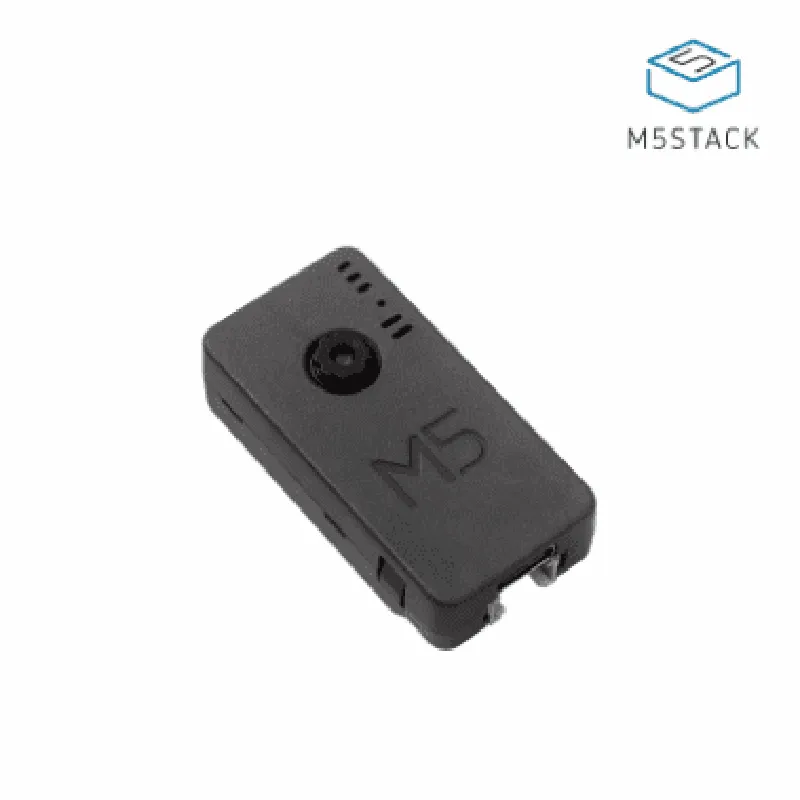
M5Stack ESP32 PSRAM Timer Camera X (OV3660)

Buy Now on Stufin

Component Name

M5Stack ESP32 PSRAM Timer Camera X (OV3660)

Overview

The M5Stack ESP32 PSRAM Timer Camera X (OV3660) is a versatile Internet of Things (IoT) component that integrates a microcontroller, Wi-Fi connectivity, high-resolution camera, and timer functionality into a compact and user-friendly device. This module is designed for a wide range of applications, including computer vision, robotics, IoT projects, and more.

Key Features

### Microcontroller

ESP32The M5Stack ESP32 PSRAM Timer Camera X is built around the popular ESP32 microcontroller, a dual-core 32-bit LX6 microprocessor with a clock speed of up to 240 MHz.
PSRAM (Pseudo Static Random Access Memory)The module features 4MB of PSRAM, which provides a larger memory capacity for storing and processing data, especially useful for demanding applications like image processing.

### Camera Module

OV3660 Camera SensorThe module is equipped with an OV3660 camera sensor, a 1/4-inch CMOS image sensor with a resolution of up to 3 megapixels (2048x1536 pixels).

Maximum Frame Rate

The camera supports a maximum frame rate of 15fps at VGA (640x480) resolution and 30fps at QVGA (320x240) resolution.

Image Formats

The camera module supports various image formats, including JPEG, BMP, and YUV.

### Timer Functionality

Timer

The module features a built-in timer that can be used to schedule camera captures, send data, or perform other tasks at specific intervals.

### Connectivity and Interfaces

Wi-FiThe ESP32 microcontroller provides built-in Wi-Fi connectivity, allowing the module to connect to the internet and communicate with other devices.

UART

The module has a UART interface for serial communication with other devices.

I2CThe module supports I2C protocol for communicating with other devices.
I/O PortsThe module features multiple I/O ports, including GPIO, I2S, and SPI, for connecting sensors, actuators, and other peripherals.

### Power Management

Operating Voltage

The module operates at a voltage range of 3.3V to 5V.

Current Consumption

The module's current consumption is approximately 120mA when the camera is active and 20mA when the camera is in standby mode.

### Operating System and Programming

MicroPython

The module supports MicroPython, a lightweight implementation of the Python programming language, making it easy to program and develop applications.

Arduino IDE

The module is also compatible with the Arduino IDE, allowing users to develop applications using the Arduino framework.

### Physical Characteristics

Dimension

The module measures 54.2mm x 25.6mm x 14.2mm (2.13in x 1.01in x 0.56in).

Weight

The module weighs approximately 25g.

Applications

The M5Stack ESP32 PSRAM Timer Camera X (OV3660) is suitable for a wide range of applications, including

Computer vision projects

Robotics and automation

IoT projects

Home automation

Security systems

Monitoring systems

Industrial automation

Machine learning and AI projects

Conclusion

The M5Stack ESP32 PSRAM Timer Camera X (OV3660) is a powerful and versatile IoT component that offers a unique combination of microcontroller, Wi-Fi connectivity, high-resolution camera, and timer functionality. Its compact design, ease of use, and flexibility make it an ideal choice for a wide range of applications, from hobbyist projects to industrial and commercial developments.

Pin Configuration

  • M5Stack ESP32 PSRAM Timer Camera X (OV3660) Pinout Documentation
  • The M5Stack ESP32 PSRAM Timer Camera X (OV3660) is a feature-rich IoT development board that combines the power of ESP32 with PSRAM, a timer, and a camera module. Here's a detailed explanation of each pin on the board:
  • Top Side Pins
  • 1. GND (Ground):
  • Description: Ground pin for the board.
  • Connection: Connect to a ground pin on your power source or other components.
  • 2. 5V:
  • Description: Power supply pin for the board (5V).
  • Connection: Connect to a 5V power source.
  • 3. USB:
  • Description: USB interface for programming and communication.
  • Connection: Connect to a USB port on your computer or a USB hub.
  • 4. RX (Received Data):
  • Description: Serial receive pin for UART communication.
  • Connection: Connect to the TX pin of another device or a serial communication module.
  • 5. TX (Transmitted Data):
  • Description: Serial transmit pin for UART communication.
  • Connection: Connect to the RX pin of another device or a serial communication module.
  • 6. IO2:
  • Description: GPIO pin (General Purpose Input/Output).
  • Connection: Can be used as an input or output for various applications, such as sensors, actuators, or LEDs.
  • 7. IO0:
  • Description: GPIO pin (General Purpose Input/Output).
  • Connection: Can be used as an input or output for various applications, such as sensors, actuators, or LEDs.
  • 8. IO4:
  • Description: GPIO pin (General Purpose Input/Output).
  • Connection: Can be used as an input or output for various applications, such as sensors, actuators, or LEDs.
  • 9. IO12:
  • Description: GPIO pin (General Purpose Input/Output).
  • Connection: Can be used as an input or output for various applications, such as sensors, actuators, or LEDs.
  • 10. IO14:
  • Description: GPIO pin (General Purpose Input/Output).
  • Connection: Can be used as an input or output for various applications, such as sensors, actuators, or LEDs.
  • 11. IO15:
  • Description: GPIO pin (General Purpose Input/Output).
  • Connection: Can be used as an input or output for various applications, such as sensors, actuators, or LEDs.
  • 12. IO18:
  • Description: GPIO pin (General Purpose Input/Output).
  • Connection: Can be used as an input or output for various applications, such as sensors, actuators, or LEDs.
  • 13. IO19:
  • Description: GPIO pin (General Purpose Input/Output).
  • Connection: Can be used as an input or output for various applications, such as sensors, actuators, or LEDs.
  • 14. IO21:
  • Description: GPIO pin (General Purpose Input/Output).
  • Connection: Can be used as an input or output for various applications, such as sensors, actuators, or LEDs.
  • 15. IO22:
  • Description: GPIO pin (General Purpose Input/Output).
  • Connection: Can be used as an input or output for various applications, such as sensors, actuators, or LEDs.
  • 16. IO23:
  • Description: GPIO pin (General Purpose Input/Output).
  • Connection: Can be used as an input or output for various applications, such as sensors, actuators, or LEDs.
  • Bottom Side Pins
  • 1. CAM_PWDN (Camera Power Down):
  • Description: Power down pin for the camera module.
  • Connection: Connect to a digital output pin to control the camera power.
  • 2. CAM_XCLK (Camera Clock):
  • Description: Clock signal pin for the camera module.
  • Connection: Connect to a clock signal source or a dedicated camera clock pin.
  • 3. CAM_PCLK (Camera Pixel Clock):
  • Description: Pixel clock signal pin for the camera module.
  • Connection: Connect to a pixel clock signal source or a dedicated camera pixel clock pin.
  • 4. CAM_VSYNC (Camera Vertical Sync):
  • Description: Vertical sync signal pin for the camera module.
  • Connection: Connect to a vertical sync signal source or a dedicated camera vertical sync pin.
  • 5. CAM_HSYNC (Camera Horizontal Sync):
  • Description: Horizontal sync signal pin for the camera module.
  • Connection: Connect to a horizontal sync signal source or a dedicated camera horizontal sync pin.
  • 6. CAM_D0-D7 (Camera Data Bus):
  • Description: 8-bit data bus pins for the camera module.
  • Connection: Connect to a data bus interface or a dedicated camera data bus pins.
  • 7. SCL (I2C Clock):
  • Description: I2C clock signal pin.
  • Connection: Connect to an I2C device or a dedicated I2C clock pin.
  • 8. SDA (I2C Data):
  • Description: I2C data signal pin.
  • Connection: Connect to an I2C device or a dedicated I2C data pin.
  • Additional Features
  • PSRAM: The board features 4MB of external PSRAM, which can be used to expand the ESP32's internal memory.
  • Timer: The board has a built-in timer module that can be used for various applications, such as pulse counting or timing events.
  • Camera Module: The OV3660 camera module is a 2-megapixel camera sensor with a built-in lens and LED indicator.
  • When connecting the pins, make sure to follow proper wiring and connection diagrams to avoid damage to the board or connected components. Always refer to the official documentation and datasheets for specific pin usage and compatibility guidelines.

Code Examples

M5Stack ESP32 PSRAM Timer Camera X (OV3660) Documentation
Overview
The M5Stack ESP32 PSRAM Timer Camera X (OV3660) is a versatile IoT component that integrates an ESP32 microcontroller, 4MB of PSRAM, a timer, and an OV3660 camera module. This device is ideal for various IoT applications, such as robotics, computer vision, and automation, that require image processing and wireless communication.
Hardware Specifications
ESP32 microcontroller with Wi-Fi and Bluetooth capabilities
 4MB of PSRAM for storing images and data
 OV3660 camera module with a maximum resolution of 2048x1536 pixels
 Timer for scheduling tasks and capturing images at regular intervals
 MicroSD card slot for storing images and data
 USB-C interface for programming and power supply
Software Libraries and Frameworks
To program the M5Stack ESP32 PSRAM Timer Camera X (OV3660), you can use the following software libraries and frameworks:
Arduino IDE with the ESP32 board package
 MicroPython with the M5Stack library
 ESP-IDF with the OV3660 camera driver
Code Examples
### Example 1: Capturing and Saving Images to MicroSD Card using Arduino
This example demonstrates how to capture images using the OV3660 camera module and save them to a microSD card using the Arduino IDE.
```c
#include <M5Stack.h>
#include <WiFi.h>
#include <SD.h>
M5Stack myM5Stack;
void setup() {
  myM5Stack.begin();
  Serial.begin(115200);
// Initialize the camera
  camera_init();
// Initialize the microSD card
  if (!SD.begin()) {
    Serial.println("Failed to initialize microSD card");
    while (1);
  }
}
void loop() {
  // Capture an image
  camera_fb_t fb = esp_camera_fb_get();
  if (!fb) {
    Serial.println("Failed to capture image");
    return;
  }
// Save the image to the microSD card
  String filename = "/IMG_" + String(millis()) + ".jpg";
  File file = SD.open(filename, FILE_WRITE);
  if (!file) {
    Serial.println("Failed to open file for writing");
    return;
  }
  file.write(fb->buf, fb->len);
  file.close();
  Serial.println("Image saved to microSD card: " + filename);
// Release the camera buffer
  esp_camera_fb_return(fb);
delay(10000); // Capture an image every 10 seconds
}
```
### Example 2: Streaming Video using MicroPython
This example demonstrates how to stream video from the OV3660 camera module using MicroPython and the M5Stack library.
```python
import machine
import uos
import m5stack
import wifi_manager
# Initialize the camera
machine.CAMERA.init()
# Connect to a Wi-Fi network
wifi_manager.connect_to_wifi("your_wifi_ssid", "your_wifi_password")
# Create a socket for streaming video
sock = machine.Socket(machine.AF_INET, machine.SOCK_STREAM)
# Set up the streaming server
server_address = ("0.0.0.0", 8080)
sock.bind(server_address)
sock.listen(1)
print("Streaming server started at http://your_device_ip:8080/")
while True:
    # Accept an incoming connection
    client, address = sock.accept()
    print("Connected by", address)
# Send the video stream
    while True:
        frame = machine.CAMERA.capture()
        client.sendall(frame)
```
### Example 3: Scheduling Image Capture using Timer
This example demonstrates how to schedule image capture using the timer on the M5Stack ESP32 PSRAM Timer Camera X (OV3660). The example uses the ESP-IDF framework and the OV3660 camera driver.
```c
#include <string.h>
#include <esp_system.h>
#include <esp_timer.h>
#include <esp_camera.h>
#define TIMER_PERIOD 10000000 // 10 seconds
static void capture_image(void arg) {
    // Capture an image
    camera_fb_t fb = esp_camera_fb_get();
    if (!fb) {
        printf("Failed to capture image
");
        return;
    }
// Save the image to a file
    FILE file = fopen("/sdcard/image.jpg", "wb");
    if (!file) {
        printf("Failed to open file for writing
");
        esp_camera_fb_return(fb);
        return;
    }
    fwrite(fb->buf, fb->len, 1, file);
    fclose(file);
    printf("Image saved to /sdcard/image.jpg
");
// Release the camera buffer
    esp_camera_fb_return(fb);
}
void app_main() {
    // Initialize the camera
    camera_config_t camera_config = {};
    camera_config.ledc_timer = LEDC_TIMER_0;
    camera_config.ledc_channel = LEDC_CHANNEL_0;
    camera_config.pin_xclk = 32;
    camera_config.pin_pclk = 34;
    camera_config.pin_vsync = 35;
    camera_config.pin_href = 36;
    camera_config.xclk_freq_hz = 20000000;
    camera_config.pixel_format = PIXFORMAT_JPEG;
    esp_err_t err = esp_camera_init(&camera_config);
    if (err != ESP_OK) {
        printf("Failed to initialize camera
");
        return;
    }
// Create a timer for scheduling image capture
    const esp_timer_create_args_t timer_args = {
        .callback = &capture_image,
        .arg = NULL,
        .name = "image_capture_timer"
    };
    esp_timer_handle_t timer;
    err = esp_timer_create(&timer_args, &timer);
    if (err != ESP_OK) {
        printf("Failed to create timer
");
        return;
    }
// Start the timer
    err = esp_timer_start_PERIODIC(timer, TIMER_PERIOD);
    if (err != ESP_OK) {
        printf("Failed to start timer
");
        return;
    }
}
```
These code examples demonstrate the capabilities of the M5Stack ESP32 PSRAM Timer Camera X (OV3660) component and provide a foundation for developing various IoT applications.