7 inches (17.8 cm)


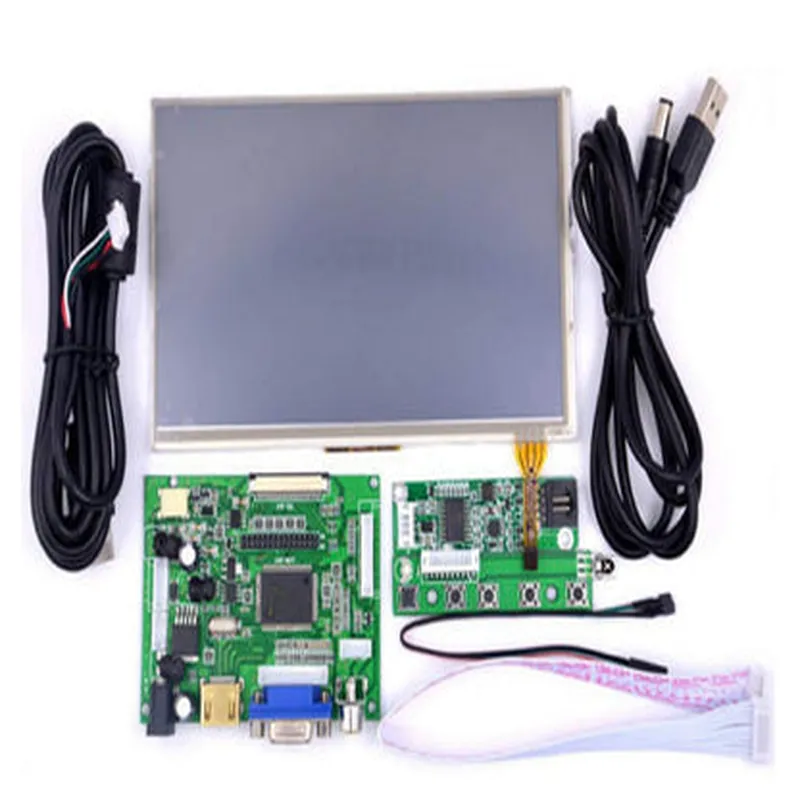
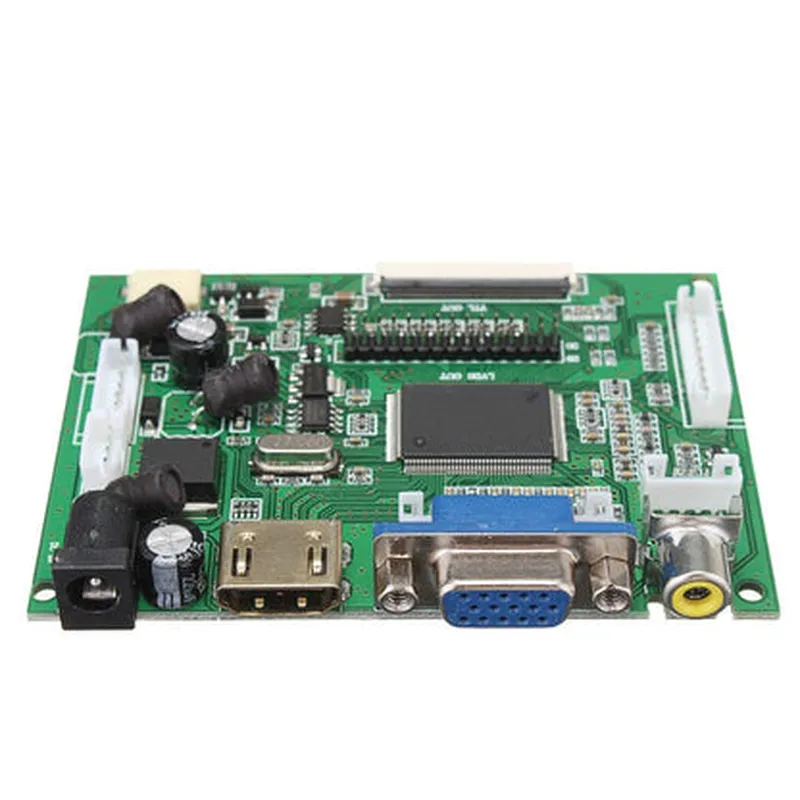
7 inches (17.8 cm)
1024x600 pixels (WSVGA)
| 16 | 9 |
LED backlight with adjustable brightness
80/80 (H/V)
### Touch Screen Specifications
Capacitive touch screen
5-point multi-touch
1024x600 pixels
USB
### Driver Board Specifications
HDMI, VGA
LVDS (connected to LCD display)
5V, 2A (via micro-USB or breadboard)
Compatible with Raspberry Pi single-board computers ( Raspberry Pi 2, 3, 4, and later)
### Kit Contents
7-inch LCD display with touch screen
Driver board with HDMI and VGA inputs
Power adapter (micro-USB)
HDMI cable
VGA cable
Ribbon cable (for LVDS connection)
Functionality
The 7-inch Raspberry Pi LCD Touch Screen Display with Kit HDMI VGA Input Driver Board is designed to provide a comprehensive display solution for Raspberry Pi projects. The driver board accepts HDMI and VGA input signals, allowing users to connect their Raspberry Pi board and display output on the LCD screen. The capacitive touch screen enables users to interact with their projects using intuitive touch gestures.
Key Applications
home automation, industrial control systems, and smart devices
ideal for testing and debugging Raspberry Pi projects
robotics, automation, and interactive learning systems
retail, hospitality, and healthcare applications
Technical Specifications
0C to 50C (32F to 122F)
-20C to 80C (-4F to 176F)
20% to 80% RH (non-condensing)
Warranty and Support
1-year limited warranty
Technical support available through manufacturer's website and email
Extensive documentation and tutorials available online
Overall, the 7-inch Raspberry Pi LCD Touch Screen Display with Kit HDMI VGA Input Driver Board is a versatile and reliable display solution for Raspberry Pi projects, offering a high-quality display, touch screen interface, and multiple input options.
Component Documentation: 7inch Raspberry Pi LCD Touch Screen Display with Kit HDMI VGA Input Driver BoardOverviewThe 7inch Raspberry Pi LCD Touch Screen Display with Kit HDMI VGA Input Driver Board is a comprehensive display solution designed for Raspberry Pi boards. This component integrates a 7-inch LCD touch screen with an HDMI and VGA input driver board, providing a versatile display interface for various applications.Technical SpecificationsDisplay Size: 7 inches
Resolution: 1024x600 pixels
Touch Screen: Resistive, supports multi-touch gestures
Driver Board: HDMI and VGA input, compatible with Raspberry Pi boards
Interface: HDMI, VGA, and USB for touch screen control
Power Supply: 5V DC, 2A
Operating Temperature: -20C to 60CCode ExamplesExample 1: Basic Display Test with Raspberry Pi (Python)This example demonstrates how to use the 7inch LCD Touch Screen Display with a Raspberry Pi board to display a simple GUI using Python.Hardware ConnectionConnect the HDMI output of the Raspberry Pi to the HDMI input of the driver board.
Connect the USB cable from the driver board to the Raspberry Pi.
Power on the Raspberry Pi and the display.SoftwareInstall the necessary libraries on your Raspberry Pi:
```
sudo apt-get update
sudo apt-get install python3 python3-pip
pip3 install pygame
```
Create a Python script to display a GUI on the LCD touch screen:
```python
import pygame# Initialize pygame
pygame.init()# Set the display dimensions
width, height = 1024, 600
screen = pygame.display.set_mode((width, height))# Set the title of the window
pygame.display.set_caption('Raspberry Pi LCD Touch Screen Display')# Fill the screen with a black background
screen.fill((0, 0, 0))# Draw a red rectangle on the screen
pygame.draw.rect(screen, (255, 0, 0), (100, 100, 200, 200))# Update the display
pygame.display.flip()# Run the GUI event loop
while True:
for event in pygame.event.get():
if event.type == pygame.QUIT:
pygame.quit()
sys.exit()
```
Example 2: Touch Screen Calibration with Raspberry Pi (Python)This example demonstrates how to calibrate the touch screen using a Raspberry Pi board and Python.Hardware ConnectionConnect the HDMI output of the Raspberry Pi to the HDMI input of the driver board.
Connect the USB cable from the driver board to the Raspberry Pi.
Power on the Raspberry Pi and the display.SoftwareInstall the necessary libraries on your Raspberry Pi:
```
sudo apt-get update
sudo apt-get install python3 python3-pip
pip3 install pygame evdev
```
Create a Python script to calibrate the touch screen:
```python
import pygame
import evdev# Initialize pygame
pygame.init()# Set the display dimensions
width, height = 1024, 600
screen = pygame.display.set_mode((width, height))# Create an evdev input device object
device = evdev.InputDevice('/dev/input/event0')# Calibration steps
device.grab()
print("Touch the top-left corner of the screen...")
event = device.read_one()
x1, y1 = event.code, event.value
print("Touch the top-right corner of the screen...")
event = device.read_one()
x2, y2 = event.code, event.value
print("Touch the bottom-left corner of the screen...")
event = device.read_one()
x3, y3 = event.code, event.value
print("Touch the bottom-right corner of the screen...")
event = device.read_one()
x4, y4 = event.code, event.value# Calculate the calibration coefficients
x_coeff = (x2 - x1) / (width - 1)
y_coeff = (y4 - y1) / (height - 1)# Print the calibration coefficients
print(f"Calibration coefficients: x={x_coeff}, y={y_coeff}")# Release the device grab
device.ungrab()
```
These code examples demonstrate the basic usage of the 7inch Raspberry Pi LCD Touch Screen Display with Kit HDMI VGA Input Driver Board. You can modify and expand these examples to suit your specific application requirements.