

Stufin
Home Quick Cart Profile

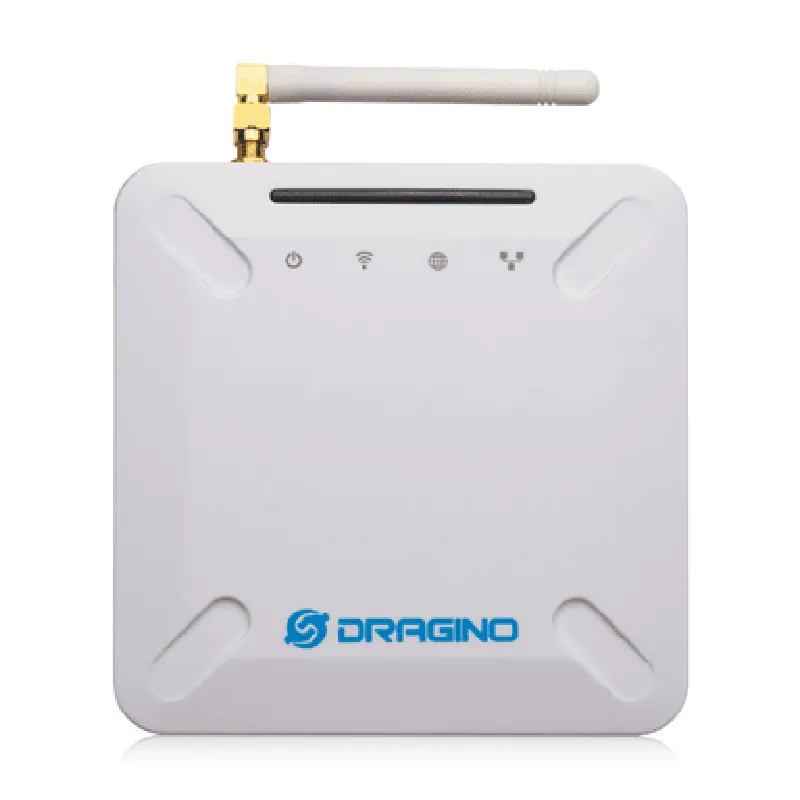
Multi-Channel Indoor Gateway For Lorawan-LPS8N

Buy Now on Stufin

Component Name

Multi-Channel Indoor Gateway For Lorawan-LPS8N

Overview

The Multi-Channel Indoor Gateway For Lorawan-LPS8N is a cutting-edge Internet of Things (IoT) device designed to facilitate seamless communication between LoRaWAN devices and the cloud. This indoor gateway is specifically tailored for use with the LPS8N LoRaWAN module, providing a reliable and efficient means of connecting a wide range of IoT devices to the internet.

Functionality

The Multi-Channel Indoor Gateway For Lorawan-LPS8N serves as a bridge between LoRaWAN devices and the cloud, enabling bi-directional communication between the two. Its primary function is to receive data from LoRaWAN devices, process it, and forward it to the cloud or a local server via Ethernet or Wi-Fi. Conversely, it can also receive data from the cloud or local server and transmit it to LoRaWAN devices.

Key Features

  • Multi-Channel Operation: The gateway supports multiple channels, allowing it to communicate with a large number of LoRaWAN devices simultaneously, making it an ideal solution for large-scale IoT deployments.
  • LoRaWAN Compliance: The gateway is fully compliant with the LoRaWAN 1.0.2 specification, ensuring interoperability with a wide range of LoRaWAN devices.
  • LPS8N Module Compatibility: The gateway is specifically designed to work with the LPS8N LoRaWAN module, providing a seamless and efficient means of connecting LPS8N-based devices to the cloud.
  • Ethernet and Wi-Fi Connectivity: The gateway offers both Ethernet and Wi-Fi connectivity options, providing flexibility in terms of deployment and integration with existing infrastructure.
  • High-Sensitivity Receiver: The gateway's high-sensitivity receiver enables it to detect and receive LoRaWAN signals at very low power levels, ensuring reliable communication even in challenging environments.
  • Advanced Data Processing: The gateway is capable of processing and analyzing LoRaWAN data in real-time, allowing for efficient and effective data transmission and reception.
  • Support for Multiple Data Protocols: The gateway supports multiple data protocols, including LoRaWAN, JSON, and CSV, making it easy to integrate with various IoT applications and platforms.
  • Compact and Durable Design: The gateway's compact design and rugged construction make it suitable for indoor deployment in a variety of environments, including industrial, commercial, and residential settings.
  • Easy Configuration and Management: The gateway can be easily configured and managed using a web-based interface or APIs, allowing users to monitor and control the gateway's performance and settings remotely.
  • Security Features: The gateway incorporates advanced security features, including encryption and secure authentication, to ensure the integrity and confidentiality of IoT data.

Technical Specifications

Frequency Range

868 MHz (EU) / 915 MHz (US)

Tx Power

Up to 27 dBm

Rx Sensitivity

Up to -140 dBm

Data Rates

0.3 kbps to 50 kbps

Protocol

LoRaWAN 1.0.2

Ethernet

10/100 Mbps

Wi-Fi802.11 b/g/n

Power Supply

12V DC, 1A

Operating Temperature

-20C to 70C

Dimensions

120 mm x 80 mm x 30 mm

Applications

The Multi-Channel Indoor Gateway For Lorawan-LPS8N is suitable for a wide range of IoT applications, including

Smart Cities and Infrastructure

Industrial Automation

Smart Buildings and Homes

Environmental Monitoring

Agricultural Monitoring

Supply Chain Management

Conclusion

The Multi-Channel Indoor Gateway For Lorawan-LPS8N is a powerful and versatile IoT gateway that provides a reliable and efficient means of connecting LoRaWAN devices to the cloud. Its advanced features, compact design, and ease of use make it an ideal solution for a wide range of IoT applications.

Pin Configuration

  • Multi-Channel Indoor Gateway for LoRaWAN-LPS8N Pinout Explanation
  • The Multi-Channel Indoor Gateway for LoRaWAN-LPS8N is a robust and compact gateway designed for IoT applications. It features a range of pins that enable connectivity and functionality with various devices and peripherals. Here's a detailed explanation of each pin, along with connection guidance:
  • Power Pins:
  • 1. VIN (Voltage Input): This pin is used to supply power to the gateway. It accepts a voltage range of 12V to 24V DC.
  • Connection: Connect a suitable power source (e.g., a wall adapter or a battery) to this pin. Ensure the voltage is within the specified range to avoid damage to the device.
  • 2. GND (Ground): This pin provides a common ground connection for the gateway.
  • Connection: Connect to a suitable ground point (e.g., a metal chassis or a grounding mat) to ensure a stable and safe operation.
  • Communication Pins:
  • 1. RX (Receive): This pin is used for serial communication (UART) and receives data from an external device.
  • Connection: Connect this pin to the TX (Transmit) pin of an external device (e.g., a microcontroller or a PC) using a suitable serial communication cable (e.g., USB-to-TTL serial adapter).
  • 2. TX (Transmit): This pin is used for serial communication (UART) and transmits data to an external device.
  • Connection: Connect this pin to the RX (Receive) pin of an external device (e.g., a microcontroller or a PC) using a suitable serial communication cable (e.g., USB-to-TTL serial adapter).
  • 3. ETH+ (Ethernet Positive): This pin is part of the RJ45 Ethernet connector and transmits data over a wired Ethernet connection.
  • Connection: Connect this pin to a suitable Ethernet cable (Category 5 or higher) to establish a wired Ethernet connection.
  • 4. ETH- (Ethernet Negative): This pin is part of the RJ45 Ethernet connector and receives data over a wired Ethernet connection.
  • Connection: Connect this pin to a suitable Ethernet cable (Category 5 or higher) to establish a wired Ethernet connection.
  • LoRaWAN Pins:
  • 1. ANT (Antenna): This pin is used to connect an external antenna for LoRaWAN communication.
  • Connection: Connect a suitable LoRaWAN antenna (e.g., a monopole or dipole antenna) to this pin, ensuring a secure and stable connection.
  • 2. SPI_CLK (SPI Clock): This pin is used for SPI communication with the LoRaWAN module.
  • Connection: Connect this pin to the corresponding SPI clock pin of the LoRaWAN module.
  • 3. SPI_MISO (SPI Master In Slave Out): This pin is used for SPI communication with the LoRaWAN module.
  • Connection: Connect this pin to the corresponding SPI MISO pin of the LoRaWAN module.
  • 4. SPI_MOSI (SPI Master Out Slave In): This pin is used for SPI communication with the LoRaWAN module.
  • Connection: Connect this pin to the corresponding SPI MOSI pin of the LoRaWAN module.
  • 5. SPI_CS (SPI Chip Select): This pin is used for SPI communication with the LoRaWAN module.
  • Connection: Connect this pin to the corresponding SPI CS pin of the LoRaWAN module.
  • Status Indicators:
  • 1. PWR (Power): This LED indicates the power status of the gateway.
  • Observation: The LED will be ON when the gateway is powered, and OFF when it's not.
  • 2. STAT (Status): This LED indicates the operational status of the gateway.
  • Observation: The LED will be ON when the gateway is operating normally, and OFF or blinking when there's an issue.
  • Miscellaneous Pins:
  • 1. RST (Reset): This pin is used to reset the gateway.
  • Connection: Connect this pin to a suitable reset button or circuit to reset the gateway.
  • 2. CON (Configuration): This pin is used for configuration and debugging purposes.
  • Connection: Connect this pin to a suitable debugging tool (e.g., a serial console) to access configuration and debugging interfaces.
  • Important Notes:
  • Ensure proper ESD (Electrostatic Discharge) protection when handling the gateway and its components.
  • Refer to the official documentation and datasheets for the LoRaWAN module and other peripheral components for specific connection guidelines.
  • Follow proper safety precautions when working with electrical components and power sources.

Code Examples

Component Documentation: Multi-Channel Indoor Gateway For LoRaWAN-LPS8N
Overview
The Multi-Channel Indoor Gateway For LoRaWAN-LPS8N is a versatile and high-performance IoT gateway designed for indoor applications. It supports multiple channels, allowing it to receive and transmit data from multiple end-devices concurrently. This gateway is compatible with the LoRaWAN protocol, enabling seamless communication with LoRaWAN-enabled devices.
Key Features
Supports up to 8 channels for concurrent communication
 Compatible with LoRaWAN 1.0.2 and 1.1 specifications
 Operates on the 868 MHz (EU) and 915 MHz (US) frequency bands
 Integrated Wi-Fi (2.4 GHz) and Ethernet connectivity for easy integration with existing networks
 Compact design for easy installation and deployment
 Low power consumption for extended battery life
Hardware Interfaces
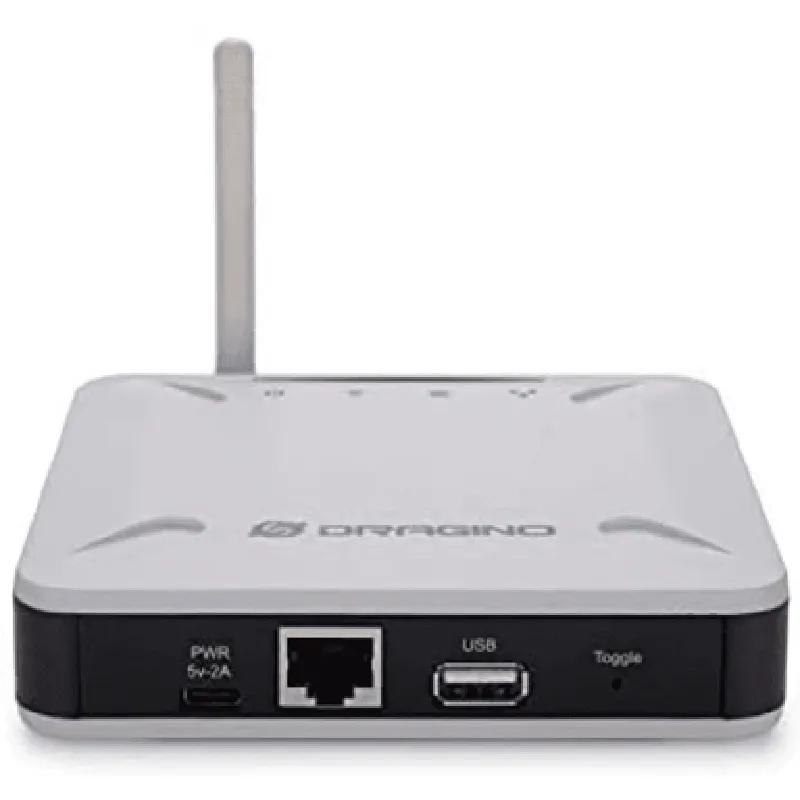
1 x Wi-Fi antenna
 1 x Ethernet port (RJ45)
 1 x USB port (for configuration and debugging)
 1 x Power input (DC 5V, 2A)
 1 x LoRaWAN antenna (SMA connector)
Software Interfaces
Supports HTTP, CoAP, and MQTT protocols for data exchange
 Built-in web server for remote configuration and monitoring
 Compatible with popular IoT platforms and cloud services
Code Examples
### Example 1: Basic LoRaWAN Communication using the HTTP API
In this example, we will demonstrate how to use the Multi-Channel Indoor Gateway For LoRaWAN-LPS8N to send and receive data using the HTTP API.
Device Setup
Connect the gateway to a power source and a Wi-Fi network
 Configure the gateway using the built-in web server (default IP: 192.168.1.1)
 Set the LoRaWAN frequency and spreading factor according to your needs
Sender Code (Arduino example)
```c
#include <LoRaWAN.h>
const char devEUI = "0102030405060708";
const char appEUI = "0102030405060708";
const char appKey = "0102030405060708090102030405060708";
LoRaWANClass lorawan;
void setup() {
  Serial.begin(9600);
  lorawan.begin(devEUI, appEUI, appKey);
}
void loop() {
  Serial.println("Sending data...");
  lorawan.send("Hello, world!", 1, 0);
  delay(10000);
}
```
Receiver Code (Python example)
```python
import requests
gateway_ip = "192.168.1.1"
api_key = "your_api_key_here"
while True:
    response = requests.get(f"http://{gateway_ip}/api/v1/downlink", headers={"Authorization": f"Bearer {api_key}"})
    if response.status_code == 200:
        print("Received data:", response.json())
    else:
        print("Error:", response.status_code)
    time.sleep(1)
```
### Example 2: MQTT Bridge using Python and Paho-MQTT
In this example, we will demonstrate how to use the Multi-Channel Indoor Gateway For LoRaWAN-LPS8N as an MQTT bridge to forward incoming LoRaWAN data to an MQTT broker.
Device Setup
Connect the gateway to a power source and a Wi-Fi network
 Configure the gateway using the built-in web server (default IP: 192.168.1.1)
 Set the LoRaWAN frequency and spreading factor according to your needs
 Enable MQTT bridging in the gateway configuration
MQTT Bridge Code (Python example)
```python
import paho.mqtt.client as mqtt
mqtt_broker_ip = "test.mosquitto.org"
mqtt_topic = "lora/+/rx"
def on_message(client, userdata, message):
    print(f"Received message on topic {message.topic}: {message.payload}")
client = mqtt.Client()
client.on_message_cb(on_message)
client.connect(mqtt_broker_ip, 1883)
client.subscribe(mqtt_topic)
while True:
    client.loop()
```
Note: These examples are for illustration purposes only and may require modifications to suit your specific use case. Please consult the component's datasheet and documentation for detailed instructions and specifications.