Stufin
Home Quick Cart Profile

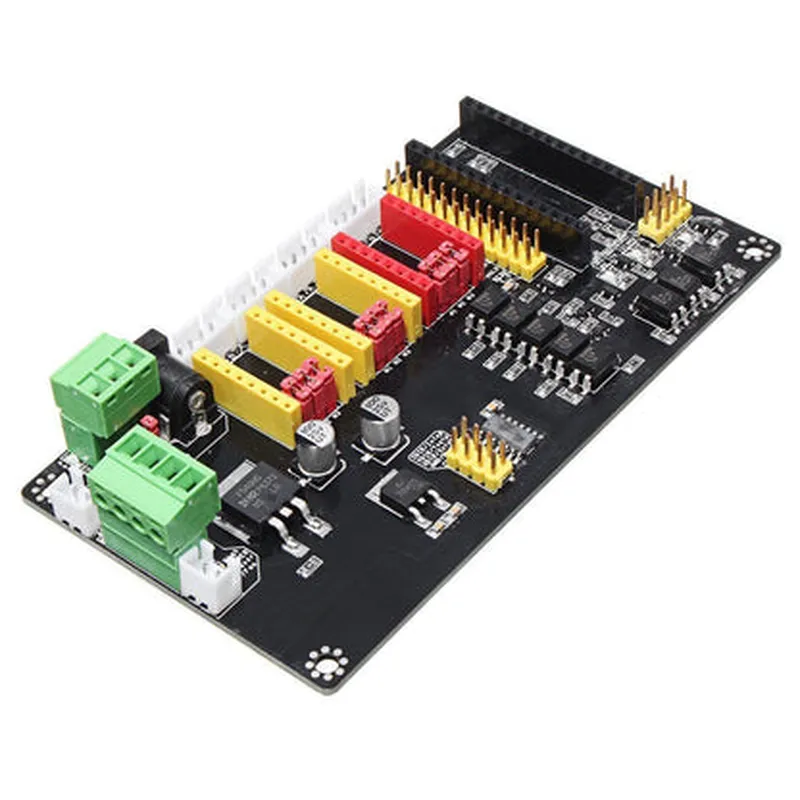
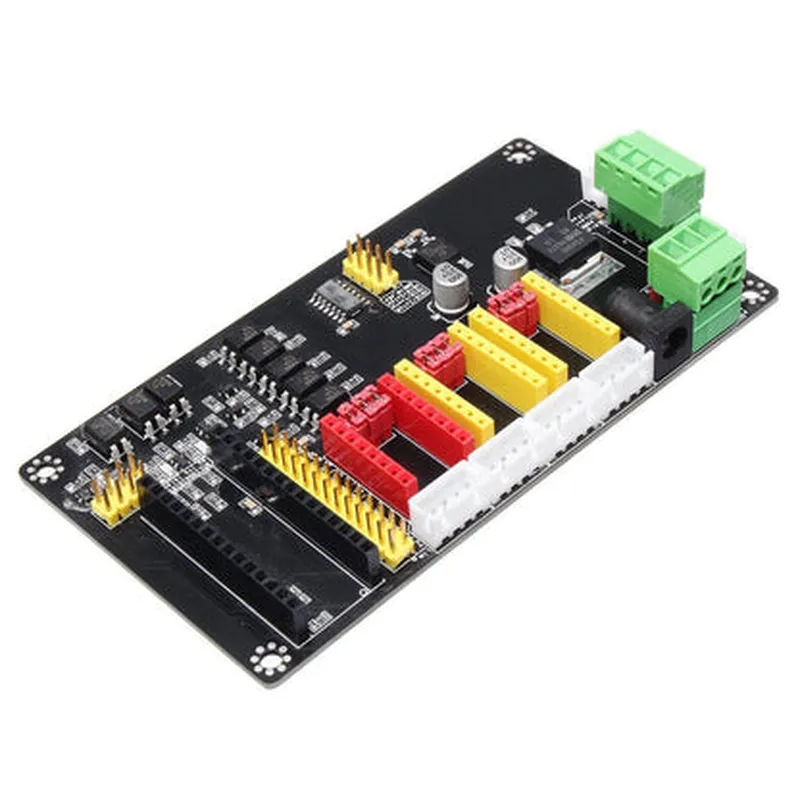
3-Axis USB CNC Arduino Nano Controller A4988 Stepper Motor Driver Board

Buy Now on Stufin

Stepper motor control

The A4988 driver IC controls the stepper motors, providing precise control over motor speed, direction, and acceleration.


Microstepping

The A4988 driver IC supports microstepping, allowing for smooth and precise motor movement.

Three-axis controlThe board can control up to three stepper motors, making it suitable for applications requiring movement along multiple axes.

USB connectivity

The Arduino Nano microcontroller provides a USB interface for easy communication with a computer or other devices.

Programmable

The board can be programmed using the Arduino Integrated Development Environment (IDE), allowing users to customize motor control algorithms and interfaces.

Key Features

  • A4988 Stepper Motor Driver IC: Provides high-torque output, microstepping, and adjustable current limiting.
  • Arduino Nano Microcontroller: Offers a compact and powerful microcontroller with USB connectivity and programmable functionality.
  • Three-Axis Control: Supports control of up to three stepper motors, ideal for CNC machines, 3D printers, and robotics.
  • Adjustable Current Limiting: Allows users to set the maximum current output for each motor, ensuring safe and efficient operation.
  • Microstepping: Enables smooth and precise motor movement, reducing vibration and noise.
  • USB Connectivity: Provides easy communication with a computer or other devices, facilitating programming, debugging, and real-time monitoring.
  • Compact Design: The board's compact size makes it suitable for applications where space is limited.
  • Programmable: Users can customize motor control algorithms and interfaces using the Arduino IDE.

Technical Specifications

Microcontroller

Arduino Nano (ATmega328P)

Stepper Motor Driver IC

A4988

Stepper Motor Current

Up to 2A per motor

Microstepping Resolution

Up to 16 microsteps per full step

Operating Voltage

5V - 12V

Communication Interface

USB (via Arduino Nano)

Dimensions

50mm x 35mm x 15mm (Approx.)

Applications

The 3-Axis USB CNC Arduino Nano Controller A4988 Stepper Motor Driver Board is suitable for a wide range of applications, including

CNC machines

3D printers

Robotics

Automation systems

Mechatronic projects

Overall, this board provides a powerful and flexible solution for precise stepper motor control, making it an ideal choice for a variety of applications requiring accurate and reliable motor movement.

Pin Configuration

  • 3-Axis USB CNC Arduino Nano Controller A4988 Stepper Motor Driver Board Pinout Explanation
  • The 3-Axis USB CNC Arduino Nano Controller A4988 Stepper Motor Driver Board is a compact and powerful board designed to control stepper motors in CNC machines, 3D printers, and other automation projects. The board features an Arduino Nano microcontroller and three A4988 stepper motor drivers. Here is a detailed explanation of the pins on the board:
  • Arduino Nano Pins:
  • 1. Vin: Input voltage pin for the Arduino Nano. Connect to a power source (e.g., USB port or external power supply) between 7-12V.
  • 2. GND: Ground pin for the Arduino Nano. Connect to the negative terminal of the power source or to a grounding point.
  • 3. D0 (RX): Serial communication receive pin. Used for serial communication between the Arduino Nano and a computer or other devices.
  • 4. D1 (TX): Serial communication transmit pin. Used for serial communication between the Arduino Nano and a computer or other devices.
  • 5. D2: Digital input/output pin.
  • 6. D3: Digital input/output pin.
  • 7. D4: Digital input/output pin.
  • 8. D5: Digital input/output pin.
  • 9. D6: Digital input/output pin.
  • 10. D7: Digital input/output pin.
  • 11. D8: Digital input/output pin.
  • 12. D9: Digital input/output pin.
  • 13. D10: Digital input/output pin.
  • 14. D11: Digital input/output pin.
  • 15. D12: Digital input/output pin.
  • 16. D13: Digital input/output pin and built-in LED.
  • 17. A0: Analog input pin.
  • 18. A1: Analog input pin.
  • 19. A2: Analog input pin.
  • 20. A3: Analog input pin.
  • 21. A4: Analog input pin (also used as SDA for I2C communication).
  • 22. A5: Analog input pin (also used as SCL for I2C communication).
  • A4988 Stepper Motor Driver Pins:
  • Motor Driver 1 (X-Axis):
  • 23. EN: Enable pin for Motor Driver 1. Connect to a digital output pin on the Arduino Nano to enable or disable the driver.
  • 24. DIR: Direction pin for Motor Driver 1. Connect to a digital output pin on the Arduino Nano to set the motor direction.
  • 25. STEP: Step pin for Motor Driver 1. Connect to a digital output pin on the Arduino Nano to generate step signals for the motor.
  • 26. MS1: Microstepping selection pin 1 for Motor Driver 1. Connect to a digital output pin on the Arduino Nano to select the microstepping mode.
  • 27. MS2: Microstepping selection pin 2 for Motor Driver 1. Connect to a digital output pin on the Arduino Nano to select the microstepping mode.
  • 28. MS3: Microstepping selection pin 3 for Motor Driver 1. Connect to a digital output pin on the Arduino Nano to select the microstepping mode.
  • 29. VM: Motor voltage input pin for Motor Driver 1. Connect to a power source (e.g., 12-24V) for the motor.
  • 30. GND: Ground pin for Motor Driver 1. Connect to the negative terminal of the motor voltage power source.
  • Motor Driver 2 (Y-Axis):
  • 31. EN: Enable pin for Motor Driver 2. Connect to a digital output pin on the Arduino Nano to enable or disable the driver.
  • 32. DIR: Direction pin for Motor Driver 2. Connect to a digital output pin on the Arduino Nano to set the motor direction.
  • 33. STEP: Step pin for Motor Driver 2. Connect to a digital output pin on the Arduino Nano to generate step signals for the motor.
  • 34. MS1: Microstepping selection pin 1 for Motor Driver 2. Connect to a digital output pin on the Arduino Nano to select the microstepping mode.
  • 35. MS2: Microstepping selection pin 2 for Motor Driver 2. Connect to a digital output pin on the Arduino Nano to select the microstepping mode.
  • 36. MS3: Microstepping selection pin 3 for Motor Driver 2. Connect to a digital output pin on the Arduino Nano to select the microstepping mode.
  • 37. VM: Motor voltage input pin for Motor Driver 2. Connect to a power source (e.g., 12-24V) for the motor.
  • 38. GND: Ground pin for Motor Driver 2. Connect to the negative terminal of the motor voltage power source.
  • Motor Driver 3 (Z-Axis):
  • 39. EN: Enable pin for Motor Driver 3. Connect to a digital output pin on the Arduino Nano to enable or disable the driver.
  • 40. DIR: Direction pin for Motor Driver 3. Connect to a digital output pin on the Arduino Nano to set the motor direction.
  • 41. STEP: Step pin for Motor Driver 3. Connect to a digital output pin on the Arduino Nano to generate step signals for the motor.
  • 42. MS1: Microstepping selection pin 1 for Motor Driver 3. Connect to a digital output pin on the Arduino Nano to select the microstepping mode.
  • 43. MS2: Microstepping selection pin 2 for Motor Driver 3. Connect to a digital output pin on theArduino Nano to select the microstepping mode.
  • 44. MS3: Microstepping selection pin 3 for Motor Driver 3. Connect to a digital output pin on the Arduino Nano to select the microstepping mode.
  • 45. VM: Motor voltage input pin for Motor Driver 3. Connect to a power source (e.g., 12-24V) for the motor.
  • 46. GND: Ground pin for Motor Driver 3. Connect to the negative terminal of the motor voltage power source.
  • Other Pins:
  • 47. USB: USB connector for connecting the board to a computer.
  • 48. JP1: Reset button for the Arduino Nano.
  • 49. JP2: USB isolator pin (not connected by default).
  • Connection Structure:
  • To connect the pins, follow this structure:
  • 1. Connect the Arduino Nano Vin pin to a power source (e.g., USB port or external power supply) between 7-12V.
  • 2. Connect the Arduino Nano GND pin to the negative terminal of the power source or to a grounding point.
  • 3. Connect the Motor Driver pins (EN, DIR, STEP, MS1, MS2, MS3, VM, and GND) to the corresponding pins on the stepper motor.
  • 4. Connect the Arduino Nano digital output pins (D2-D13) to the EN, DIR, STEP, MS1, MS2, and MS3 pins of the Motor Drivers.
  • 5. Connect the motor voltage power source (e.g., 12-24V) to the VM pins of the Motor Drivers.
  • 6. Connect the GND pins of the Motor Drivers to the negative terminal of the motor voltage power source.
  • 7. Connect the USB cable to the USB connector on the board and to a computer.
  • Remember to consult the datasheets and documentation for the specific stepper motors and Arduino Nano for more detailed information on pin connections and usage.

Code Examples

3-Axis USB CNC Arduino Nano Controller A4988 Stepper Motor Driver Board Documentation
Overview
The 3-Axis USB CNC Arduino Nano Controller A4988 Stepper Motor Driver Board is a compact and versatile board designed for controlling stepper motors in various CNC, robotics, and automation applications. It features an Arduino Nano microcontroller, three A4988 stepper motor drivers, and a USB interface for communication.
Key Features
Arduino Nano microcontroller
 Three A4988 stepper motor drivers
 USB interface for communication
 Supports 2A maximum current per motor
 Microstepping capability (1/16, 1/8, 1/4, 1/2, full step)
-Compatible with CNC, robotics, and automation projects
Pinout
| Pin | Function |
| --- | --- |
| VCC | Power supply (5V) |
| GND | Ground |
| X_DIR | X-axis direction control |
| X_STEP | X-axis step control |
| Y_DIR | Y-axis direction control |
| Y_STEP | Y-axis step control |
| Z_DIR | Z-axis direction control |
| Z_STEP | Z-axis step control |
| EN | Enable signal (active low) |
| RX | USB serial communication (RX) |
| TX | USB serial communication (TX) |
| RST | Reset pin |
Code Examples
### Example 1: Basic Stepper Motor Control
This example demonstrates how to control a single stepper motor using the A4988 driver. We will use the Arduino Nano to send step and direction signals to the motor.
```cpp
const int dirPin = 2;  // Direction pin for X-axis
const int stepPin = 3; // Step pin for X-axis
void setup() {
  pinMode(dirPin, OUTPUT);
  pinMode(stepPin, OUTPUT);
}
void loop() {
  // Set direction
  digitalWrite(dirPin, HIGH); // Clockwise direction
// Take 1000 steps
  for (int i = 0; i < 1000; i++) {
    digitalWrite(stepPin, HIGH);
    delayMicroseconds(500);
    digitalWrite(stepPin, LOW);
    delayMicroseconds(500);
  }
// Change direction
  digitalWrite(dirPin, LOW); // Counter-clockwise direction
// Take 1000 steps
  for (int i = 0; i < 1000; i++) {
    digitalWrite(stepPin, HIGH);
    delayMicroseconds(500);
    digitalWrite(stepPin, LOW);
    delayMicroseconds(500);
  }
}
```
### Example 2: Multi-Axis Stepper Motor Control with USB Communication
This example demonstrates how to control multiple stepper motors using the A4988 drivers and communicate with a computer using the USB interface.
```cpp
#include <Arduino.h>
const int xDirPin = 2;  // Direction pin for X-axis
const int xStepPin = 3; // Step pin for X-axis
const int yDirPin = 4;  // Direction pin for Y-axis
const int yStepPin = 5; // Step pin for Y-axis
const int zDirPin = 6;  // Direction pin for Z-axis
const int zStepPin = 7; // Step pin for Z-axis
void setup() {
  pinMode(xDirPin, OUTPUT);
  pinMode(xStepPin, OUTPUT);
  pinMode(yDirPin, OUTPUT);
  pinMode(yStepPin, OUTPUT);
  pinMode(zDirPin, OUTPUT);
  pinMode(zStepPin, OUTPUT);
  Serial.begin(9600);
}
void loop() {
  if (Serial.available() > 0) {
    char command = Serial.read();
    switch (command) {
      case 'x':
        // Move X-axis 1000 steps
        digitalWrite(xDirPin, HIGH);
        for (int i = 0; i < 1000; i++) {
          digitalWrite(xStepPin, HIGH);
          delayMicroseconds(500);
          digitalWrite(xStepPin, LOW);
          delayMicroseconds(500);
        }
        break;
      case 'y':
        // Move Y-axis 1000 steps
        digitalWrite(yDirPin, HIGH);
        for (int i = 0; i < 1000; i++) {
          digitalWrite(yStepPin, HIGH);
          delayMicroseconds(500);
          digitalWrite(yStepPin, LOW);
          delayMicroseconds(500);
        }
        break;
      case 'z':
        // Move Z-axis 1000 steps
        digitalWrite(zDirPin, HIGH);
        for (int i = 0; i < 1000; i++) {
          digitalWrite(zStepPin, HIGH);
          delayMicroseconds(500);
          digitalWrite(zStepPin, LOW);
          delayMicroseconds(500);
        }
        break;
      default:
        Serial.println("Unknown command");
        break;
    }
  }
}
```
Note: In the above example, the serial communication is used to receive commands from the computer to control the stepper motors. The commands are sent as characters ('x', 'y', or 'z') to move the corresponding axis.