Stufin
Home Quick Cart Profile

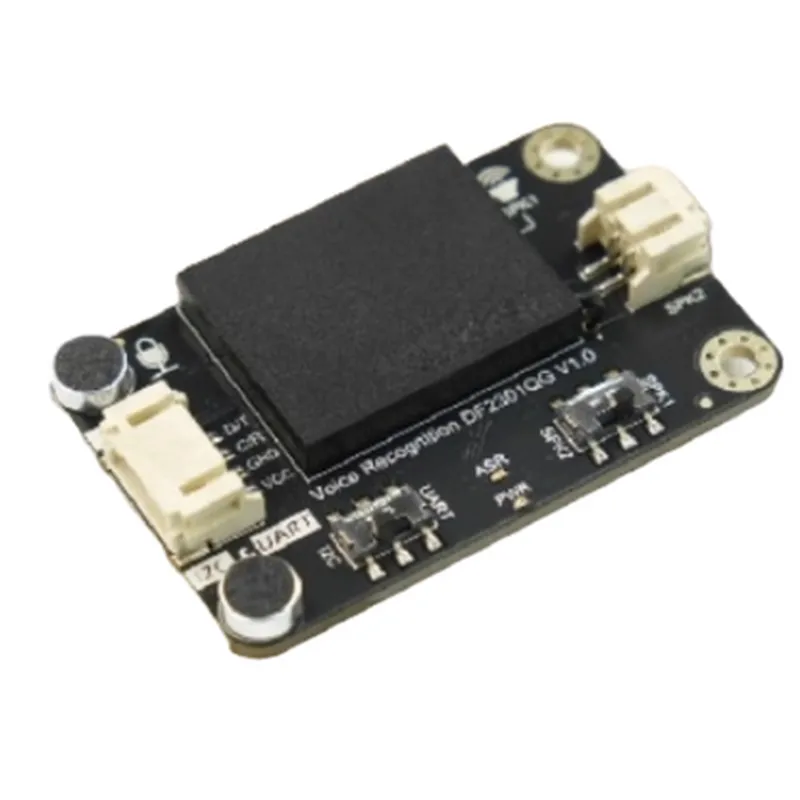
Gravity: Offline Voice Recognition Sensor for micro:bit, Arduino, ESP32 - I2C & UART

Buy Now on Stufin

Component Name

GravityOffline Voice Recognition Sensor

The Gravity

Offline Voice Recognition Sensor is widely available through online retailers and distributors. For more information on purchasing and availability, please visit the manufacturer's website or authorized resellers.

Key Features

  • I2C & UART Interface: The sensor features both I2C and UART interfaces, allowing for flexible communication protocols and easy integration with various microcontrollers.
  • High-Accuracy Recognition: The sensor boasts high-accuracy voice recognition capabilities, minimizing errors and ensuring reliable device responses.
  • Multi-Language Support: The sensor supports multiple languages, making it an ideal choice for global IoT applications.
  • Low Power Consumption: The sensor is designed to operate with low power consumption, ensuring extended battery life and minimizing energy waste.
  • Compact Design: The sensor features a compact design, making it suitable for integration into space-constrained IoT devices.
  • Easy Configuration: The sensor's configuration process is simplified, allowing users to easily customize and fine-tune voice recognition settings.

Technical Specifications

  • Supply Voltage: 3.3V or 5V
  • Communication Protocol: I2C and UART
  • Recognition Accuracy: >90%
  • Support Languages: Multi-language support (dependent on library and configuration)
  • Power Consumption: <50mA (average)
  • Dimensions: 25.5mm x 20.5mm x 10.5mm

Applications

  • Smart Home Automation: Integrate voice recognition capabilities into smart home devices, enabling users to control lighting, temperature, and security systems with voice commands.
  • Wearables and IoT Devices: Add voice recognition functionality to wearable devices, such as smartwatches and fitness trackers, or integrate it into IoT devices, such as robots and drones.
  • Industry 4.0 and Automation: Implement voice recognition in industrial settings, enabling operators to control machinery and equipment with voice commands.

Documentation and Resources

Datasheet

User Manual

Library and Code Examples (for microbit, Arduino, and ESP32)

Tutorial and Project Guides

Pin Configuration

  • Gravity: Offline Voice Recognition Sensor for micro:bit, Arduino, ESP32 - I2C & UART
  • Pinout Explanation:
  • The Gravity: Offline Voice Recognition Sensor is a versatile module that can be connected to various microcontrollers such as micro:bit, Arduino, and ESP32 using I2C and UART protocols. The sensor has a total of 7 pins, which are explained below:
  • 1. VCC (Power Supply):
  • Function: Power supply pin for the sensor module.
  • Description: Connect this pin to a power source with a voltage range of 3.3V to 5.5V.
  • Recommended connection: Connect to VCC pin of the microcontroller board (e.g., 3.3V or 5V on Arduino).
  • 2. GND (Ground):
  • Function: Ground pin for the sensor module.
  • Description: Connect this pin to the ground of the power source.
  • Recommended connection: Connect to GND pin of the microcontroller board.
  • 3. SCL (I2C Clock):
  • Function: I2C clock pin for I2C communication protocol.
  • Description: This pin is used to synchronize the data transmission between the sensor and the microcontroller.
  • Recommended connection: Connect to SCL pin of the microcontroller board (e.g., SCL on Arduino).
  • 4. SDA (I2C Data):
  • Function: I2C data pin for I2C communication protocol.
  • Description: This pin is used to transmit and receive data between the sensor and the microcontroller.
  • Recommended connection: Connect to SDA pin of the microcontroller board (e.g., SDA on Arduino).
  • 5. TX (UART Transmit):
  • Function: UART transmit pin for UART communication protocol.
  • Description: This pin is used to transmit data from the sensor to the microcontroller.
  • Recommended connection: Connect to RX pin of the microcontroller board (e.g., RX on Arduino).
  • 6. RX (UART Receive):
  • Function: UART receive pin for UART communication protocol.
  • Description: This pin is used to receive data from the microcontroller to the sensor.
  • Recommended connection: Connect to TX pin of the microcontroller board (e.g., TX on Arduino).
  • 7. INT (Interrupt):
  • Function: Interrupt pin for voice recognition interrupts.
  • Description: This pin is used to trigger an interrupt when the sensor detects voice activity.
  • Recommended connection: Connect to a digital input pin on the microcontroller board (e.g., D2 on Arduino).
  • Connection Structure:
  • When connecting the Gravity: Offline Voice Recognition Sensor to your microcontroller board, follow the structure below:
  • VCC -> VCC (Power Supply)
  • GND -> GND (Ground)
  • SCL -> SCL (I2C Clock)
  • SDA -> SDA (I2C Data)
  • TX -> RX (UART Transmit)
  • RX -> TX (UART Receive)
  • INT -> Digital Input Pin (Interrupt)
  • Note:
  • Make sure to check the pinout and compatibility of your microcontroller board before connecting the sensor.
  • Use a level shifter or voltage divider if the voltage levels of the sensor and microcontroller are different.
  • Refer to the documentation of your microcontroller board for specific connection guidelines and library requirements.

Code Examples

Gravity: Offline Voice Recognition Sensor Documentation
Overview
The Gravity: Offline Voice Recognition Sensor is a versatile voice recognition module designed for micro:bit, Arduino, and ESP32 boards. It features I2C and UART interfaces, enabling easy integration with a wide range of IoT projects. This sensor allows for offline voice recognition, eliminating the need for internet connectivity, making it an ideal choice for various applications such as home automation, robotics, and more.
Technical Specifications
Power supply: 3.3V - 5V
 Communication protocols: I2C, UART
 Recognition accuracy: Up to 95%
 Support for 255 customizable voice commands
 Adjustable sensitivity and threshold settings
Code Examples
### Example 1: Using the Gravity Voice Recognition Sensor with micro:bit (MicroPython)
In this example, we'll demonstrate how to use the Gravity Voice Recognition Sensor with a micro:bit board to recognize and respond to voice commands.
Hardware Connection
Connect the Gravity Voice Recognition Sensor to the micro:bit board using the I2C interface:
	+ VCC to 3V
	+ GND to GND
	+ SCL to SCL (P19)
	+ SDA to SDA (P20)
Code
```python
import i2c
import microbit
# Initialize the Gravity Voice Recognition Sensor
sensor = i2c.I2C(scl=microbit.pin19, sda=microbit.pin20, freq=400000)
# Define a list of voice commands and their corresponding actions
commands = {
    'hello': lambda: microbit.display.show('Hello!'),
    'goodbye': lambda: microbit.display.show('Goodbye!'),
    'turn on': lambda: microbit.pin13.write_digital(1),
    'turn off': lambda: microbit.pin13.write_digital(0)
}
while True:
    # Read the recognition result from the sensor
    result = sensor.read(0x00, 1)
    if result:
        # Get the recognized command
        command = commands.get(result.decode('utf-8').strip())
        if command:
            # Execute the corresponding action
            command()
```
### Example 2: Using the Gravity Voice Recognition Sensor with Arduino (C++)
In this example, we'll demonstrate how to use the Gravity Voice Recognition Sensor with an Arduino board to recognize and respond to voice commands.
Hardware Connection
Connect the Gravity Voice Recognition Sensor to the Arduino board using the UART interface:
	+ VCC to 5V
	+ GND to GND
	+ TX to RX (Digital Pin 0)
	+ RX to TX (Digital Pin 1)
Code
```cpp
#include <SoftwareSerial.h>
// Define the UART pins for communication with the Gravity Voice Recognition Sensor
SoftwareSerial voiceSensor(D1, D0); // RX, TX
void setup() {
  Serial.begin(9600);
  voiceSensor.begin(9600);
}
void loop() {
  // Read the recognition result from the sensor
  if (voiceSensor.available() > 0) {
    String command = voiceSensor.readStringUntil('
');
    command.trim();
// Define a list of voice commands and their corresponding actions
    if (command.equals("hello")) {
      Serial.println("Hello!");
      // Execute the corresponding action
    } else if (command.equals("goodbye")) {
      Serial.println("Goodbye!");
      // Execute the corresponding action
    } else if (command.equals("turn on")) {
      digitalWrite(LED_BUILTIN, HIGH);
      // Execute the corresponding action
    } else if (command.equals("turn off")) {
      digitalWrite(LED_BUILTIN, LOW);
      // Execute the corresponding action
    }
  }
  delay(100);
}
```
### Example 3: Using the Gravity Voice Recognition Sensor with ESP32 (MicroPython)
In this example, we'll demonstrate how to use the Gravity Voice Recognition Sensor with an ESP32 board to recognize and respond to voice commands.
Hardware Connection
Connect the Gravity Voice Recognition Sensor to the ESP32 board using the I2C interface:
	+ VCC to 3.3V
	+ GND to GND
	+ SCL to SCL (GPIO 22)
	+ SDA to SDA (GPIO 21)
Code
```python
import machine
import utime
# Initialize the Gravity Voice Recognition Sensor
i2c = machine.I2C(scl=machine.Pin(22), sda=machine.Pin(21), freq=400000)
# Define a list of voice commands and their corresponding actions
commands = {
    'hello': lambda: print('Hello!'),
    'goodbye': lambda: print('Goodbye!'),
    'turn on': lambda: machine.Pin(25, machine.Pin.OUT).value(1),
    'turn off': lambda: machine.Pin(25, machine.Pin.OUT).value(0)
}
while True:
    # Read the recognition result from the sensor
    result = i2c.readfrom(0x00, 1)
    if result:
        # Get the recognized command
        command = commands.get(result.decode('utf-8').strip())
        if command:
            # Execute the corresponding action
            command()
    utime.sleep(0.1)
```
These examples demonstrate the basic usage of the Gravity Voice Recognition Sensor with various microcontrollers. You can customize and extend the code to fit your specific IoT project requirements.