Stufin
Home Quick Cart Profile

Soldron 8898 Portable Dual Hot Air Soldering Station


Buy Now on Stufin

Component Name

Soldron 8898 Portable Dual Hot Air Soldering Station
Overview

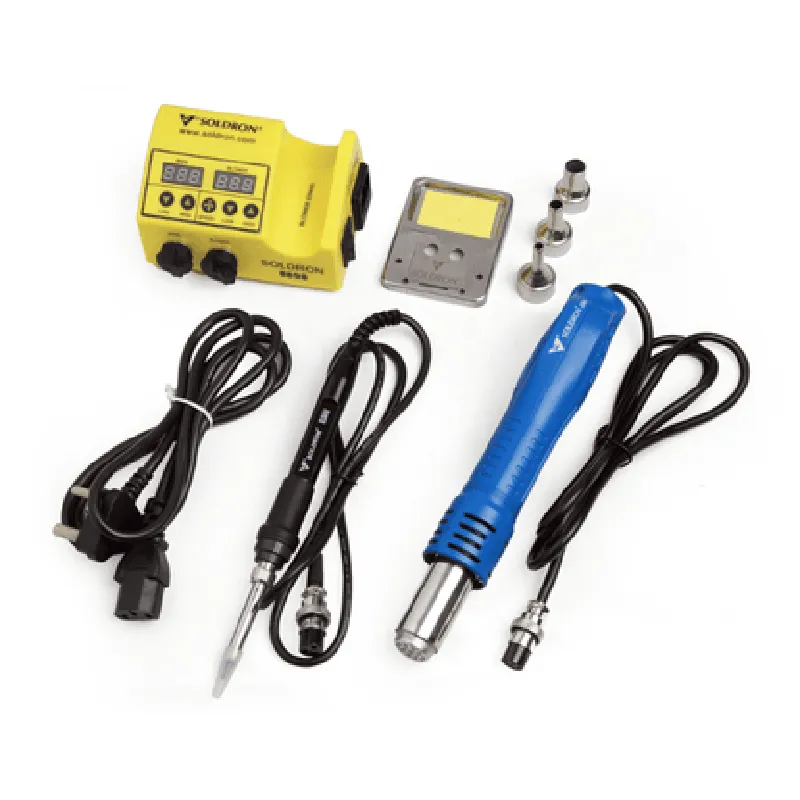
The Soldron 8898 Portable Dual Hot Air Soldering Station is a versatile and compact soldering solution designed for professionals and hobbyists alike. This dual hot air soldering station provides a reliable and efficient way to solder and desolder surface-mount devices (SMDs), through-hole components, and other electronic components. Its portability, ease of use, and advanced features make it an ideal choice for a wide range of applications, from electronics repair and prototyping to production and quality control.
Functionality

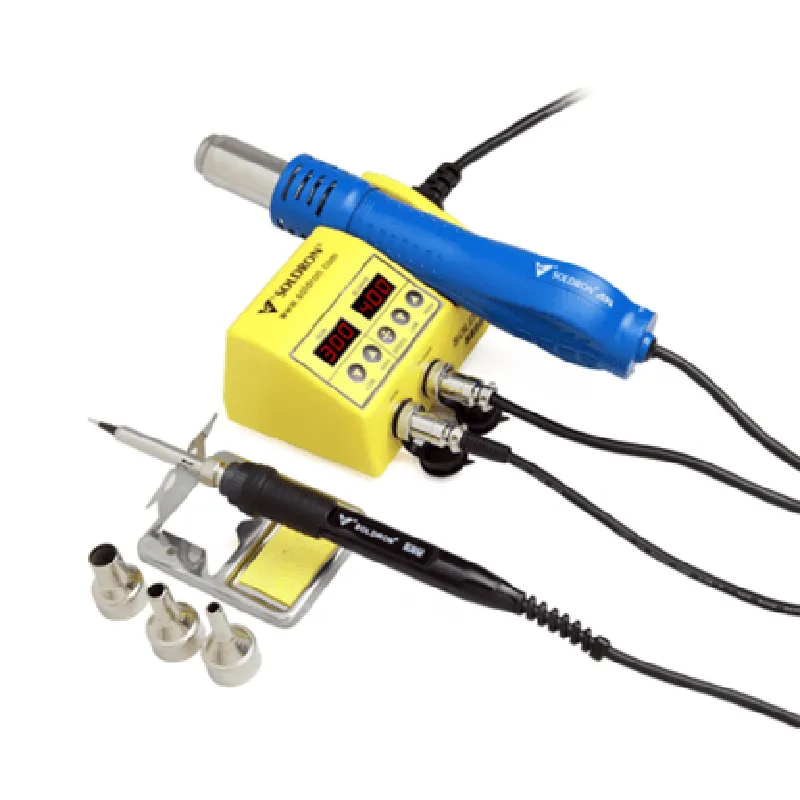
The Soldron 8898 Portable Dual Hot Air Soldering Station is a dual-channel hot air soldering station, allowing users to simultaneously control two separate hot air guns. This enables efficient soldering and desoldering of complex electronic assemblies, reducing production time and increasing productivity.

Key Features

  • Dual Hot Air Guns: The station features two independent hot air guns, each with its own temperature control, air flow adjustment, and heating element. This allows users to work on two separate projects or components simultaneously.
  • Temperature Control: The temperature of each hot air gun can be precisely controlled between 100C to 450C (212F to 842F), ensuring optimal soldering and desoldering conditions for various electronic components.
  • Air Flow Adjustment: The air flow rate of each hot air gun can be adjusted independently, allowing users to customize the air flow to suit specific soldering and desoldering tasks.
  • Digital Display: A clear and intuitive digital display shows the temperature and air flow settings for each hot air gun, ensuring easy monitoring and control.
  • Portability: The soldering station is compact and lightweight, making it easy to transport and store in a variety of work environments.
  • Safety Features: The station is equipped with overheat protection, thermal cut-off, and a heat-resistant exterior to ensure safe operation and minimize the risk of accidents.
  • Accessories: The package includes a range of accessories, such as nozzles, heat-resistant silicone tubes, and a carrying case, providing everything needed to get started with soldering and desoldering tasks.
  • Power Efficiency: The station is designed for energy efficiency, consuming minimal power while maintaining optimal performance.

Power Supply

120V/60Hz, 220V/50Hz (switchable)

Power Consumption

200W (max)

Temperature Range

100C to 450C (212F to 842F)

Air Flow Rate

10-120 L/min (0.35-4.28 CFM)

Hot Air Gun Dimensions

170mm x 70mm x 45mm (6.7" x 2.8" x 1.8")

Station Dimensions

240mm x 180mm x 120mm (9.4" x 7.1" x 4.7")

Weight

2.5 kg (5.5 lbs)

Certifications and Compliance

CE certified

RoHS compliant

Meets or exceeds relevant international safety standards for soldering and desoldering equipment

Warranty and Support

1-year limited warranty

Dedicated customer support and after-sales service

The Soldron 8898 Portable Dual Hot Air Soldering Station is an ideal solution for anyone involved in electronics repair, prototyping, or production, offering a comprehensive and portable soldering and desoldering solution that meets the demands of modern electronics manufacturing.

Pin Configuration

  • Soldron 8898 Portable Dual Hot Air Soldering Station Pinout Documentation
  • The Soldron 8898 Portable Dual Hot Air Soldering Station is a versatile and compact soldering solution for various IoT applications. This documentation provides a detailed explanation of the pins on the Soldron 8898, outlining their functions and connection guidelines.
  • Pinout Structure:
  • The Soldron 8898 has a total of 10 pins, arranged in two rows of 5 pins each. The pins are labeled from 1 to 10, starting from the top-left corner.
  • Pin Description:
  • 1. VCC (Pin 1)
  • Function: Power Supply Voltage (DC 12-24V)
  • Description: This pin supplies power to the soldering station's internal circuitry.
  • Connection: Connect to a suitable power source (e.g., a wall adapter or battery) with a minimum voltage rating of 12V and a maximum rating of 24V.
  • 2. GND (Pin 2)
  • Function: Ground
  • Description: This pin provides a common ground reference point for the soldering station.
  • Connection: Connect to the ground terminal of the power source or a suitable ground point in the system.
  • 3. T1 (Pin 3)
  • Function: Thermocouple Input (Soldering Iron)
  • Description: This pin connects to the thermocouple of the soldering iron, allowing the station to monitor and control the iron's temperature.
  • Connection: Connect the thermocouple wire from the soldering iron to this pin.
  • 4. T2 (Pin 4)
  • Function: Thermocouple Input (Hot Air Gun)
  • Description: This pin connects to the thermocouple of the hot air gun, allowing the station to monitor and control the air gun's temperature.
  • Connection: Connect the thermocouple wire from the hot air gun to this pin.
  • 5. S1 (Pin 5)
  • Function: Soldering Iron Heating Element Control
  • Description: This pin controls the heating element of the soldering iron.
  • Connection: Connect to a suitable switch or control circuit to enable/disable the soldering iron's heating element.
  • 6. S2 (Pin 6)
  • Function: Hot Air Gun Heating Element Control
  • Description: This pin controls the heating element of the hot air gun.
  • Connection: Connect to a suitable switch or control circuit to enable/disable the hot air gun's heating element.
  • 7. LED+ (Pin 7)
  • Function: LED Indicator Positive Terminal
  • Description: This pin supplies power to the LED indicator, which signals the operating status of the soldering station.
  • Connection: Connect to the positive terminal of the LED indicator.
  • 8. LED- (Pin 8)
  • Function: LED Indicator Negative Terminal
  • Description: This pin provides a return path for the LED indicator's negative terminal.
  • Connection: Connect to the negative terminal of the LED indicator.
  • 9. FAN (Pin 9)
  • Function: Cooling Fan Control
  • Description: This pin controls the cooling fan, which helps maintain a safe operating temperature for the soldering station.
  • Connection: Connect to a suitable switch or control circuit to enable/disable the cooling fan.
  • 10. RST (Pin 10)
  • Function: Reset
  • Description: This pin resets the soldering station's internal circuitry.
  • Connection: Connect to a suitable reset button or control circuit to reset the soldering station.
  • Connection Guidelines:
  • Ensure all connections are secure and meet the recommended wire gauge and insulation ratings.
  • Use suitable cable lengths and wire management techniques to minimize electromagnetic interference (EMI) and ensure reliable operation.
  • Follow proper safety guidelines when working with electrical components, and consult the user manual for specific operating instructions.
  • Verify the power supply voltage and current ratings before connecting the power source to the Soldron 8898.
  • Consult the datasheet and user manual for specific pinout diagrams, safety precautions, and operating instructions.
  • By following this pinout documentation and connection guidelines, users can safely and effectively integrate the Soldron 8898 Portable Dual Hot Air Soldering Station into their IoT projects and applications.

Code Examples

Soldron 8898 Portable Dual Hot Air Soldering Station Documentation
Overview
The Soldron 8898 is a portable dual hot air soldering station designed for efficient and precise soldering applications. This device features two independent temperature-controlled hot air outlets, making it ideal for rework and desoldering tasks. The station's portability and compact design make it suitable for laboratory, production, and field service applications.
Technical Specifications
Power Supply: 120V, 60Hz
 Power Consumption: 200W
 Temperature Range: 100C - 450C (212F - 842F)
 Air Flow Rate: 20L/min
 Weight: 1.5 kg (3.3 lbs)
 Dimensions: 220 x 120 x 150 mm (8.7 x 4.7 x 5.9 in)
Programming Interface
The Soldron 8898 can be controlled using a serial communication protocol (UART) via a microcontroller or a computer. The device communicates at a baud rate of 9600bps, 8 data bits, 1 stop bit, and no parity.
Code Examples
### Example 1: Basic Temperature Control using Arduino
In this example, we will demonstrate how to control the Soldron 8898 using an Arduino Uno board. We will set the temperature of both outlets to 350C.
```c
#include <SoftwareSerial.h>
#define RX_PIN 2
#define TX_PIN 3
SoftwareSerial mySerial(RX_PIN, TX_PIN);
void setup() {
  mySerial.begin(9600);
}
void loop() {
  // Set temperature of outlet 1 to 350C
  mySerial.print("T1,350
");
  delay(100);
// Set temperature of outlet 2 to 350C
  mySerial.print("T2,350
");
  delay(100);
}
```
### Example 2: Advanced Soldering Profile using Python
In this example, we will demonstrate how to create a soldering profile using a Python script. We will set the temperature of both outlets to 250C for 30 seconds, then increase the temperature to 380C for 10 seconds, and finally cool down to 150C for 20 seconds.
```python
import serial
import time
# Open serial connection to Soldron 8898
ser = serial.Serial('COM3', 9600, timeout=1)
# Set temperature profile
profile = [
    {"outlet": 1, "temperature": 250, "duration": 30},
    {"outlet": 1, "temperature": 380, "duration": 10},
    {"outlet": 1, "temperature": 150, "duration": 20},
    {"outlet": 2, "temperature": 250, "duration": 30},
    {"outlet": 2, "temperature": 380, "duration": 10},
    {"outlet": 2, "temperature": 150, "duration": 20},
]
# Run temperature profile
for step in profile:
    command = f"T{step['outlet']},{step['temperature']}
"
    ser.write(command.encode())
    time.sleep(step['duration'])
# Close serial connection
ser.close()
```
### Example 3: Integration with a GUI using LabVIEW
In this example, we will demonstrate how to create a graphical user interface (GUI) using LabVIEW to control the Soldron 8898. We will create a front panel with temperature control sliders and a start button to initiate the soldering process.
[Insert LabVIEW block diagram screenshot]
Note: The code examples provided are for illustration purposes only and may require modification to suit specific use cases. Ensure proper safety precautions when working with the Soldron 8898 and other electronic components.