Octal 3-state Inverting Buffer IC - 74HC540


Octal 3-state Inverting Buffer IC - 74HC540
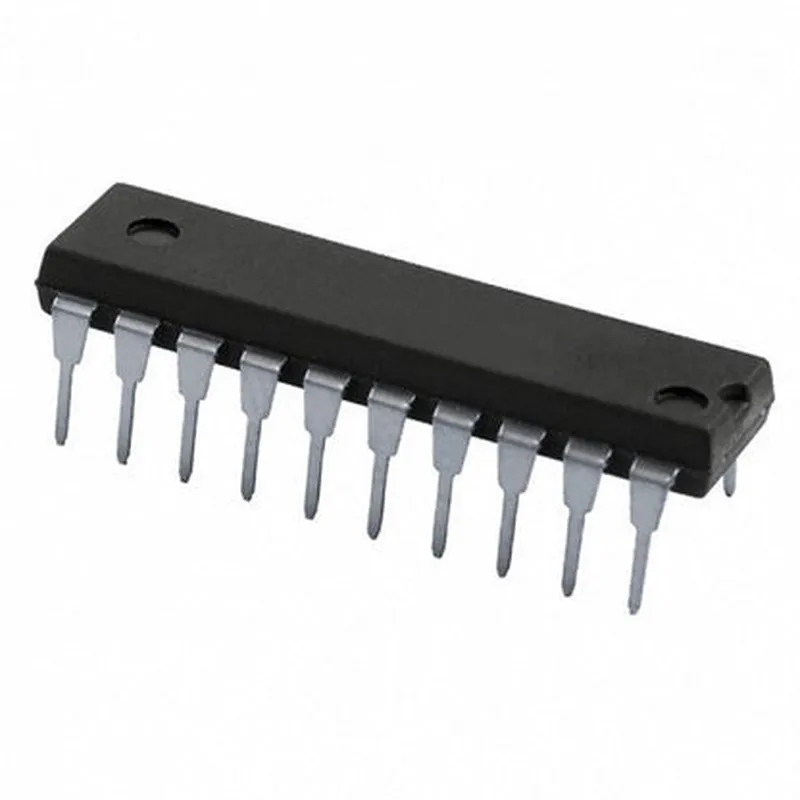
The 74HC540 is an octal 3-state inverting buffer integrated circuit (IC) that belongs to the 74HC series of high-speed CMOS logic devices. It is a widely used component in digital electronic circuits, offering high-speed, low-power consumption, and low noise operation.
The 74HC540 IC is designed to provide eight individual inverting buffer channels, each with a 3-state output capability. The device takes in an input signal and inverts it, while also allowing the output to be placed in a high-impedance state (high-Z) when the output enable (OE) input is set to a logic high. This 3-state capability enables the device to be used in bus-oriented applications, such as data buses, where multiple devices need to share the same signal lines.
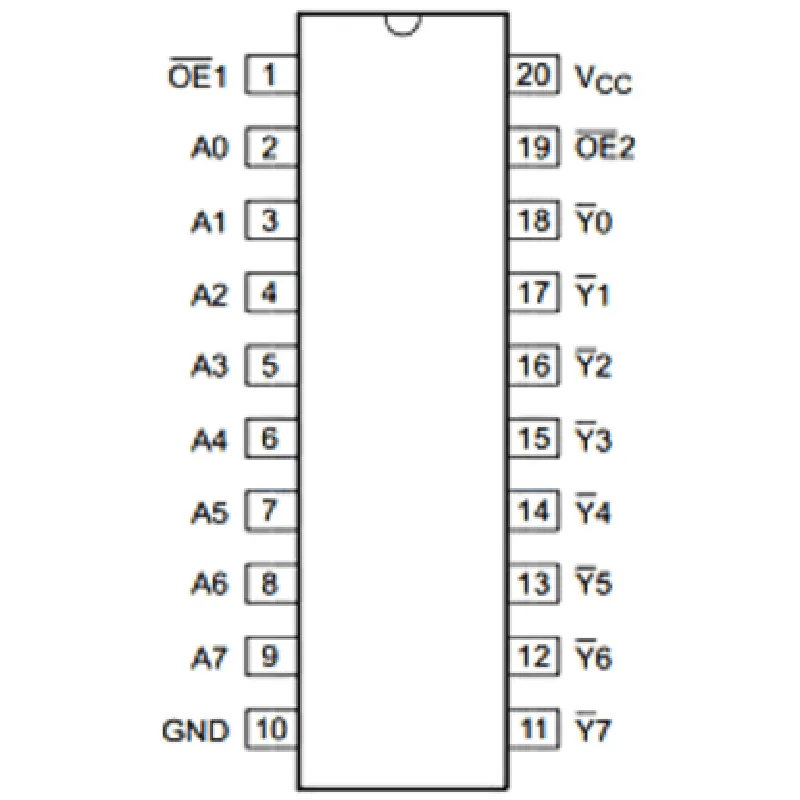
| The 74HC540 has a total of 20 pins, with the following pinout |
| Pin Number | Pin Name | Function |
| --- | --- | --- |
| 1-8 | A1-A8 | Input |
| 9-16 | Y1-Y8 | Output |
| 17 | OE | Output Enable |
| 18-20 | VCC, GND | Power Supply |
| The 74HC540 is commonly used in various applications, including |
Digital signal processing
Data bus systems
Microprocessor and microcontroller interfaces
Logic gates and flip-flops
Buffering and line driving applications
| Parameter | Value |
| --- | --- |
| Supply Voltage (VCC) | 2.0 V to 6.0 V |
| Input Voltage (VI) | 0 V to VCC |
| Output Voltage (VO) | 0 V to VCC |
| Output Current (IO) | 25 mA |
| Propagation Delay (tpd) | 13 ns |
| Maximum Clock Frequency (fclk) | 80 MHz |
| Power Consumption (PD) | 4 A per gate |
The technical specifications provided are for reference purposes only and are subject to change. Please consult the manufacturer's datasheet for the most up-to-date and accurate information.
74HC540 Octal 3-state Inverting Buffer IC DocumentationOverviewThe 74HC540 is an octal 3-state inverting buffer IC, designed to provide a high-speed, low-power, and low-noise buffering solution for digital circuits. It consists of eight inverting buffers, each with a separate output enable (OE) input, which allows for independent control of each buffer's output.PinoutThe 74HC540 comes in a 20-pin DIP package. The pinout is as follows:Pins 1-8: Input (A0-A7)
Pins 10-17: Output (Y0-Y7)
Pins 18-19: Output Enable (OE0-OE1)
Pin 20: VCC (Supply Voltage)
Pin 10: GND (Ground)Operating ModesThe 74HC540 can operate in three states:1. High-Impedance State: When OE is set to LOW, the output is in a high-impedance state, allowing the input to float.
2. Active State: When OE is set to HIGH, the output is active and follows the input signal.
3. Shutdown State: When VCC is set to 0V, the device enters a low-power shutdown state.Code Examples### Example 1: Inverting Buffer with Output EnableIn this example, we'll use the 74HC540 to invert a digital signal and control the output using the output enable (OE) pin.Circuit Diagram```
+-----------+
| |
| 74HC540 |
| |
+-------->+ A0 | Y0 +--------+
| Input | | Output |
+-------->+ --- | --- +--------+
| |
+-------->+ OE | GND +--------+
| Enable | | Ground |
+-------->+ --- | --- +--------+
+-----------+
```Arduino Code
```c
const int inputPin = 2;
const int oePin = 3;
const int outputPin = 4;void setup() {
pinMode(inputPin, INPUT);
pinMode(oePin, OUTPUT);
pinMode(outputPin, OUTPUT);
}void loop() {
int inputValue = digitalRead(inputPin);
digitalWrite(oePin, HIGH); // Enable output
digitalWrite(outputPin, !inputValue); // Invert input signal
delay(100);
digitalWrite(oePin, LOW); // Disable output
delay(100);
}
```### Example 2: 3-State Inverting Buffer with Multiple OutputsIn this example, we'll use the 74HC540 to invert multiple digital signals and control the outputs independently using the output enable (OE) pins.Circuit Diagram```
+-----------+
| |
| 74HC540 |
| |
+-------->+ A0 | Y0 +--------+
| Input 0 | | Output 0 |
+-------->+ --- | --- +--------+
| |
+-------->+ A1 | Y1 +--------+
| Input 1 | | Output 1 |
+-------->+ --- | --- +--------+
| |
+-------->+ OE0 | OE1 +--------+
| Enable 0 | Enable 1 | Ground |
+-------->+ --- | --- +--------+
+-----------+
```Arduino Code
```c
const int input0Pin = 2;
const int input1Pin = 3;
const int oe0Pin = 4;
const int oe1Pin = 5;
const int output0Pin = 6;
const int output1Pin = 7;void setup() {
pinMode(input0Pin, INPUT);
pinMode(input1Pin, INPUT);
pinMode(oe0Pin, OUTPUT);
pinMode(oe1Pin, OUTPUT);
pinMode(output0Pin, OUTPUT);
pinMode(output1Pin, OUTPUT);
}void loop() {
int inputValue0 = digitalRead(input0Pin);
int inputValue1 = digitalRead(input1Pin);digitalWrite(oe0Pin, HIGH); // Enable output 0
digitalWrite(output0Pin, !inputValue0); // Invert input 0 signal
digitalWrite(oe1Pin, LOW); // Disable output 1delay(100);digitalWrite(oe0Pin, LOW); // Disable output 0
digitalWrite(oe1Pin, HIGH); // Enable output 1
digitalWrite(output1Pin, !inputValue1); // Invert input 1 signaldelay(100);
}
```Note: In both examples, you can replace the Arduino board with any other microcontroller or digital circuit that provides the necessary input and output signals.