Stufin
Home Quick Cart Profile

DIY Sanitizer Dispenser Kit with Timer

Buy Now on Stufin

Component Name

DIY Sanitizer Dispenser Kit with Timer

Overview

The DIY Sanitizer Dispenser Kit with Timer is a comprehensive IoT-based solution designed for individuals and organizations seeking to maintain a hygienic environment by promoting regular hand sanitization. This kit enables users to create a customized sanitizer dispenser system with a built-in timer, ensuring efficient and effective sanitization practices.

Functionality

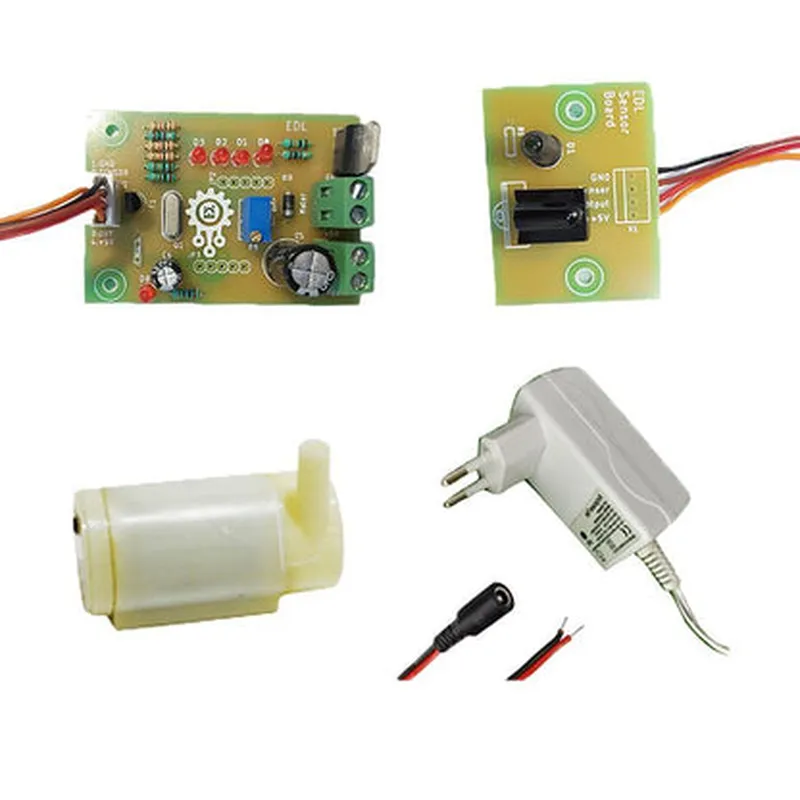
The DIY Sanitizer Dispenser Kit with Timer consists of the following components

  • Sanitizer Dispenser Module: A programmable dispenser unit that stores and dispenses a specified amount of hand sanitizer upon user activation.
  • Timer Module: A configurable timer module that allows users to set specific time intervals for automatic dispenser activation, ensuring consistent sanitization practices.
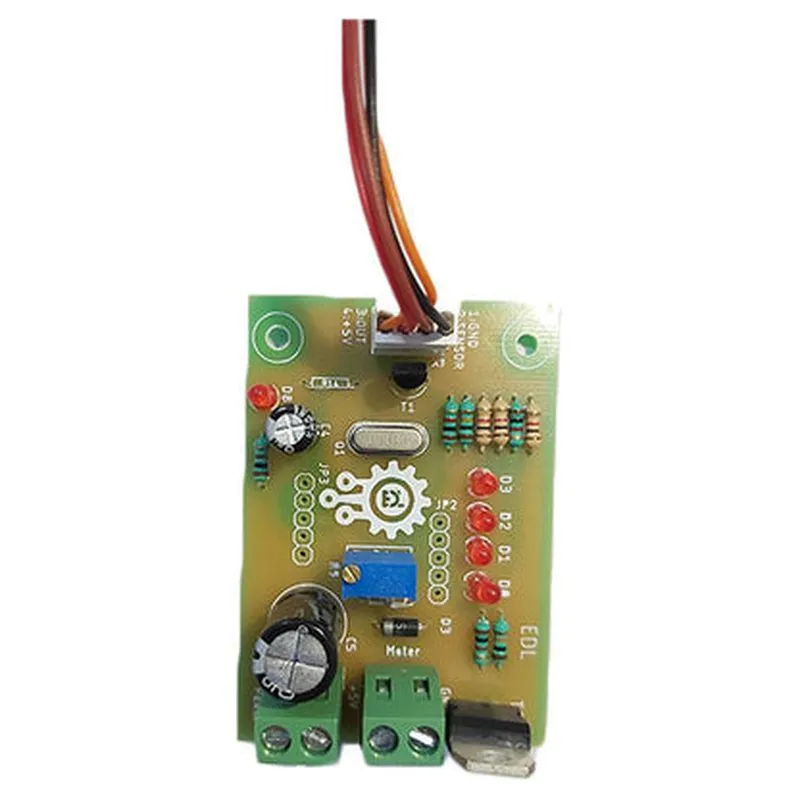
  • Microcontroller Unit (MCU): A compact microcontroller that integrates the dispenser and timer modules, facilitating seamless communication and control.

Key Features

  • Customizable Dispenser Settings: Users can program the dispenser module to dispense a specific amount of sanitizer, ensuring optimal usage and minimizing waste.
  • Configurable Timer Intervals: The timer module allows users to set customized time intervals (e.g., every 15 minutes, hourly, or daily) to accommodate varying sanitization needs.
  • Automatic Dispensing: The system automatically dispenses sanitizer at the set time intervals, promoting consistent hand hygiene practices.
  • Manual Override: Users can manually activate the dispenser module in case of an emergency or when additional sanitizer is needed.
  • Low-Level Indication: The system features a low-level indicator that alerts users when the sanitizer reservoir is running low, ensuring uninterrupted operation.
  • Compact and Portable Design: The DIY Sanitizer Dispenser Kit with Timer is designed to be compact, making it suitable for installation in various settings, including homes, offices, schools, and public facilities.
  • Easy Assembly and Integration: The kit is designed for DIY enthusiasts and professionals, featuring a simple and intuitive assembly process that requires minimal technical expertise.

Technical Specifications

Microcontroller Unit (MCU)
+ ModelATmega328P
+ Clock Speed16 MHz
+ Program Memory32 KB

Dispenser Module

+ Pump TypePeristaltic Pump
+ Flow Rate1-5 mL/min (adjustable)
+ Sanitizer Reservoir Capacity500 mL

Timer Module

+ Timer Resolution1 minute
+ Maximum Timer Setting24 hours

Power Supply

+ Operating Voltage5V
+ Power Consumption<1A

Communication Interface

+ Serial Communication ProtocolUART
+ Baud Rate9600 bps

Applications

  • Home and Office Use: Promote hand hygiene practices in residential and commercial environments.
  • Healthcare Facilities: Enhance patient care by ensuring consistent sanitization practices.
  • Educational Institutions: Encourage good hygiene habits among students and staff.
  • Public Facilities: Install in public restrooms, gyms, and other high-traffic areas to promote public health and safety.
The DIY Sanitizer Dispenser Kit with Timer is an ideal solution for various settings, including

By integrating the DIY Sanitizer Dispenser Kit with Timer into various environments, individuals and organizations can effectively promote hand hygiene practices, reduce the spread of germs, and maintain a clean and healthy environment.

Pin Configuration

  • DIY Sanitizer Dispenser Kit with Timer: Pin Explanation and Connection Guide
  • The DIY Sanitizer Dispenser Kit with Timer is an innovative IoT-based solution for promoting hygiene and cleanliness. This kit consists of a microcontroller, a timer, a dispenser, and other essential components. To help you understand the kit's functionality and connections, we'll break down the pins and their roles in this comprehensive guide.
  • Microcontroller Pins:
  • 1. VCC (Pin 1): Power supply pin, connect to a 5V power source.
  • Connection: Connect to the positive terminal of the power supply (e.g., a 5V USB adapter or a 5V battery).
  • 2. GND (Pin 2): Ground pin, connect to the negative terminal of the power supply.
  • Connection: Connect to the negative terminal of the power supply (e.g., the negative terminal of a 5V USB adapter or a 5V battery).
  • 3. RST (Pin 3): Reset pin, used to reset the microcontroller.
  • Connection: Connect to a 10k resistor and then to the VCC pin for a simple reset circuit.
  • 4. D0-D13 (Pins 4-17): Digital input/output pins, used for connecting various components.
  • Connections will be explained in subsequent sections.
  • Timer Pins:
  • 1. VCC (Pin 1): Power supply pin, connect to the microcontroller's VCC pin.
  • Connection: Connect to the microcontroller's VCC pin (Pin 1).
  • 2. GND (Pin 2): Ground pin, connect to the microcontroller's GND pin.
  • Connection: Connect to the microcontroller's GND pin (Pin 2).
  • 3. CLK (Pin 3): Clock input pin, connects to the microcontroller's clock output pin.
  • Connection: Connect to the microcontroller's D13 pin.
  • 4. DIO (Pin 4): Data input/output pin, connects to the microcontroller's digital input/output pin.
  • Connection: Connect to the microcontroller's D10 pin.
  • Dispenser Pins:
  • 1. VCC (Pin 1): Power supply pin, connect to the microcontroller's VCC pin.
  • Connection: Connect to the microcontroller's VCC pin (Pin 1).
  • 2. GND (Pin 2): Ground pin, connect to the microcontroller's GND pin.
  • Connection: Connect to the microcontroller's GND pin (Pin 2).
  • 3. SIG (Pin 3): Signal pin, connects to the microcontroller's digital output pin.
  • Connection: Connect to the microcontroller's D11 pin.
  • Connections Summary:
  • Connect the microcontroller's VCC pin to a 5V power source.
  • Connect the microcontroller's GND pin to the negative terminal of the power supply.
  • Connect the timer's VCC pin to the microcontroller's VCC pin.
  • Connect the timer's GND pin to the microcontroller's GND pin.
  • Connect the timer's CLK pin to the microcontroller's D13 pin.
  • Connect the timer's DIO pin to the microcontroller's D10 pin.
  • Connect the dispenser's VCC pin to the microcontroller's VCC pin.
  • Connect the dispenser's GND pin to the microcontroller's GND pin.
  • Connect the dispenser's SIG pin to the microcontroller's D11 pin.
  • Additional Connections:
  • Connect a 10k resistor to the microcontroller's RST pin and then to the VCC pin for a simple reset circuit.
  • Connect a button or a switch to the microcontroller's D12 pin for manual dispenser activation (optional).
  • Important Notes:
  • Ensure all connections are secure and correct to avoid damage to the components or the microcontroller.
  • Use a breadboard or a PCB to connect the components, and apply proper soldering techniques if necessary.
  • Consult the datasheets for each component to understand their specific requirements and limitations.
  • By following this guide, you should be able to successfully connect the pins and assemble the DIY Sanitizer Dispenser Kit with Timer. If you encounter any issues or have further questions, refer to the kit's documentation or seek assistance from a qualified professional.

Code Examples

DIY Sanitizer Dispenser Kit with Timer Documentation
Overview
The DIY Sanitizer Dispenser Kit with Timer is an innovative IoT component designed to promote good hygiene practices in various settings, such as households, offices, schools, and public spaces. This kit enables users to create a customized hand sanitizer dispenser with a built-in timer, ensuring that individuals sanitize their hands at regular intervals. The kit consists of a microcontroller, a servo motor, a pump, a sensor, and a timer module.
Technical Specifications
Microcontroller: Arduino-compatible board (e.g., Arduino Uno or Arduino Nano)
 Servo Motor: SG90 Micro Servo Motor
 Pump: DC 3V Peristaltic Pump
 Sensor: IR Infrared Obstacle Avoidance Sensor
 Timer Module: DS1307 Real-Time Clock (RTC) Module
 Power Supply: 3V-5V DC (via USB or battery)
Pinout
| Component | Pin | Description |
| --- | --- | --- |
| Microcontroller | D2 | Servo Motor Signal |
| Microcontroller | D3 | Pump Signal |
| Microcontroller | D4 | IR Sensor Signal |
| Microcontroller | SCL, SDA | Timer Module (I2C) |
| Servo Motor | VCC, GND, SIG | Motor Power, Ground, Signal |
| Pump | VCC, GND | Pump Power, Ground |
| IR Sensor | VCC, GND, OUT | Sensor Power, Ground, Output |
| Timer Module | VCC, GND, SCL, SDA | Timer Power, Ground, I2C |
Code Examples
### Example 1: Basic Sanitizer Dispenser with Timer
This example demonstrates a basic implementation of the DIY Sanitizer Dispenser Kit with Timer. The dispenser will dispense sanitizer every 30 seconds.
```c++
#include <Wire.h>
#include <Servo.h>
// Initialize servo motor and pump pins
const int servoPin = 2;
const int pumpPin = 3;
// Initialize timer module
DS1307 rtc;
void setup() {
  // Initialize servo motor and pump
  pinMode(servoPin, OUTPUT);
  pinMode(pumpPin, OUTPUT);
// Initialize timer module
  Wire.begin();
  rtc.begin();
// Set timer to dispense sanitizer every 30 seconds
  rtc.setInterval(30);
}
void loop() {
  // Check if timer interval has elapsed
  if (rtc.isIntervalElapsed()) {
    // Dispense sanitizer
    dispenseSanitizer();
    rtc.resetInterval();
  }
}
void dispenseSanitizer() {
  // Rotate servo motor to dispense sanitizer
  Servo servo;
  servo.attach(servoPin);
  servo.write(0);
  delay(500);
  servo.write(180);
  delay(500);
  servo.detach();
// Activate pump to dispense sanitizer
  digitalWrite(pumpPin, HIGH);
  delay(500);
  digitalWrite(pumpPin, LOW);
}
```
### Example 2: Advanced Sanitizer Dispenser with Sensor and Timer
This example demonstrates an advanced implementation of the DIY Sanitizer Dispenser Kit with Timer. The dispenser will dispense sanitizer only when an individual is detected by the IR sensor, and will also keep track of the number of dispenses.
```c++
#include <Wire.h>
#include <Servo.h>
// Initialize servo motor, pump, and IR sensor pins
const int servoPin = 2;
const int pumpPin = 3;
const int irSensorPin = 4;
// Initialize timer module
DS1307 rtc;
// Initialize dispense counter
int dispenseCount = 0;
void setup() {
  // Initialize servo motor, pump, and IR sensor
  pinMode(servoPin, OUTPUT);
  pinMode(pumpPin, OUTPUT);
  pinMode(irSensorPin, INPUT);
// Initialize timer module
  Wire.begin();
  rtc.begin();
// Set timer to dispense sanitizer every 30 seconds
  rtc.setInterval(30);
}
void loop() {
  // Check if timer interval has elapsed
  if (rtc.isIntervalElapsed()) {
    // Check if individual is detected by IR sensor
    if (digitalRead(irSensorPin) == HIGH) {
      // Dispense sanitizer
      dispenseSanitizer();
      dispenseCount++;
      Serial.print("Dispense Count: ");
      Serial.println(dispenseCount);
    }
    rtc.resetInterval();
  }
}
void dispenseSanitizer() {
  // Rotate servo motor to dispense sanitizer
  Servo servo;
  servo.attach(servoPin);
  servo.write(0);
  delay(500);
  servo.write(180);
  delay(500);
  servo.detach();
// Activate pump to dispense sanitizer
  digitalWrite(pumpPin, HIGH);
  delay(500);
  digitalWrite(pumpPin, LOW);
}
```
Note: These code examples are for demonstration purposes only and may require modifications to suit specific use cases. Additionally, proper safety precautions should be taken when working with electronic components and sanitizers.