Stufin
Home Quick Cart Profile

mmWave-C4001 24Ghz Human Presence Detection Sensor

Buy Now on Stufin

Pin Configuration

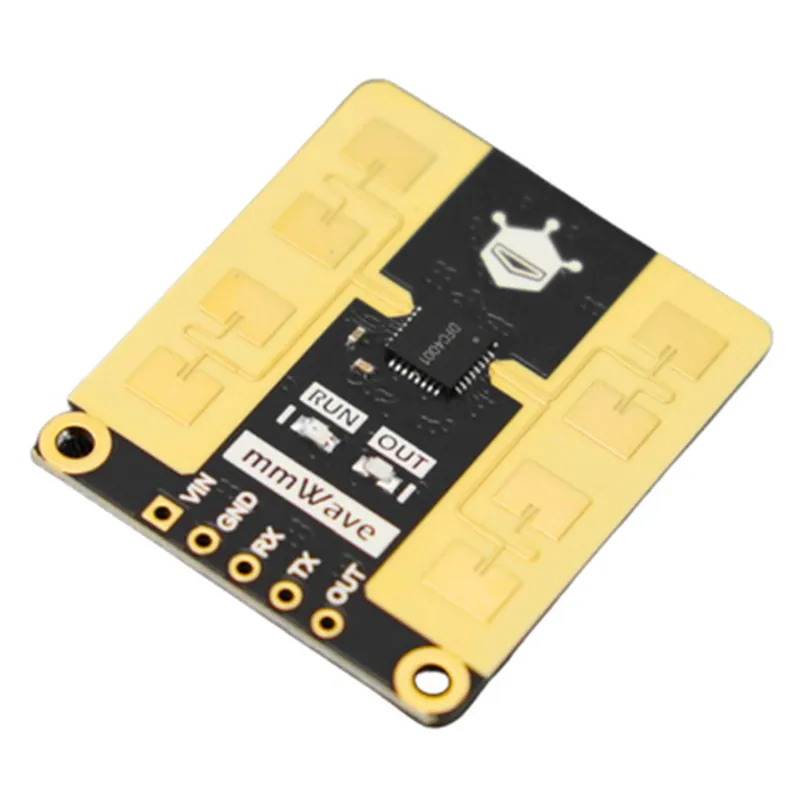
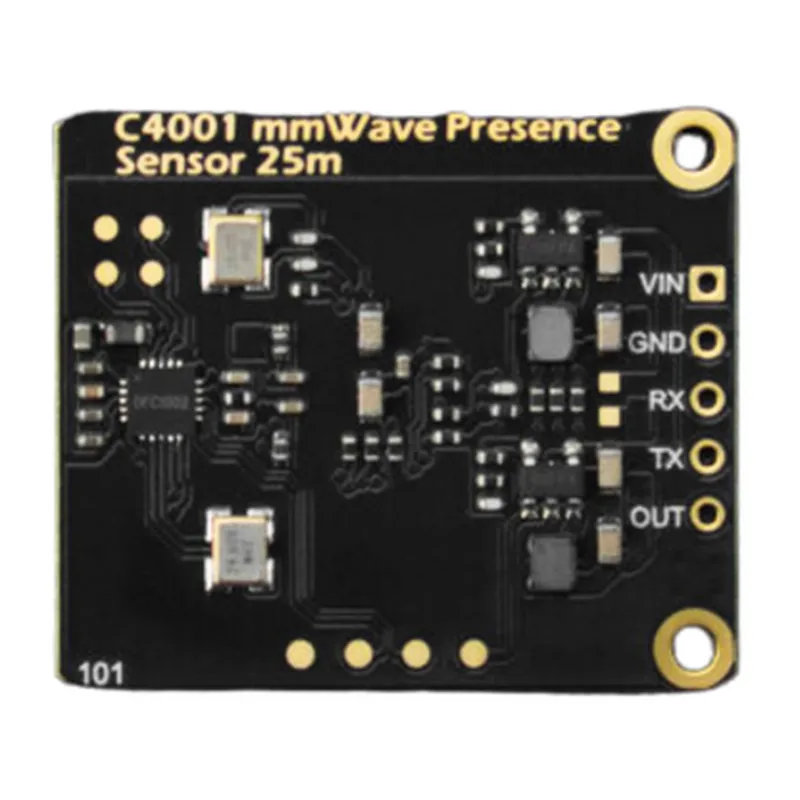
  • mmWave-C4001 24Ghz Human Presence Detection Sensor Pinout
  • The mmWave-C4001 24Ghz Human Presence Detection Sensor is a compact, low-power radar sensor designed for detecting human presence and motion. The sensor has a total of 12 pins, which are explained below:
  • Pin 1: VCC (Supply Voltage)
  • Function: Power supply pin for the sensor
  • Voltage range: 3.3V to 5.5V
  • Typical voltage: 3.3V
  • Notes: A stable power supply is essential for the sensor's operation. Ensure that the power supply is decoupled with a 100nF capacitor to reduce noise.
  • Pin 2: GND (Ground)
  • Function: Grounding pin for the sensor
  • Notes: Connect this pin to the ground plane of the PCB or the system's ground.
  • Pin 3: SDA (Serial Data)
  • Function: I2C serial data pin for communication with the microcontroller
  • Notes: Connect this pin to the SDA pin of the microcontroller.
  • Pin 4: SCL (Serial Clock)
  • Function: I2C serial clock pin for communication with the microcontroller
  • Notes: Connect this pin to the SCL pin of the microcontroller.
  • Pin 5: IRQ (Interrupt Request)
  • Function: Interrupt request pin to notify the microcontroller of events (e.g., presence detection)
  • Notes: Connect this pin to an interrupt pin of the microcontroller.
  • Pin 6: RST (Reset)
  • Function: Active-low reset pin to reset the sensor
  • Notes: Connect this pin to a digital output pin of the microcontroller. Asserting a low signal on this pin resets the sensor.
  • Pin 7: CS (Chip Select)
  • Function: Chip select pin for SPI communication (optional)
  • Notes: If SPI communication is used, connect this pin to a digital output pin of the microcontroller. If I2C communication is used, leave this pin unconnected.
  • Pin 8: MISO (Master In Slave Out)
  • Function: SPI master-in-slave-out pin for data transmission (optional)
  • Notes: If SPI communication is used, connect this pin to the MISO pin of the microcontroller. If I2C communication is used, leave this pin unconnected.
  • Pin 9: MOSI (Master Out Slave In)
  • Function: SPI master-out-slave-in pin for data reception (optional)
  • Notes: If SPI communication is used, connect this pin to the MOSI pin of the microcontroller. If I2C communication is used, leave this pin unconnected.
  • Pin 10: SCK (Serial Clock)
  • Function: SPI serial clock pin for data transmission (optional)
  • Notes: If SPI communication is used, connect this pin to the SCK pin of the microcontroller. If I2C communication is used, leave this pin unconnected.
  • Pin 11: NC (No Connect)
  • Function: No connection pin
  • Notes: Leave this pin unconnected.
  • Pin 12: NC (No Connect)
  • Function: No connection pin
  • Notes: Leave this pin unconnected.
  • Connection Structure:
  • To connect the mmWave-C4001 24Ghz Human Presence Detection Sensor to a microcontroller, follow this structure:
  • 1. Power supply:
  • Connect VCC (Pin 1) to a 3.3V power supply or a voltage regulator.
  • Connect GND (Pin 2) to the ground plane of the PCB or the system's ground.
  • 2. I2C Communication:
  • Connect SDA (Pin 3) to the SDA pin of the microcontroller.
  • Connect SCL (Pin 4) to the SCL pin of the microcontroller.
  • Connect IRQ (Pin 5) to an interrupt pin of the microcontroller.
  • Connect RST (Pin 6) to a digital output pin of the microcontroller.
  • 3. SPI Communication (optional):
  • Connect CS (Pin 7) to a digital output pin of the microcontroller.
  • Connect MISO (Pin 8) to the MISO pin of the microcontroller.
  • Connect MOSI (Pin 9) to the MOSI pin of the microcontroller.
  • Connect SCK (Pin 10) to the SCK pin of the microcontroller.
  • Important Notes:
  • Ensure that the sensor is operated within the recommended temperature range (-20C to 85C) and humidity range (20% to 80% RH).
  • Use a 100nF capacitor to decouple the power supply to reduce noise.
  • Follow proper PCB design and layout guidelines to minimize electromagnetic interference (EMI) and ensure reliable operation.
  • By following this pinout and connection structure, you can successfully integrate the mmWave-C4001 24Ghz Human Presence Detection Sensor into your IoT project.

Code Examples

mmWave-C4001 24Ghz Human Presence Detection Sensor Documentation
Overview
The mmWave-C4001 is a 24 GHz human presence detection sensor that uses mmWave technology to detect and track the presence of humans in a specific area. It is a highly accurate and reliable sensor suitable for various IoT applications, including smart homes, security systems, and industrial automation.
Technical Specifications
Frequency: 24 GHz
 Range: Up to 10 meters
 Accuracy: 1 cm
 Power supply: 3.3 V - 5 V
 Communication interface: UART, I2C, or SPI
 Operating temperature: -20C to 70C
Pinout
The mmWave-C4001 has a 12-pin interface with the following pinout:
| Pin | Function |
| --- | --- |
| 1 | VCC (3.3 V - 5 V) |
| 2 | GND |
| 3 | TX (UART) |
| 4 | RX (UART) |
| 5 | SCL (I2C) |
| 6 | SDA (I2C) |
| 7 | SCK (SPI) |
| 8 | MOSI (SPI) |
| 9 | MISO (SPI) |
| 10 | CS (SPI) |
| 11 | Interrupt |
| 12 | Reset |
Code Examples
### Example 1: Using the mmWave-C4001 with an Arduino Board (UART Interface)
In this example, we will use an Arduino Uno board to communicate with the mmWave-C4001 sensor using the UART interface.
```c++
#include <SoftwareSerial.h>
#define RX_PIN 2  // RX pin of the mmWave-C4001
#define TX_PIN 3  // TX pin of the mmWave-C4001
SoftwareSerial mmWaveSerial(RX_PIN, TX_PIN);
void setup() {
  Serial.begin(9600);
  mmWaveSerial.begin(115200);
}
void loop() {
  mmWaveSerial.write("AT+ GetData");
  delay(100);
  String data = mmWaveSerial.readStringUntil('
');
  int distance = data.substring(12, 15).toInt();
  Serial.print("Distance: ");
  Serial.print(distance);
  Serial.println(" cm");
  delay(500);
}
```
### Example 2: Using the mmWave-C4001 with a Raspberry Pi (I2C Interface)
In this example, we will use a Raspberry Pi to communicate with the mmWave-C4001 sensor using the I2C interface.
```python
import smbus
bus = smbus.SMBus(1)  // I2C bus number
mmWaveAddress = 0x1A  // I2C address of the mmWave-C4001
def get-distance():
  data = bus.read_i2c_block_data(mmWaveAddress, 0x00, 6)
  distance = (data[3] << 8) + data[4]
  return distance
while True:
  distance = get_distance()
  print("Distance: ", distance, "cm")
  time.sleep(0.5)
```
### Example 3: Using the mmWave-C4001 with an ESP32 Board (SPI Interface)
In this example, we will use an ESP32 board to communicate with the mmWave-C4001 sensor using the SPI interface.
```c++
#include <SPI.h>
#define SPI_CS 5  // CS pin of the mmWave-C4001
#define SPI_CLK 18  // CLK pin of the mmWave-C4001
#define SPI_MOSI 23  // MOSI pin of the mmWave-C4001
#define SPI_MISO 19  // MISO pin of the mmWave-C4001
SPI spi;
void setup() {
  spi.begin(SPI_CS, SPI_CLK, SPI_MOSI, SPI_MISO);
  Serial.begin(115200);
}
void loop() {
  spi.transfer("AT+ GetData");
  delay(100);
  uint8_t data[6];
  spi.transfer(data, 6);
  int distance = (data[3] << 8) + data[4];
  Serial.print("Distance: ");
  Serial.print(distance);
  Serial.println(" cm");
  delay(500);
}
```
Note: In all examples, make sure to connect the mmWave-C4001 to the corresponding pins on the development board, and ensure that the power supply voltage and communication interface match the sensor's specifications.