

Stufin
Home Quick Cart Profile

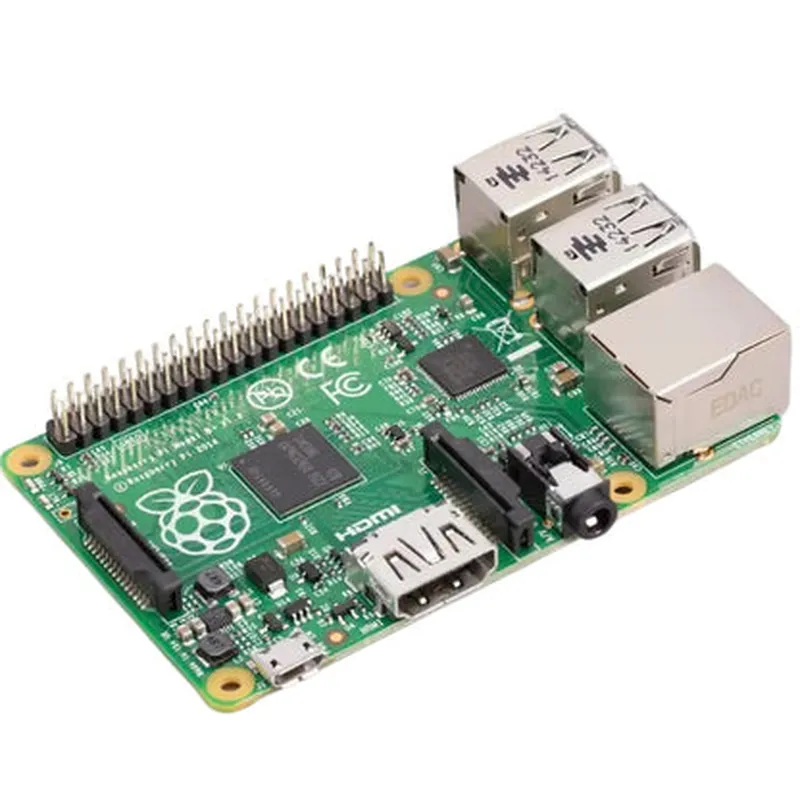
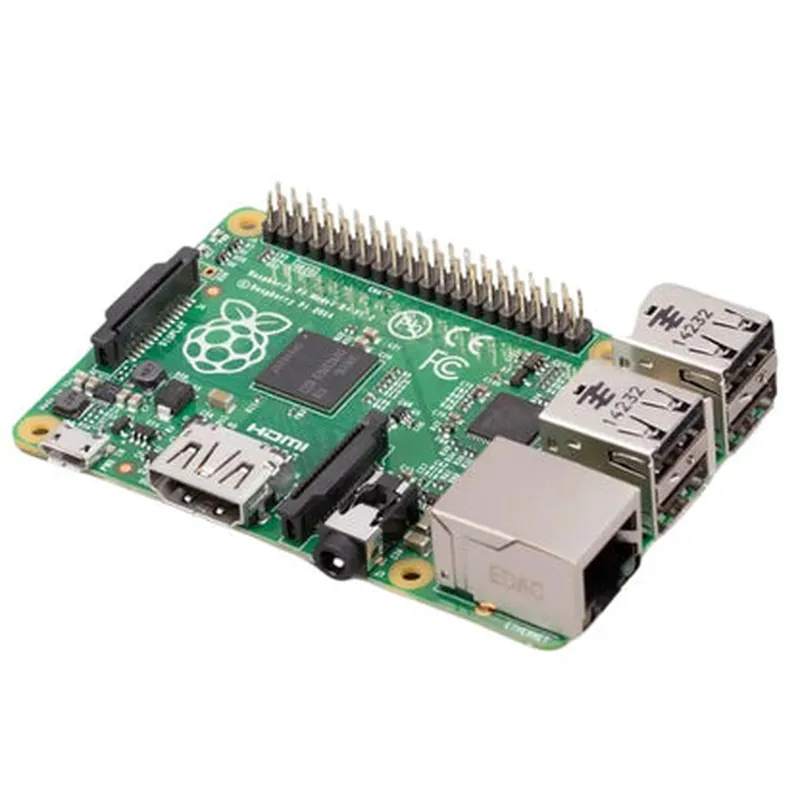
Official Raspberry Pi Model 1 B+

Buy Now on Stufin

Component Name

Official Raspberry Pi Model 1 B+

Overview

-------------

The Official Raspberry Pi Model 1 B+ is a single-board microcomputer designed to promote coding, robotics, and DIY projects. It is a revised version of the original Raspberry Pi Model B, offering improved performance, increased memory, and additional features.

Functionality

---------------

The Raspberry Pi Model 1 B+ is a fully functional computer that can run a variety of operating systems, including Raspbian, Windows 10 IoT, and Linux distributions. It is designed to be used in a wide range of applications, including

Learning programming languages like Python, Scratch, and Java

Building robotic projects, such as robots, drones, and autonomous vehicles

Creating IoT projects, such as home automation, weather stations, and sensor networks

Developing media centers, emulators, and retro game consoles

Prototyping and proof-of-concept designs for industrial and commercial applications

Key Features

--------------

### Processors and Memory

Broadcom BCM2835 system-on-chip (SoC) with a 700 MHz ARMv6 processor

512 MB of RAM

### Connectivity and Expansion

4 USB 2.0 ports

1 Ethernet RJ45 port

1 HDMI port (supports up to 1080p resolution)

1 3.5mm analog audio jack

1 camera interface (CSI) connector

1 expansion header with 40 GPIO pins

### Storage

MicroSD card slot (supports up to 32 GB)

### Power and Operating Conditions

Operating voltage

5V

Power consumption

3.5W ( idle), 4.5W (max)

Operating temperature

0C to 50C

### Other Features

Real-time clock (RTC) module

On-board Wi-Fi and Bluetooth 4.1 modules

Supports H.264 video encoding and decoding

Compatible with a wide range of operating systems and software

Dimensions and Weight

-------------------------

Length

85 mm (3.37 inches)

Width

56 mm (2.2 inches)

Height

17 mm (0.67 inches)

Weight

45 grams (1.59 ounces)

Certifications and Compliance

------------------------------

CE and FCC certified

RoHS and WEEE compliant

Packaging and Accessories

---------------------------

Standard packaging includes the Raspberry Pi Model 1 B+ board, a quick-start guide, and a set of GPIO pin headers

Optional accessories include power supplies, cases, and peripherals

Documentation and Resources

-----------------------------

Official Raspberry Pi documentation and resources available at raspberrypi.org

Extensive community support and forums

Wide range of tutorials, guides, and projects available online

Pin Configuration

  • Raspberry Pi Model 1 B+ Pinout Guide
  • The Raspberry Pi Model 1 B+ is a popular single-board computer used for various IoT projects, robotics, and other applications. It features a 40-pin GPIO (General Purpose Input/Output) header, which provides a way to connect sensors, actuators, and other devices to the board. Here's a detailed explanation of each pin:
  • GPIO Pins (26-40)
  • 1. Pin 26 - GPIO07: A digital input/output pin that can be used as an output to drive a signal or as an input to read a signal.
  • 2. Pin 27 - GPIO00: A digital input/output pin that can be used as an output to drive a signal or as an input to read a signal.
  • 3. Pin 28 - GPIO01: A digital input/output pin that can be used as an output to drive a signal or as an input to read a signal.
  • 4. Pin 29 - GPIO05: A digital input/output pin that can be used as an output to drive a signal or as an input to read a signal.
  • 5. Pin 30 - GPIO06: A digital input/output pin that can be used as an output to drive a signal or as an input to read a signal.
  • 6. Pin 31 - GND: A ground pin, used as a reference point for the circuit.
  • 7. Pin 32 - GPIO12: A digital input/output pin that can be used as an output to drive a signal or as an input to read a signal.
  • 8. Pin 33 - GPIO13: A digital input/output pin that can be used as an output to drive a signal or as an input to read a signal.
  • 9. Pin 34 - GND: A ground pin, used as a reference point for the circuit.
  • 10. Pin 35 - GPIO19: A digital input/output pin that can be used as an output to drive a signal or as an input to read a signal.
  • 11. Pin 36 - GPIO16: A digital input/output pin that can be used as an output to drive a signal or as an input to read a signal.
  • 12. Pin 37 - GPIO26: A digital input/output pin that can be used as an output to drive a signal or as an input to read a signal.
  • 13. Pin 38 - GPIO20: A digital input/output pin that can be used as an output to drive a signal or as an input to read a signal.
  • 14. Pin 39 - GND: A ground pin, used as a reference point for the circuit.
  • 15. Pin 40 - GPIO21: A digital input/output pin that can be used as an output to drive a signal or as an input to read a signal.
  • Power Pins (1-6)
  • 1. Pin 1 - 3V3: A 3.3V power pin, used to supply power to components that require a 3.3V voltage level.
  • 2. Pin 2 - 5V: A 5V power pin, used to supply power to components that require a 5V voltage level.
  • 3. Pin 3 - GND: A ground pin, used as a reference point for the circuit.
  • 4. Pin 4 - 5V: A 5V power pin, used to supply power to components that require a 5V voltage level.
  • 5. Pin 5 - GND: A ground pin, used as a reference point for the circuit.
  • 6. Pin 6 - GND: A ground pin, used as a reference point for the circuit.
  • UART Pins (8-10)
  • 1. Pin 8 - TXD: A transmission pin for the UART (Universal Asynchronous Receiver-Transmitter) interface, used for serial communication.
  • 2. Pin 9 - RXD: A reception pin for the UART interface, used for serial communication.
  • 3. Pin 10 - GND: A ground pin, used as a reference point for the circuit.
  • SPI Pins (19-21)
  • 1. Pin 19 - MOSI: A Master Out Slave In pin for the SPI (Serial Peripheral Interface) bus, used for communication with SPI devices.
  • 2. Pin 20 - MISO: A Master In Slave Out pin for the SPI bus, used for communication with SPI devices.
  • 3. Pin 21 - SCLK: A clock pin for the SPI bus, used to synchronize data transmission.
  • I2C Pins (27-28)
  • 1. Pin 27 - SDA: A data pin for the I2C (Inter-Integrated Circuit) bus, used for communication with I2C devices.
  • 2. Pin 28 - SCL: A clock pin for the I2C bus, used to synchronize data transmission.
  • Other Pins
  • 1. Pin 25 - ID_SD: A detection pin for the SD card, used to detect the presence of an SD card.
  • 2. Pin 24 - ID_SC: A detection pin for the SD card, used to detect the presence of an SD card.
  • Connecting Pins
  • When connecting pins on the Raspberry Pi, it's essential to ensure that you're using the correct pinouts and voltage levels to avoid damaging your components or the Raspberry Pi itself. Here are some general guidelines:
  • Use a breadboard or PCB to connect components, as this will help prevent accidental shorts and make it easier to connect and disconnect components.
  • Use jumper wires to connect pins on the Raspberry Pi to components on the breadboard or PCB.
  • Ensure that you're using the correct voltage level for each component. The Raspberry Pi can supply 3.3V and 5V, but some components may require a specific voltage level.
  • Use resistors and capacitors as necessary to limit current and voltage levels, and to filter out noise.
  • Ground all components to the Raspberry Pi's GND pins to prevent electrical noise and ensure a stable circuit.
  • By following these guidelines and understanding the pinout of the Raspberry Pi Model 1 B+, you can create complex and innovative IoT projects with ease.

Code Examples

Raspberry Pi Model 1 B+ Documentation
Overview
The Raspberry Pi Model 1 B+ is a single-board computer and a popular IoT component designed for DIY electronics projects. It is a cost-effective, highly capable, and compact device that can run a full-fledged operating system and support various interfaces.
Specifications
Processor: Broadcom BCM2835 ARMv7 Quad Core Processor
 Memory: 512 MB RAM
 Storage: MicroSD card slot
 Operating System: Raspberry Pi OS (formerly Raspbian), Ubuntu, and other Linux distributions
 Networking: 10/100 Ethernet, Wi-Fi (802.11n), and Bluetooth 4.1
 USB: 4 x USB 2.0 ports
 GPIO: 40-pin GPIO header
 Video Output: HDMI, composite video
 Audio Output: 3.5mm audio jack, HDMI
 Power: 5V, 2A micro-USB power input
Programming Languages
The Raspberry Pi Model 1 B+ supports various programming languages, including:
Python: The official recommended language for the Raspberry Pi
 Java: Using the Java SE Embedded runtime environment
 C/C++: Using the GCC compiler
 Node.js: Using the Node.js runtime environment
Code Examples
### Example 1: Blinking LED using Python
This example demonstrates how to use the GPIO pins to control an LED connected to the Raspberry Pi Model 1 B+.
Hardware Requirements:
Raspberry Pi Model 1 B+
 Breadboard
 LED
 1 k resistor
 Jumper wires
Software Requirements:
Raspberry Pi OS (formerly Raspbian) with Python 3.x
Code:
```python
import RPi.GPIO as GPIO
import time
# Set up GPIO mode
GPIO.setmode(GPIO.BCM)
# Set up GPIO pin 17 as an output
GPIO.setup(17, GPIO.OUT)
try:
    while True:
        # Turn the LED on
        GPIO.output(17, GPIO.HIGH)
        time.sleep(1)
        
        # Turn the LED off
        GPIO.output(17, GPIO.LOW)
        time.sleep(1)
except KeyboardInterrupt:
    GPIO.cleanup()
```
### Example 2: Reading Temperature and Humidity using Java
This example demonstrates how to use the Raspberry Pi Model 1 B+ to read temperature and humidity data from a DHT11 sensor.
Hardware Requirements:
Raspberry Pi Model 1 B+
 Breadboard
 DHT11 temperature and humidity sensor
 Jumper wires
Software Requirements:
Raspberry Pi OS (formerly Raspbian) with Java SE Embedded runtime environment
Code:
```java
import java.io.IOException;
import java.util.logging.Level;
import java.util.logging.Logger;
import com.pi4j.io.gpio.GpioController;
import com.pi4j.io.gpio.GpioFactory;
import com.pi4j.io.gpio.GpioPinDigitalInput;
import com.pi4j.io.gpio.RaspiPin;
import com.pi4j.io.gpio.event.GpioPinDigitalStateChangeEvent;
import com.pi4j.io.gpio.event.GpioPinListener;
public class DHT11Reader {
    private static final Logger logger = Logger.getLogger(DHT11Reader.class.getName());
public static void main(String[] args) throws IOException {
        // Create a GPIO controller
        final GpioController gpio = GpioFactory.getInstance();
// Set up GPIO pin 4 as an input
        final GpioPinDigitalInput dhtPin = gpio.provisionDigitalInputPin(RaspiPin.GPIO_04);
// Add a listener to the pin
        dhtPin.addListener(new GpioPinListener() {
            @Override
            public void handleGpioPinDigitalStateChangeEvent(GpioPinDigitalStateChangeEvent event) {
                // Read temperature and humidity data from the DHT11 sensor
                int temperature = readTemperature(event.getState());
                int humidity = readHumidity(event.getState());
logger.log(Level.INFO, "Temperature: {0}C, Humidity: {1}%", temperature, humidity);
            }
        });
// Start the GPIO listener
        gpio.attachListener(dhtPin);
    }
private static int readTemperature(boolean state) {
        // Implement temperature reading logic here
        return 20; // Replace with actual temperature reading logic
    }
private static int readHumidity(boolean state) {
        // Implement humidity reading logic here
        return 60; // Replace with actual humidity reading logic
    }
}
```
Note: The provided code examples are simplified and do not include error handling or implementation details for brevity. You may need to modify the code to suit your specific requirements.