Stufin
Home Quick Cart Profile

Matatalab 20 in 1 Creator STEM Kit - with 400 Building Blocks (Educational Robotics Starter Kit for 8+ Years) - Compatible with Lego

Buy Now on Stufin

Component Name

Matatalab 20 in 1 Creator STEM Kit


Overview

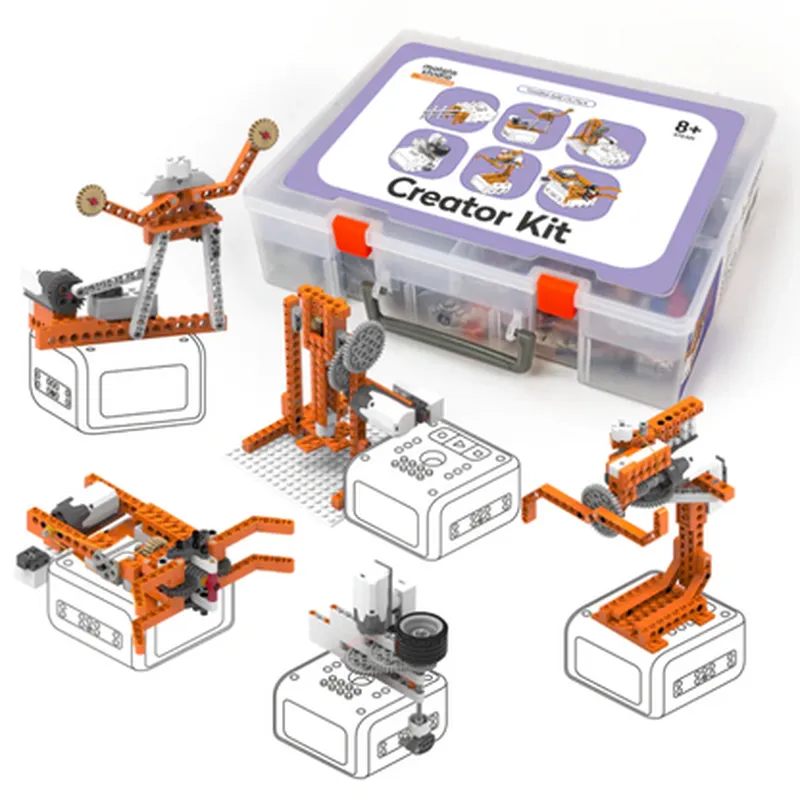
The Matatalab 20 in 1 Creator STEM Kit is an educational robotics starter kit designed for children aged 8 and above. It is a comprehensive kit that combines 400 building blocks with electronic components, software, and curriculum-based learning materials to provide a unique STEM learning experience. The kit is compatible with Lego bricks, allowing users to integrate their existing Lego collections with the Matatalab system.
Functionality

  • Building and Construction: The kit includes 400 building blocks that can be used to create a variety of robots, vehicles, and structures. These blocks are compatible with Lego bricks, allowing users to integrate their existing Lego collections with the Matatalab system.
  • Programming and Electronics: The kit comes with electronic components, such as sensors, motors, and a microcontroller, that can be programmed using the Matatalab software. This introduces kids to the basics of programming and electronics, enabling them to create interactive and responsive projects.
  • Learning and Education: The kit includes a comprehensive curriculum-based learning system, complete with tutorials, guides, and exercises. This educational content is designed to teach kids various STEM concepts, such as programming, electronics, and robotics, in a fun and engaging way.
The Matatalab 20 in 1 Creator STEM Kit is designed to introduce kids to the world of robotics, programming, and electronics. The kit enables users to build and create various robots and projects, teaching them essential skills in science, technology, engineering, and mathematics (STEM). The kit's functionality can be divided into three main areas
Key Features

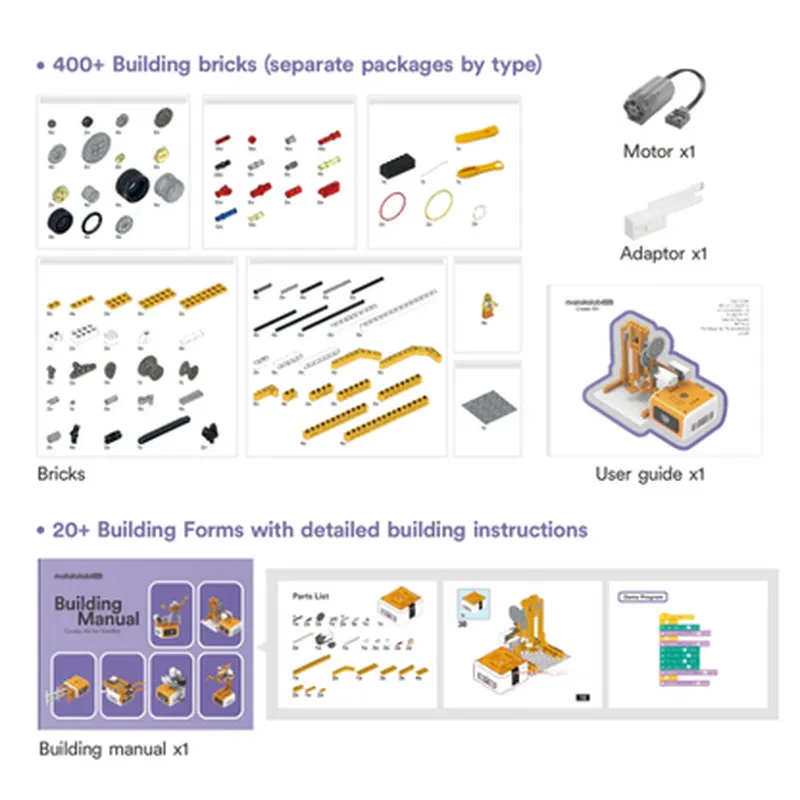
  • 400 Building Blocks: The kit includes 400 building blocks that are compatible with Lego bricks, providing endless possibilities for creative construction and design.
  • Electronic Components: The kit comes with electronic components, such as sensors, motors, and a microcontroller, that can be programmed and used to create interactive projects.
  • Matatalab Software: The kit includes access to the Matatalab software, which is used to program and control the electronic components.
  • Curriculum-Based Learning: The kit includes a comprehensive curriculum-based learning system, complete with tutorials, guides, and exercises, designed to teach kids various STEM concepts.
  • Compatibility with Lego: The kit is compatible with Lego bricks, allowing users to integrate their existing Lego collections with the Matatalab system.
  • 20 Projects and Robots: The kit enables users to build and create 20 different projects and robots, ranging from simple robots to complex machines.
  • Educational Value: The kit is designed to teach kids essential skills in STEM subjects, including programming, electronics, and robotics, in a fun and engaging way.
  • Easy to Use: The kit is easy to use, even for kids with no prior experience in programming or electronics.

Technical Specifications

  • Building Blocks: 400 pieces, compatible with Lego bricks
  • Electronic Components: Sensors, motors, microcontroller
  • Software: Matatalab software, accessible online
  • Age Range: 8 years and above
  • Compatibility: Compatible with Lego bricks
  • Projects and Robots: 20 different projects and robots can be built with the kit
  • Learning System: Comprehensive curriculum-based learning system, complete with tutorials, guides, and exercises

Conclusion

The Matatalab 20 in 1 Creator STEM Kit is an excellent educational robotics starter kit for kids aged 8 and above. It provides a comprehensive and engaging learning experience, teaching essential skills in STEM subjects while promoting creativity, critical thinking, and problem-solving abilities. With its easy-to-use interface, curriculum-based learning system, and compatibility with Lego bricks, this kit is an ideal choice for kids looking to explore the world of robotics and programming.

Pin Configuration

  • Matatalab 20 in 1 Creator STEM Kit Pinout Documentation
  • The Matatalab 20 in 1 Creator STEM Kit is an educational robotics starter kit designed for kids aged 8 and above. It consists of 400 building blocks compatible with Lego, making it an ideal platform for learning robotics, programming, and creativity. The kit's electronic module features a variety of pins that allow users to connect different components and sensors to bring their creations to life. Below is a detailed explanation of each pin, followed by a step-by-step guide on how to connect them.
  • Pinout Description:
  • Microcontroller Pins:
  • 1. VCC (Red): Power supply pin, typically 3.3V or 5V, depending on the power source.
  • 2. GND (Black): Ground pin, used as a reference point for the microcontroller.
  • 3. TX (Blue): Transmitter pin, used for serial communication (UART) to send data.
  • 4. RX (Green): Receiver pin, used for serial communication (UART) to receive data.
  • 5. SCL (Yellow): Clock pin, used for I2C communication protocol.
  • 6. SDA (White): Data pin, used for I2C communication protocol.
  • Digital Pins:
  • 7. D0 (Orange): Digital input/output pin, can be used as a GPIO (General Purpose Input/Output) pin.
  • 8. D1 (Orange): Digital input/output pin, can be used as a GPIO pin.
  • 9. D2 (Orange): Digital input/output pin, can be used as a GPIO pin.
  • 10. D3 (Orange): Digital input/output pin, can be used as a GPIO pin.
  • 11. D4 (Orange): Digital input/output pin, can be used as a GPIO pin.
  • 12. D5 (Orange): Digital input/output pin, can be used as a GPIO pin.
  • 13. D6 (Orange): Digital input/output pin, can be used as a GPIO pin.
  • 14. D7 (Orange): Digital input/output pin, can be used as a GPIO pin.
  • Analog Pins:
  • 15. A0 (Brown): Analog input pin, can be used to read analog values from sensors.
  • 16. A1 (Brown): Analog input pin, can be used to read analog values from sensors.
  • 17. A2 (Brown): Analog input pin, can be used to read analog values from sensors.
  • 18. A3 (Brown): Analog input pin, can be used to read analog values from sensors.
  • Special Pins:
  • 19. VIN (Red): External power input pin, can be used to power the kit with an external power source.
  • 20. 3V3 (Red): 3.3V power output pin, can be used to power external components.
  • Pin Connection Structure:
  • Step 1: Connect Power
  • Connect the VCC (Red) pin to a power source (e.g., a battery pack or a USB cable).
  • Connect the GND (Black) pin to the ground of the power source.
  • Step 2: Connect Microcontroller Pins
  • Connect the TX (Blue) pin to the RX pin of a serial communication device (e.g., a USB-to-TTL serial adapter).
  • Connect the RX (Green) pin to the TX pin of a serial communication device.
  • Connect the SCL (Yellow) pin to the clock pin of an I2C device.
  • Connect the SDA (White) pin to the data pin of an I2C device.
  • Step 3: Connect Digital Pins
  • Connect digital sensors or modules to the digital pins (D0-D7) using jumper wires.
  • Ensure the voltage levels of the connected devices are compatible with the microcontroller.
  • Step 4: Connect Analog Pins
  • Connect analog sensors to the analog pins (A0-A3) using jumper wires.
  • Ensure the voltage levels of the connected devices are compatible with the microcontroller.
  • Step 5: Connect Special Pins
  • Connect an external power source to the VIN (Red) pin, if necessary.
  • Use the 3V3 (Red) pin to power external components that require 3.3V.
  • Important Notes:
  • Always ensure the power supply is within the recommended voltage range (3.3V or 5V) to avoid damaging the kit.
  • Use jumper wires to connect pins to avoid short circuits and damage to the kit.
  • Refer to the Matatalab 20 in 1 Creator STEM Kit's user manual and documentation for specific usage guidelines and safety precautions.

Code Examples

Matatalab 20 in 1 Creator STEM Kit Documentation
Overview
The Matatalab 20 in 1 Creator STEM Kit is an educational robotics starter kit designed for children aged 8 and above. This comprehensive kit includes 400 building blocks, compatible with Lego, and allows users to create a wide range of innovative projects. This documentation provides an introduction to the kit's components, programming languages, and example code snippets to get started with robotics and coding.
Kit Components
400 building blocks (compatible with Lego)
 Main Control Board (MCB)
 Sensors (Light, Sound, Touch, Infrared)
 Motors (2x DC Motors, 1x Servo Motor)
 LED Lights (RGB, Single Color)
 Power Source (Battery Holder, USB Cable)
Programming Languages
The Matatalab 20 in 1 Creator STEM Kit supports three programming languages:
1. Scratch: A visual programming language developed by MIT, ideal for beginners.
2. Blockly: A block-based programming language, popular in educational robotics.
3. Python: A text-based programming language for advanced users.
Example 1: Line Follower Robot using Scratch
Create a line follower robot that uses the Infrared Sensor to detect black lines on a white surface. This example demonstrates the use of sensors and motors in a real-world application.
Scratch Code:
```scratch
when green flag clicked
  set motor speed to 50
  forever
    read infrared sensor
    if infrared sensor = black then
      turn motor left 10 degrees
    else
      turn motor right 10 degrees
    end
  end
```
Example 2: Traffic Light System using Blockly
Create a traffic light system that demonstrates the use of LED lights and timers. This example showcases the kit's ability to create interactive projects.
Blockly Code:
1. Initialize the RGB LED light to green.
```blockly
initialize RGB LED to green
```
2. Wait for 5 seconds.
```blockly
wait 5 seconds
```
3. Change the RGB LED light to yellow.
```blockly
set RGB LED to yellow
```
4. Wait for 2 seconds.
```blockly
wait 2 seconds
```
5. Change the RGB LED light to red.
```blockly
set RGB LED to red
```
6. Wait for 5 seconds.
```blockly
wait 5 seconds
```
7. Loop back to step 1.
```blockly
loop
```
Example 3: Obstacle Avoidance Robot using Python
Create an obstacle avoidance robot that uses the Ultrasonic Sensor to detect obstacles and navigate around them. This example demonstrates the use of advanced sensors and Python programming.
Python Code:
```python
import matatalab
# Initialize the Ultrasonic Sensor
us_sensor = matatalab.UltrasonicSensor()
while True:
    # Read distance from Ultrasonic Sensor
    distance = us_sensor.read_distance()
    
    # If obstacle detected, turn around
    if distance < 20:
        matatalab.motor_turnaround()
    # Move forward
    else:
        matatalab.motor_forward()
```
These examples provide a starting point for users to explore the Matatalab 20 in 1 Creator STEM Kit's capabilities. With its compatibility with Lego and variety of components, the possibilities for creative projects are endless.