

Stufin
Home Quick Cart Profile

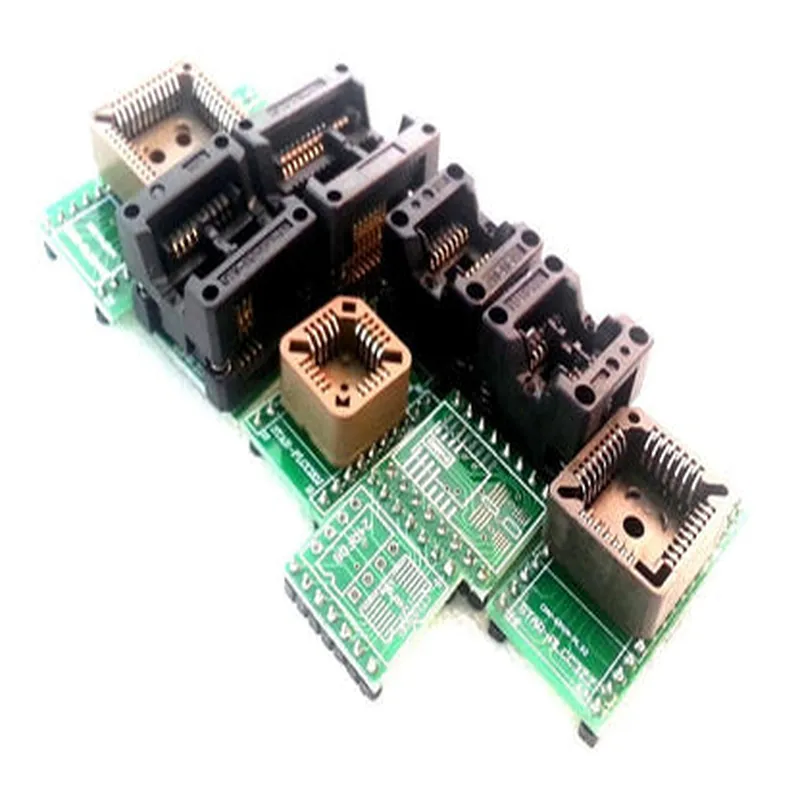
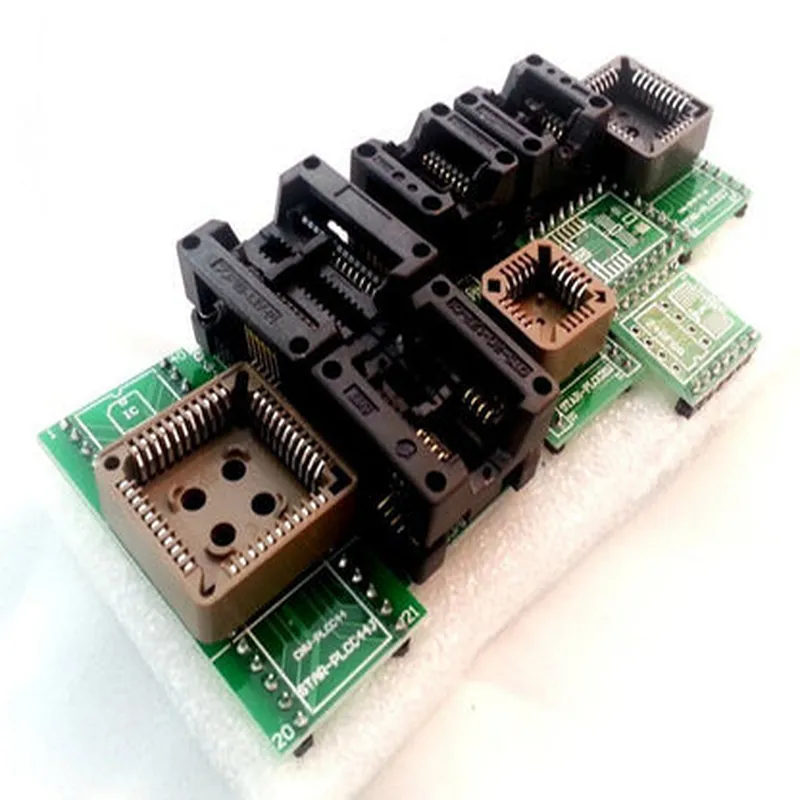
SMD IC Adapters Set for Programmers, 9 Pieces

Buy Now on Stufin

Operating Temperature

-40C to +85C

Working Voltage

0V to 5V

Current Rating

1A per pin

PCB Material

FR4 (Flame Retardant 4)

Connector Type

SMT (Surface-Mount Technology)

Applications

  • IoT Device Development
  • Robotics and Automation
  • Electronic Circuit Design and Prototyping
  • IC Programming and Testing
  • Educational Institutions and Training Centers
  • Research and Development Laboratories
The SMD IC Adapters Set for Programmers, 9 Pieces, is suitable for a variety of applications, including

Conclusion

The SMD IC Adapters Set for Programmers, 9 Pieces, is a valuable resource for anyone working with SMD ICs. Its comprehensive set of adapters, compact design, and ease of use make it an essential tool for programmers, engineers, and hobbyists alike.

Pin Configuration

  • Component Overview
  • The SMD IC Adapters Set for Programmers, 9 Pieces is a collection of adapters designed to facilitate the connection of surface-mount devices (SMDs) to breadboards, PCBs, or other development boards. This set includes 9 different adapters, each catering to a specific SMD package type. This documentation will provide a detailed explanation of the pins for each adapter, as well as a step-by-step guide on how to connect them.
  • Adapter Types and Pinouts
  • The 9-piece set includes adapters for the following SMD package types:
  • 1. SOIC-8 (1206)
  • Pin 1: VCC (Power Supply)
  • Pin 2: GND (Ground)
  • Pin 3: SCL (Serial Clock)
  • Pin 4: SDA (Serial Data)
  • Pin 5: NC (Not Connected)
  • Pin 6: NC (Not Connected)
  • Pin 7: NC (Not Connected)
  • Pin 8: NC (Not Connected)
  • 2. SOIC-14 (150)
  • Pin 1: VCC (Power Supply)
  • Pin 2: GND (Ground)
  • Pin 3: SCL (Serial Clock)
  • Pin 4: SDA (Serial Data)
  • Pin 5: NC (Not Connected)
  • Pin 6: NC (Not Connected)
  • Pin 7: NC (Not Connected)
  • Pin 8: NC (Not Connected)
  • Pin 9: NC (Not Connected)
  • Pin 10: NC (Not Connected)
  • Pin 11: NC (Not Connected)
  • Pin 12: NC (Not Connected)
  • Pin 13: NC (Not Connected)
  • Pin 14: NC (Not Connected)
  • 3. QFN-16 (153)
  • Pin 1: VCC (Power Supply)
  • Pin 2: GND (Ground)
  • Pin 3: SCL (Serial Clock)
  • Pin 4: SDA (Serial Data)
  • Pin 5: NC (Not Connected)
  • Pin 6: NC (Not Connected)
  • Pin 7: NC (Not Connected)
  • Pin 8: NC (Not Connected)
  • Pin 9: NC (Not Connected)
  • Pin 10: NC (Not Connected)
  • Pin 11: NC (Not Connected)
  • Pin 12: NC (Not Connected)
  • Pin 13: NC (Not Connected)
  • Pin 14: NC (Not Connected)
  • Pin 15: NC (Not Connected)
  • Pin 16: NC (Not Connected)
  • 4. TSSOP-14 (1210)
  • Pin 1: VCC (Power Supply)
  • Pin 2: GND (Ground)
  • Pin 3: SCL (Serial Clock)
  • Pin 4: SDA (Serial Data)
  • Pin 5: NC (Not Connected)
  • Pin 6: NC (Not Connected)
  • Pin 7: NC (Not Connected)
  • Pin 8: NC (Not Connected)
  • Pin 9: NC (Not Connected)
  • Pin 10: NC (Not Connected)
  • Pin 11: NC (Not Connected)
  • Pin 12: NC (Not Connected)
  • Pin 13: NC (Not Connected)
  • Pin 14: NC (Not Connected)
  • 5. TSSOP-20 (2510)
  • Pin 1: VCC (Power Supply)
  • Pin 2: GND (Ground)
  • Pin 3: SCL (Serial Clock)
  • Pin 4: SDA (Serial Data)
  • Pin 5: NC (Not Connected)
  • Pin 6: NC (Not Connected)
  • Pin 7: NC (Not Connected)
  • Pin 8: NC (Not Connected)
  • Pin 9: NC (Not Connected)
  • Pin 10: NC (Not Connected)
  • Pin 11: NC (Not Connected)
  • Pin 12: NC (Not Connected)
  • Pin 13: NC (Not Connected)
  • Pin 14: NC (Not Connected)
  • Pin 15: NC (Not Connected)
  • Pin 16: NC (Not Connected)
  • Pin 17: NC (Not Connected)
  • Pin 18: NC (Not Connected)
  • Pin 19: NC (Not Connected)
  • Pin 20: NC (Not Connected)
  • 6. QFN-24 (3025)
  • Pin 1: VCC (Power Supply)
  • Pin 2: GND (Ground)
  • Pin 3: SCL (Serial Clock)
  • Pin 4: SDA (Serial Data)
  • Pin 5: NC (Not Connected)
  • Pin 6: NC (Not Connected)
  • Pin 7: NC (Not Connected)
  • Pin 8: NC (Not Connected)
  • Pin 9: NC (Not Connected)
  • Pin 10: NC (Not Connected)
  • Pin 11: NC (Not Connected)
  • Pin 12: NC (Not Connected)
  • Pin 13: NC (Not Connected)
  • Pin 14: NC (Not Connected)
  • Pin 15: NC (Not Connected)
  • Pin 16: NC (Not Connected)
  • Pin 17: NC (Not Connected)
  • Pin 18: NC (Not Connected)
  • Pin 19: NC (Not Connected)
  • Pin 20: NC (Not Connected)
  • Pin 21: NC (Not Connected)
  • Pin 22: NC (Not Connected)
  • Pin 23: NC (Not Connected)
  • Pin 24: NC (Not Connected)
  • 7. SOIC-16 (150)
  • Pin 1: VCC (Power Supply)
  • Pin 2: GND (Ground)
  • Pin 3: SCL (Serial Clock)
  • Pin 4: SDA (Serial Data)
  • Pin 5: NC (Not Connected)
  • Pin 6: NC (Not Connected)
  • Pin 7: NC (Not Connected)
  • Pin 8: NC (Not Connected)
  • Pin 9: NC (Not Connected)
  • Pin 10: NC (Not Connected)
  • Pin 11: NC (Not Connected)
  • Pin 12: NC (Not Connected)
  • Pin 13: NC (Not Connected)
  • Pin 14: NC (Not Connected)
  • Pin 15: NC (Not Connected)
  • Pin 16: NC (Not Connected)
  • 8. TSSOP-28 (2818)
  • Pin 1: VCC (Power Supply)
  • Pin 2: GND (Ground)
  • Pin 3: SCL (Serial Clock)
  • Pin 4: SDA (Serial Data)
  • Pin 5: NC (Not Connected)
  • Pin 6: NC (Not Connected)
  • Pin 7: NC (Not Connected)
  • Pin 8: NC (Not Connected)
  • Pin 9: NC (Not Connected)
  • Pin 10: NC (Not Connected)
  • Pin 11: NC (Not Connected)
  • Pin 12: NC (Not Connected)
  • Pin 13: NC (Not Connected)
  • Pin 14: NC (Not Connected)
  • Pin 15: NC (Not Connected)
  • Pin 16: NC (Not Connected)
  • Pin 17: NC (Not Connected)
  • Pin 18: NC (Not Connected)
  • Pin 19: NC (Not Connected)
  • Pin 20: NC (Not Connected)
  • Pin 21: NC (Not Connected)
  • Pin 22: NC (Not Connected)
  • Pin 23: NC (Not Connected)
  • Pin 24: NC (Not Connected)
  • Pin 25: NC (Not Connected)
  • Pin 26: NC (Not Connected)
  • Pin 27: NC (Not Connected)
  • Pin 28: NC (Not Connected)
  • 9. QFN-32 (4030)
  • Pin 1: VCC (Power Supply)
  • Pin 2: GND (Ground)
  • Pin 3: SCL (Serial Clock)
  • Pin 4: SDA (Serial Data)
  • Pin 5: NC (Not Connected)
  • Pin 6: NC (Not Connected)
  • Pin 7: NC (Not Connected)
  • Pin 8: NC (Not Connected)
  • Pin 9: NC (Not Connected)
  • Pin 10: NC (Not Connected)
  • Pin 11: NC (Not Connected)
  • Pin 12: NC (Not Connected)
  • Pin 13: NC (Not Connected)
  • Pin 14: NC (Not Connected)
  • Pin 15: NC (Not Connected)
  • Pin 16: NC (Not Connected)
  • Pin 17: NC (Not Connected)
  • Pin 18: NC (Not Connected)
  • Pin 19: NC (Not Connected)
  • Pin 20: NC (Not Connected)
  • Pin 21: NC (Not Connected)
  • Pin 22: NC (Not Connected)
  • Pin 23: NC (Not Connected)
  • Pin 24: NC (Not Connected)
  • Pin 25: NC (Not Connected)
  • Pin 26: NC (Not Connected)
  • Pin 27: NC (Not Connected)
  • Pin 28: NC (Not Connected)
  • Pin 29: NC (Not Connected)
  • Pin 30: NC (Not Connected)
  • Pin 31: NC (Not Connected)
  • Pin 32: NC (Not Connected)
  • Connection Guide
  • To connect an SMD IC to a breadboard or PCB using these adapters, follow these steps:
  • 1. Identify the SMD package type: Determine the package type of your SMD IC (e.g., SOIC-8, QFN-16, etc.).
  • 2. Select the correct adapter: Choose the adapter from the set that corresponds to your SMD package type.
  • 3. Align the SMD IC: Place the SMD IC on the adapter, ensuring that the pins on the IC align with the corresponding pins on the adapter.
  • 4. Secure the SMD IC: Use a gentle pressing motion to secure the SMD IC to the adapter. Make sure the IC is properly seated and the pins are aligned.
  • 5. Connect the adapter to the breadboard or PCB: Insert the adapter into the breadboard or PCB, ensuring that the pins on the adapter align with the corresponding pins on the board.
  • 6. Verify connections: Double-check that all connections are secure and correct.
  • By following these steps, you can easily connect SMD ICs to breadboards or PCBs using these adapters, making prototyping and development more convenient and efficient.

Code Examples

SMD IC Adapters Set for Programmers, 9 Pieces
Overview
The SMD IC Adapters Set for Programmers is a collection of 9 adapters designed to facilitate the connection of surface-mount devices (SMD) to breadboards, PCBs, and other prototyping platforms. This set is ideal for programmers, engineers, and hobbyists who need to connect SMD components to their projects.
Adapters Included
The set includes the following adapters:
1 x SOIC-8 to DIP-8 adapter
 1 x SOIC-14 to DIP-14 adapter
 1 x QFN-16 to DIP-16 adapter
 1 x QFN-20 to DIP-20 adapter
 1 x SOT-23 to DIP-6 adapter
 1 x SOT-323 to DIP-6 adapter
 1 x MSOP-8 to DIP-8 adapter
 1 x MSOP-10 to DIP-10 adapter
 1 x TSSOP-14 to DIP-14 adapter
Features
Allows for easy connection of SMD components to breadboards, PCBs, and other prototyping platforms
 Compatible with various SMD packages (SOIC, QFN, SOT, MSOP, TSSOP)
 Durable and reliable construction ensures long-lasting performance
 Easy to use and requires no soldering
Code Examples
### Example 1: Using the SOIC-8 to DIP-8 adapter with an Arduino Board
In this example, we will use the SOIC-8 to DIP-8 adapter to connect a 24LC256 EEPROM chip to an Arduino Uno board.
Hardware Requirements
Arduino Uno board
 SOIC-8 to DIP-8 adapter
 24LC256 EEPROM chip
 Breadboard and jumper wires
Code
```c++
#include <Arduino.h>
#include <Wire.h>
#define EEPROM_ADDRESS 0x50
void setup() {
  Wire.begin(); // Initialize I2C communication
}
void loop() {
  byte data = 0x12;
  Wire.beginTransmission(EEPROM_ADDRESS);
  Wire.write(data);
  Wire.endTransmission();
delay(1000);
Wire.beginTransmission(EEPROM_ADDRESS);
  Wire.requestFrom(EEPROM_ADDRESS, 1);
  byte receivedData = Wire.read();
  Serial.print("Received data: ");
  Serial.println(receivedData, HEX);
delay(1000);
}
```
### Example 2: Using the QFN-16 to DIP-16 adapter with a Raspberry Pi
In this example, we will use the QFN-16 to DIP-16 adapter to connect a MCP3008 analog-to-digital converter (ADC) chip to a Raspberry Pi.
Hardware Requirements
Raspberry Pi board
 QFN-16 to DIP-16 adapter
 MCP3008 ADC chip
 Breadboard and jumper wires
Code
```python
import RPi.GPIO as GPIO
import time
# Set up GPIO mode
GPIO.setmode(GPIO.BCM)
# Define ADC pin connections
CLK = 18
MOSI = 23
MISO = 24
CS = 25
# Set up ADC pins as output
GPIO.setup(CLK, GPIO.OUT)
GPIO.setup(MOSI, GPIO.OUT)
GPIO.setup(MISO, GPIO.IN)
GPIO.setup(CS, GPIO.OUT)
while True:
    # Send clock signal
    GPIO.output(CLK, GPIO.HIGH)
    GPIO.output(CLK, GPIO.LOW)
# Send MOSI signal
    GPIO.output(MOSI, GPIO.HIGH)
    GPIO.output(MOSI, GPIO.LOW)
# Read MISO signal
    data = GPIO.input(MISO)
# Print ADC reading
    print("ADC reading: ", data)
# Wait 1 second before taking the next reading
    time.sleep(1)
```
Note: These examples are for illustrative purposes only and may require additional circuitry and programming to function correctly.