Raspberry Pi IOT Kit Documentation
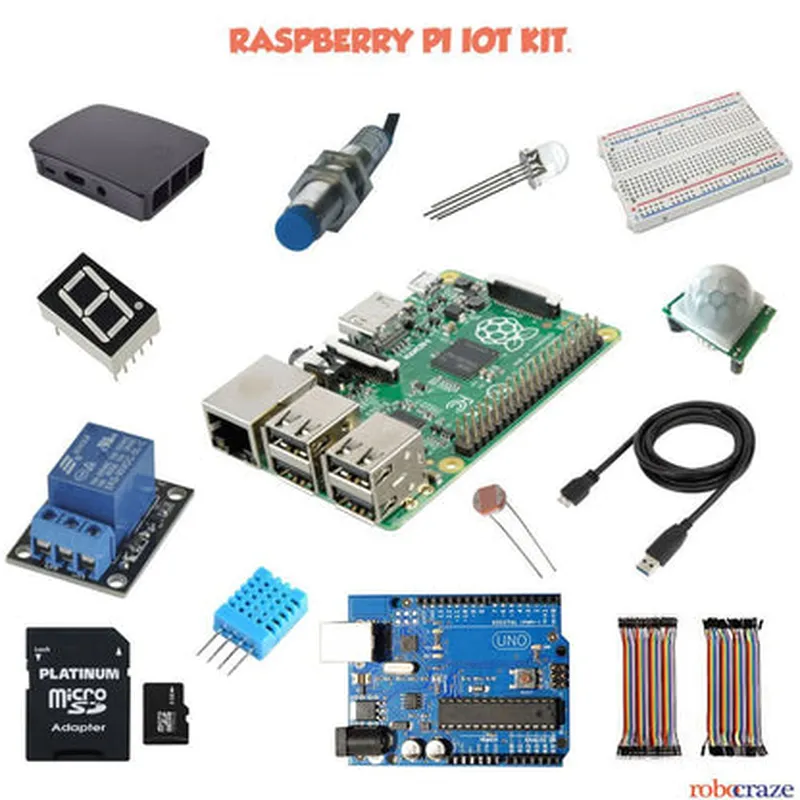
The Raspberry Pi IOT Kit is a comprehensive bundle of hardware components and software tools designed to facilitate the development of Internet of Things (IoT) projects. The kit includes a Raspberry Pi single-board computer, various sensors, and peripherals that enable users to create interactive and connected devices.
Raspberry Pi (Model 4 or 3 B+)
 Breadboard
 Jumper wires
 Sensors (temperature, humidity, light, motion)
 LEDs
 Resistor pack
 Power supply
 microSD card
Raspbian OS (pre-installed on the microSD card)
 Python programming language
 IoT-specific libraries and frameworks (e.g., RPi.GPIO, Python-SMBus)
### Example 1: Temperature Sensor Reading
In this example, we'll use the temperature sensor to read the ambient temperature and display it on the terminal.
Raspberry Pi
 Breadboard
 Temperature sensor (DS18B20)
 Jumper wires
Raspbian OS
 Python 3.x
 RPi.GPIO library
Code
```python
import os
import time
import RPi.GPIO as GPIO
# Set up the temperature sensor
GPIO.setmode(GPIO.BCM)
temp_sensor_pin = 18
GPIO.setup(temp_sensor_pin, GPIO.IN)
while True:
    # Read the temperature sensor data
    temp_data = os.popen('cat /sys/bus/w1/devices/28-000006a27455/w1_slave').read()
    temp_c = float(temp_data.split('=')[1]) / 1000
    temp_f = (temp_c  9/5) + 32
# Print the temperature readings
    print(f'Temperature: {temp_c:.2f}C / {temp_f:.2f}F')
    time.sleep(1)
```
### Example 2: Home Automation with LED and Button
In this example, we'll create a simple home automation system that turns an LED on and off using a button press.
Raspberry Pi
 Breadboard
 LED
 Button
 Resistor (1 k)
 Jumper wires
Raspbian OS
 Python 3.x
 RPi.GPIO library
Code
```python
import RPi.GPIO as GPIO
import time
# Set up the GPIO pins
GPIO.setmode(GPIO.BCM)
led_pin = 17
button_pin = 23
GPIO.setup(led_pin, GPIO.OUT)
GPIO.setup(button_pin, GPIO.IN, pull_up_down=GPIO.PUD_UP)
while True:
    # Read the button state
    if GPIO.input(button_pin) == False:
        # Toggle the LED
        GPIO.output(led_pin, not GPIO.input(led_pin))
        time.sleep(0.5)
```
### Example 3: IoT-based Weather Station (Advanced)
In this example, we'll create an IoT-based weather station that collects temperature, humidity, and light intensity data and sends it to a cloud-based server using MQTT protocol.
Raspberry Pi
 Breadboard
 Temperature sensor (DS18B20)
 Humidity sensor (DHT11)
 Light sensor (LDR)
 Wi-Fi module (optional)
 Jumper wires
Raspbian OS
 Python 3.x
 RPi.GPIO library
 paho-mqtt library
Code
```python
import paho.mqtt.client as mqtt
import RPi.GPIO as GPIO
import time
# Set up the MQTT client
mqtt_client = mqtt.Client()
mqtt_client.connect('your_mqtt_broker_ip', 1883)
# Set up the sensors
temp_sensor_pin = 18
humi_sensor_pin = 4
light_sensor_pin = 17
GPIO.setup(temp_sensor_pin, GPIO.IN)
GPIO.setup(humi_sensor_pin, GPIO.IN)
GPIO.setup(light_sensor_pin, GPIO.IN)
while True:
    # Read the sensor data
    temp_c = read_temperature()
    humi_rh = read_humidity()
    lightIntensity = read_light_intensity()
# Create a JSON payload
    payload = {'temperature': temp_c, 'humidity': humi_rh, 'light_intensity': lightIntensity}
# Publish the data to the MQTT broker
    mqtt_client.publish('weather_station/data', json.dumps(payload))
    time.sleep(10)
```
Note: These examples are meant to demonstrate the basic usage of the Raspberry Pi IOT Kit and are not intended to be production-ready code. You should modify and expand on these examples to suit your specific project requirements.