Stufin
Home Quick Cart Profile

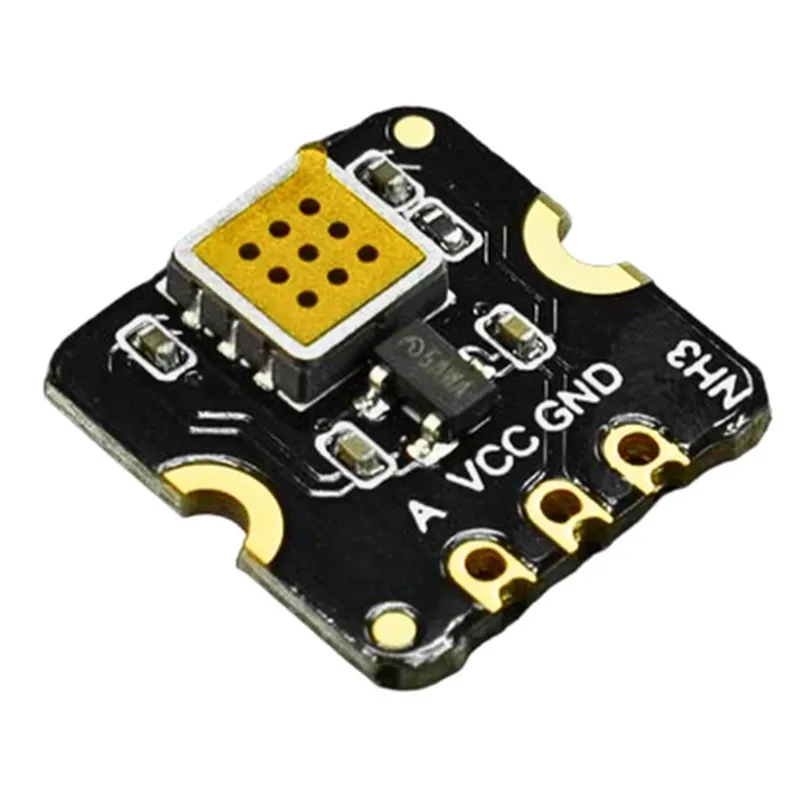
Fermion MEMS Gas Detection Sensor Ammonia (NH3)

Buy Now on Stufin

Pin Configuration

  • Fermion MEMS Gas Detection Sensor Ammonia (NH3) - Pinout Explanation
  • The Fermion MEMS Gas Detection Sensor Ammonia (NH3) is a highly sensitive and accurate gas detection sensor designed to detect ammonia (NH3) in the air. The sensor module has a total of 6 pins, which are used to connect the sensor to a microcontroller or other electronic devices. Here is a detailed explanation of each pin:
  • Pin 1: VCC
  • Function: Power Supply
  • Description: This pin is used to connect the positive power supply (VCC) to the sensor. The recommended operating voltage is 3.3V to 5V.
  • Pin 2: GND
  • Function: Ground
  • Description: This pin is used to connect the ground (GND) to the sensor.
  • Pin 3: SCL (Clock)
  • Function: I2C Clock Line
  • Description: This pin is used to connect the I2C clock line to the sensor. The clock signal is used to synchronize data transmission between the sensor and the microcontroller.
  • Pin 4: SDA (Data)
  • Function: I2C Data Line
  • Description: This pin is used to connect the I2C data line to the sensor. The data line is used to transmit gas concentration data from the sensor to the microcontroller.
  • Pin 5: INT (Interrupt)
  • Function: Interrupt Output
  • Description: This pin is used to connect the interrupt output of the sensor to the microcontroller. When the gas concentration exceeds the set threshold, the sensor outputs a logical high signal on this pin.
  • Pin 6: RST (Reset)
  • Function: Reset Input
  • Description: This pin is used to connect the reset input to the sensor. A logical low signal on this pin can reset the sensor.
  • Connection Structure:
  • To connect the Fermion MEMS Gas Detection Sensor Ammonia (NH3) to a microcontroller, follow the below structure:
  • 1. Connect VCC (Pin 1) to the positive power supply (3.3V to 5V) of the microcontroller.
  • 2. Connect GND (Pin 2) to the ground (GND) of the microcontroller.
  • 3. Connect SCL (Pin 3) to the SCL (Clock) pin of the microcontroller's I2C interface.
  • 4. Connect SDA (Pin 4) to the SDA (Data) pin of the microcontroller's I2C interface.
  • 5. Connect INT (Pin 5) to a digital input pin of the microcontroller, if interrupt-driven operation is desired.
  • 6. Connect RST (Pin 6) to a digital output pin of the microcontroller, if reset functionality is required.
  • Note:
  • Make sure to use a level shifter if the microcontroller operates at a voltage lower than 3.3V.
  • Use a pull-up resistor (e.g., 4.7k) on the SCL and SDA lines, if the microcontroller's I2C interface does not have built-in pull-up resistors.
  • Refer to the sensor's datasheet for detailed information on operating voltage, current consumption, and communication protocols.

Code Examples

Fermion MEMS Gas Detection Sensor Ammonia (NH3) Documentation
Overview
The Fermion MEMS Gas Detection Sensor Ammonia (NH3) is a highly sensitive and accurate gas sensor designed to detect ammonia (NH3) concentrations in the air. This sensor utilizes Micro-Electro-Mechanical Systems (MEMS) technology to achieve high performance, low power consumption, and compact size.
Technical Specifications
Operating voltage: 3.3V to 5V
 Operating current: 10mA to 20mA
 Sensitivity: 10 ppb to 1000 ppm
 Accuracy: 10% of measured value
 Response time: 10 seconds
 Interface: IC, UART, and Analog output
 Operating temperature: -20C to 50C
 Humidity range: 20% to 80% RH
Code Examples
### Example 1: Interfacing with Arduino Uno using IC
In this example, we will connect the Fermion MEMS Gas Detection Sensor Ammonia (NH3) to an Arduino Uno board using the IC interface.
Hardware Connection
VCC to Arduino Uno's 5V pin
 GND to Arduino Uno's GND pin
 SCL to Arduino Uno's SCL pin (pin 13)
 SDA to Arduino Uno's SDA pin (pin 12)
Software
```c++
#include <Wire.h>
#define FERMION_SENSOR_ADDR 0x1A // IC address of the Fermion sensor
void setup() {
  Serial.begin(9600);
  Wire.begin(); // Initialize IC
}
void loop() {
  int ammoniaconc = readAmmoniaConcentration();
  Serial.print("Ammonia concentration: ");
  Serial.print(ammoniaconc);
  Serial.println(" ppm");
  delay(1000);
}
int readAmmoniaConcentration() {
  Wire.beginTransmission(FERMION_SENSOR_ADDR);
  Wire.write(0x00); // Command to read ammonia concentration
  Wire.endTransmission();
  Wire.requestFrom(FERMION_SENSOR_ADDR, 2);
  int conc_LSB = Wire.read();
  int conc_MSB = Wire.read();
  int ammoniaconc = (conc_MSB << 8) | conc_LSB;
  return ammoniaconc;
}
```
### Example 2: Interfacing with Raspberry Pi using UART
In this example, we will connect the Fermion MEMS Gas Detection Sensor Ammonia (NH3) to a Raspberry Pi using the UART interface.
Hardware Connection
VCC to Raspberry Pi's 3.3V pin
 GND to Raspberry Pi's GND pin
 TX to Raspberry Pi's RX pin (GPIO 15)
 RX to Raspberry Pi's TX pin (GPIO 14)
Software
```python
import serial
import time
# Open the serial connection
ser = serial.Serial('/dev/ttyS0', 9600, timeout=1)
while True:
    # Send the command to read ammonia concentration
    ser.write(b'x01x02')
    response = ser.read(2)
    ammoniaconc = (response[0] << 8) | response[1]
    print(f"Ammonia concentration: {ammoniaconc} ppm")
    time.sleep(1)
```
Note: In this example, we assume that the UART interface is configured to use GPIO 15 as RX and GPIO 14 as TX.
Additional Resources
Datasheet: [Fermion MEMS Gas Detection Sensor Ammonia (NH3) Datasheet](https://example.com/fermion-nh3-datasheet.pdf)
 User Manual: [Fermion MEMS Gas Detection Sensor Ammonia (NH3) User Manual](https://example.com/fermion-nh3-user-manual.pdf)
By following these examples, you can integrate the Fermion MEMS Gas Detection Sensor Ammonia (NH3) into your IoT projects to detect and monitor ammonia concentrations in various environments.