Stufin
Home Quick Cart Profile

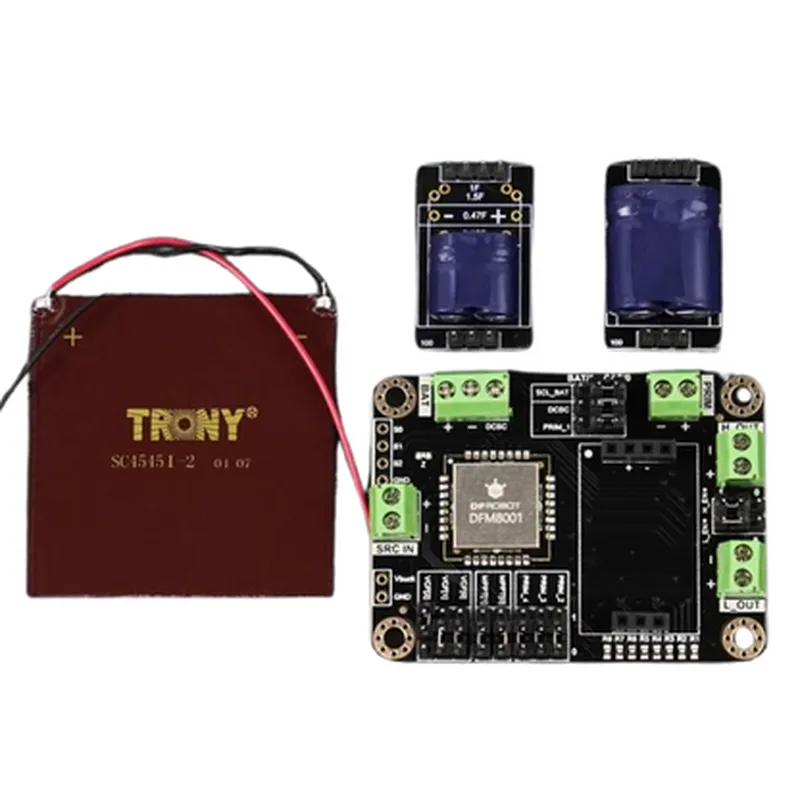
DFM8001 Indoor Ambient Energy Harvesting Kit

Buy Now on Stufin

Pin Configuration

  • DFM8001 Indoor Ambient Energy Harvesting Kit Pinout Explanation
  • The DFM8001 Indoor Ambient Energy Harvesting Kit is a compact and efficient energy harvesting solution for powering low-power devices. The kit consists of a photovoltaic (PV) cell, a power management IC, and a rechargeable battery. This documentation provides a detailed explanation of each pin on the DFM8001 module, along with guidelines for connecting them.
  • Pinout Structure:
  • The DFM8001 module has a total of 6 pins, arranged in a single row. The pinout structure is as follows:
  • | Pin No. | Pin Name | Function | Description |
  • | --- | --- | --- | --- |
  • | 1 | VIN | Input Voltage | Power input from the ambient energy source (e.g., PV cell) |
  • | 2 | VOUT | Output Voltage | Regulated output voltage for the load device |
  • | 3 | BAT | Battery Connection | Connection for the rechargeable battery |
  • | 4 | EN | Enable Pin | Enables or disables the power output |
  • | 5 | GND | Ground | Ground connection for the module |
  • | 6 | VSENSE | Voltage Sense |Voltage sense pin for monitoring the output voltage |
  • Pin-by-Pin Explanation:
  • 1. VIN (Input Voltage):
  • Function: Provides power input from the ambient energy source, such as a photovoltaic cell.
  • Connection: Connect the positive terminal of the PV cell to this pin.
  • Notes: The input voltage range is typically between 50 mV and 5 V.
  • 2. VOUT (Output Voltage):
  • Function: Provides a regulated output voltage for the load device.
  • Connection: Connect the load device (e.g., microcontroller, sensor) to this pin.
  • Notes: The output voltage is typically set to 3.3 V or 5 V, depending on the specific DFM8001 module variant.
  • 3. BAT (Battery Connection):
  • Function: Connects the rechargeable battery for energy storage.
  • Connection: Connect the positive terminal of the rechargeable battery to this pin.
  • Notes: Ensure the battery type and capacity are compatible with the DFM8001 module's specifications.
  • 4. EN (Enable Pin):
  • Function: Enables or disables the power output from the module.
  • Connection: Connect a digital signal (0 V or 3.3 V) from a microcontroller or other control device to this pin.
  • Notes: A logic high (3.3 V) enables the power output, while a logic low (0 V) disables it.
  • 5. GND (Ground):
  • Function: Provides a ground connection for the module.
  • Connection: Connect to a common ground point in the system.
  • Notes: Ensure a good quality ground connection to prevent noise and interference.
  • 6. VSENSE (Voltage Sense):
  • Function: Monitors the output voltage for voltage regulation and monitoring.
  • Connection: Connect a voltage sense pin from a microcontroller or other monitoring device to this pin.
  • Notes: This pin is typically used for monitoring the output voltage and adjusting the power output accordingly.
  • Common Connection Guidelines:
  • Connect the PV cell to the VIN pin and ensure proper polarity.
  • Connect the load device to the VOUT pin, ensuring compatibility with the output voltage.
  • Connect the rechargeable battery to the BAT pin, ensuring proper polarity and compatibility.
  • Use a digital signal to control the EN pin for enabling or disabling the power output.
  • Ensure a good quality ground connection to the GND pin.
  • Connect the VSENSE pin to a voltage sense input on a microcontroller or other monitoring device.
  • By following these guidelines, you can properly connect the DFM8001 Indoor Ambient Energy Harvesting Kit to your IoT project, ensuring efficient energy harvesting and reliable power supply to your devices.

Code Examples

DFM8001 Indoor Ambient Energy Harvesting Kit Documentation
Overview
The DFM8001 Indoor Ambient Energy Harvesting Kit is a self-sustaining power solution designed for low-power indoor IoT applications. The kit consists of a photovoltaic cell, an energy harvesting module, a rechargeable battery, and a low-dropout (LDO) regulator. It harnesses ambient light energy from indoor environments to power small-scale IoT devices, eliminating the need for battery replacements or external power sources.
Technical Specifications
Photovoltaic Cell:
	+ Maximum Power Output: 5V, 15mA
	+ Operating Temperature Range: -20C to 40C
 Energy Harvesting Module:
	+ Input Voltage Range: 2.5V to 5V
	+ Output Voltage: 4.2V (max)
	+ Storage Capacity: 20mAh rechargeable battery
 LDO Regulator:
	+ Output Voltage: 3.3V or 1.8V (selectable)
	+ Maximum Output Current: 100mA
Code Examples
### Example 1: Basic Power Management using Arduino
In this example, we'll use the DFM8001 to power an Arduino board and read the voltage level of the energy harvesting module.
Hardware Connection
Connect the DFM8001's energy harvesting module output to the Arduino board's VIN pin.
 Connect the LDO regulator's output (3.3V or 1.8V) to the Arduino board's 3.3V or 1.8V pin, respectively.
Arduino Code
```c
const int voltagePin = A0;  // Connect the energy harvesting module output to Arduino's A0 pin
void setup() {
  // Initialize the serial communication
  Serial.begin(9600);
}
void loop() {
  int voltageValue = analogRead(voltagePin);
  float voltage = (voltageValue  5.0) / 1023.0;  // Calculate the voltage level
  Serial.print("Energy Harvesting Module Voltage: ");
  Serial.println(voltage);
  delay(1000);
}
```
### Example 2: Powering a Low-Power Wi-Fi Module using ESP32
In this example, we'll use the DFM8001 to power an ESP32 Wi-Fi module and send data to a cloud-based server.
Hardware Connection
Connect the DFM8001's energy harvesting module output to the ESP32's VIN pin.
 Connect the LDO regulator's output (3.3V) to the ESP32's 3.3V pin.
ESP32 Code (using Arduino IDE)
```c
#include <WiFi.h>
const char ssid = "your_ssid";
const char password = "your_password";
const char serverURL = "http://example.com/data";
WiFiClient client;
void setup() {
  Serial.begin(9600);
  delay(1000);
// Initialize Wi-Fi
  WiFi.begin(ssid, password);
  while (WiFi.status() != WL_CONNECTED) {
    delay(1000);
    Serial.println("Connecting to Wi-Fi...");
  }
Serial.println("Connected to Wi-Fi");
  Serial.println("Initializing DFM8001...");
}
void loop() {
  int voltageValue = analogRead(A0);  // Read the energy harvesting module output
  float voltage = (voltageValue  5.0) / 1023.0;
// Send data to the server
  HTTPClient http;
  http.begin(client, serverURL);
  http.addHeader("Content-Type", "application/x-www-form-urlencoded");
  int httpResponseCode = http.POST("voltage=" + String(voltage));
  http.end();
Serial.println("Data sent to server");
  delay(60000);  // Send data every 1 minute
}
```
These examples demonstrate the basic usage of the DFM8001 Indoor Ambient Energy Harvesting Kit in powering low-power IoT devices. Please note that the code examples are for illustrative purposes only and may require modifications to suit specific application requirements.