Stufin
Home Quick Cart Profile

Elecrow - CrowBot BOLT - Open Source Programmable Smart Robot Car, STEAM Kit with Infrared Remote Control


Buy Now on Stufin

Component Name

Elecrow - CrowBot BOLT - Open Source Programmable Smart Robot Car, STEAM Kit with Infrared Remote Control
Overview

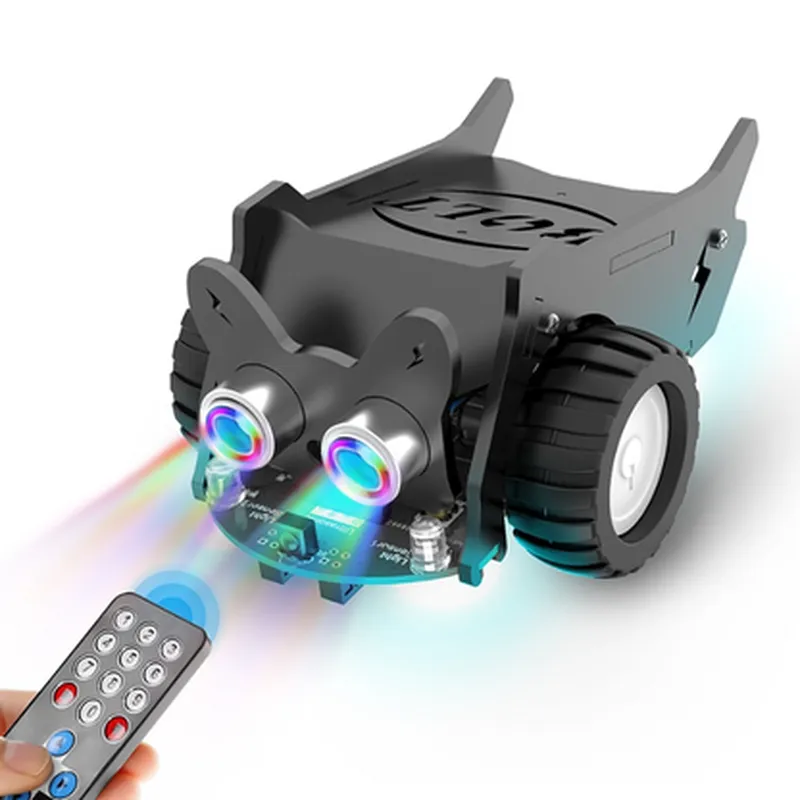
The CrowBot BOLT is an open-source, programmable smart robot car designed specifically for STEAM education (Science, Technology, Engineering, Arts, and Mathematics). This kit is ideal for students, hobbyists, and enthusiasts looking to explore the world of robotics, programming, and IoT. The CrowBot BOLT comes with a range of features that make it an excellent platform for learning and project development.

Functionality

The CrowBot BOLT is a fully functional robot car that can be controlled using an infrared remote control or programmed using various programming languages such as C++, Python, or Scratch. The robot's microcontroller is based on the popular Arduino platform, making it easy to program and customize.

Key Features

  • Microcontroller: The CrowBot BOLT is built around the Arduino Uno board, which provides a robust and versatile platform for programming and customization.
  • Programmable: The robot can be programmed using a range of programming languages, including C++, Python, and Scratch, allowing users to create custom algorithms and applications.
  • Infrared Remote Control: The kit comes with an infrared remote control, enabling users to control the robot's movements and functions wirelessly.
  • Sensor Integration: The CrowBot BOLT features a range of sensors, including:

Ultrasonic sensor for obstacle detection

Infrared sensor for line following and object detection

Light sensor for light-sensitive applications

  • Motor Control: The robot is equipped with two high-torque DC motors, providing smooth and precise movement control.
  • Power Supply: The kit includes a rechargeable Li-ion battery and a USB charging port for convenient recharging.
  • Modular Design: The CrowBot BOLT's modular design allows users to easily upgrade or replace components, making it an ideal platform for prototyping and experimentation.
  • STEAM Education: The kit is specifically designed for STEAM education, making it an excellent tool for teaching concepts such as programming, robotics, and electronics.
  • Open-Source: The CrowBot BOLT is an open-source platform, allowing users to access and modify the source code and schematics.

Microcontroller

Arduino Uno

Processor

ATmega328P

Operating Voltage

5V

Motor Control

2 x High-torque DC motors

Sensors

Ultrasonic, Infrared, Light

Power Supply

Rechargeable Li-ion battery, USB charging port

Communication

Infrared remote control, Serial communication (UART)

Dimensions

180 x 120 x 50 mm

Weight

Approximately 250g

Certifications and Compliance

CE certification

RoHS compliance

FCC compliance

What's in the Box

CrowBot BOLT robot car

Infrared remote control

Rechargeable Li-ion battery

USB charging cable

Quick start guide

User manual

Programming software and documentation (online resources)

Target Audience

Students and educators in STEAM fields

Hobbyists and enthusiasts interested in robotics and IoT

Professionals looking for a platform for proof-of-concept development or prototyping

Programming Languages and Tools

C++

Python

Scratch

Arduino IDE

Warranty and Support

1-year limited warranty

Dedicated customer support and online resources

Online community and forums for discussion and troubleshooting

Pin Configuration

  • Elecrow CrowBot BOLT - Open Source Programmable Smart Robot Car, STEAM Kit with Infrared Remote Control
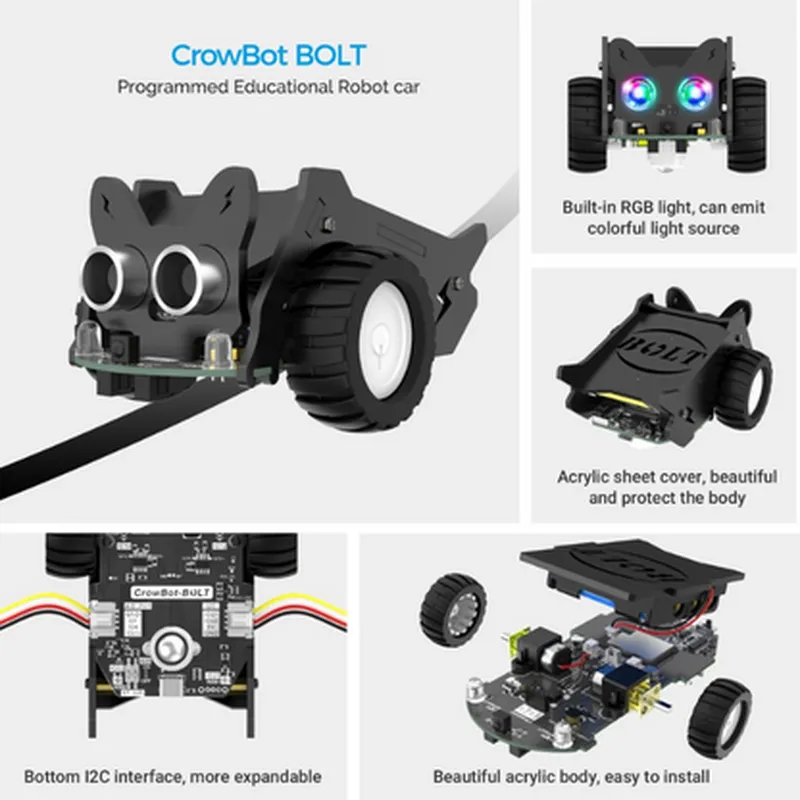
  • Pinout Explanation
  • The CrowBot BOLT is a programmable smart robot car that offers a versatile platform for STEAM (Science, Technology, Engineering, Arts, and Mathematics) education. The robot car is equipped with various sensors and interfaces, which are accessed through a set of pins on the main board. This section explains the functionality of each pin and provides guidance on how to connect them.
  • Pins:
  • 1. Vin (Input Voltage)
  • Pin type: Power input
  • Description: This pin is used to supply power to the robot car. It accepts a voltage range of 7V to 12V.
  • Connection: Connect a battery or a power source (e.g., a USB cable) to this pin.
  • 2. GND (Ground)
  • Pin type: Power ground
  • Description: This pin is the ground reference for the robot car.
  • Connection: Connect the negative terminal of the power source or battery to this pin.
  • 3. VCC (3.3V Output)
  • Pin type: Power output
  • Description: This pin provides a stable 3.3V output voltage for external components.
  • Connection: Connect external devices that require a 3.3V power supply to this pin.
  • 4. RX (UART Receive)
  • Pin type: Digital input
  • Description: This pin is used for serial communication and receives data from an external serial device.
  • Connection: Connect the RX pin of an external serial device (e.g., a microcontroller or a sensor) to this pin.
  • 5. TX (UART Transmit)
  • Pin type: Digital output
  • Description: This pin is used for serial communication and transmits data to an external serial device.
  • Connection: Connect the TX pin of an external serial device (e.g., a microcontroller or a sensor) to this pin.
  • 6. SCL (I2C Clock)
  • Pin type: Digital input/output
  • Description: This pin is used for I2C communication and provides the clock signal.
  • Connection: Connect the SCL pin of an external I2C device to this pin.
  • 7. SDA (I2C Data)
  • Pin type: Digital input/output
  • Description: This pin is used for I2C communication and transmits data between devices.
  • Connection: Connect the SDA pin of an external I2C device to this pin.
  • 8. IR_RX (Infrared Receive)
  • Pin type: Digital input
  • Description: This pin is used to receive infrared signals from the infrared remote control.
  • Connection: No external connection required. This pin is connected internally to the infrared receiver module.
  • 9. BUZZER (Buzzer Output)
  • Pin type: Digital output
  • Description: This pin is used to drive a buzzer or a speaker to produce sound.
  • Connection: Connect a buzzer or a speaker to this pin. Be sure to add a suitable resistor and capacitor to the circuit for proper operation.
  • 10. LED_R, LED_G, LED_B (RGB LED Outputs)
  • Pin type: Digital output
  • Description: These pins are used to control the red, green, and blue channels of an RGB LED.
  • Connection: Connect the corresponding pins of an RGB LED to these pins. Be sure to add suitable resistors to the circuit for proper operation.
  • 11. M1DIR, M2DIR (Motor Direction Control Outputs)
  • Pin type: Digital output
  • Description: These pins are used to control the direction of the two DC motors.
  • Connection: Connect the direction control pins of the motor driver IC to these pins.
  • 12. M1PWM, M2PWM (Motor Speed Control Outputs)
  • Pin type: Digital output
  • Description: These pins are used to control the speed of the two DC motors using PWM (Pulse-Width Modulation) signals.
  • Connection: Connect the PWM input pins of the motor driver IC to these pins.
  • 13. US_TRIG (Ultrasonic Trigger Output)
  • Pin type: Digital output
  • Description: This pin is used to trigger the ultrasonic sensor to send out ultrasonic waves.
  • Connection: Connect the trigger pin of an ultrasonic sensor module to this pin.
  • 14. US_ECHO (Ultrasonic Echo Input)
  • Pin type: Digital input
  • Description: This pin is used to receive the echo signal from the ultrasonic sensor.
  • Connection: Connect the echo pin of an ultrasonic sensor module to this pin.
  • 15. LINE_TRACKER (Line Tracking Sensor Input)
  • Pin type: Analog input
  • Description: This pin is used to read the analog signal from a line tracking sensor.
  • Connection: Connect the output pin of a line tracking sensor module to this pin.
  • 16. AD_KEY (Analog to Digital Converter Input)
  • Pin type: Analog input
  • Description: This pin is used as an analog input for the onboard ADC (Analog-to-Digital Converter).
  • Connection: Connect an analog sensor or a potentiometer to this pin.
  • Additional Connections:
  • Connect the motors to the motor driver IC and the motor driver IC to the main board according to the motor driver IC's datasheet.
  • Connect the infrared receiver module to the main board according to the module's datasheet.
  • Connect the power switch and the battery to the main board according to the robot car's user manual.
  • Note: Before connecting any external components, ensure that you have read and understood the datasheets of both the CrowBot BOLT and the external components. Always follow proper wiring and safety precautions when working with electrical circuits.

Code Examples

Elecrow CrowBot BOLT: Open Source Programmable Smart Robot Car, STEAM Kit with Infrared Remote Control
Overview
The Elecrow CrowBot BOLT is an open-source, programmable smart robot car designed for STEAM education. This robot car is equipped with an infrared remote control, allowing users to program and control its movements. The CrowBot BOLT is an ideal platform for students, hobbyists, and professionals to learn and experiment with robotics, programming, and IoT concepts.
Technical Specifications
Microcontroller: ESP32-WROVER-E (Dual-Core 32-bit LX6 Microprocessor)
 Wireless Connectivity: Wi-Fi, Bluetooth 4.2
 Infrared Remote Control: Yes
 Motor Drivers: 2x L298N (DC Motor Driver)
 Power Supply: 7.4V 1500mAh Li-ion Battery
 Sensors: Infrared, Ultrasonic, Line Follower
 Programming Language: C, Python (MicroPython)
API and Programming
The CrowBot BOLT can be programmed using C or MicroPython. The ESP32-WROVER-E microcontroller provides a range of libraries and APIs for controlling the robot's movements, interacting with sensors, and communicating with external devices.
Example 1: Line Follower Program (MicroPython)
```python
import machine
import time
# Initialize the line follower sensor
line_follower = machine.Pin(32, machine.Pin.IN)
# Set the motor speeds
left_motor_speed = 100
right_motor_speed = 100
while True:
    # Read the line follower sensor
    line_detected = line_follower.value()
    
    if line_detected:
        # Move forward
        machine.Pin(14, machine.Pin.OUT).value(1)  # Left motor forward
        machine.Pin(15, machine.Pin.OUT).value(1)  # Right motor forward
    else:
        # Stop and turn around
        machine.Pin(14, machine.Pin.OUT).value(0)  # Left motor stop
        machine.Pin(15, machine.Pin.OUT).value(0)  # Right motor stop
        time.sleep(0.5)
        machine.Pin(14, machine.Pin.OUT).value(1)  # Left motor backward
        machine.Pin(15, machine.Pin.OUT).value(1)  # Right motor backward
        time.sleep(0.5)
```
This example demonstrates how to use the line follower sensor to control the robot's movement. The program reads the sensor value and adjusts the motor speeds accordingly.
Example 2: Infrared Remote Control (C)
```c
#include <esp_wifi.h>
#include <esp_remote.h>
// Define the infrared remote control commands
#define CMD_FORWARD 0x10
#define CMD_BACKWARD 0x11
#define CMD_LEFT 0x12
#define CMD_RIGHT 0x13
#define CMD_STOP 0x14
void IRAM_ATTR infrared_callback(void args) {
    // Read the infrared remote control signal
    uint8_t signal = esp_remote_get_signal();
    
    switch (signal) {
        case CMD_FORWARD:
            // Move forward
            gpio_set_level(14, 1);  // Left motor forward
            gpio_set_level(15, 1);  // Right motor forward
            break;
        case CMD_BACKWARD:
            // Move backward
            gpio_set_level(14, 1);  // Left motor backward
            gpio_set_level(15, 1);  // Right motor backward
            break;
        case CMD_LEFT:
            // Turn left
            gpio_set_level(14, 1);  // Left motor forward
            gpio_set_level(15, 0);  // Right motor stop
            break;
        case CMD_RIGHT:
            // Turn right
            gpio_set_level(14, 0);  // Left motor stop
            gpio_set_level(15, 1);  // Right motor forward
            break;
        case CMD_STOP:
            // Stop
            gpio_set_level(14, 0);  // Left motor stop
            gpio_set_level(15, 0);  // Right motor stop
            break;
    }
}
void setup() {
    // Initialize the infrared remote control
    esp_remote_init(infrared_callback);
}
void loop() {
    // No operation
}
```
This example demonstrates how to use the infrared remote control to control the robot's movement. The program defines the infrared remote control commands and uses an interrupt-based approach to read the signal and adjust the motor speeds accordingly.
These examples provide a basic understanding of how to program and control the Elecrow CrowBot BOLT using MicroPython and C. By leveraging the robot's APIs and libraries, developers can create more complex and innovative projects.