64 KB of on-chip flash memory for storing program code and data.


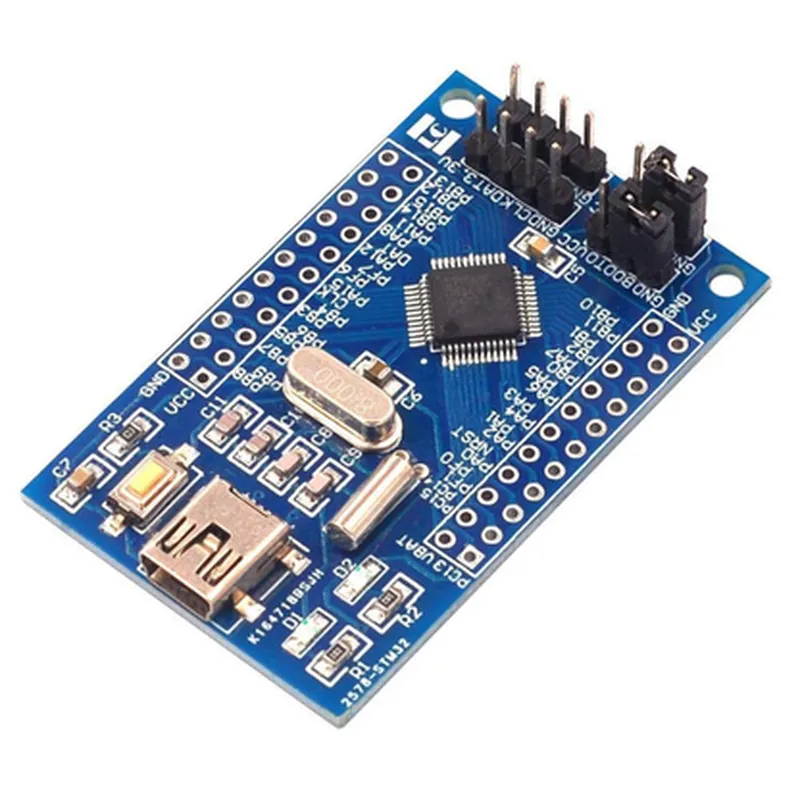
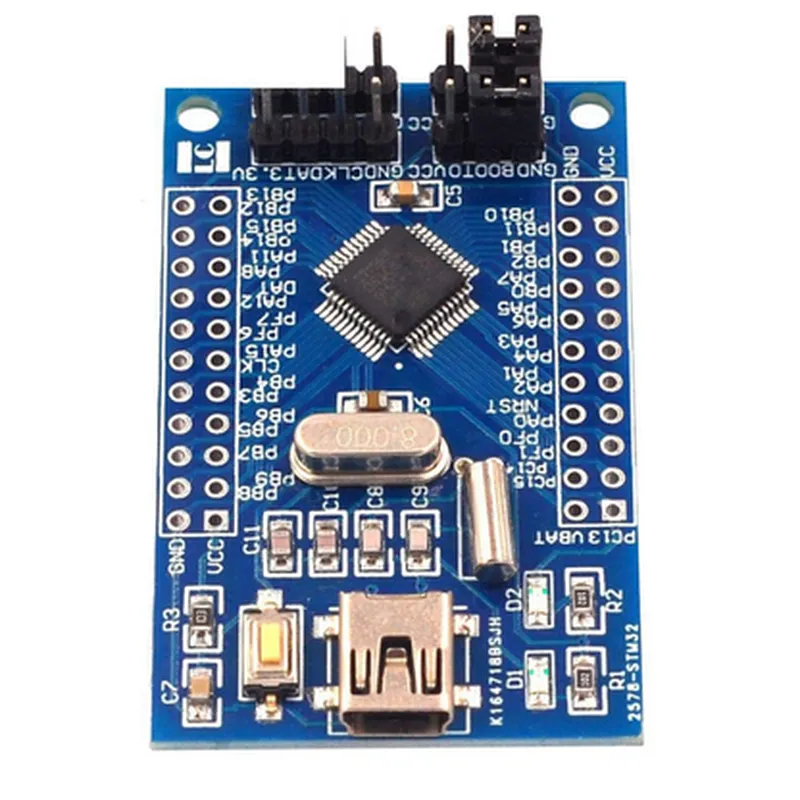
64 KB of on-chip flash memory for storing program code and data.
8 KB of on-chip static random-access memory (SRAM) for data storage.
A range of peripherals, including timers, USART, SPI, I2C, I2S, USB, and analog-to-digital converters.
Key Features
| The ARM Cortex-M0 STM32F051C8T6 STM32 Core Board offers the following key features |
The board is compact, measuring only 38 x 24 mm, making it ideal for IoT projects with limited space.
The STM32F051C8T6 microcontroller is designed for low-power applications, making it suitable for battery-powered devices.
| High-performance processing | The ARM Cortex-M0 processor core provides high-performance processing capabilities, making it suitable for demanding IoT applications. |
The board offers a range of peripherals, including USART, SPI, I2C, I2S, USB, and analog-to-digital converters, which can be used to interface with various sensors and actuators.
The board features an onboard crystal oscillator, which provides a stable clock source for the microcontroller.
The board provides a USB interface, which can be used for programming, debugging, and communication with a host computer.
| Breadboard-friendly design | The board features a breadboard-friendly design, making it easy to connect to external components and sensors. |
Pinouts and Connectors
| The board has a total of 36 pins, which are divided into the following categories |
26 pins are dedicated to the microcontroller, including power pins, Ground pins, and peripherals.
4 pins are dedicated to the USB interface.
6 pins are available for external connections, including GPIO, ADC, and DAC.
| The board also features various connectors, including |
A standard USB-A connector for programming, debugging, and communication with a host computer.
The board features breadboard pins, making it easy to connect to external components and sensors.
Applications
| The ARM Cortex-M0 STM32F051C8T6 STM32 Core Board is suitable for a wide range of IoT applications, including |
The board's low power consumption and high-performance processing make it ideal for robotics projects.
The board can be used to develop home automation projects, such as smart lighting systems and temperature control systems.
The board can be used to develop industrial control systems, such as motor control and process control systems.
The board's small form factor and low power consumption make it suitable for wearable devices, such as fitness trackers and smartwatches.
Software Development
| The ARM Cortex-M0 STM32F051C8T6 STM32 Core Board can be programmed using various development tools, including |
A popular development environment for ARM-based microcontrollers.
A comprehensive development environment for embedded systems.
A free, online development environment for ARM-based microcontrollers.
Conclusion
The ARM Cortex-M0 STM32F051C8T6 STM32 Core Board is a powerful and versatile development board, ideal for prototyping and development of IoT projects. Its compact size, low power consumption, and high-performance processing capabilities make it suitable for a wide range of applications, from robotics to home automation and industrial control.
ARM Cortex-M0 STM32F051C8T6 STM32 Core Board Minimum Development Board DocumentationOverviewThe ARM Cortex-M0 STM32F051C8T6 STM32 Core Board is a minimum development board based on the STM32F051C8T6 microcontroller, which is part of the STM32F0 series of 32-bit microcontrollers. This board provides a compact and cost-effective solution for developing IoT projects, robots, and other embedded systems.Technical SpecificationsMicrocontroller: STM32F051C8T6
Core: ARM Cortex-M0
Clock Speed: 48 MHz
Flash Memory: 64 KB
SRAM: 8 KB
Peripherals: UART, SPI, I2C, I2S, USB, ADC, DAC, timers, and GPIOsCode Examples### Example 1: Blinking LED using GPIOIn this example, we will use the GPIO pins to blink an LED connected to the board.Hardware RequirementsARM Cortex-M0 STM32F051C8T6 STM32 Core Board
LED
Resistor (1 k)
Breadboard and jumper wiresSoftware RequirementsSTM32CubeMX (for code generation)
Keil Vision (or any other compatible IDE)Code
```c
#include "stm32f0xx_hal.h"int main(void) {
/ Initialize the HAL library /
HAL_Init();/ Configure GPIO pin PA5 as output /
GPIO_InitTypeDef GPIO_InitStruct = {0};
GPIO_InitStruct.Pin = GPIO_PIN_5;
GPIO_InitStruct.Mode = GPIO_MODE_OUTPUT;
GPIO_InitStruct.Pull = GPIO_NOPULL;
HAL_GPIO_Init(GPIOA, &GPIO_InitStruct);while (1) {
/ Set the LED on /
HAL_GPIO_WritePin(GPIOA, GPIO_PIN_5, GPIO_PIN_SET);
HAL_Delay(500); / wait 500 ms // Set the LED off /
HAL_GPIO_WritePin(GPIOA, GPIO_PIN_5, GPIO_PIN_RESET);
HAL_Delay(500); / wait 500 ms /
}
}
```
### Example 2: UART CommunicationIn this example, we will use the UART peripheral to send and receive data between the board and a serial terminal.Hardware RequirementsARM Cortex-M0 STM32F051C8T6 STM32 Core Board
USB-to-TTL serial adapter (e.g., FTDI)
Serial terminal software (e.g., Tera Term)Software RequirementsSTM32CubeMX (for code generation)
Keil Vision (or any other compatible IDE)Code
```c
#include "stm32f0xx_hal.h"int main(void) {
/ Initialize the HAL library /
HAL_Init();/ Configure UART2 as asynchronous mode /
UART_HandleTypeDef huart2;
huart2.Instance = USART2;
huart2.Init.BaudRate = 9600;
huart2.Init.WordLength = UART_WORDLENGTH_8B;
huart2.Init.StopBits = UART_STOPBITS_1;
huart2.Init.Parity = UART_PARITY_NONE;
huart2.Init.Mode = UART_MODE_TX_RX;
HAL_UART_Init(&huart2);while (1) {
/ Send a string to the serial terminal /
uint8_t data[] = "Hello, world!";
HAL_UART_Transmit(&huart2, data, sizeof(data), 1000);/ Receive data from the serial terminal /
uint8_t rx_data[10];
HAL_UART_Receive(&huart2, rx_data, 10, 1000);
HAL_Delay(100); / wait 100 ms /
}
}
```
These examples demonstrate the basic usage of the ARM Cortex-M0 STM32F051C8T6 STM32 Core Board. You can modify the code to suit your specific project requirements.