Stufin
Home Quick Cart Profile

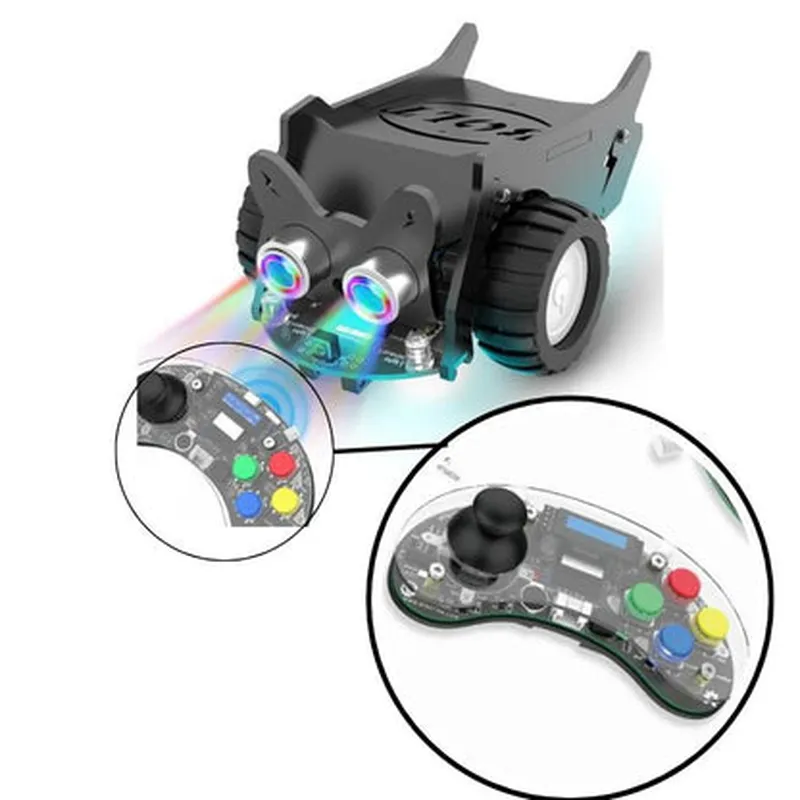
Elecrow - CrowBot BOLT - Open Source Programmable Smart Robot Car, STEAM Kit with Joystick Handle


Buy Now on Stufin

Component Name

Elecrow - CrowBot BOLT - Open Source Programmable Smart Robot Car, STEAM Kit with Joystick Handle
Overview

The Elecrow CrowBot BOLT is an open-source, programmable smart robot car designed for STEAM (Science, Technology, Engineering, Arts, and Mathematics) education. This innovative kit combines robotics, IoT, and AI to provide an engaging and interactive learning experience for students, hobbyists, and professionals alike.

Functionality

The CrowBot BOLT is a programmable robot car that can be controlled using a joystick handle, allowing users to navigate through obstacles and explore various environments. The robot car can be programmed using popular programming languages such as Python, C++, and Java, making it an ideal platform for learning programming concepts, robotics, and automation.

Key Features

### Hardware Features

  • Microcontroller: The CrowBot BOLT is based on the Arduino Mega 2560 board, a popular open-source microcontroller platform.
  • Motor Driver: The robot car features a built-in L298P motor driver, which allows for precise control of the two DC motors.
  • Sensors: The kit includes various sensors, such as:

Ultrasonic sensor for obstacle detection and distance measurement.

Infrared sensor for line following and edge detection.

Light sensor for detecting ambient light levels.

  • Power Supply: The robot car is powered by a 7.4V 2000mAh Li-ion battery, providing a reasonable operating time.
  • Communication: The CrowBot BOLT supports wireless communication through an onboard WiFi module.
  • Expansion: The kit features expansion ports for connecting additional modules, such as GPS, Bluetooth, or cameras.

### Software Features

  • Programming Languages: The CrowBot BOLT supports various programming languages, including Python, C++, and Java.
  • Arduino IDE: The kit is fully compatible with the Arduino Integrated Development Environment (IDE), making it easy to write and upload code to the robot car.
  • Open-Source: The CrowBot BOLT is an open-source platform, allowing users to modify and customize the code to suit their needs.
  • Example Code: The kit comes with a range of example codes and projects to help users get started with programming and robotics.

### Educational Features

  • STEAM Education: The CrowBot BOLT is designed specifically for STEAM education, focusing on robotics, programming, and automation.
  • Project-Based Learning: The kit encourages project-based learning, allowing students to develop problem-solving skills, critical thinking, and creativity.
  • Tutorial and Documentation: Elecrow provides extensive tutorial and documentation resources to help teachers and students get started with the CrowBot BOLT.

### Additional Features

  • Joystick Handle: The kit includes a joystick handle for manual control of the robot car.
  • Modular Design: The CrowBot BOLT features a modular design, making it easy to assemble and disassemble for maintenance and upgrades.
  • Durable Construction: The robot car is built with durable materials, ensuring a long lifespan and withstanding rough handling.

Applications

  • Education: Perfect for STEAM education, robotics, and programming classes.
  • Hobbyists: Ideal for DIY enthusiasts and hobbyists interested in robotics and IoT.
  • Research: Suitable for research projects and prototyping in robotics, AI, and automation.
  • Competition: Can be used in robotics competitions, such as robotics Olympiads and hackathons.
The Elecrow CrowBot BOLT is suitable for a wide range of applications, including

Conclusion

The Elecrow CrowBot BOLT is a comprehensive, open-source programmable smart robot car designed for STEAM education and beyond. With its rich feature set, modularity, and ease of use, this kit provides an engaging and interactive learning experience for students, hobbyists, and professionals alike.

Pin Configuration

  • Elecrow CrowBot BOLT - Open Source Programmable Smart Robot Car, STEAM Kit with Joystick Handle
  • Pinout Description
  • The Elecrow CrowBot BOLT is an open-source programmable smart robot car that comes with a joystick handle. This STEAM kit is designed for educational purposes, allowing users to learn programming and robotics concepts. The robot car is based on a microcontroller platform, which provides a range of input/output pins for connecting various sensors, actuators, and peripherals. This section describes the pins on the CrowBot BOLT, explaining their functions and how to connect them.
  • Microcontroller Pins
  • The CrowBot BOLT's microcontroller has a total of 34 pins, which are divided into several categories:
  • ### Digital Pins (D0 - D13)
  • These pins are used for digital input/output operations.
  • D0 - D7: These pins can be used as digital input/output pins or as serial communication pins (UART, SPI, I2C).
  • + Pin D0: Digital input/output or UART RX (serial receive)
  • + Pin D1: Digital input/output or UART TX (serial transmit)
  • + Pin D2: Digital input/output or I2C SDA (serial data)
  • + Pin D3: Digital input/output or I2C SCL (serial clock)
  • + Pin D4: Digital input/output or SPI MOSI (master out slave in)
  • + Pin D5: Digital input/output or SPI MISO (master in slave out)
  • + Pin D6: Digital input/output or SPI SCK (serial clock)
  • + Pin D7: Digital input/output
  • D8 - D13: These pins are dedicated digital input/output pins.
  • + Pin D8: Digital input/output
  • + Pin D9: Digital input/output
  • + Pin D10: Digital input/output
  • + Pin D11: Digital input/output
  • + Pin D12: Digital input/output
  • + Pin D13: Digital input/output
  • ### Analog Pins (A0 - A5)
  • These pins are used for analog input operations.
  • A0 - A5: These pins can be used to read analog signals from sensors or other analog devices.
  • + Pin A0: Analog input
  • + Pin A1: Analog input
  • + Pin A2: Analog input
  • + Pin A3: Analog input
  • + Pin A4: Analog input
  • + Pin A5: Analog input
  • ### Power Pins (VCC, GND)
  • These pins provide power and ground connections.
  • VCC: Positive power supply pin ( typically 5V or 3.3V)
  • GND: Ground pin
  • ### Special Pins (VIN, RST, 3.3V, 5V)
  • These pins have special functions.
  • VIN: Input voltage pin (connected to battery or external power source)
  • RST: Reset pin (active low)
  • 3.3V: 3.3V regulated power output pin
  • 5V: 5V regulated power output pin
  • ### Joystick Handle Pins
  • The joystick handle has the following pins:
  • VCC: Positive power supply pin (connected to VIN)
  • GND: Ground pin
  • X-axis: Analog input pin for X-axis movement detection
  • Y-axis: Analog input pin for Y-axis movement detection
  • SW: Digital input pin for joystick button press detection
  • Connecting the Pins
  • To connect the pins, follow these steps:
  • 1. Connect the power supply:
  • Connect the VIN pin to a suitable power source (e.g., battery or USB adapter).
  • Make sure the VCC pin is connected to the VIN pin.
  • 2. Connect the ground:
  • Connect the GND pin to a suitable ground point.
  • 3. Connect sensors and actuators:
  • Connect digital sensors or actuators to the digital pins (D0 - D13) as required.
  • Connect analog sensors to the analog pins (A0 - A5) as required.
  • 4. Connect the joystick handle:
  • Connect the joystick handle's VCC pin to the VIN pin.
  • Connect the joystick handle's GND pin to the GND pin.
  • Connect the joystick handle's X-axis, Y-axis, and SW pins to digital pins (D0 - D13) as required.
  • Remember to consult the datasheet and user manual for specific pinouts, voltage levels, and programming requirements for the CrowBot BOLT. Additionally, ensure proper connection and insulation of wires to avoid damage or electrical shock.

Code Examples

Elecrow - CrowBot BOLT - Open Source Programmable Smart Robot Car, STEAM Kit with Joystick Handle
Overview
The CrowBot BOLT is an open-source, programmable smart robot car designed for STEAM education. It comes with a joystick handle and is perfect for beginners and experienced users alike. This robot car is equipped with various sensors, a microcontroller, and a motor driver, making it an ideal platform for learning programming, robotics, and electronics.
Hardware Specifications
Microcontroller: ESP32-WROVER-B
 Motor Driver: L298P
 Sensors: Ultrasonic, Infrared, and Line Follower
 Joystick Handle: 2.4GHz Wireless Joystick
 Power Source: 18650 Battery (Not Included)
 Operating Voltage: 3.7V - 4.2V
 Communication: Wi-Fi, Bluetooth, and Serial
Programming Languages
The CrowBot BOLT supports multiple programming languages, including:
MicroPython
 C/C++
 Arduino IDE
Example 1: Line Follower using MicroPython
In this example, we will create a line follower robot using MicroPython. The robot will use the line follower sensor to detect the line and adjust its movement accordingly.
Code:
```python
import machine
import utime
# Initialize line follower sensor
line_sensor = machine.Pin(26, machine.Pin.IN)
# Initialize motor pins
left_motor_forward = machine.Pin(13, machine.Pin.OUT)
left_motor_backward = machine.Pin(12, machine.Pin.OUT)
right_motor_forward = machine.Pin(14, machine.Pin.OUT)
right_motor_backward = machine.Pin(15, machine.Pin.OUT)
while True:
    # Read line sensor value
    line_value = line_sensor.value()
# Move forward if line is detected
    if line_value == 1:
        left_motor_forward.value(1)
        right_motor_forward.value(1)
    # Turn left if line is not detected
    else:
        left_motor_backward.value(1)
        right_motor_forward.value(1)
# Delay for 50ms
    utime.sleep_ms(50)
```
Example 2: Obstacle Avoidance using C/C++
In this example, we will create an obstacle avoidance robot using C/C++. The robot will use the ultrasonic sensor to detect obstacles and adjust its movement accordingly.
Code:
```c
#include <Arduino.h>
// Initialize ultrasonic sensor pins
const int trigPin = 2;
const int echoPin = 3;
// Initialize motor pins
const int left_motor_forward = 13;
const int left_motor_backward = 12;
const int right_motor_forward = 14;
const int right_motor_backward = 15;
void setup() {
  pinMode(trigPin, OUTPUT);
  pinMode(echoPin, INPUT);
  pinMode(left_motor_forward, OUTPUT);
  pinMode(left_motor_backward, OUTPUT);
  pinMode(right_motor_forward, OUTPUT);
  pinMode(right_motor_backward, OUTPUT);
}
void loop() {
  // Read ultrasonic sensor value
  int distance = readUltrasonic();
// Move forward if no obstacle is detected
  if (distance > 20) {
    digitalWrite(left_motor_forward, HIGH);
    digitalWrite(right_motor_forward, HIGH);
  }
  // Turn right if obstacle is detected
  else {
    digitalWrite(left_motor_backward, HIGH);
    digitalWrite(right_motor_forward, HIGH);
  }
// Delay for 50ms
  delay(50);
}
int readUltrasonic() {
  digitalWrite(trigPin, LOW);
  delayMicroseconds(2);
  digitalWrite(trigPin, HIGH);
  delayMicroseconds(10);
  digitalWrite(trigPin, LOW);
int duration = pulseIn(echoPin, HIGH);
  int distance = duration  0.034 / 2;
return distance;
}
```
Example 3: Joystick Control using Arduino IDE
In this example, we will create a joystick-controlled robot using the Arduino IDE. The robot will receive joystick data from the 2.4GHz wireless joystick and adjust its movement accordingly.
Code:
```arduino
#include <CrowBot_BOLT.h>
// Initialize joystick library
Joystick joystick;
void setup() {
  Serial.begin(115200);
  joystick.begin();
}
void loop() {
  // Read joystick data
  int xValue = joystick.getXAxis();
  int yValue = joystick.getYAxis();
// Move forward if joystick is pushed forward
  if (yValue > 0) {
    digitalWrite(left_motor_forward, HIGH);
    digitalWrite(right_motor_forward, HIGH);
  }
  // Move backward if joystick is pushed backward
  else if (yValue < 0) {
    digitalWrite(left_motor_backward, HIGH);
    digitalWrite(right_motor_backward, HIGH);
  }
  // Turn left if joystick is pushed left
  else if (xValue < 0) {
    digitalWrite(left_motor_backward, HIGH);
    digitalWrite(right_motor_forward, HIGH);
  }
  // Turn right if joystick is pushed right
  else if (xValue > 0) {
    digitalWrite(left_motor_forward, HIGH);
    digitalWrite(right_motor_backward, HIGH);
  }
// Delay for 50ms
  delay(50);
}
```
These examples demonstrate how to use the CrowBot BOLT in various contexts, including line following, obstacle avoidance, and joystick control. The robot's flexibility and programmability make it an ideal platform for learning and development.