Stufin
Home Quick Cart Profile

ELECROW Crowbits Explorer Kit with No-Coding Control, LEGO Compatibility, and STEM Learning

Buy Now on Stufin

Component Name

ELECROW Crowbits Explorer Kit


Overview

The ELECROW Crowbits Explorer Kit is a innovative, no-coding control kit designed for STEM education and interactive learning. This unique kit combines the benefits of LEGO compatibility with advanced IoT technology, making it an ideal tool for kids and adults alike to explore the world of programming, robotics, and electronics.
Functionality

The Crowbits Explorer Kit allows users to create and control interactive projects without requiring any prior coding knowledge. The kit includes a range of modular components, each with its own specific function, which can be easily connected and programmed using the Crowbits app. This intuitive app provides a visual interface for users to design and control their projects, making it an excellent introduction to programming and IoT concepts.

Key Features

  • No-Coding Control: The kit's no-coding control system allows users to create and program projects without needing to write code. This feature makes it accessible to users of all ages and skill levels.
  • LEGO Compatibility: The Crowbits Explorer Kit is designed to be compatible with LEGO bricks, enabling users to integrate their creations with the popular building blocks.
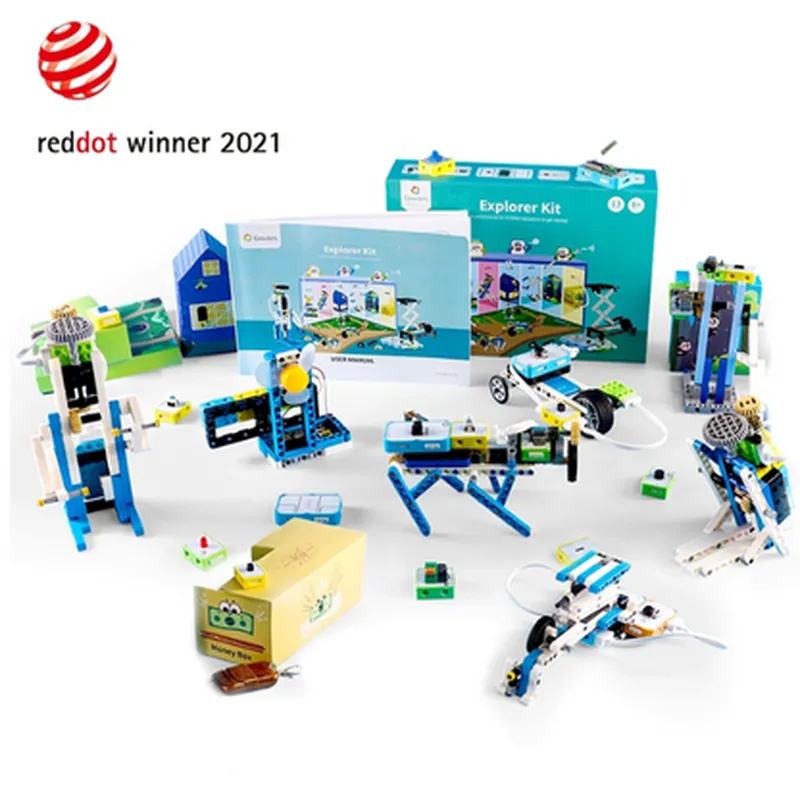
  • Modular Components: The kit includes a range of modular components, each with its own specific function, such as sensors, motors, and displays. These components can be easily connected and rearranged to create different projects.
  • STEM Learning: The Crowbits Explorer Kit is specifically designed for STEM education, providing an interactive and engaging way to learn about programming, electronics, and robotics.
  • Crowbits App: The kit comes with a dedicated app that provides a visual interface for designing and controlling projects. The app is available for both iOS and Android devices.
  • Wi-Fi and Bluetooth Connectivity: The kit supports both Wi-Fi and Bluetooth connectivity, enabling users to control their projects remotely and connect to other devices.
  • Sensor and Motor Integration: The kit includes a range of sensors, such as light, sound, and touch sensors, as well as motors, which can be used to create interactive and dynamic projects.
  • Customizable Projects: The Crowbits Explorer Kit allows users to create custom projects, from simple robotic cars to complex interactive installations.
  • Tutorials and Resources: The kit comes with a range of tutorials and resources, including online guides, videos, and lesson plans, to help users get started and make the most of the kit.

Microcontroller

ESP32

Wireless Connectivity

Wi-Fi and Bluetooth 4.2

Operating Voltage

3.3V

Power Consumption

150mA (max)

Dimensions

100 x 80 x 20mm (main board)

What's Included

Main Board

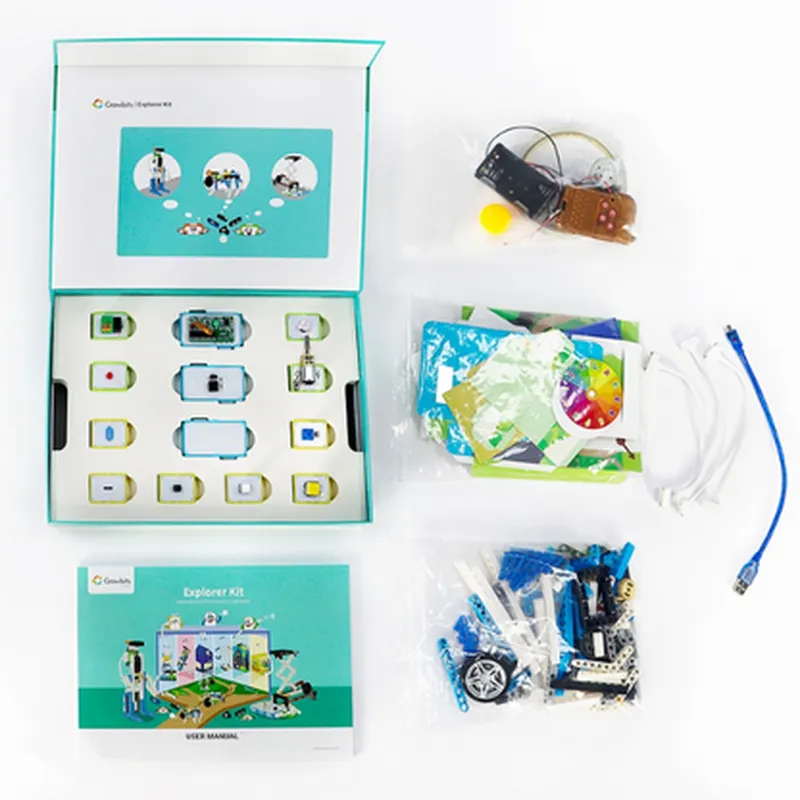
Modular Components (sensors, motors, displays, etc.)

Crowbits App (iOS and Android)

LEGO Compatibility Adapter

Power Supply

User Manual and Tutorial Guides

Online Resources and Lesson Plans

The ELECROW Crowbits Explorer Kit is designed for
Students (ages 8-18) interested in STEM education and interactive learning

Teachers and educators looking for innovative tools for their classrooms

Hobbyists and makers interested in IoT, robotics, and electronics

Parents seeking to introduce their children to programming and coding concepts

Pin Configuration

  • ELECROW Crowbits Explorer Kit Pinout Guide
  • The ELECROW Crowbits Explorer Kit is a innovative, no-coding IoT development platform designed for STEM learning and LEGO compatibility. The kit features a comprehensive set of pins that enable users to connect various sensors, actuators, and modules to create interactive projects. In this documentation, we will delve into the details of each pin, explaining their functions and how to connect them.
  • Pin Structure:
  • The Crowbits Explorer Kit has a total of 34 pins, divided into three categories: Power, Digital, and analog pins.
  • Power Pins (6):
  • 1. VIN (5V): Input voltage pin, accepts 5V DC power from an external power source or battery.
  • 2. GND: Ground pin, provides a common ground connection for the entire circuit.
  • 3. 3.3V: Regulated 3.3V output pin, suitable for powering small modules and sensors.
  • 4. VCC: 5V output pin, similar to VIN, but with built-in voltage regulation.
  • 5. Batt-: Negative terminal of the onboard battery connector (optional).
  • 6. Batt+: Positive terminal of the onboard battery connector (optional).
  • Digital Pins (14):
  • 1. D0 (RX): Digital input/output pin, also serves as the receive pin for serial communication.
  • 2. D1 (TX): Digital input/output pin, also serves as the transmit pin for serial communication.
  • 3. D2: Digital input/output pin, can be used for general-purpose I/O operations.
  • 4. D3: Digital input/output pin, can be used for general-purpose I/O operations.
  • 5. D4: Digital input/output pin, can be used for general-purpose I/O operations.
  • 6. D5: Digital input/output pin, can be used for general-purpose I/O operations.
  • 7. D6: Digital input/output pin, can be used for general-purpose I/O operations.
  • 8. D7: Digital input/output pin, can be used for general-purpose I/O operations.
  • 9. D8: Digital input/output pin, can be used for general-purpose I/O operations.
  • 10. D9: Digital input/output pin, can be used for general-purpose I/O operations.
  • 11. D10: Digital input/output pin, can be used for general-purpose I/O operations.
  • 12. D11: Digital input/output pin, can be used for general-purpose I/O operations.
  • 13. D12: Digital input/output pin, can be used for general-purpose I/O operations.
  • 14. D13: Digital input/output pin, can be used for general-purpose I/O operations.
  • Analog Pins (14):
  • 1. A0: Analog input pin, can be used to read analog signals from sensors.
  • 2. A1: Analog input pin, can be used to read analog signals from sensors.
  • 3. A2: Analog input pin, can be used to read analog signals from sensors.
  • 4. A3: Analog input pin, can be used to read analog signals from sensors.
  • 5. A4: Analog input pin, can be used to read analog signals from sensors.
  • 6. A5: Analog input pin, can be used to read analog signals from sensors.
  • 7. A6: Analog input pin, can be used to read analog signals from sensors.
  • 8. A7: Analog input pin, can be used to read analog signals from sensors.
  • 9. A8: Analog input pin, can be used to read analog signals from sensors.
  • 10. A9: Analog input pin, can be used to read analog signals from sensors.
  • 11. A10: Analog input pin, can be used to read analog signals from sensors.
  • 12. A11: Analog input pin, can be used to read analog signals from sensors.
  • 13. A12: Analog input pin, can be used to read analog signals from sensors.
  • 14. A13: Analog input pin, can be used to read analog signals from sensors.
  • Connecting the Pins:
  • When connecting pins to modules, sensors, or actuators, ensure you follow these guidelines:
  • Use the correct pin type (digital or analog) for the specific module or sensor.
  • Verify the voltage and current ratings of the pin and the module or sensor to avoid damage.
  • Use jumper wires or breadboard connections to connect pins to modules or sensors.
  • Pay attention to the pin orientation and avoid inserting pins in the wrong orientation.
  • By understanding the pin structure and functions of the ELECROW Crowbits Explorer Kit, you can unlock a world of creative possibilities in IoT development and STEM education.

Code Examples

ELECROW Crowbits Explorer Kit Documentation
Overview
The ELECROW Crowbits Explorer Kit is an innovative, no-coding control kit designed for STEM learning and creative experimentation. It features LEGO compatibility, allowing users to build and program their projects using a drag-and-drop interface. This kit is perfect for students, hobbyists, and professionals looking to explore the world of IoT and robotics without requiring extensive programming knowledge.
Components Included
Crowbits Main Board (with Wi-Fi and Bluetooth connectivity)
 Motor Module
 Sensor Module (including light, sound, and vibration sensors)
 LCD Display Module
 Power Module (with USB and battery connections)
 LEGO-compatible building blocks
No-Coding Control Interface
The Crowbits Explorer Kit uses a visual programming interface, allowing users to create programs by dragging and dropping blocks rather than writing code. This interface is accessible through a web browser or mobile app.
Example 1: Line Follower Robot using Crowbits and LEGO
In this example, we'll create a line follower robot using the Crowbits Explorer Kit and LEGO building blocks.
Hardware Components
Crowbits Main Board
 Motor Module (x2)
 Sensor Module (with line detection sensor)
 Power Module
 LEGO building blocks (for robot chassis and wheels)
No-Coding Program
Using the Crowbits visual programming interface, create a program with the following blocks:
1. `When` block: Set the trigger to "Line detected" (using the line detection sensor)
2. `Then` block: Set the motor speed to 50% (for both motors)
3. `ELSE` block: Set the motor speed to -50% (for both motors)
4. `Repeat` block: Loop the program indefinitely
This program will allow the robot to follow a line by adjusting its motor speed based on the sensor's detection of the line.
Example 2: Environmental Monitoring System using Crowbits and Sensors
In this example, we'll create an environmental monitoring system using the Crowbits Explorer Kit and various sensors.
Hardware Components
Crowbits Main Board
 Sensor Module (with temperature, humidity, and light sensors)
 LCD Display Module
 Power Module
No-Coding Program
Using the Crowbits visual programming interface, create a program with the following blocks:
1. `When` block: Set the trigger to "Temperature exceeds 25C" (using the temperature sensor)
2. `Then` block: Display the temperature reading on the LCD display
3. `When` block: Set the trigger to "Humidity exceeds 60%" (using the humidity sensor)
4. `Then` block: Display the humidity reading on the LCD display
5. `When` block: Set the trigger to "Light intensity exceeds 500 lux" (using the light sensor)
6. `Then` block: Display the light intensity reading on the LCD display
This program will allow the system to monitor and display environmental data in real-time, making it an excellent project for STEM education and IoT exploration.
Example 3: Wi-Fi Remote Control using Crowbits and Mobile App
In this example, we'll create a Wi-Fi remote control system using the Crowbits Explorer Kit and a mobile app.
Hardware Components
Crowbits Main Board
 Motor Module
 Power Module
No-Coding Program
Using the Crowbits visual programming interface, create a program with the following blocks:
1. `When` block: Set the trigger to "Wi-Fi command received" (using the mobile app)
2. `Then` block: Set the motor speed to the received value (using the motor module)
Mobile App Configuration
Configure the mobile app to send Wi-Fi commands to the Crowbits Main Board, allowing remote control of the motor module.
This program will allow users to remotely control the motor module using a mobile app, making it an excellent project for IoT and robotics experimentation.
Conclusion
The ELECROW Crowbits Explorer Kit is an innovative, no-coding control kit that offers endless possibilities for STEM learning and IoT exploration. With its LEGO compatibility and visual programming interface, users can bring their projects to life without requiring extensive programming knowledge. The examples provided demonstrate the kit's potential in various contexts, from line follower robots to environmental monitoring systems and Wi-Fi remote control.