Stufin
Home Quick Cart Profile

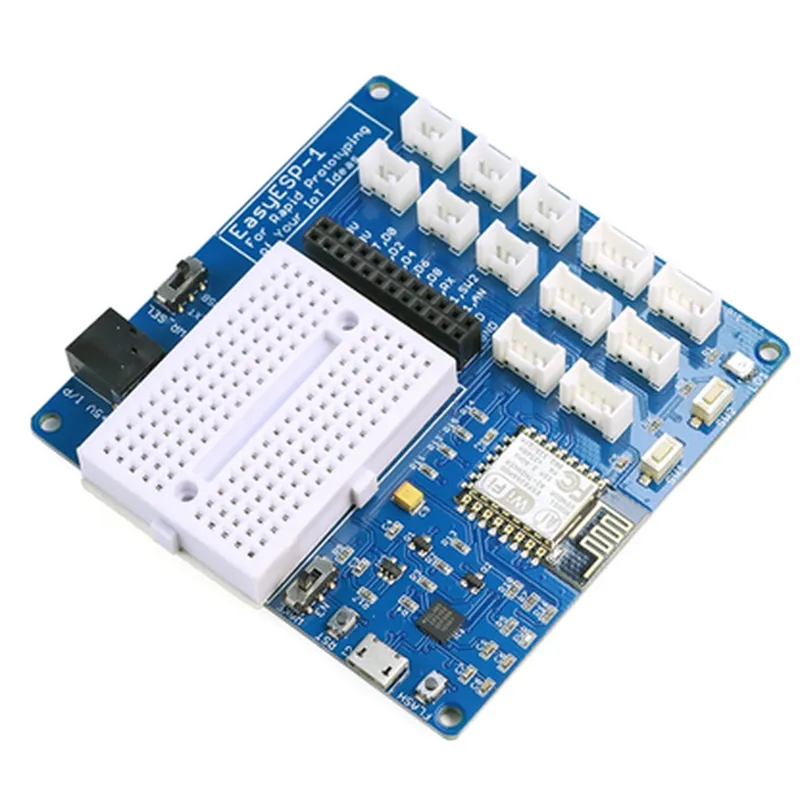
ELECROW EasyESP-1: Rapid Prototyping WiFi ESP8266 Experimenter Board - Easy Programming, GPIO Access, Breadboard

Buy Now on Stufin

Key Features

  • Microcontroller: The EasyESP-1 is built around the popular ESP8266 WROOM-02 WiFi module, which integrates a 32-bit LX6 microprocessor, 4MB of flash memory, and 520 KB of SRAM.
  • WiFi Connectivity: The board offers WiFi 802.11 b/g/n connectivity, enabling seamless communication with other devices and the internet.
  • GPIO Access: The EasyESP-1 provides 13 GPIO pins, including 10 digital pins, 2 analog input pins, and 1 analog output pin, allowing for easy connection to various sensors, actuators, and peripherals.
  • Breadboard-Friendly Design: The board features a breadboard-compatible layout, making it easy to connect and disconnect components using jumper wires.
  • Easy Programming: The EasyESP-1 supports multiple programming languages, including C, C++, Lua, and MicroPython, using popular development tools like Arduino IDE, NodeMCU, and LuaUploader.
  • On-Board USB-to-UART Bridge: The board features a built-in USB-to-UART bridge (CP2102) for easy programming and debugging via a micro-USB port.
  • Power Management: The EasyESP-1 includes a 3.3V voltage regulator and a power LED indicator, ensuring stable power supply and visual feedback.
  • Compact Size: The board measures 50mm x 25mm, making it an ideal choice for compact IoT projects and prototyping.

Functionality

  • WiFi-enabled devices: Develop WiFi-enabled devices, such as smart home automation systems, wireless sensors, and IoT gateways.
  • Robotics and Automation: Use the EasyESP-1 to build robotic projects, automate tasks, and control devices remotely.
  • Sensor Integration: Connect various sensors, such as temperature, humidity, and motion sensors, to build IoT applications and monitor environmental conditions.
  • Proof-of-Concept Development: The EasyESP-1 is an ideal platform for prototyping and testing IoT ideas, reducing the time and cost of development.
The ELECROW EasyESP-1 is designed for rapid prototyping and development of IoT projects, including

Microcontroller

ESP8266 WROOM-02

Operating Frequency

2.4 GHz

WiFi Protocol

802.11 b/g/n

Flash Memory

4MB

SRAM

520 KB

GPIO Pins

13 (10 digital, 2 analog input, 1 analog output)

Power Supply

3.3V (via USB or external power source)

Power Consumption

<200mA (active mode), <5mA (sleep mode)

Dimensions

50mm x 25mm

Datasheet

ESP8266 WROOM-02

Programming Guides

Arduino IDE, NodeMCU, LuaUploader

Schematic and PCB Layout

Available upon request

Pin Configuration

  • ELECROW EasyESP-1: Rapid Prototyping WiFi ESP8266 Experimenter Board
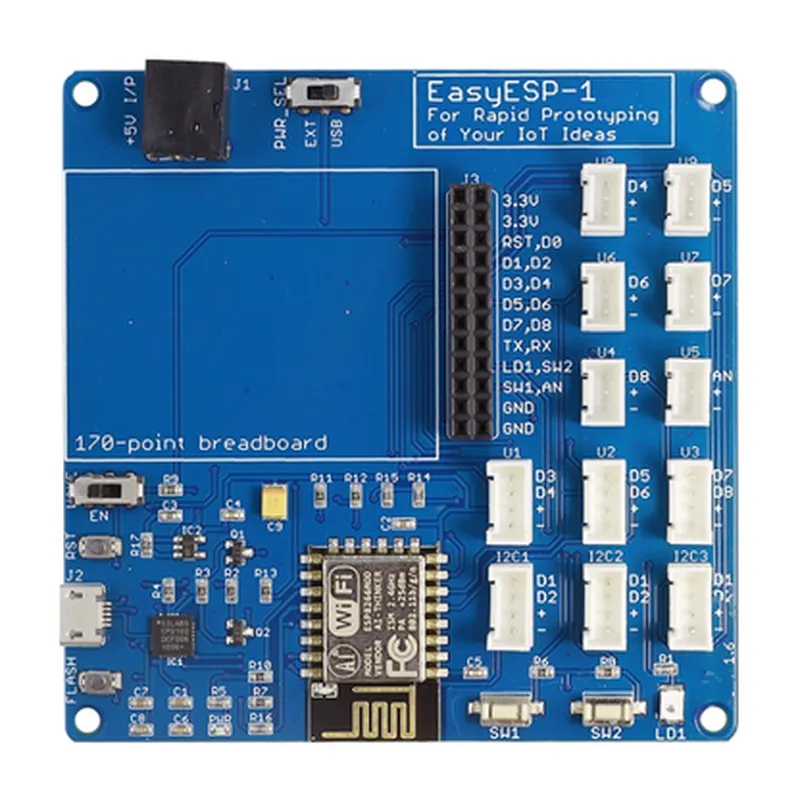
  • The ELECROW EasyESP-1 is a rapid prototyping board designed for the ESP8266 microcontroller, a popular WiFi enabled system-on-chip (SoC). The board provides easy access to GPIO pins, a breadboard-friendly layout, and simplified programming features.
  • Pinout Description
  • The EasyESP-1 board has a total of 26 pins, including power pins, GPIO pins, and special function pins. Here's a detailed description of each pin:
  • Power Pins
  • 1. VCC (3.3V): The power pin for the ESP8266 microcontroller, which operates at 3.3V.
  • 2. GND: The ground pin, used as a reference point for the circuit.
  • GPIO Pins
  • 3. GPIO0: A general-purpose input/output pin, can be used for digital input/output or as an interrupt pin.
  • 4. GPIO1: A general-purpose input/output pin, can be used for digital input/output or as an interrupt pin.
  • 5. GPIO2: A general-purpose input/output pin, can be used for digital input/output or as an interrupt pin.
  • 6. GPIO3: A general-purpose input/output pin, can be used for digital input/output or as an interrupt pin.
  • 7. GPIO4: A general-purpose input/output pin, can be used for digital input/output or as an interrupt pin.
  • 8. GPIO5: A general-purpose input/output pin, can be used for digital input/output or as an interrupt pin.
  • 9. GPIO12: A general-purpose input/output pin, can be used for digital input/output or as an interrupt pin.
  • 10. GPIO13: A general-purpose input/output pin, can be used for digital input/output or as an interrupt pin.
  • 11. GPIO14: A general-purpose input/output pin, can be used for digital input/output or as an interrupt pin.
  • 12. GPIO15: A general-purpose input/output pin, can be used for digital input/output or as an interrupt pin.
  • Special Function Pins
  • 13. RX: The receive pin for serial communication (UART).
  • 14. TX: The transmit pin for serial communication (UART).
  • 15. EN: The enable pin for the ESP8266 microcontroller. Pulling this pin high enables the chip.
  • 16. RST: The reset pin for the ESP8266 microcontroller. Pulling this pin low resets the chip.
  • 17. FLASH: The flash pin for programming the ESP8266 microcontroller.
  • Additional Pins
  • 18. 3V3: A 3.3V output pin from the onboard voltage regulator.
  • 19. VIN: The input pin for the onboard voltage regulator.
  • 20. GND: An additional ground pin for convenience.
  • Breadboard-Friendly Pins
  • 21. B1-B10: A set of 10 breadboard-friendly pins, providing access to GPIO pins and power pins.
  • Button and LED
  • 22. BOOT: A push-button used to enter programming mode.
  • 23. LED: A built-in LED indicator, connected to GPIO2.
  • Mounting Holes
  • 24. MH1-MH4: Four mounting holes for securing the board to a chassis or breadboard.
  • Note:
  • The pin numbering starts from the top-left corner of the board and increases clockwise.
  • The GPIO pins can be used as inputs, outputs, or for special functions like I2C, SPI, or UART, depending on the specific application and firmware configuration.
  • Always refer to the ESP8266 datasheet and the ELECROW EasyESP-1 documentation for specific pin usage and configuration guidelines.
  • Connecting the Pins
  • When connecting the pins, make sure to follow proper breadboarding and wiring techniques to avoid damage to the board or components. Here's a general outline for connecting the pins:
  • Use a breadboard to connect components and modules to the EasyESP-1 board.
  • Connect power sources (e.g., a USB cable or a battery) to the VIN and GND pins.
  • Connect GPIO pins to peripherals like sensors, LEDs, or motors, depending on your project's requirements.
  • Use the RX and TX pins for serial communication (UART) with a serial terminal or another device.
  • Use the EN and RST pins to control the ESP8266 microcontroller's power and reset states.
  • Use the FLASH pin for programming the ESP8266 microcontroller.
  • Connect the BOOT button to a pull-up resistor and a capacitor to enable programming mode.
  • Use the built-in LED and resistor to indicate the board's status or for debugging purposes.
  • Remember to consult the EasyESP-1 documentation and the ESP8266 datasheet for specific connection diagrams and configuration guidelines for your project.

Code Examples

ELECROW EasyESP-1: Rapid Prototyping WiFi ESP8266 Experimenter Board
Overview
The ELECROW EasyESP-1 is a rapid prototyping WiFi ESP8266 experimenter board designed for easy programming and GPIO access. This board is perfect for IoT projects, prototyping, and development, offering a breadboard-friendly design for quick connections.
Features
ESP8266 WiFi module with 802.11 b/g/n protocol
 Onboard USB-to-UART converter for easy programming
 Breadboard-friendly design for easy connections
 GPIO access to all ESP8266 pins
 Power supply options: USB, battery, or external power source
 Support for Arduino IDE, MicroPython, and Lua programming languages
Pinout
The ELECROW EasyESP-1 has the following pinout:
| Pin | Function |
| --- | --- |
| 1 | VCC (3.3V) |
| 2 | GND |
| 3 | RX (UART) |
| 4 | TX (UART) |
| 5 | GPIO0 |
| 6 | GPIO2 |
| 7 | GPIO4 |
| 8 | GPIO5 |
| 9 | GPIO12 |
| 10 | GPIO13 |
| 11 | GPIO14 |
| 12 | GPIO15 |
| 13 | GPIO16 |
| 14 | GPIO17 |
| 15 | GPIO18 |
Programming
The ELECROW EasyESP-1 can be programmed using various programming languages, including Arduino IDE, MicroPython, and Lua. Here are some example codes to get you started:
### Example 1: WiFi Connection using Arduino IDE
This example demonstrates how to connect to a WiFi network using the Arduino IDE.
```c
#include <WiFi.h>
const char ssid = "your_wifi_ssid";
const char password = "your_wifi_password";
void setup() {
  Serial.begin(115200);
  WiFi.begin(ssid, password);
  while (WiFi.status() != WL_CONNECTED) {
    delay(1000);
    Serial.println("Connecting to WiFi...");
  }
  Serial.println("Connected to WiFi");
  Serial.println("IP address: ");
  Serial.println(WiFi.localIP());
}
void loop() {
  // Put your code here
}
```
### Example 2: Blinking LED using MicroPython
This example demonstrates how to blink an LED connected to GPIO12 using MicroPython.
```python
import machine
import utime
led = machine.Pin(12, machine.Pin.OUT)
while True:
    led.value(1)
    utime.sleep(0.5)
    led.value(0)
    utime.sleep(0.5)
```
### Example 3: HTTP Server using Lua
This example demonstrates how to create a simple HTTP server using Lua to control a relay connected to GPIO13.
```lua
-- Include the WiFi and HTTP libraries
wifi.setmode(wifi.STATION)
wifi.sta.config("your_wifi_ssid","your_wifi_password")
wifi.sta.connect()
-- Create an HTTP server
srv = net.createServer(net.TCP)
-- Define the relay pin
gpio.mode(13, gpio.OUTPUT)
-- Define the HTTP handler
srv:listen(80,function(conn)
  conn:on("receive",function(conn,payload)
    if payload:find("GET /on") then
      gpio.write(13, gpio.HIGH)
      conn:send("HTTP/1.1 200 OK

Relay is ON")
    elseif payload:find("GET /off") then
      gpio.write(13, gpio.LOW)
      conn:send("HTTP/1.1 200 OK

Relay is OFF")
    else
      conn:send("HTTP/1.1 404 Not Found

")
    end
  end)
  conn:on("sent",function(conn) conn:close() end)
end)
```
These examples demonstrate the ease of use and flexibility of the ELECROW EasyESP-1 for various IoT projects.