Stufin
Home Quick Cart Profile

Elecrow ESP32 WT32-SC01 Dev Board with 3.5" Multi-Touch Screen, Bluetooth & WiFi


Buy Now on Stufin

Component Name

Elecrow ESP32 WT32-SC01 Dev Board with 3.5" Multi-Touch Screen, Bluetooth & WiFi
Overview

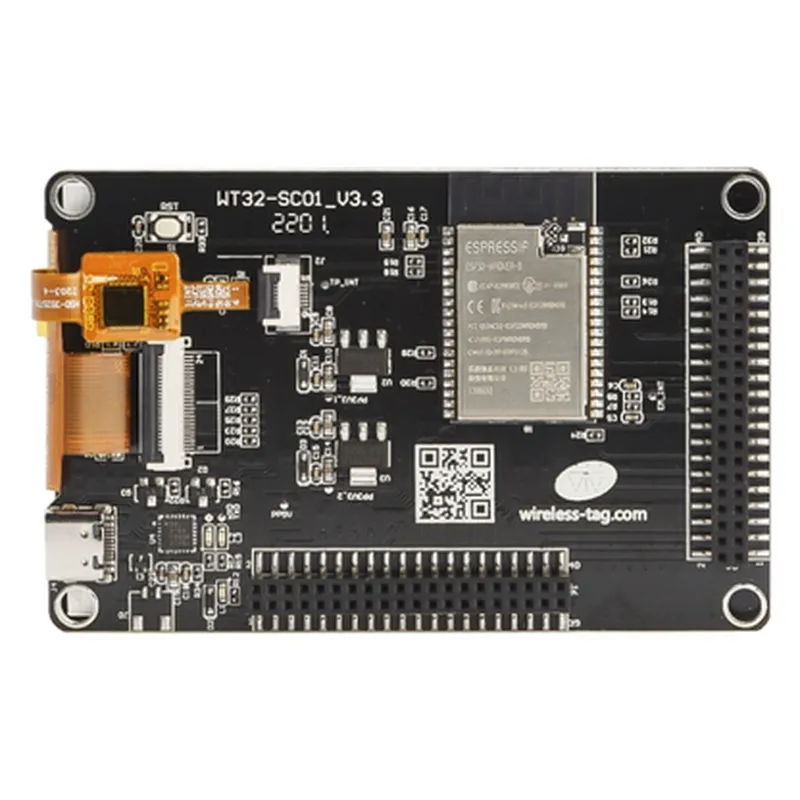
The Elecrow ESP32 WT32-SC01 Dev Board is a comprehensive development board featuring a 3.5" multi-touch screen, Bluetooth, and WiFi capabilities, built around the powerful ESP32 microcontroller. This board offers a versatile platform for developers, makers, and IoT enthusiasts to create innovative projects, prototypes, and products.

Key Features

  • ESP32 Microcontroller: The board is powered by the ESP32, a dual-core 32-bit LX6 microprocessor with a clock speed of up to 240 MHz, offering Wi-Fi, Bluetooth, and BLE capabilities.
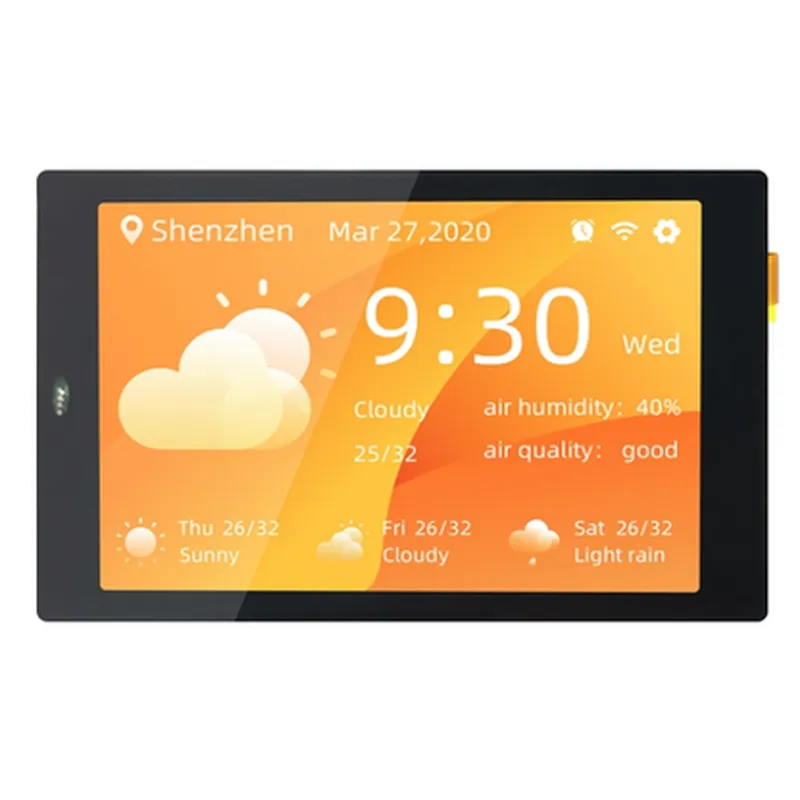
  • 3.5" Multi-Touch Screen: The board features a 3.5-inch TFT LCD display with capacitive multi-touch support, allowing for intuitive user interactions.
  • Wireless Connectivity:
  • Wi-FiSupports 802.11 b/g/n Wi-Fi standard, enabling fast and reliable wireless connectivity.

Bluetooth

Features Bluetooth 4.2, allowing for seamless connections to other devices.

  • On-Board Peripherals:
  • Micro-SD Card SlotSupports up to 64GB of external storage.
    USB Type-CEnables easy programming, debugging, and data transfer.
    3.5mm Audio JackSupports audio output.

Microphone

Built-in microphone for voice-based applications.

  • Expansion Capabilities:

GPIO

22 programmable GPIO pins for connecting external peripherals and modules.

  • Power Management:
I2C, I2S, SPI, UARTSupports various serial communication protocols.

Battery Charging

Supports USB-C charging for Li-ion/Li-polymer batteries.

Voltage Regulator

On-board voltage regulator ensures stable power supply to the board.

  • Dimensions and Mounting:

Dimensions

85mm x 55mm (3.34" x 2.17")

Mounting

Four mounting holes for secure attachment to enclosures or projects.

Functionality

  • IoT Projects: Develop IoT-based projects, such as smart home automation, industrial automation, and wearables.
  • Robotics and Automation: Create robotic projects, gesture-controlled robots, and automation systems.
  • Wearables and Accessories: Design smartwatches, fitness trackers, and other wearable devices.
  • Smart Home and Automation: Develop smart home automation systems, security systems, and more.
  • Audio and Video Applications: Create audio and video streaming devices, audio players, and more.
The Elecrow ESP32 WT32-SC01 Dev Board is designed for a wide range of applications, including

Software Support

  • Arduino IDE: Compatible with Arduino IDE for easy programming and development.
  • MicroPython: Supports MicroPython, a lightweight Python implementation for microcontrollers.
  • ESP-IDF: Compatible with the official ESP-IDF framework for ESP32 development.
The Elecrow ESP32 WT32-SC01 Dev Board is supported by a range of software platforms, including

Documentation and Resources

Elecrow provides extensive documentation, including datasheets, user manuals, and example codes, to help developers get started with the ESP32 WT32-SC01 Dev Board. Additionally, a large community of developers and users contributes to the board's ecosystem, offering a wealth of information and resources.

Pin Configuration

  • Elecrow ESP32 WT32-SC01 Dev Board Pinout Documentation
  • The Elecrow ESP32 WT32-SC01 Dev Board is a feature-rich development board that combines the power of ESP32 with a 3.5-inch multi-touch screen, Bluetooth, and Wi-Fi capabilities. This documentation provides a detailed explanation of the pins on the board, helping you understand their functions and how to connect them for your IoT projects.
  • Pinout Diagram:
  • Before we dive into the pinout explanation, here's a reference diagram to help you visualize the pin layout:
  • ```
  • +-------------------------------+
  • | ESP32 Module |
  • +-------------------------------+
  • | GND | 3V3 | EN | IO0 |
  • | IO2 | IO4 | IO12 | IO14 |
  • | GND | IO15 | IO13 | IO9 |
  • | IO10 | IO7 | IO8 | IO11 |
  • | IO6 | IO5 | IO16 | IO17 |
  • | IO18 | IO19 | IO21 | IO22 |
  • | IO23 | IO25 | IO26 | IO27 |
  • | IO32 | IO33 | IO34 | IO35 |
  • | IO36 | IO37 | IO38 | IO39 |
  • | IO40 | IO41 | IO42 | IO43 |
  • | IO44 | IO45 | IO46 | IO47 |
  • +-------------------------------+
  • | Screen Interface |
  • +-------------------------------+
  • | VCC | GND | SCL | SDA |
  • | INT | RST | BLK |
  • +-------------------------------+
  • | Power Management |
  • +-------------------------------+
  • | USB | GND | 5V |
  • +-------------------------------+
  • ```
  • Pin Explanation:
  • Here's a detailed explanation of each pin on the Elecrow ESP32 WT32-SC01 Dev Board:
  • ESP32 Module Pins:
  • 1. GND: Ground pin, connected to the digital ground of the ESP32 module.
  • 2. 3V3: 3.3V power supply pin, used to power the ESP32 module.
  • 3. EN: Enable pin, used to reset the ESP32 module.
  • 4. IO0: General-purpose input/output pin, can be used as an input, output, or for other functions.
  • 5. IO2: General-purpose input/output pin, can be used as an input, output, or for other functions.
  • 6. IO4: General-purpose input/output pin, can be used as an input, output, or for other functions.
  • 7. IO12: General-purpose input/output pin, can be used as an input, output, or for other functions.
  • 8. IO14: General-purpose input/output pin, can be used as an input, output, or for other functions.
  • 9. IO15: General-purpose input/output pin, can be used as an input, output, or for other functions.
  • 10. IO16: General-purpose input/output pin, can be used as an input, output, or for other functions.
  • 11. IO17: General-purpose input/output pin, can be used as an input, output, or for other functions.
  • 12. IO18: General-purpose input/output pin, can be used as an input, output, or for other functions.
  • 13. IO19: General-purpose input/output pin, can be used as an input, output, or for other functions.
  • 14. IO21: General-purpose input/output pin, can be used as an input, output, or for other functions.
  • 15. IO22: General-purpose input/output pin, can be used as an input, output, or for other functions.
  • 16. IO23: General-purpose input/output pin, can be used as an input, output, or for other functions.
  • 17. IO25: General-purpose input/output pin, can be used as an input, output, or for other functions.
  • 18. IO26: General-purpose input/output pin, can be used as an input, output, or for other functions.
  • 19. IO27: General-purpose input/output pin, can be used as an input, output, or for other functions.
  • 20. IO32: General-purpose input/output pin, can be used as an input, output, or for other functions.
  • 21. IO33: General-purpose input/output pin, can be used as an input, output, or for other functions.
  • 22. IO34: General-purpose input/output pin, can be used as an input, output, or for other functions.
  • 23. IO35: General-purpose input/output pin, can be used as an input, output, or for other functions.
  • 24. IO36: General-purpose input/output pin, can be used as an input, output, or for other functions.
  • 25. IO37: General-purpose input/output pin, can be used as an input, output, or for other functions.
  • 26. IO38: General-purpose input/output pin, can be used as an input, output, or for other functions.
  • 27. IO39: General-purpose input/output pin, can be used as an input, output, or for other functions.
  • 28. IO40: General-purpose input/output pin, can be used as an input, output, or for other functions.
  • 29. IO41: General-purpose input/output pin, can be used as an input, output, or for other functions.
  • 30. IO42: General-purpose input/output pin, can be used as an input, output, or for other functions.
  • 31. IO43: General-purpose input/output pin, can be used as an input, output, or for other functions.
  • 32. IO44: General-purpose input/output pin, can be used as an input, output, or for other functions.
  • 33. IO45: General-purpose input/output pin, can be used as an input, output, or for other functions.
  • 34. IO46: General-purpose input/output pin, can be used as an input, output, or for other functions.
  • 35. IO47: General-purpose input/output pin, can be used as an input, output, or for other functions.
  • Screen Interface Pins:
  • 1. VCC: Power supply pin for the 3.5-inch multi-touch screen.
  • 2. GND: Ground pin for the 3.5-inch multi-touch screen.
  • 3. SCL: Clock pin for the I2C communication with the screen.
  • 4. SDA: Data pin for the I2C communication with the screen.
  • 5. INT: Interrupt pin for the screen, used to signal touch events.
  • 6. RST: Reset pin for the screen, used to reset the screen controller.
  • 7. BLK: Backlight pin, used to control the screen's backlight.
  • Power Management Pins:
  • 1. USB: USB pin for power supply and data communication.
  • 2. GND: Ground pin for the power supply.
  • 3. 5V: 5V power supply pin, used to power external devices.
  • Connection Structure:
  • When connecting the pins, make sure to follow the recommended connection structure:
  • Use breadboards or PCBs to connect the pins to your desired peripherals or modules.
  • Use jumper wires or male-female headers to connect the pins to other components.
  • Ensure that the power supply pins (3V3, 5V, and GND) are connected correctly to avoid damage to the board.
  • Use a USB cable to connect the board to a computer or USB power source.
  • When using the screen interface, connect the SCL and SDA pins to the corresponding I2C pins on your peripherals or modules.
  • Remember to consult the datasheet for the ESP32 module and the screen controller for specific pin configuration and usage guidelines.

Code Examples

Elecrow ESP32 WT32-SC01 Dev Board Documentation
Overview
The Elecrow ESP32 WT32-SC01 Dev Board is a comprehensive IoT development board that features an ESP32 microcontroller, a 3.5" multi-touch screen, Bluetooth, and WiFi capabilities. This board is ideal for developing a wide range of IoT projects, from simple automation systems to complex multimedia applications.
Hardware Specifications
Microcontroller: ESP32 Dual-Core 32-bit LX6 Microprocessor
 Display: 3.5" Multi-Touch Capacitive Screen with 320x480 Resolution
 Bluetooth: Bluetooth 4.2 with BLE support
 WiFi: 2.4 GHz WiFi with 802.11 b/g/n support
 Interfaces: USB, UART, SPI, I2C, I2S, SD card slot
 Power Supply: 5V DC input, onboard 3.3V regulator
Software Development
The Elecrow ESP32 WT32-SC01 Dev Board supports various programming languages, including C, C++, MicroPython, and Lua. For this documentation, we will focus on MicroPython examples.
Example 1: Basic WiFi Connectivity and Web Server
This example demonstrates how to connect to a WiFi network and create a simple web server using MicroPython.
```
import machine
import network
import socket
# WiFi setup
wifi = network.WLAN(network.STA_IF)
wifi.active(True)
wifi.connect('your_wifi_ssid', 'your_wifi_password')
# Wait for WiFi connection
while not wifi.isconnected():
    pass
print('Connected to WiFi')
# Create a socket
s = socket.socket(socket.AF_INET, socket.SOCK_STREAM)
s.bind(('', 80))
s.listen(5)
print('Web server started on port 80')
while True:
    conn, addr = s.accept()
    request = conn.recv(1024)
    print('Request from', addr)
    conn.send('HTTP/1.1 200 OK

Hello, World!')
    conn.close()
```
Example 2: Bluetooth Low Energy (BLE) Advertising
This example demonstrates how to use the Elecrow ESP32 WT32-SC01 Dev Board as a BLE peripheral device, advertising a simple service and characteristic.
```
import ubluetooth
# Initialize BLE
ble = ubluetooth.BLE()
# Set device name and appearance
ble.config(device_name='Elecrow ESP32', appearance=0x0080)
# Define a simple service and characteristic
service_uuid = ubluetooth.UUID('12345678-1234-1234-1234-123456789012')
char_uuid = ubluetooth.UUID('90123456-1234-1234-1234-123456789012')
# Create a service and characteristic
service = ble.service(service_uuid)
char = service.characteristic(char_uuid, ubluetooth.ATTRIBUTE.WRITE)
# Start advertising
ble.advertise()
print('Advertising started')
while True:
    # Handle BLE events
    pass
```
Example 3: Touch Screen and Graphics
This example demonstrates how to use the 3.5" multi-touch screen to display graphics and handle touch events.
```
import machine
import utouch
# Initialize touchscreen
ts = utouch.TouchScreen()
# Define a function to draw a rectangle
def draw_rect(x, y, w, h, color):
    ts.set_pixel(x, y, color)
    ts.set_pixel(x+w-1, y, color)
    ts.set_pixel(x, y+h-1, color)
    ts.set_pixel(x+w-1, y+h-1, color)
    for i in range(w-2):
        ts.set_pixel(x+i+1, y, color)
        ts.set_pixel(x+i+1, y+h-1, color)
    for i in range(h-2):
        ts.set_pixel(x, y+i+1, color)
        ts.set_pixel(x+w-1, y+i+1, color)
# Draw a red rectangle
draw_rect(50, 50, 100, 100, 0xff0000)
# Handle touch events
while True:
    touch = ts.read_touch()
    if touch:
        print('Touch detected at ({}, {})'.format(touch.x, touch.y))
        # Handle touch event based on touch coordinates
```
These examples demonstrate the versatility of the Elecrow ESP32 WT32-SC01 Dev Board and its capabilities in WiFi connectivity, BLE advertising, and graphics rendering. With its rich set of features and MicroPython support, this board is an ideal choice for a wide range of IoT projects.