Stufin
Home Quick Cart Profile

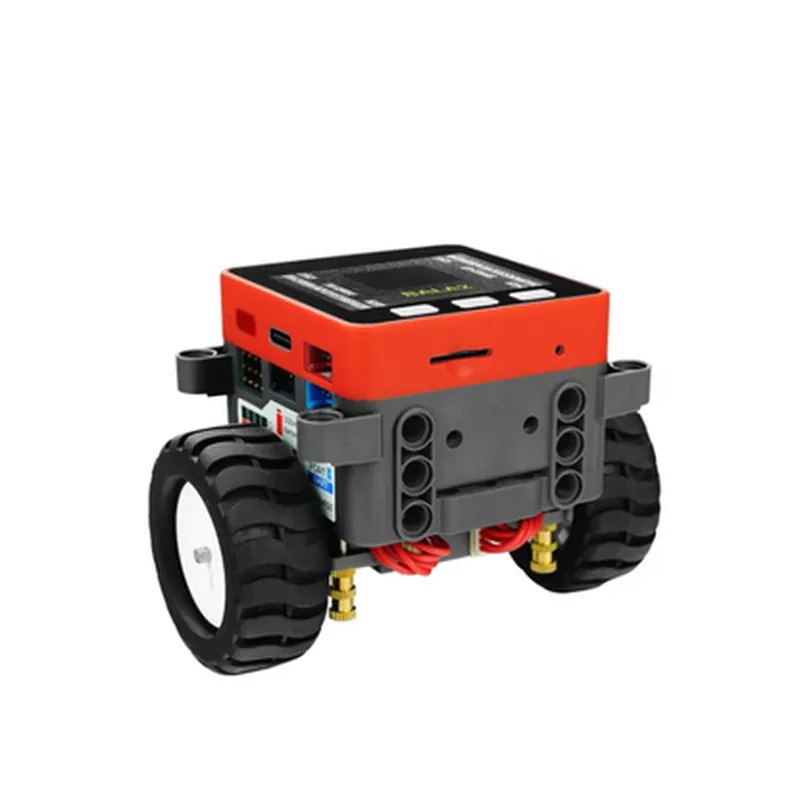
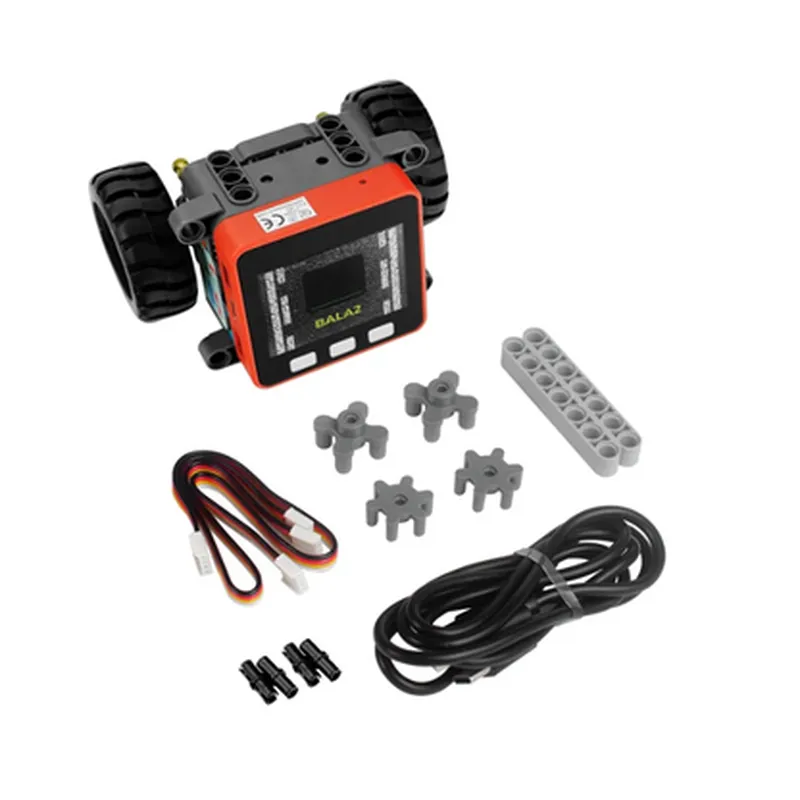
M5Stack BALA2 FIRE Self-Balancing Robot Kit

Buy Now on Stufin

Obstacle avoidance

Equipped with ultrasonic sensors, the robot can detect and avoid obstacles in its path.


Line following

The robot can follow a predetermined path using its onboard sensors and algorithms.

Remote control

The robot can be controlled remotely using a smartphone or computer via Bluetooth or Wi-Fi.

IoT integration

The robot can be integrated with other IoT devices and sensors to expand its capabilities and interact with its environment.

Key Features

Microcontroller

ESP32-WROVER-E, a high-performance Wi-Fi and Bluetooth-enabled microcontroller with 4MB of Flash and 520KB of SRAM.

Sensors

+ MPU6050 6-axis accelerometer and gyroscope for balance and motion detection.

+ Ultrasonic sensors for obstacle avoidance.

+ Infrared sensors for line following.

Motor Control

Dual 1.5A motor drivers for precise control of the robot's movements.

Power Management

2S 7.4V 1500mAh lithium-ion battery with charging and discharging protection.

Communication

Wi-Fi, Bluetooth 4.0, and USB-C for programming and debugging.

Expansion

Compatible with M5Stack modules and accessories, including GPS, camera, and audio modules.

Programming

Supports MicroPython, Arduino, and C++ programming languages.

Dimensions and Weight

Length

140mm (5.5 inches)

Width

90mm (3.5 inches)

Height

70mm (2.75 inches)

Weight

450g (15.9 oz)

What's Included

M5Stack BALA2 FIRE Self-Balancing Robot Kit

2S 7.4V 1500mAh lithium-ion battery

USB-C cable

Quick start guide

Access to online documentation and community resources

Target Applications

Robotics enthusiasts and hobbyists

IoT developers and researchers

Educational institutions and universities

Commercial product development and prototyping

Pin Configuration

  • M5Stack BALA2 FIRE Self-Balancing Robot Kit Pinout Guide
  • The M5Stack BALA2 FIRE Self-Balancing Robot Kit is a versatile and advanced IoT component designed for robotics and automation applications. The kit comprises a comprehensive set of sensors, motor drivers, and microcontrollers, all integrated into a compact and modular design. In this documentation, we will delve into the pinout structure of the M5Stack BALA2 FIRE, explaining each pin's function and how to connect them.
  • Microcontroller (ESP32) Pinout:
  • The ESP32 microcontroller is the brain of the M5Stack BALA2 FIRE, responsible for processing and controlling the robot's movements. The pinout structure for the ESP32 is as follows:
  • 1. VIN (5V): Input voltage pin, which should be connected to a 5V power source.
  • 2. GND: Ground pin, which provides a common ground reference for the system.
  • 3. GPIO0: General-purpose input/output pin, used for sensor connections, motor control, or other custom applications.
  • 4. GPIO1: General-purpose input/output pin, used for sensor connections, motor control, or other custom applications.
  • 5. GPIO2: General-purpose input/output pin, used for sensor connections, motor control, or other custom applications.
  • 6. GPIO4: General-purpose input/output pin, used for sensor connections, motor control, or other custom applications.
  • 7. GPIO5: General-purpose input/output pin, used for sensor connections, motor control, or other custom applications.
  • 8. GPIO12: General-purpose input/output pin, used for sensor connections, motor control, or other custom applications.
  • 9. GPIO13: General-purpose input/output pin, used for sensor connections, motor control, or other custom applications.
  • 10. GPIO14: General-purpose input/output pin, used for sensor connections, motor control, or other custom applications.
  • 11. GPIO15: General-purpose input/output pin, used for sensor connections, motor control, or other custom applications.
  • 12. GPIO16: General-purpose input/output pin, used for sensor connections, motor control, or other custom applications.
  • 13. GPIO17: General-purpose input/output pin, used for sensor connections, motor control, or other custom applications.
  • 14. GPIO18: General-purpose input/output pin, used for sensor connections, motor control, or other custom applications.
  • 15. GPIO19: General-purpose input/output pin, used for sensor connections, motor control, or other custom applications.
  • 16. GPIO21: General-purpose input/output pin, used for sensor connections, motor control, or other custom applications.
  • 17. GPIO22: General-purpose input/output pin, used for sensor connections, motor control, or other custom applications.
  • 18. GPIO23: General-purpose input/output pin, used for sensor connections, motor control, or other custom applications.
  • 19. GPIO25: General-purpose input/output pin, used for sensor connections, motor control, or other custom applications.
  • 20. GPIO26: General-purpose input/output pin, used for sensor connections, motor control, or other custom applications.
  • 21. GPIO27: General-purpose input/output pin, used for sensor connections, motor control, or other custom applications.
  • 22. GPIO32: General-purpose input/output pin, used for sensor connections, motor control, or other custom applications.
  • 23. GPIO33: General-purpose input/output pin, used for sensor connections, motor control, or other custom applications.
  • 24. GPIO34: General-purpose input/output pin, used for sensor connections, motor control, or other custom applications.
  • 25. GPIO35: General-purpose input/output pin, used for sensor connections, motor control, or other custom applications.
  • 26. GPIO36: General-purpose input/output pin, used for sensor connections, motor control, or other custom applications.
  • 27. GPIO39: General-purpose input/output pin, used for sensor connections, motor control, or other custom applications.
  • Motor Driver (DRV8833) Pinout:
  • The DRV8833 motor driver is responsible for controlling the robot's motors. The pinout structure for the DRV8833 is as follows:
  • 1. VM (5V): Input voltage pin, which should be connected to a 5V power source.
  • 2. GND: Ground pin, which provides a common ground reference for the motor driver.
  • 3. AIN1: Motor control input pin, used to control the direction and speed of motor A.
  • 4. AIN2: Motor control input pin, used to control the direction and speed of motor A.
  • 5. BIN1: Motor control input pin, used to control the direction and speed of motor B.
  • 6. BIN2: Motor control input pin, used to control the direction and speed of motor B.
  • 7. OUT1: Motor output pin, connected to motor A.
  • 8. OUT2: Motor output pin, connected to motor A.
  • 9. OUT3: Motor output pin, connected to motor B.
  • 10. OUT4: Motor output pin, connected to motor B.
  • Sensor and Other Connections:
  • The M5Stack BALA2 FIRE also features various sensor and connector pins, including:
  • 1. I2C SCL: I2C clock pin, used for communication with I2C devices.
  • 2. I2C SDA: I2C data pin, used for communication with I2C devices.
  • 3. UART RX: UART receive pin, used for serial communication.
  • 4. UART TX: UART transmit pin, used for serial communication.
  • 5. SPI CLK: SPI clock pin, used for communication with SPI devices.
  • 6. SPI MOSI: SPI master-out-slave-in pin, used for communication with SPI devices.
  • 7. SPI MISO: SPI master-in-slave-out pin, used for communication with SPI devices.
  • 8. IR Pin: Infrared sensor pin, used for obstacle detection.
  • 9. LINE Pin: Line sensor pin, used for line following and navigation.
  • 10. Battery Pin: Battery monitoring pin, used to monitor the robot's battery level.
  • Connection Structure:
  • To connect the M5Stack BALA2 FIRE, follow this general structure:
  • Connect the VIN and GND pins to a 5V power source and a common ground reference, respectively.
  • Connect the motor driver output pins (OUT1, OUT2, OUT3, and OUT4) to the robot's motors.
  • Connect the sensor pins (I2C SCL, I2C SDA, UART RX, UART TX, SPI CLK, SPI MOSI, and SPI MISO) to the corresponding sensors and peripherals.
  • Connect the general-purpose input/output pins (GPIO0-39) to custom applications, sensors, or other devices as required.
  • Connect the IR Pin, LINE Pin, and Battery Pin to the corresponding sensors and peripherals.
  • Important Notes:
  • Ensure proper voltage and current ratings for all connections to avoid damage to the M5Stack BALA2 FIRE or other components.
  • Use suitable connectors and cables for all connections, taking into account the robot's mobility and environmental conditions.
  • Consult the M5Stack BALA2 FIRE datasheet and relevant documentation for specific connection and programming requirements.
  • By following this pinout guide and connection structure, you can successfully integrate the M5Stack BALA2 FIRE into your robotics and automation projects.

Code Examples

M5Stack BALA2 FIRE Self-Balancing Robot Kit Documentation
Overview
The M5Stack BALA2 FIRE Self-Balancing Robot Kit is a comprehensive IoT development platform that combines the M5Stack Core ESP32 module with a balance car robot, designed for robotics and IoT enthusiasts. This kit is equipped with a MPU6050 gyroscope, L298N motor driver, and other essential components, allowing users to build and program a self-balancing robot.
Hardware Components
M5Stack Core ESP32 module
 BALA2 FIRE balance car robot
 MPU6050 gyroscope
 L298N motor driver
 2x DC motors
 Power management module
 USB-C port for programming and power supply
Software Requirements
M5Stack Arduino library (for ESP32)
 Arduino IDE (version 1.8.x or later)
Code Examples
### Example 1: Basic Self-Balancing Robot
This example demonstrates how to use the BALA2 FIRE Self-Balancing Robot Kit to create a basic self-balancing robot.
Code:
```cpp
#include <M5Stack.h>
#include <Wire.h>
#define MPU6050_ADDRESS 0x68
M5Stack m5;
void setup() {
  // Initialize M5Stack
  m5.begin();
  
  // Initialize MPU6050
  Wire.begin();
  Wire.beginTransmission(MPU6050_ADDRESS);
  Wire.write(0x6B); // PWR_MGMT_1 register
  Wire.write(0x00); // reset
  Wire.endTransmission();
  
  // Initialize motors
  pinMode(MOTOR_LEFT, OUTPUT);
  pinMode(MOTOR_RIGHT, OUTPUT);
}
void loop() {
  // Read MPU6050 data
  int16_t ax, ay, az;
  Wire.beginTransmission(MPU6050_ADDRESS);
  Wire.write(0x3B); // ACCEL_XOUT_H register
  Wire.endTransmission();
  Wire.requestFrom(MPU6050_ADDRESS, 6);
  ax = Wire.read() << 8 | Wire.read();
  ay = Wire.read() << 8 | Wire.read();
  az = Wire.read() << 8 | Wire.read();
  
  // Calculate angle
  float angle = atan2(ay, az)  180 / PI;
  
  // Control motors
  if (angle > 10) {
    digitalWrite(MOTOR_LEFT, HIGH);
    digitalWrite(MOTOR_RIGHT, LOW);
  } else if (angle < -10) {
    digitalWrite(MOTOR_LEFT, LOW);
    digitalWrite(MOTOR_RIGHT, HIGH);
  } else {
    digitalWrite(MOTOR_LEFT, LOW);
    digitalWrite(MOTOR_RIGHT, LOW);
  }
  
  delay(50);
}
```
Description: This code initializes the M5Stack, MPU6050, and motor pins. It then reads the MPU6050 data to calculate the robot's angle. Based on the angle, it controls the motors to maintain balance.
### Example 2: Remote Controlled Self-Balancing Robot (using WiFi)
This example demonstrates how to use the BALA2 FIRE Self-Balancing Robot Kit to create a remote-controlled self-balancing robot using WiFi.
Code:
```cpp
#include <M5Stack.h>
#include <WiFi.h>
#include <Wire.h>
#define MPU6050_ADDRESS 0x68
#define MOTOR_LEFT 2
#define MOTOR_RIGHT 3
M5Stack m5;
WiFiClient client;
const char ssid = "your_wifi_ssid";
const char password = "your_wifi_password";
void setup() {
  // Initialize M5Stack
  m5.begin();
  
  // Initialize WiFi
  WiFi.begin(ssid, password);
  while (WiFi.status() != WL_CONNECTED) {
    delay(1000);
    Serial.println("Connecting to WiFi...");
  }
  Serial.println("Connected to WiFi");
  Serial.println("Starting robot...");
  
  // Initialize MPU6050
  Wire.begin();
  Wire.beginTransmission(MPU6050_ADDRESS);
  Wire.write(0x6B); // PWR_MGMT_1 register
  Wire.write(0x00); // reset
  Wire.endTransmission();
  
  // Initialize motors
  pinMode(MOTOR_LEFT, OUTPUT);
  pinMode(MOTOR_RIGHT, OUTPUT);
}
void loop() {
  // Read MPU6050 data
  int16_t ax, ay, az;
  Wire.beginTransmission(MPU6050_ADDRESS);
  Wire.write(0x3B); // ACCEL_XOUT_H register
  Wire.endTransmission();
  Wire.requestFrom(MPU6050_ADDRESS, 6);
  ax = Wire.read() << 8 | Wire.read();
  ay = Wire.read() << 8 | Wire.read();
  az = Wire.read() << 8 | Wire.read();
  
  // Calculate angle
  float angle = atan2(ay, az)  180 / PI;
  
  // Send data to server
  client.setServer("your_server_ip", 80);
  client.print("GET /robot_data?angle=");
  client.print(angle);
  client.println(" HTTP/1.1");
  client.println("Host: your_server_ip");
  client.println("Connection: close");
  client.println();
  
  // Receive commands from server
  int command = client.parseInt();
  if (command == 1) {
    digitalWrite(MOTOR_LEFT, HIGH);
    digitalWrite(MOTOR_RIGHT, LOW);
  } else if (command == 2) {
    digitalWrite(MOTOR_LEFT, LOW);
    digitalWrite(MOTOR_RIGHT, HIGH);
  } else {
    digitalWrite(MOTOR_LEFT, LOW);
    digitalWrite(MOTOR_RIGHT, LOW);
  }
  
  delay(50);
}
```
Description: This code initializes the M5Stack, WiFi, and motor pins. It then reads the MPU6050 data to calculate the robot's angle. The angle data is sent to a server using WiFi, and the robot receives commands from the server to control its movement.
Note: You will need to set up a server to receive the robot's data and send commands to the robot. You can use a platform like ESP8266WebServer or a Raspberry Pi as the server.