Stufin
Home Quick Cart Profile

DC-DC Charge Discharge Integrated Module (5V/2A)


Buy Now on Stufin

Component Name

DC-DC Charge Discharge Integrated Module (5V/2A)
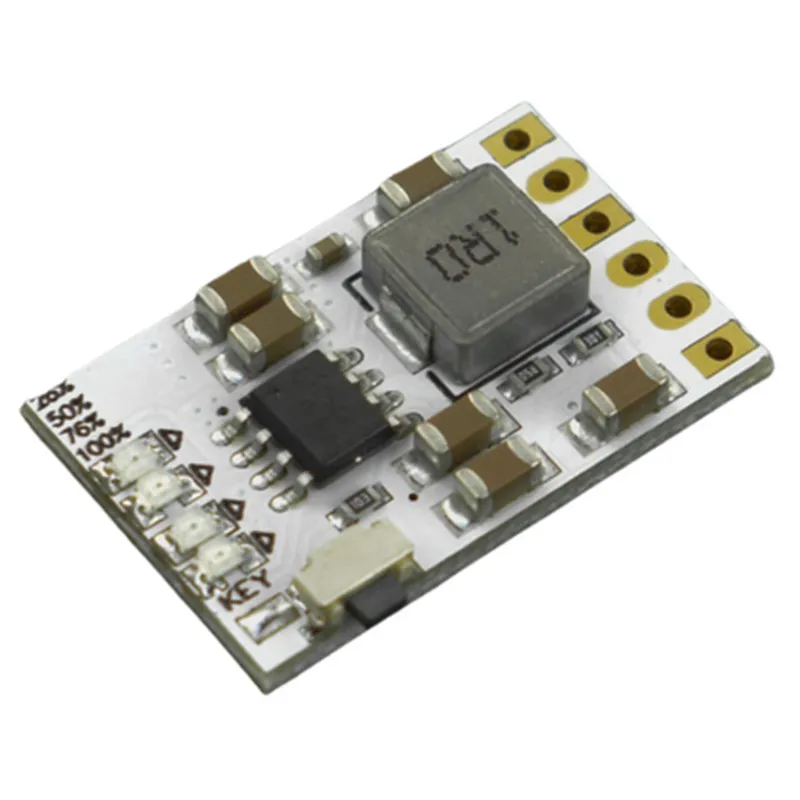
Overview

The DC-DC Charge Discharge Integrated Module (5V/2A) is a compact, high-efficiency power management module designed for IoT and other battery-powered applications. This module integrates a DC-DC converter, charging circuit, and discharge control functionality in a single package, making it an ideal solution for devices requiring efficient power management.
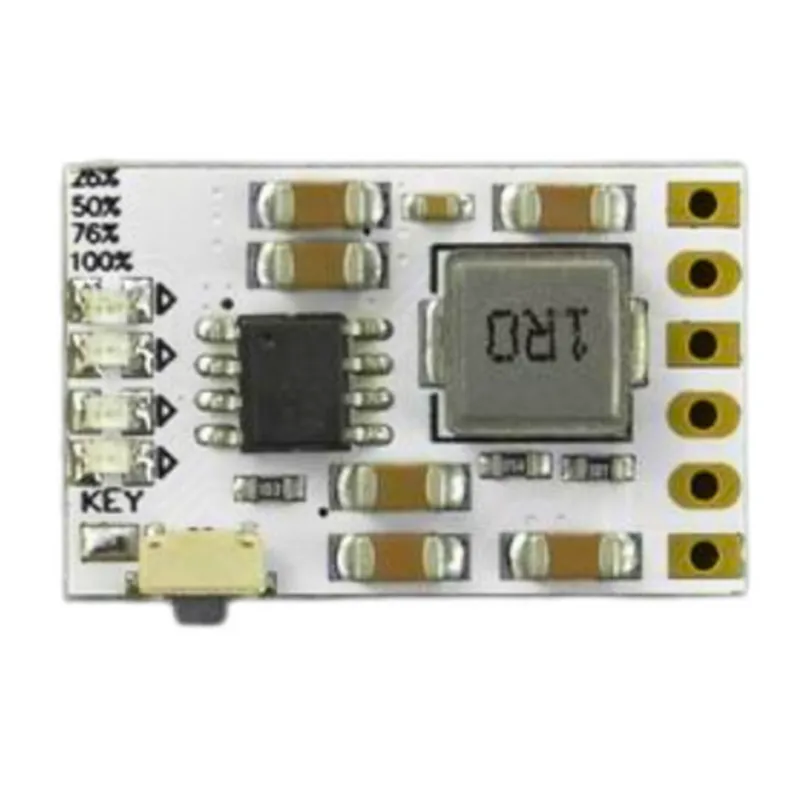
Functionality

  • DC-DC Conversion: The module features a high-efficiency DC-DC converter that accepts an input voltage range of 4.5V to 12V and outputs a regulated 5V voltage at up to 2A current.
  • Charging: The module includes a built-in charging circuit that can charge lithium-ion or lithium-polymer batteries with a maximum charging current of 2A.
  • Discharge Control: The module features an integrated discharge control circuit that prevents the battery from over-discharging, ensuring a safe and efficient power supply to the connected device.
The DC-DC Charge Discharge Integrated Module (5V/2A) performs the following functions

Key Features

  • High Efficiency: The module achieves high efficiency of up to 95% in DC-DC conversion, minimizing heat generation and power loss.
  • Compact Design: The module's compact design (approximately 25mm x 20mm x 5mm) makes it ideal for space-constrained applications.
  • Wide Input Range: The module accepts a wide input voltage range of 4.5V to 12V, making it suitable for various power sources.
  • Overcharge Protection: The module's charging circuit features overcharge protection to prevent damage to the battery.
  • Over-Discharge Protection: The module's discharge control circuit prevents the battery from over-discharging, ensuring a safe and efficient power supply.
  • Short-Circuit Protection: The module includes short-circuit protection to prevent damage to the device in case of a short circuit.
  • Thermal Protection: The module features thermal protection to prevent overheating and ensure reliable operation.
  • Low Dropout: The module's DC-DC converter features a low dropout voltage of 0.5V, ensuring a stable output voltage even with a low input voltage.

Input Voltage Range

4.5V to 12V

Output Voltage

5V 2%

Output Current

Up to 2A

Charging Current

Up to 2A

Efficiency

Up to 95%

Operating Temperature Range

-40C to +85C

Storage Temperature Range

-40C to +125C

Applications

  • IoT devices
  • Wearable devices
  • Portable electronics
  • Battery-powered sensors
  • Robotics and drones
  • Automotive systems
The DC-DC Charge Discharge Integrated Module (5V/2A) is suitable for a wide range of applications, including

VIN

Input voltage pin (4.5V to 12V)

VOUT

Output voltage pin (5V)

CHG

Charging input pin

BAT

Battery connection pin

EN

Enable input pin (active high)

GND

Ground pin

Important Notes

Ensure proper thermal management to prevent overheating.

Use a suitable heat sink for high-temperature applications.

Follow recommended PCB layout and component placement guidelines to minimize electromagnetic interference (EMI).

Pin Configuration

  • DC-DC Charge Discharge Integrated Module (5V/2A) Pinout Explanation
  • The DC-DC Charge Discharge Integrated Module (5V/2A) is a compact and efficient power management module designed for battery-powered IoT devices. This module integrates a DC-DC converter, battery charger, and discharge circuitry to facilitate efficient power management. Here's a detailed explanation of each pin on the module:
  • Pin List:
  • 1. VIN (Input Voltage): 6-24V
  • Connect the input power source (e.g., wall adapter, solar panel, or battery) to this pin.
  • The module's built-in voltage regulator will convert the input voltage to 5V for the output.
  • 2. GND (Ground): 0V
  • Connect the ground terminal of the input power source and the load device to this pin.
  • 3. VOUT (Output Voltage): 5V
  • This pin provides a regulated 5V output up to 2A for powering your IoT device (e.g., microcontroller, sensor, or communication module).
  • 4. BAT (Battery Positive): 3.7-4.2V
  • Connect the positive terminal of a rechargeable Li-ion or Li-polymer battery to this pin.
  • The module's built-in battery charger will regulate the charging process.
  • 5. B- (Battery Negative): 0V
  • Connect the negative terminal of the rechargeable battery to this pin.
  • 6. CHG (Charge Indicator): Active Low
  • This pin is an open-drain output that indicates the charging status of the battery.
  • When the battery is charging, the CHG pin is pulled low ( Logic 0). When charging is complete or the battery is not charging, the CHG pin is high impedance ( Logic 1).
  • 7. EN (Enable): Active High
  • This pin enables or disables the module's output.
  • When the EN pin is high ( Logic 1), the module is enabled, and the output is available.
  • When the EN pin is low ( Logic 0), the module is disabled, and the output is disconnected.
  • Connection Structure:
  • To connect the DC-DC Charge Discharge Integrated Module (5V/2A) to your IoT device, follow this structure:
  • Input Power Source:
  • Connect the positive terminal of the input power source (e.g., wall adapter) to VIN.
  • Connect the negative terminal of the input power source to GND.
  • Battery Connection:
  • Connect the positive terminal of the rechargeable battery to BAT.
  • Connect the negative terminal of the rechargeable battery to B-.
  • Output Connection:
  • Connect the VOUT pin to the positive terminal of your IoT device (e.g., microcontroller, sensor, or communication module).
  • Connect the GND pin to the negative terminal of your IoT device.
  • Enable and Charge Indicator:
  • Connect the EN pin to a digital output of your microcontroller or a switch to enable or disable the module's output.
  • Connect the CHG pin to a digital input of your microcontroller to monitor the charging status of the battery.
  • Note:
  • Make sure to use a suitable rechargeable battery with a capacity compatible with your IoT device's power requirements.
  • Ensure proper heat dissipation for the module, especially during high-power charging or discharging.
  • Refer to the module's datasheet for specific power ratings, temperature ranges, and other operating conditions to ensure safe and reliable operation.

Code Examples

DC-DC Charge Discharge Integrated Module (5V/2A) Documentation
Overview
The DC-DC Charge Discharge Integrated Module is a compact, high-efficiency power management module that integrates a DC-DC converter, charging circuit, and discharge protection. This module provides a stable 5V output at up to 2A, making it suitable for a wide range of IoT applications. The module is designed to work with a variety of battery types and can be used to power devices such as microcontrollers, sensors, and small actuators.
Features
Input voltage range: 6V to 24V
 Output voltage: 5V  0.5V
 Output current: Up to 2A
 Charging voltage: 6V to 12V
 Charging current: Up to 2A
 Discharge protection voltage: 3V
 Operating temperature range: -40C to 85C
Pinout
The module has the following pins:
VIN: Input voltage (6V to 24V)
 VOUT: Output voltage (5V)
 BATT: Battery connection (positive terminal)
 GND: Ground
 CHG: Charging control pin (active high)
 EN: Enable pin (active high)
Code Examples
### Example 1: Basic Power Supply with Arduino
In this example, we will use the DC-DC Charge Discharge Integrated Module to power an Arduino Board from a 12V battery.
```c
// Connect VIN to 12V battery positive terminal
// Connect GND to 12V battery negative terminal
// Connect VOUT to Arduino Vin pin
// Connect EN to Arduino digital pin 2
const int enablePin = 2;
void setup() {
  pinMode(enablePin, OUTPUT);
  digitalWrite(enablePin, HIGH); // Enable the module
}
void loop() {
  // Your Arduino code here
}
```
### Example 2: Solar-Powered IoT Node with ESP32
In this example, we will use the DC-DC Charge Discharge Integrated Module to charge a 6V battery from a solar panel and power an ESP32 microcontroller.
```c
// Connect VIN to solar panel positive terminal
// Connect GND to solar panel negative terminal
// Connect BATT to 6V battery positive terminal
// Connect VOUT to ESP32 Vin pin
// Connect CHG to ESP32 digital pin 15
// Connect EN to ESP32 digital pin 2
const int chargePin = 15;
const int enablePin = 2;
void setup() {
  pinMode(chargePin, OUTPUT);
  pinMode(enablePin, OUTPUT);
  digitalWrite(chargePin, HIGH); // Enable charging
  digitalWrite(enablePin, HIGH); // Enable the module
}
void loop() {
  // Your ESP32 code here
}
```
### Example 3: Automatic Power Switching with Raspberry Pi
In this example, we will use the DC-DC Charge Discharge Integrated Module to automatically switch between a 12V power supply and a 12V battery based on the input voltage.
```python
# Connect VIN to 12V power supply or 12V battery
# Connect GND to 12V power supply or 12V battery negative terminal
# Connect VOUT to Raspberry Pi power pin
# Connect EN to Raspberry Pi GPIO pin 17
import RPi.GPIO as GPIO
GPIO.setmode(GPIO.BCM)
enable_pin = 17
GPIO.setup(enable_pin, GPIO.OUT)
def check_input_voltage():
    # Implement your input voltage monitoring logic here
    # Return True if input voltage is available, False otherwise
    pass
while True:
    if check_input_voltage():
        GPIO.output(enable_pin, GPIO.HIGH) # Enable the module
    else:
        GPIO.output(enable_pin, GPIO.LOW) # Disable the module
```
Note: The above examples are for illustration purposes only and may require additional circuitry and programming to ensure safe and efficient operation. Please consult the module's datasheet and application notes for more information.