Stufin
Home Quick Cart Profile

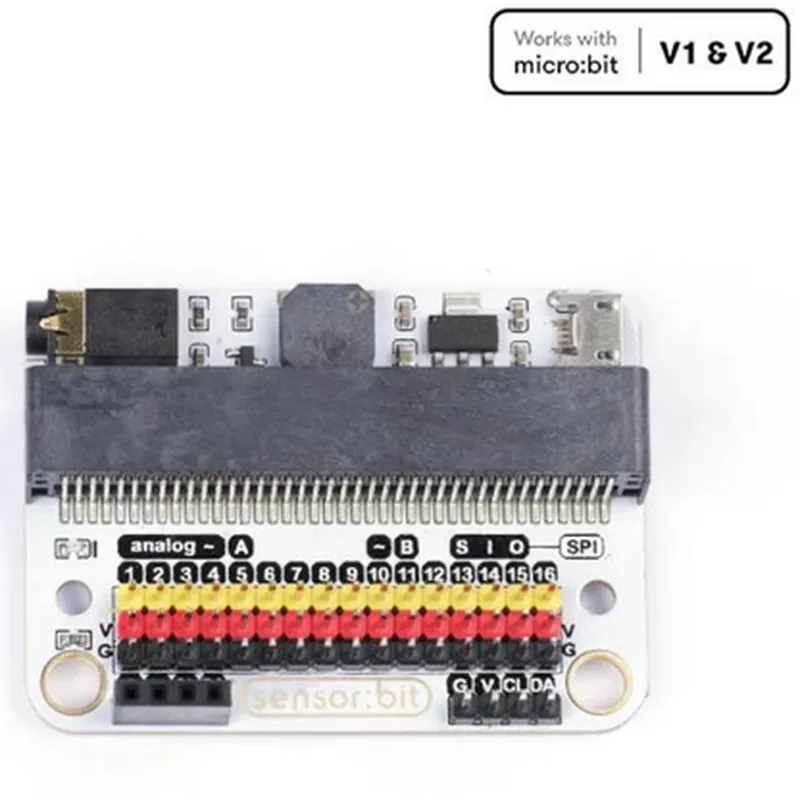
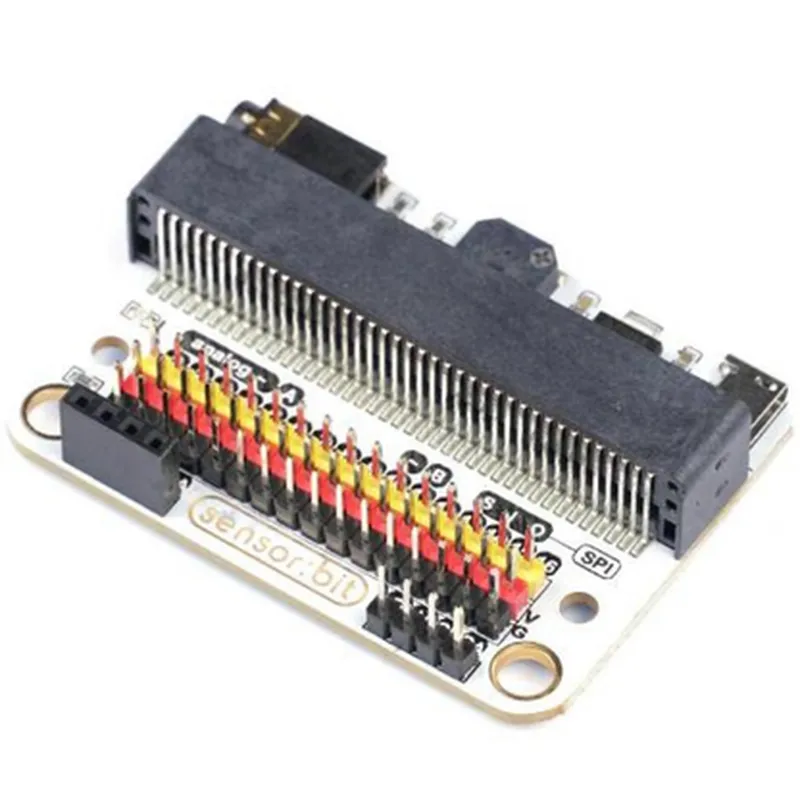
ELECFREAKS Sensor:bit (IO Extension Board For micro:bit)

Buy Now on Stufin

The ELECFREAKS Sensor

bit is an IO extension board specifically designed for the microbit, a popular microcontroller board used in various IoT and educational projects. This IO extension board expands the micro:bit's capabilities by providing additional interfaces and sensors, making it an ideal component for projects that require advanced sensing and interaction capabilities.

Functionality

The Sensor

bit is designed to be easy to use, with a simple and intuitive interface that allows users to quickly integrate it with their microbit projects.

Key Features

  • Environmental Sensors:

Environmental monitoring

Temperature, humidity, and light sensing

Motion detection

Gesture recognition and 3-axis acceleration

Audio capabilities

Microphone and speaker interfaces

Expansion interfaces

I2C, UART, and GPIO for connecting external sensors and devices

Temperature sensor

Measures ambient temperature with high accuracy

Humidity sensor

Monitors relative humidity levels

Light sensor

Detects ambient light levels

  • Motion Detection:

Gesture recognition

Built-in 3-axis accelerometer for detecting gestures and movements

  • Audio Capabilities:
3-axis acceleration sensorMeasures acceleration forces in three dimensions

Microphone interface

Connects to an external microphone for audio input

Speaker interface

Drives an external speaker for audio output

  • Expansion Interfaces:
  • I2C interfaceConnects to external I2C devices such as displays, sensors, and modules

UART interface

Enables serial communication with external devices

GPIO interface

Provides additional general-purpose input/output pins for connecting custom circuits or devices

  • Micro:bit Compatibility:

Designed specifically for the micro

bit, ensuring seamless integration and compatibility

Easy to use with the micro

bit's graphical programming language (Blocks) and other programming languages like Python and C++

  • Power Management:

Powered directly from the micro

bit's 3V output

Low power consumption design for battery-powered projects

  • Mechanical Design:

Compact and lightweight design, making it easy to integrate into projects

Durable and reliable construction, with high-quality components and PCB manufacturing

Technical Specifications

Operating voltage

3V

Operating temperature

-20C to 70C

Dimensions

43.5 x 53.5 mm

Weight

20g

Supported Programming Languages

Micro

bit Blocks

Python

C++

Applications

IoT projects

Environmental monitoring, smart home automation, industrial automation

Robotics and robotic arms

Gesture recognition, motion detection, and sensor integration

Wearable devices

Health and fitness monitoring, gesture recognition

Educational projects

STEM education, project-based learning, coding and programming

By providing a range of interfaces and sensors, the ELECFREAKS Sensorbit greatly expands the capabilities of the micro:bit, making it an ideal component for IoT development, robotics, and educational projects.

Pin Configuration

  • ELECFREAKS Sensor:bit (IO Extension Board For micro:bit) Pinout Guide
  • The ELECFREAKS Sensor:bit is an IO extension board designed specifically for the micro:bit, providing a convenient and flexible way to connect various sensors and modules. The board features a set of pins that allow users to easily interface with their micro:bit projects. Here's a detailed explanation of each pin, along with connection guidelines:
  • Pins on the Sensor:bit Board:
  • 1. P0 (Digital Pin)
  • Function: Digital input/output
  • Connection: Can be used to connect digital sensors or modules, such as buttons, LEDs, or digital output devices
  • micro: bit Pin: P0 on the micro:bit board
  • 2. P1 (Digital Pin)
  • Function: Digital input/output
  • Connection: Can be used to connect digital sensors or modules, such as buttons, LEDs, or digital output devices
  • micro: bit Pin: P1 on the micro:bit board
  • 3. P2 (Digital Pin)
  • Function: Digital input/output
  • Connection: Can be used to connect digital sensors or modules, such as buttons, LEDs, or digital output devices
  • micro: bit Pin: P2 on the micro:bit board
  • 4. P8 (I2C SCL)
  • Function: I2C clock signal
  • Connection: Used for I2C communication with modules such as LCD displays, temperature sensors, or other I2C devices
  • micro: bit Pin: P8 on the micro:bit board
  • 5. P12 (I2C SDA)
  • Function: I2C data signal
  • Connection: Used for I2C communication with modules such as LCD displays, temperature sensors, or other I2C devices
  • micro: bit Pin: P12 on the micro:bit board
  • 6. 3V (Power Pin)
  • Function: 3.3V power supply
  • Connection: Used to power external modules or sensors that require a 3.3V power source
  • 7. GND (Ground Pin)
  • Function: Ground connection
  • Connection: Used as a common ground reference for all connected modules or sensors
  • 8. V1/V2 (Analog Input Pins)
  • Function: Analog input
  • Connection: Can be used to connect analog sensors, such as potentiometers, light sensors, or sound sensors
  • micro: bit Pin: P1/P2 on the micro:bit board ( depends on the input channel used)
  • Connecting the Pins:
  • To connect the pins on the Sensor:bit board to your micro:bit, follow these steps:
  • 1. Carefully plug the micro:bit into the Sensor:bit board, ensuring that the pins align properly.
  • 2. Connect your sensors or modules to the corresponding pins on the Sensor:bit board.
  • For digital sensors, connect the sensor's VCC pin to the 3V pin on the Sensor:bit board, and the sensor's GND pin to the GND pin on the board.
  • For analog sensors, connect the sensor's VCC pin to the 3V pin on the Sensor:bit board, and the sensor's GND pin to the GND pin on the board. Connect the sensor's output pin to one of the analog input pins (V1 or V2) on the Sensor:bit board.
  • For I2C devices, connect the device's VCC pin to the 3V pin on the Sensor:bit board, and the device's GND pin to the GND pin on the board. Connect the device's SCL pin to the P8 pin on the Sensor:bit board, and the device's SDA pin to the P12 pin on the board.
  • Important Notes:
  • When connecting sensors or modules, ensure that the voltage and current requirements are compatible with the micro:bit's capabilities.
  • Always refer to the documentation and datasheets of the connected sensors or modules for specific connection guidelines and setup requirements.
  • Use proper breadboard wires or jumper wires to connect the pins, and avoid loose connections or shorts that may damage the micro:bit or connected devices.

Code Examples

ELECFREAKS Sensor:bit (IO Extension Board For micro:bit) Documentation
Overview
The ELECFREAKS Sensor:bit is an IO extension board designed for the micro:bit, a popular microcontroller board used in educational and prototyping applications. This board provides an easy-to-use interface for connecting various sensors and modules, allowing users to explore the world of IoT and robotics with ease.
Key Features
Compatible with micro:bit v1.5 and v2.0
 12 digital IO pins and 6 analog IO pins
 Supports various sensor modules, including temperature, humidity, light, sound, and motion sensors
 Onboard buzzer and LED indicators
 Power supply: 3V - 5V (via micro:bit USB or battery)
Pinout
The Sensor:bit board has the following pinout:
| Pin | Function |
| --- | --- |
| P0 - P12 | Digital IO pins |
| A0 - A5 | Analog IO pins |
| BUZZER | Onboard buzzer |
| LED | Onboard LED indicator |
| VCC | Power supply (3V - 5V) |
| GND | Ground |
Code Examples
### Example 1: Reading Temperature with a DS18B20 Sensor
In this example, we'll use the Sensor:bit to read temperature data from a DS18B20 temperature sensor.
```python
from microbit import 
import sensorbit
# Initialize the Sensor:bit
sensorbit.init()
# Define the DS18B20 sensor pin
temp_sensor = sensorbit.Pin(P0, sensorbit.Pin.IN)
while True:
    # Read temperature data from the sensor
    temp_c = temp_sensor.read_analog()
    temp_f = (temp_c  9/5) + 32
    
    # Display temperature on the micro:bit screen
    display.scroll("Temp: {:.1f}C {:.1f}F".format(temp_c, temp_f))
    sleep(1000)
```
### Example 2: Controlling a Servo Motor
In this example, we'll use the Sensor:bit to control a servo motor using the micro:bit's PWM output.
```python
from microbit import 
import sensorbit
# Initialize the Sensor:bit
sensorbit.init()
# Define the servo motor pin
servo_pin = sensorbit.Pin(P1, sensorbit.Pin.OUT)
while True:
    # Set the servo motor to 0 degrees
    servo_pin.write_analog(0)
    sleep(1000)
    
    # Set the servo motor to 90 degrees
    servo_pin.write_analog(90)
    sleep(1000)
    
    # Set the servo motor to 180 degrees
    servo_pin.write_analog(180)
    sleep(1000)
```
### Example 3: Sound Detection with a Microphone
In this example, we'll use the Sensor:bit to detect sound levels using a microphone module.
```python
from microbit import 
import sensorbit
# Initialize the Sensor:bit
sensorbit.init()
# Define the microphone pin
mic_pin = sensorbit.Pin(P2, sensorbit.Pin.IN)
while True:
    # Read sound level data from the microphone
    sound_level = mic_pin.read_analog()
    
    # If sound level is above a certain threshold, trigger an action
    if sound_level > 500:
        display.show(Image.HAPPY)
        buzzer.play("C4", 500)
    else:
        display.show(Image.SAD)
```
These examples demonstrate the versatility of the ELECFREAKS Sensor:bit and its ability to interface with various sensors and modules. By using the micro:bit's built-in functionality and the Sensor:bit's IO pins, users can create a wide range of IoT and robotics projects.