Stufin
Home Quick Cart Profile

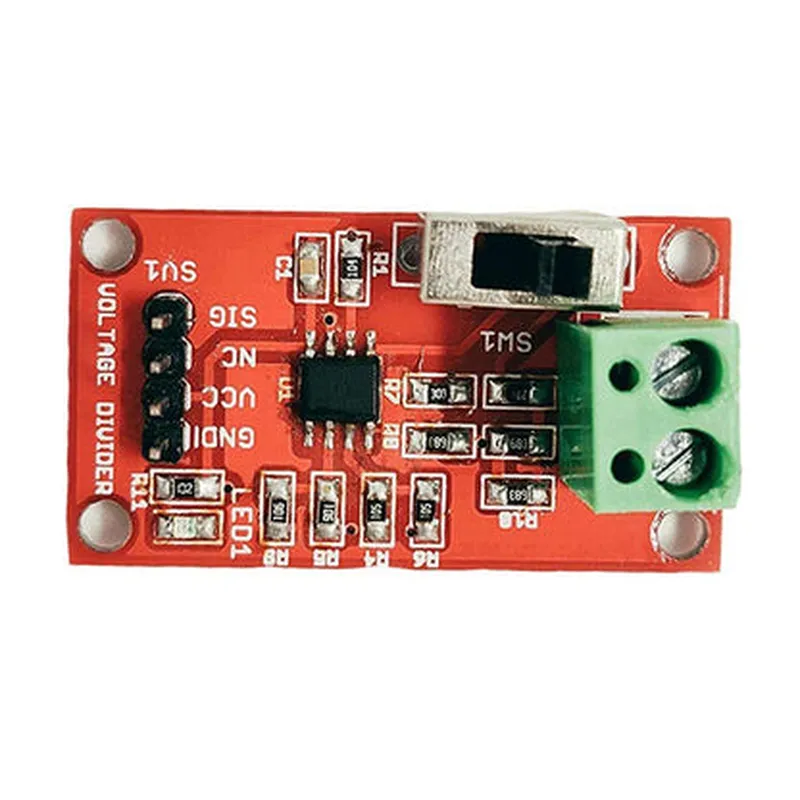
Seeedstudio Grove-Voltage Divider Module

Buy Now on Stufin

Pin Configuration

  • Grove-Voltage Divider Module Documentation
  • Overview
  • The Grove-Voltage Divider Module is a compact, easy-to-use module designed to simplify voltage division tasks in various IoT projects. This module is part of the Grove series, a modular, standardized connector-based system that allows for seamless integration with other Grove modules. The Voltage Divider Module provides a convenient way to divide an input voltage into two output voltages, making it an essential component in many IoT applications.
  • Pinout Explanation
  • The Grove-Voltage Divider Module features a 4-pin interface, with each pin serving a specific purpose. Here's a breakdown of each pin:
  • Pin 1: VCC (Input Voltage)
  • Function: This pin connects to the input voltage source (e.g., a battery or a power supply).
  • Description: The VCC pin accepts an input voltage, which will be divided into two output voltages.
  • Typical Input Voltage Range: 3.3V to 12V (dependent on the specific application).
  • Pin 2: Vout1 (Output Voltage 1)
  • Function: This pin provides the first divided output voltage.
  • Description: The Vout1 pin outputs a voltage that is a fraction of the input voltage, determined by the ratio of resistors R1 and R2 in the voltage divider circuit.
  • Pin 3: Vout2 (Output Voltage 2)
  • Function: This pin provides the second divided output voltage.
  • Description: The Vout2 pin outputs a voltage that is also a fraction of the input voltage, determined by the ratio of resistors R1 and R2 in the voltage divider circuit.
  • Pin 4: GND (Ground)
  • Function: This pin connects to the system ground or negative terminal of the power supply.
  • Description: The GND pin provides a common reference point for the module and ensures proper operation of the voltage divider circuit.
  • Connection Structure
  • To connect the Grove-Voltage Divider Module, follow these steps:
  • 1. Connect the input voltage source:
  • Connect the positive terminal of the power source (e.g., battery or power supply) to the VCC pin (Pin 1) of the module.
  • 2. Connect the output voltage 1:
  • Connect the Vout1 pin (Pin 2) to the input of the device or component that requires the first divided output voltage.
  • 3. Connect the output voltage 2:
  • Connect the Vout2 pin (Pin 3) to the input of the device or component that requires the second divided output voltage.
  • 4. Connect the ground:
  • Connect the negative terminal of the power source (or system ground) to the GND pin (Pin 4) of the module.
  • Important Note
  • When using the Grove-Voltage Divider Module, ensure that the input voltage and the divider resistors (R1 and R2) are chosen appropriately for the specific application to avoid damage to the module or connected devices.
  • This module is designed for use with the Grove system, which allows for easy connection and disconnection of modules using standardized connectors. If you're new to the Grove system, refer to the Seeedstudio Grove documentation for more information on how to use Grove modules with your IoT projects.

Code Examples

Seeedstudio Grove-Voltage Divider Module Documentation
Overview
The Seeedstudio Grove-Voltage Divider Module is a compact and easy-to-use module designed to facilitate voltage division in IoT projects. This module is based on a resistive voltage divider circuit, which allows users to reduce a higher voltage to a lower voltage level, making it safe for microcontrollers and other devices with limited voltage tolerance.
Features
Voltage division ratio: 1:1, 1:2, 1:5, 1:10, or custom ratio
 Input voltage range: 0-40V
 Output voltage range: 0-20V
 Output current: up to 10mA
 Grove compatible interface for easy connection
Connecting the Module
The Grove-Voltage Divider Module has a standard 4-pin Grove connector. To connect the module, follow these steps:
1. Connect the input voltage (Vin) to the module's Vin pin.
2. Connect the ground (GND) to the module's GND pin.
3. Connect the output voltage (Vout) to the module's Vout pin.
4. Connect the Grove connector to a microcontroller or other devices.
Code Examples
### Example 1: Reading Voltage Divider Output using Arduino
In this example, we will use an Arduino board to read the output voltage of the Grove-Voltage Divider Module.
```c
const int voutPin = A0;  // Connect Vout to Analog Input A0
void setup() {
  Serial.begin(9600);
}
void loop() {
  int voutValue = analogRead(voutPin);
  float voutVoltage = voutValue  (5.0 / 1023.0);
  Serial.print("Output Voltage: ");
  Serial.print(voutVoltage);
  Serial.println(" V");
  delay(500);
}
```
### Example 2: Using the Voltage Divider Module with Raspberry Pi (Python)
In this example, we will use a Raspberry Pi to read the output voltage of the Grove-Voltage Divider Module using Python.
```python
import RPi.GPIO as GPIO
import time
GPIO.setmode(GPIO.BCM)
voutPin = 18  # Connect Vout to GPIO 18
GPIO.setup(voutPin, GPIO.IN)
while True:
    voutValue = GPIO.input(voutPin)
    voutVoltage = voutValue  3.3  # Assuming 3.3V as the reference voltage
    print("Output Voltage: {:.2f} V".format(voutVoltage))
    time.sleep(0.5)
```
### Example 3: Using the Voltage Divider Module with ESP32 (MicroPython)
In this example, we will use an ESP32 board to read the output voltage of the Grove-Voltage Divider Module using MicroPython.
```python
import machine
voutPin = machine.Pin(32)  # Connect Vout to GPIO 32
while True:
    voutValue = voutPin.value()
    voutVoltage = voutValue  3.3  # Assuming 3.3V as the reference voltage
    print("Output Voltage: {:.2f} V".format(voutVoltage))
    time.sleep(0.5)
```
Troubleshooting
Ensure the input voltage is within the specified range (0-40V).
 Verify the voltage divider ratio is set correctly.
 Check the connections to the microcontroller or other devices.
 Use a multimeter to measure the output voltage if you're unsure about the readings.
By following these examples and guidelines, you can effectively use the Seeedstudio Grove-Voltage Divider Module in your IoT projects.