Stufin
Home Quick Cart Profile

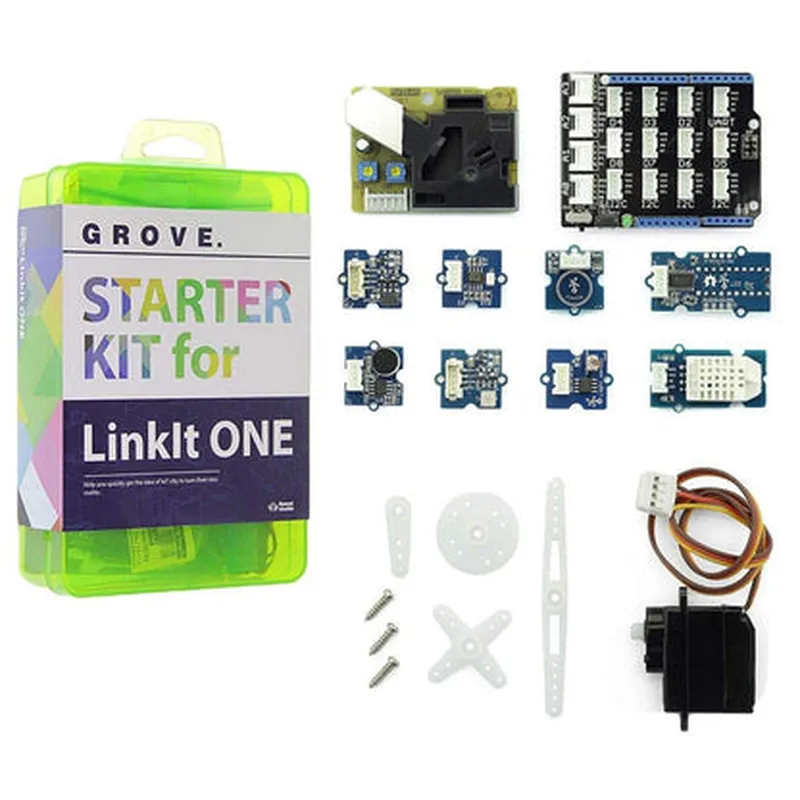
Grove Starter IoT Kit

Buy Now on Stufin

The kit provides a range of modules and sensors that can be used to

Monitor environmental parameters such as temperature, humidity, and light

Detect and track motion, gesture, and orientation

Measure sound and vibration levels

Control and interact with LEDs, relays, and other actuators

Establish wireless communication using Wi-Fi and Bluetooth Low Energy (BLE)

Key Features

  • Grove Board: Arduino-compatible, featuring a range of interfaces, including digital and analog pins, I2C, UART, and SPI.
  • Modular Design: The kit includes a variety of modular components, allowing users to easily connect and disconnect sensors, actuators, and modules as needed.
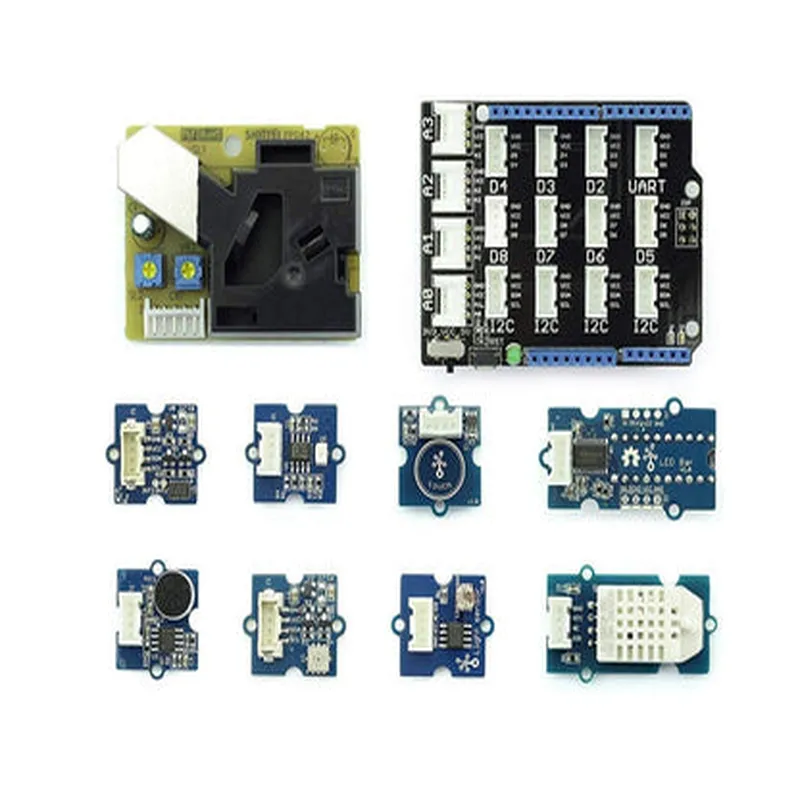
  • Sensors and Modules: The kit comes with a range of sensors and modules, including:

DHT11 Temperature and Humidity Sensor

Light Sensor

Sound Sensor

Vibration Sensor

PIR Motion Sensor

LED Module

Relay Module

Wi-Fi Module (ESP8266)

Bluetooth Low Energy (BLE) Module

  • Easy Connectivity: The kit features a simple, plug-and-play connectivity system, allowing users to quickly connect and disconnect modules without the need for breadboarding or soldering.
  • Open-Source Software: The kit is compatible with the popular Arduino Integrated Development Environment (IDE), providing access to a vast library of open-source software and resources.
  • Comprehensive Documentation: The kit includes detailed documentation, tutorials, and project guides, making it easy for users to get started and explore the world of IoT.

Specifications

Grove Board

+ MicrocontrollerATmega328P
+ Operating Voltage5V
+ Input/Output Pins14 digital, 6 analog
+ Communication InterfacesI2C, UART, SPI

Sensors and Modules

+ DHT11 Temperature and Humidity Sensor-20C to 50C, 0-100% RH
+ Light Sensor0-100,000 lux
+ Sound Sensor0-100 dB
+ Vibration Sensor0-100 g
+ PIR Motion Sensor3-5 meters detection range
+ LED Module3x RGB LEDs
+ Relay Module2x SPDT relays, 230V/10A
+ Wi-Fi ModuleESP8266, 802.11 b/g/n, 2.4 GHz
+ Bluetooth Low Energy (BLE) Module4.0, 2.4 GHz

Power Supply

+ USB Powered (via Micro-USB cable)

+ External Power Supply (optional)5V, 2A

Applications

The Grove Starter IoT Kit is ideal for a wide range of applications, including

Home automation and security systems

Environmental monitoring and tracking

Wearable devices and accessories

Robotics and autonomous systems

IoT-based prototyping and proof-of-concept development

Conclusion

The Grove Starter IoT Kit provides a comprehensive and easy-to-use platform for exploring the world of IoT. With its modular design, extensive range of sensors and modules, and open-source software, this kit is perfect for anyone looking to develop innovative IoT projects. Whether you're a beginner or an experienced developer, the Grove Starter IoT Kit is an excellent choice for getting started with IoT development.

Pin Configuration

  • Grove Starter IoT Kit Pinout Documentation
  • The Grove Starter IoT Kit is an innovative hardware platform designed for rapid prototyping and development of Internet of Things (IoT) projects. The kit comes with various modules and sensors that can be easily connected using the standardized Grove connectors. Below is a detailed explanation of each pin on the Grove Starter IoT Kit, along with guidelines on how to connect them.
  • Base Shield Pins:
  • 1. GND (Ground):
  • Pin Description: Ground pin, provides a common reference point for all modules.
  • Connection: Connect to the ground pin of sensors, modules, or other components.
  • 2. VCC (Power):
  • Pin Description: Power supply pin, provides 5V or 3.3V depending on the module's requirements.
  • Connection: Connect to the power pin of sensors, modules, or other components.
  • 3. RX (Serial Receive):
  • Pin Description: Serial receive pin, used for serial communication.
  • Connection: Connect to the TX pin of a serial module or sensor.
  • 4. TX (Serial Transmit):
  • Pin Description: Serial transmit pin, used for serial communication.
  • Connection: Connect to the RX pin of a serial module or sensor.
  • 5. D2 (Digital Pin 2):
  • Pin Description: Digital I/O pin, can be used as an input or output.
  • Connection: Connect to digital sensors, modules, or other components that require a digital signal.
  • 6. D3 (Digital Pin 3):
  • Pin Description: Digital I/O pin, can be used as an input or output.
  • Connection: Connect to digital sensors, modules, or other components that require a digital signal.
  • 7. D4 (Digital Pin 4):
  • Pin Description: Digital I/O pin, can be used as an input or output.
  • Connection: Connect to digital sensors, modules, or other components that require a digital signal.
  • 8. D5 (Digital Pin 5):
  • Pin Description: Digital I/O pin, can be used as an input or output.
  • Connection: Connect to digital sensors, modules, or other components that require a digital signal.
  • 9. D6 (Digital Pin 6):
  • Pin Description: Digital I/O pin, can be used as an input or output.
  • Connection: Connect to digital sensors, modules, or other components that require a digital signal.
  • 10. D7 (Digital Pin 7):
  • Pin Description: Digital I/O pin, can be used as an input or output.
  • Connection: Connect to digital sensors, modules, or other components that require a digital signal.
  • 11. D8 (Digital Pin 8):
  • Pin Description: Digital I/O pin, can be used as an input or output.
  • Connection: Connect to digital sensors, modules, or other components that require a digital signal.
  • 12. D9 (Digital Pin 9):
  • Pin Description: Digital I/O pin, can be used as an input or output.
  • Connection: Connect to digital sensors, modules, or other components that require a digital signal.
  • 13. D10 (Digital Pin 10):
  • Pin Description: Digital I/O pin, can be used as an input or output.
  • Connection: Connect to digital sensors, modules, or other components that require a digital signal.
  • 14. D11 (Digital Pin 11):
  • Pin Description: Digital I/O pin, can be used as an input or output.
  • Connection: Connect to digital sensors, modules, or other components that require a digital signal.
  • 15. D12 (Digital Pin 12):
  • Pin Description: Digital I/O pin, can be used as an input or output.
  • Connection: Connect to digital sensors, modules, or other components that require a digital signal.
  • 16. A0 (Analog Input 0):
  • Pin Description: Analog input pin, can be used to read analog signals from sensors.
  • Connection: Connect to analog sensors, modules, or other components that require an analog input.
  • 17. A1 (Analog Input 1):
  • Pin Description: Analog input pin, can be used to read analog signals from sensors.
  • Connection: Connect to analog sensors, modules, or other components that require an analog input.
  • 18. A2 (Analog Input 2):
  • Pin Description: Analog input pin, can be used to read analog signals from sensors.
  • Connection: Connect to analog sensors, modules, or other components that require an analog input.
  • 19. A3 (Analog Input 3):
  • Pin Description: Analog input pin, can be used to read analog signals from sensors.
  • Connection: Connect to analog sensors, modules, or other components that require an analog input.
  • 20. A4 (Analog Input 4):
  • Pin Description: Analog input pin, can be used to read analog signals from sensors.
  • Connection: Connect to analog sensors, modules, or other components that require an analog input.
  • 21. A5 (Analog Input 5):
  • Pin Description: Analog input pin, can be used to read analog signals from sensors.
  • Connection: Connect to analog sensors, modules, or other components that require an analog input.
  • Grove Connectors:
  • The Grove Starter IoT Kit features several Grove connectors, which are used to connect various Grove modules and sensors. These connectors are labeled as follows:
  • Grove Digital Connector: Used for digital modules and sensors.
  • Grove Analog Connector: Used for analog modules and sensors.
  • Grove I2C Connector: Used for I2C modules and sensors.
  • Grove UART Connector: Used for UART modules and sensors.
  • When connecting Grove modules or sensors, ensure that the connector type matches the module's requirements. Simply plug the module into the corresponding Grove connector, and secure it with the locking mechanism.
  • Important Notes:
  • Always refer to the documentation of the specific Grove module or sensor being connected to ensure correct pinout and connection guidelines.
  • Be cautious when connecting modules and sensors to avoid damage or electrical shock.
  • Use a breadboard or PCB to connect modules and sensors if the Grove connectors are not available.
  • By following this pinout documentation and connection guidelines, you can easily set up and connect various modules and sensors to your Grove Starter IoT Kit, enabling you to rapidly prototype and develop innovative IoT projects.

Code Examples

Grove Starter IoT Kit Documentation
The Grove Starter IoT Kit is a comprehensive bundle of IoT components and sensors designed to help users get started with building innovative IoT projects. This kit includes a range of modules, including sensors, actuators, and communication modules, that can be easily connected and programmed using the Arduino or Raspberry Pi platforms.
Components Included:
Grove Base Shield v2.0
 Grove Temperature and Humidity Sensor
 Grove Light Sensor
 Grove Sound Sensor
 Grove Button
 Grove LED
 Grove Relay
 Grove Ethernet Module
 Grove WiFi Module
 Jumper wires
Code Examples:
### Example 1: Temperature and Humidity Monitoring using Arduino
This example demonstrates how to use the Grove Temperature and Humidity Sensor to monitor and display temperature and humidity values using the Arduino platform.
Hardware Requirements:
Grove Base Shield v2.0
 Grove Temperature and Humidity Sensor
 Arduino Board (e.g., Arduino Uno)
Software Requirements:
Arduino IDE
Code:
```c++
#include <DHT.h>
#define DHTPIN 2     // Digital pin connected to the DHT sensor
#define DHTTYPE DHT11   // DHT 11
DHT dht(DHTPIN, DHTTYPE);
void setup() {
  Serial.begin(9600);
  dht.begin();
}
void loop() {
  int temp = dht.readTemperature();
  int humi = dht.readHumidity();
  
  if (isnan(temp) || isnan(humi)) {
    Serial.println("Failed to read from DHT sensor!");
    return;
  }
  
  Serial.print("Temperature: ");
  Serial.print(temp);
  Serial.println(" C");
  Serial.print("Humidity: ");
  Serial.print(humi);
  Serial.println(" %");
  
  delay(2000);
}
```
Output:
The code will print the temperature and humidity values to the serial monitor every 2 seconds.
### Example 2: IoT-Based Home Automation using Raspberry Pi and WiFi Module
This example demonstrates how to use the Grove WiFi Module and the Grove Relay to control a lamp remotely using a Raspberry Pi.
Hardware Requirements:
Grove Base Shield v2.0
 Grove WiFi Module
 Grove Relay
 Raspberry Pi
 Lamp or any other appliance to be controlled
Software Requirements:
Raspbian OS
 Python 3.x
Code:
```python
import RPi.GPIO as GPIO
import time
import socket
# Set up GPIO pins
GPIO.setmode(GPIO.BCM)
GPIO.setup(17, GPIO.OUT)  # Relay pin
# Set up WiFi connection
SSID = 'your_wifi_ssid'
PASSWORD = 'your_wifi_password'
sock = socket.socket(socket.AF_INET, socket.SOCK_STREAM)
sock.bind(('192.168.0.100', 8080))  # Replace with your Raspberry Pi's IP address
sock.listen(5)
while True:
    conn, addr = sock.accept()
    print('Connected by', addr)
    
    while True:
        data = conn.recv(1024)
        if not data:
            break
        
        if data.decode() == 'ON':
            GPIO.output(17, GPIO.HIGH)  # Turn on the lamp
        elif data.decode() == 'OFF':
            GPIO.output(17, GPIO.LOW)  # Turn off the lamp
    
    conn.close()
```
Note: Replace `your_wifi_ssid` and `your_wifi_password` with your WiFi network's SSID and password.
Output:
The code will establish a WiFi connection and start a server on the Raspberry Pi. When a client sends an `ON` or `OFF` command to the server, the lamp will be turned on or off accordingly.
These examples demonstrate the versatility of the Grove Starter IoT Kit and its potential to be used in a wide range of IoT applications.