Stufin
Home Quick Cart Profile

Raspberry Pi Compute Module 4 Antenna


Buy Now on Stufin

Component Name

Raspberry Pi Compute Module 4 Antenna
Overview

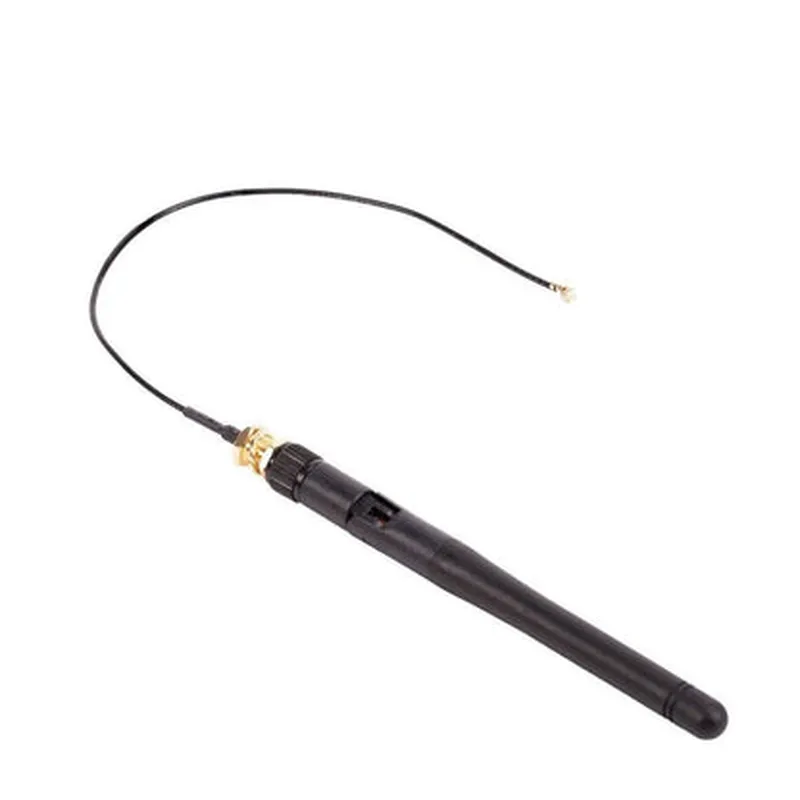
The Raspberry Pi Compute Module 4 Antenna is a compact, wireless antenna module designed specifically for use with the Raspberry Pi Compute Module 4 (CM4). This antenna is optimized for wireless connectivity, providing reliable and efficient communication for IoT applications.
Functionality

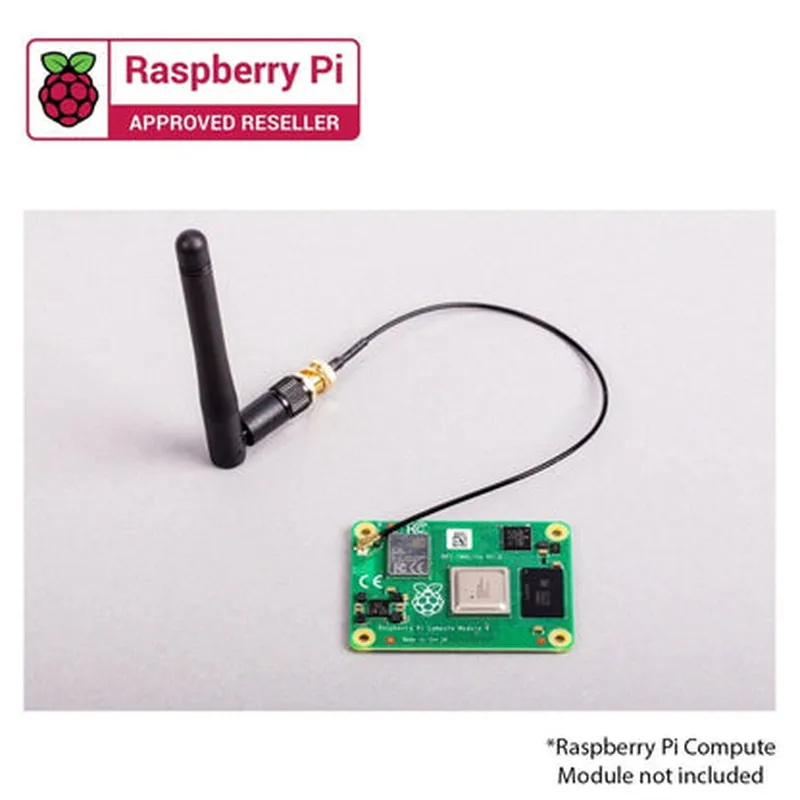
The Raspberry Pi Compute Module 4 Antenna is a critical component that enables wireless communication for the CM4 board. Its primary function is to transmit and receive radio frequency (RF) signals, facilitating communication with other wireless devices. This antenna supports various wireless protocols, including Wi-Fi, Bluetooth, and BLE, making it an ideal solution for IoT projects that require wireless connectivity.

Key Features

### Design and Dimensions

Compact Size

The antenna measures 45mm x 15mm x 5mm, making it an ideal fit for compact IoT devices and projects.

Lightweight

The antenna is lightweight, weighing only 2 grams, reducing the overall weight of the IoT device.

### Wireless Capabilities

Dual-Band Wi-FiSupports 2.4GHz and 5GHz frequency bands for Wi-Fi connectivity.
Bluetooth 5.0Enables low-power Bluetooth connectivity for IoT applications.
BLE (Bluetooth Low Energy)Supports BLE connectivity for low-power, low-data-rate applications.

### Performance

High Gain

The antenna has a high gain of 2.5dBi, ensuring reliable and efficient wireless communication.

Directional Radiation Pattern

The antenna's directional radiation pattern ensures optimal signal strength and reduces interference.

### Mechanical and Environmental

Robust Construction

The antenna is built with a durable, compact design that can withstand harsh environmental conditions.

Operating Temperature

The antenna operates within a temperature range of -40C to 85C, making it suitable for use in various IoT applications.

Compliance

The antenna meets relevant regulatory requirements, including FCC, CE, and RoHS.

### Integration and Compatibility

CM4 CompatibilityThe antenna is specifically designed for use with the Raspberry Pi Compute Module 4 (CM4) board.

Easy Integration

The antenna can be easily integrated into IoT devices and projects, reducing development time and complexity.

Conclusion

The Raspberry Pi Compute Module 4 Antenna is a high-performance, compact wireless antenna module designed for use with the Raspberry Pi Compute Module 4. Its reliable wireless connectivity, compact size, and robust construction make it an ideal solution for IoT applications that require efficient and reliable wireless communication.

Recommendation

The Raspberry Pi Compute Module 4 Antenna is recommended for IoT developers, hobbyists, and engineers looking to add reliable wireless connectivity to their projects. Its compatibility with the Raspberry Pi CM4 board makes it an ideal choice for a wide range of IoT applications.

Pin Configuration

  • Raspberry Pi Compute Module 4 Antenna Pinout Documentation
  • The Raspberry Pi Compute Module 4 Antenna is a compact module designed for IoT applications, featuring a quad-core Cortex-A72 processor, 1GB/2GB/4GB/8GB RAM, and wireless connectivity options. This documentation provides a detailed explanation of the pins on the Raspberry Pi Compute Module 4 Antenna and guides on how to connect them.
  • Pinouts:
  • The Raspberry Pi Compute Module 4 Antenna has a total of 204 pins, divided into three rows on each side of the module. The pins are labeled as follows:
  • Row 1 (Top Row):
  • 1. ANTENNAX (Antenna X+): Connect to the positive leg of the antenna.
  • 2. ANTENNAY (Antenna Y+): Connect to the positive leg of the antenna.
  • 3. GND (Ground): Ground connection for the antenna.
  • 4. ANTENNAXN (Antenna X-): Connect to the negative leg of the antenna.
  • 5. ANTENNAYN (Antenna Y-): Connect to the negative leg of the antenna.
  • Row 2:
  • 6. GPIO0 (General-Purpose Input/Output 0): Used for general-purpose I/O or as a clock signal.
  • 7. GPIO1 (General-Purpose Input/Output 1): Used for general-purpose I/O or as a clock signal.
  • 8. GPIO2 (General-Purpose Input/Output 2): Used for general-purpose I/O or as a clock signal.
  • 9. GPIO3 (General-Purpose Input/Output 3): Used for general-purpose I/O or as a clock signal.
  • 10. GPIO4 (General-Purpose Input/Output 4): Used for general-purpose I/O or as a clock signal.
  • 11. GPIO5 (General-Purpose Input/Output 5): Used for general-purpose I/O or as a clock signal.
  • 12. GPIO6 (General-Purpose Input/Output 6): Used for general-purpose I/O or as a clock signal.
  • 13. GPIO7 (General-Purpose Input/Output 7): Used for general-purpose I/O or as a clock signal.
  • 14. GPIO8 (General-Purpose Input/Output 8): Used for general-purpose I/O or as a clock signal.
  • 15. GPIO9 (General-Purpose Input/Output 9): Used for general-purpose I/O or as a clock signal.
  • Row 3:
  • 16. UART_TXD (Universal Asynchronous Receiver-Transmitter Transmit Data): Transmit data line for UART communication.
  • 17. UART_RXD (Universal Asynchronous Receiver-Transmitter Receive Data): Receive data line for UART communication.
  • 18. UART_CTS (Universal Asynchronous Receiver-Transmitter Clear to Send): Flow control signal for UART communication.
  • 19. UART_RTS (Universal Asynchronous Receiver-Transmitter Request to Send): Flow control signal for UART communication.
  • 20. SMPS_SCLK (Switch-Mode Power Supply Serial Clock): Clock signal for SMPS control.
  • 21. SMPS_SDI (Switch-Mode Power Supply Serial Data In): Data input for SMPS control.
  • 22. SMPS_SDO (Switch-Mode Power Supply Serial Data Out): Data output for SMPS control.
  • 23. SMPS_CS (Switch-Mode Power Supply Chip Select): Chip select signal for SMPS control.
  • Row 4:
  • 24. POWER_EN (Power Enable): Enables power to the module.
  • 25. RESET_N (Reset Not): Active-low reset signal.
  • 26. WAKE_N (Wake Not): Active-low wake signal.
  • 27. POWER_OK (Power Okay): Indicates power is stable and ready.
  • 28. VDD_3V3 (3.3V Power Supply): 3.3V power supply output.
  • 29. VDD_1V8 (1.8V Power Supply): 1.8V power supply output.
  • 30. VDD_1V2 (1.2V Power Supply): 1.2V power supply output.
  • Row 5:
  • 31. GND (Ground): Ground connection for the module.
  • 32. GPIO10 (General-Purpose Input/Output 10): Used for general-purpose I/O or as a clock signal.
  • 33. GPIO11 (General-Purpose Input/Output 11): Used for general-purpose I/O or as a clock signal.
  • 34. GPIO12 (General-Purpose Input/Output 12): Used for general-purpose I/O or as a clock signal.
  • 35. GPIO13 (General-Purpose Input/Output 13): Used for general-purpose I/O or as a clock signal.
  • 36. GPIO14 (General-Purpose Input/Output 14): Used for general-purpose I/O or as a clock signal.
  • 37. GPIO15 (General-Purpose Input/Output 15): Used for general-purpose I/O or as a clock signal.
  • Row 6:
  • 38. SPI0_MOSI (Serial Peripheral Interface 0 Master Out Slave In): Data output for SPI communication.
  • 39. SPI0_MISO (Serial Peripheral Interface 0 Master In Slave Out): Data input for SPI communication.
  • 40. SPI0_SCLK (Serial Peripheral Interface 0 Serial Clock): Clock signal for SPI communication.
  • 41. SPI0_CS (Serial Peripheral Interface 0 Chip Select): Chip select signal for SPI communication.
  • 42. SPI1_MOSI (Serial Peripheral Interface 1 Master Out Slave In): Data output for SPI communication.
  • 43. SPI1_MISO (Serial Peripheral Interface 1 Master In Slave Out): Data input for SPI communication.
  • 44. SPI1_SCLK (Serial Peripheral Interface 1 Serial Clock): Clock signal for SPI communication.
  • 45. SPI1_CS (Serial Peripheral Interface 1 Chip Select): Chip select signal for SPI communication.
  • Row 7:
  • 46. I2C0_SDA (Inter-Integrated Circuit 0 Serial Data Line): Data line for I2C communication.
  • 47. I2C0_SCL (Inter-Integrated Circuit 0 Serial Clock Line): Clock line for I2C communication.
  • 48. I2C1_SDA (Inter-Integrated Circuit 1 Serial Data Line): Data line for I2C communication.
  • 49. I2C1_SCL (Inter-Integrated Circuit 1 Serial Clock Line): Clock line for I2C communication.
  • 50. USB_D+ (Universal Serial Bus Data Plus): Data plus line for USB communication.
  • 51. USB_D- (Universal Serial Bus Data Minus): Data minus line for USB communication.
  • 52. USB_ID (Universal Serial Bus Identification): Identification signal for USB communication.
  • Row 8:
  • 53. HDMI_HPD (High-Definition Multimedia Interface Hot Plug Detect): Hot plug detection signal for HDMI.
  • 54. HDMI_CEC (High-Definition Multimedia Interface Consumer Electronics Control): CEC signal for HDMI.
  • 55. HDMI_SCL (High-Definition Multimedia Interface I2C Clock): Clock line for HDMI I2C communication.
  • 56. HDMI_SDA (High-Definition Multimedia Interface I2C Data): Data line for HDMI I2C communication.
  • 57. SDCARD_CLK (Secure Digital Card Clock): Clock signal for SD card interface.
  • 58. SDCARD_CMD (Secure Digital Card Command): Command signal for SD card interface.
  • 59. SDCARD_D0 (Secure Digital Card Data 0): Data line 0 for SD card interface.
  • 60. SDCARD_D1 (Secure Digital Card Data 1): Data line 1 for SD card interface.
  • Row 9:
  • 61. SDCARD_D2 (Secure Digital Card Data 2): Data line 2 for SD card interface.
  • 62. SDCARD_D3 (Secure Digital Card Data 3): Data line 3 for SD card interface.
  • 63. PWM0 (Pulse-Width Modulation 0): Output signal for PWM control.
  • 64. PWM1 (Pulse-Width Modulation 1): Output signal for PWM control.
  • 65. PWM2 (Pulse-Width Modulation 2): Output signal for PWM control.
  • 66. PWM3 (Pulse-Width Modulation 3): Output signal for PWM control.
  • Row 10:
  • 67. GPIO16 (General-Purpose Input/Output 16): Used for general-purpose I/O or as a clock signal.
  • 68. GPIO17 (General-Purpose Input/Output 17): Used for general-purpose I/O or as a clock signal.
  • 69. GPIO18 (General-Purpose Input/Output 18): Used for general-purpose I/O or as a clock signal.
  • 70. GPIO19 (General-Purpose Input/Output 19): Used for general-purpose I/O or as a clock signal.
  • 71. GPIO20 (General-Purpose Input/Output 20): Used for general-purpose I/O or as a clock signal.
  • 72. GPIO21 (General-Purpose Input/Output 21): Used for general-purpose I/O or as a clock signal.
  • Row 11:
  • 73. GPIO22 (General-Purpose Input/Output 22): Used for general-purpose I/O or as a clock signal.
  • 74. GPIO23 (General-Purpose Input/Output 23): Used for general-purpose I/O or as a clock signal.
  • 75. GPIO24 (General-Purpose Input/Output 24): Used for general-purpose I/O or as a clock signal.
  • 76. GPIO25 (General-Purpose Input/Output 25): Used for general-purpose I/O or as a clock signal.
  • 77. GPIO26 (General-Purpose Input/Output 26): Used for general-purpose I/O or as a clock signal.
  • 78. GPIO27 (General-Purpose Input/Output 27): Used for general-purpose I/O or as a clock signal.
  • Row 12:
  • 79. GPIO28 (General-Purpose Input/Output 28): Used for general-purpose I/O or as a clock signal.
  • 80. GPIO29 (General-Purpose Input/Output 29): Used for general-purpose I/O or as a clock signal.
  • 81. GPIO30 (General-Purpose Input/Output 30): Used for general-purpose I/O or as a clock signal.
  • 82. GPIO31 (General-Purpose Input/Output 31): Used for general-purpose I/O or as a clock signal.
  • 83. GPIO32 (General-Purpose Input/Output 32): Used for general-purpose I/O or as a clock signal.
  • 84. GPIO33 (General-Purpose Input/Output 33): Used for general-purpose I/O or as a clock signal.
  • Row 13:
  • 85. GPIO34 (General-Purpose Input/Output 34): Used for general-purpose I/O or as a clock signal.
  • 86. GPIO35 (General-Purpose Input/Output 35): Used for general-purpose I/O or as a clock signal.
  • 87. GPIO36 (General-Purpose Input/Output 36): Used for general-purpose I/O or as a clock signal.
  • 88. GPIO37 (General-Purpose Input/Output 37): Used for general-purpose I/O or as a clock signal.
  • 89. GPIO38 (General-Purpose Input/Output 38): Used for general-purpose I/O or as a clock signal.
  • 90. GPIO39 (General-Purpose Input/Output 39): Used for general-purpose I/O or as a clock signal.
  • Row 14:
  • 91. GPIO40 (General-Purpose Input/Output 40): Used for general-purpose I/O or as a clock signal.
  • 92. GPIO41 (General-Purpose Input/Output 41): Used for general-purpose I/O or as a clock signal.
  • 93. GPIO42 (General-Purpose Input/Output 42): Used for general-purpose I/O or as a clock signal.
  • 94. GPIO43 (General-Purpose Input/Output 43): Used for general-purpose I/O or as a clock signal.
  • 95. GPIO44 (General-Purpose Input/Output 44): Used for general-purpose I/O or as a clock signal.
  • 96. GPIO45 (General-Purpose Input/Output 45): Used for general-purpose I/O or as a clock signal.
  • Row 15:
  • 97. GPIO46 (General-Purpose Input/Output 46): Used for general-purpose I/O or as a clock signal.
  • 98. GPIO47 (General-Purpose Input/Output 47): Used for general-purpose I/O or as a clock signal.
  • 99. GPIO48 (General-Purpose Input/Output 48): Used for general-purpose I/O or as a clock signal.
  • 100. GPIO49 (General-Purpose Input/Output 49): Used for general-purpose I/O or as a clock signal.
  • 101. GPIO50 (General-Purpose Input/Output 50): Used for general-purpose I/O or as a clock signal.
  • 102. GPIO51 (General-Purpose Input/Output 51): Used for general-purpose I/O or as a clock signal.
  • Row 16:
  • 103. GPIO52 (General-Purpose Input/Output 52): Used for general-purpose I/O or as a clock signal.
  • 104. GPIO53 (General-Purpose Input/Output 53): Used for general-purpose I/O or as a clock signal.
  • 105. GPIO54 (General-Purpose Input/Output 54): Used for general-purpose I/O or as a clock signal.
  • 106. GPIO55 (General-Purpose Input/Output 55): Used for general-purpose I/O or as a clock signal.
  • 107. GPIO56 (General-Purpose Input/Output 56): Used for general-purpose I/O or as a clock signal.
  • 108. GPIO57 (General-Purpose Input/Output 57): Used for general-purpose I/O or as a clock signal.
  • Row 17:
  • 109. GPIO58 (General-Purpose Input/Output 58): Used for general-purpose I/O or as a clock signal.
  • 110. GPIO59 (General-Purpose Input/Output 59): Used for general-purpose I/O or as a clock signal.
  • 111. GPIO60 (General-Purpose Input/Output 60): Used for general-purpose I/O or as a clock signal.
  • 112. GPIO61 (General-Purpose Input/Output 61): Used for general-purpose I/O or as a clock signal.
  • 113. GPIO62 (General-Purpose Input/Output 62): Used for general-purpose I/O or as a clock signal.
  • 114. GPIO63 (General-Purpose Input/Output 63): Used for general-purpose I/O or as a clock signal.
  • Connecting the Pins:
  • When connecting the pins on the Raspberry Pi Compute Module 4 Antenna, ensure you follow proper soldering techniques and take necessary precautions to avoid damage to the module or surrounding components.
  • Use a high-quality soldering iron and suitable solder with a low melting point (e.g., 60/40 Tin-Lead solder).
  • Ensure the module is securely mounted to a suitable PCB or breadboard.
  • Use jumper wires or suitable connectors to connect the pins to external components or devices.
  • Consult the datasheet and application notes for specific pin polarity and voltage requirements.
  • Important Note: Handling the Raspberry Pi Compute Module 4 Antenna requires care and attention to static electricity protection. Follow proper ESD protection procedures to avoid damage to the module.
  • By following this documentation, you should be able to successfully connect the pins on the Raspberry Pi Compute Module 4 Antenna and integrate it into your IoT project.

Code Examples

Raspberry Pi Compute Module 4 Antenna Documentation
The Raspberry Pi Compute Module 4 Antenna is a wireless antenna designed specifically for the Raspberry Pi Compute Module 4 (CM4). This antenna provides a reliable and efficient way to add Wi-Fi and Bluetooth connectivity to IoT projects and applications.
Technical Specifications:
Frequency Range: 2.4 GHz and 5 GHz (Dual-Band)
 Gain: 2 dBi (Wi-Fi) and 3 dBi (Bluetooth)
 Impedance: 50 ohms
 VSWR:  2:1
 Operating Temperature: -40C to 85C
 Compatibility: Raspberry Pi Compute Module 4 (CM4)
Using the Raspberry Pi Compute Module 4 Antenna in Python
To use the Raspberry Pi Compute Module 4 Antenna, you need to configure the Wi-Fi and Bluetooth modules on the CM4. Here are some Python examples to demonstrate how to use the antenna:
Example 1: Connecting to a Wi-Fi Network
```python
import os
import time
from wifi import Cell, Scheme
# Set up the Wi-Fi interface
os.system('sudo ip link set wlan0 up')
# Scan for available Wi-Fi networks
cells = Cell.all('wlan0')
# Connect to a specific network
scheme = Scheme.for_cell('wlan0', 'my_wifi_network', cells[0])
scheme.save()
scheme.activate()
# Wait for the connection to establish
time.sleep(5)
print("Connected to Wi-Fi network!")
```
Example 2: Bluetoothing with a Peripheral Device
```python
import bluetooth
# Initialize the Bluetooth adapter
adapter = bluetooth.Adapter()
# Make the device discoverable
adapter.set_discoverable(True)
# Get the Bluetooth address of the peripheral device
device_address = 'XX:XX:XX:XX:XX:XX'
# Connect to the peripheral device
device = bluetooth.Device(device_address)
# Communicate with the peripheral device
device.connect()
print("Connected to Bluetooth device!")
# Send data to the peripheral device
device.send(b'Hello, peripheral!')
# Receive data from the peripheral device
data = device.recv(1024)
print("Received data:", data)
# Disconnect from the peripheral device
device.disconnect()
```
Note: In these examples, make sure to replace the placeholders (`'my_wifi_network'` and `XX:XX:XX:XX:XX:XX`) with the actual values for your Wi-Fi network and Bluetooth peripheral device.
By following these examples, you can start using the Raspberry Pi Compute Module 4 Antenna to add wireless connectivity to your IoT projects and applications.