Stufin
Home Quick Cart Profile

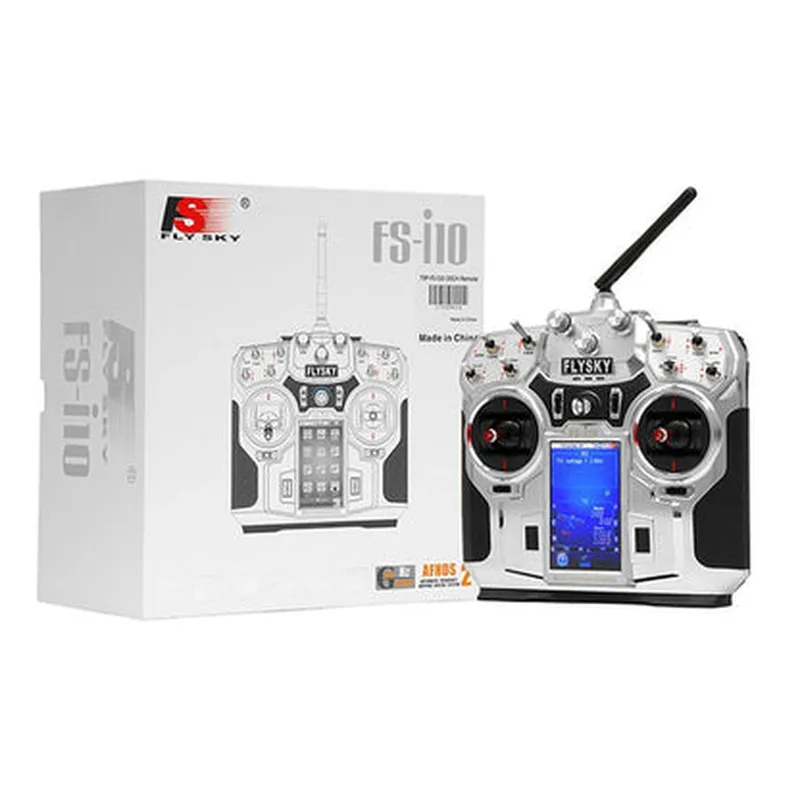
Flysky FS-i10 10CH 2.4GHz AFHDS 2 LCD Transmitter with Receiver


Buy Now on Stufin

Component Name

Flysky FS-i10 10CH 2.4GHz AFHDS 2 LCD Transmitter with Receiver
Overview

The Flysky FS-i10 is a 10-channel, 2.4GHz radio frequency (RF) transmitter and receiver system designed for remote control applications, particularly in the fields of drone, robotics, and model aircraft. This system utilizes Advanced Frequency Hopping Digital System 2 (AFHDS 2) technology, ensuring reliable and interference-free communication between the transmitter and receiver.

Functionality

The Flysky FS-i10 transmitter and receiver system is designed to provide a reliable and real-time communication link between the user and the remote device. The transmitter allows the user to send control signals to the receiver, which in turn, interprets and executes the commands on the connected device.

Key Features

### Transmitter (FS-i10)

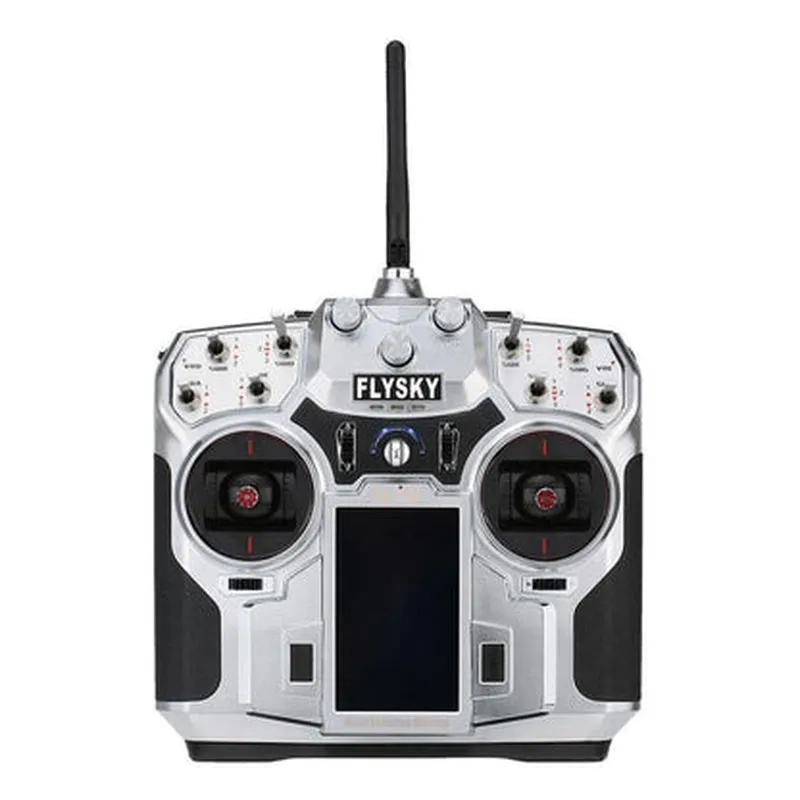
  • LCD Display: A backlit LCD display provides real-time telemetry data, including battery voltage, signal strength, and channel settings.
  • 10-Channel Capability: Supports up to 10 different channels, allowing for multiple devices to be controlled simultaneously.
  • 2.4GHz Frequency: Operates on the 2.4GHz frequency band, minimizing interference from other devices.
  • AFHDS 2 Technology: Utilizes Advanced Frequency Hopping Digital System 2, ensuring reliable and secure communication.
  • Ergonomic Design: Comfortable, ergonomic design with a non-slip grip, reducing fatigue during extended use.
  • Adjustable Settings: Allows for customization of channel settings, including end-point adjustments, servo reversing, and trim settings.

### Receiver (FS-GR3E)

  • Compact Design: Small, lightweight design makes it easy to integrate into a variety of devices.
  • 10-Channel Capability: Supports up to 10 different channels, allowing for multiple devices to be controlled simultaneously.
  • 2.4GHz Frequency: Operates on the 2.4GHz frequency band, minimizing interference from other devices.
  • AFHDS 2 Technology: Utilizes Advanced Frequency Hopping Digital System 2, ensuring reliable and secure communication.
  • Low Power Consumption: Designed for low power consumption, reducing the drain on connected device batteries.
  • SBUS and PPM Outputs: Supports both SBUS and PPM output protocols, allowing for compatibility with a wide range of devices.

Additional Features

Real-time TelemetryThe transmitter's LCD display provides real-time telemetry data, allowing the user to monitor the device's performance and adjust settings accordingly.

Model Memory

The transmitter can store up to 20 model settings, allowing for easy switching between different devices.

Alarm Function

The transmitter features an alarm function, alerting the user to low battery voltage, signal loss, and other critical events.

Frequency

2.4GHz

Modulation

AFHDS 2

Transmission Range

Up to 2.5 km (1.55 miles)

Power Consumption

100mA (transmitter), 20mA (receiver)

Operating Voltage

6V (transmitter), 3.7V (receiver)

Dimensions

155 x 100 x 35mm (transmitter), 33 x 20 x 10mm (receiver)

Weight

270g (transmitter), 10g (receiver)

Applications

The Flysky FS-i10 10CH 2.4GHz AFHDS 2 LCD Transmitter with Receiver is suitable for a variety of remote control applications, including
Drone and unmanned aerial vehicle (UAV) control

Model aircraft and RC car control

Robotics and automation

IoT and M2M applicationsrequiring reliable, real-time communication.

Pin Configuration

  • Flysky FS-i10 10CH 2.4GHz AFHDS 2 LCD Transmitter with Receiver Pinout Explanation
  • The Flysky FS-i10 transmitter and receiver are popular components in the IoT and robotics domain, used for remote control applications. Understanding the pinout of the transmitter and receiver is crucial for successful integration into projects. Here's a detailed explanation of the pins on the Flysky FS-i10 transmitter and receiver:
  • Transmitter Pinout:
  • The Flysky FS-i10 transmitter has a 10-channel output, with a mix of digital and analog pins.
  • #### Digital Pins:
  • 1. CH1-CH10 (Channel 1 to Channel 10): These 10 digital output pins correspond to the 10 channels of the transmitter. Each channel can be assigned to control a specific function or device. The pins are labeled CH1 to CH10 and are used to transmit digital signals to the receiver.
  • #### Analog Pins:
  • 1. BAT (Battery Voltage): This analog input pin measures the voltage of the transmitter's battery. It can be used to monitor the battery level and display it on the LCD screen.
  • 2. TR (Throttle): This analog input pin is connected to the throttle stick on the transmitter. It measures the throttle position and sends the corresponding analog signal to the receiver.
  • 3. AIL (Aileron): This analog input pin is connected to the aileron stick on the transmitter. It measures the aileron position and sends the corresponding analog signal to the receiver.
  • 4. ELE (Elevator): This analog input pin is connected to the elevator stick on the transmitter. It measures the elevator position and sends the corresponding analog signal to the receiver.
  • 5. RUD (Rudder): This analog input pin is connected to the rudder stick on the transmitter. It measures the rudder position and sends the corresponding analog signal to the receiver.
  • #### Miscellaneous Pins:
  • 1. VCC (Power Supply): This pin provides the power supply to the transmitter, typically 3.7V to 4.2V from a LiPo battery.
  • 2. GND (Ground): This pin is the ground reference for the transmitter.
  • Receiver Pinout:
  • The Flysky FS-i10 receiver has a 10-channel output, with a mix of digital and analog pins.
  • #### Digital Pins:
  • 1. CH1-CH10 (Channel 1 to Channel 10): These 10 digital output pins correspond to the 10 channels of the receiver. Each channel receives the digital signal from the transmitter and can be connected to a device or function.
  • #### Analog Pins:
  • 1. VCC (Power Supply): This pin provides the power supply to the receiver, typically 3.7V to 4.2V from a LiPo battery.
  • 2. GND (Ground): This pin is the ground reference for the receiver.
  • Connecting the Pins:
  • #### Transmitter to Receiver Connection:
  • 1. Connect the CH1-CH10 pins on the transmitter to the corresponding CH1-CH10 pins on the receiver.
  • #### Power Connection:
  • 1. Connect the VCC pin on the transmitter to a 3.7V to 4.2V power source (e.g., LiPo battery).
  • 2. Connect the GND pin on the transmitter to the ground reference of the power source.
  • #### Analog Connections:
  • 1. Connect the BAT pin on the transmitter to a voltage sensor or a voltage divider circuit to measure the battery voltage.
  • 2. Connect the TR, AIL, ELE, and RUD pins on the transmitter to the corresponding potentiometers or sensors on the transmitter sticks.
  • #### Notes:
  • Make sure to use proper wiring and insulation to prevent electrical shorts and damage to the components.
  • Refer to the Flysky FS-i10 user manual for specific instructions on setting up and configuring the transmitter and receiver.
  • When connecting devices to the receiver, ensure that they are compatible with the digital and analog signal formats used by the Flysky FS-i10.
  • Following these guidelines will help you successfully connect and use the Flysky FS-i10 transmitter and receiver in your IoT and robotics projects.

Code Examples

Flysky FS-i10 10CH 2.4GHz AFHDS 2 LCD Transmitter with Receiver Documentation
Overview
The Flysky FS-i10 is a 10-channel, 2.4GHz AFHDS 2 (Automatic Frequency Hopping Digital System) transmitter with a built-in LCD screen and a compatible receiver. It is designed for remote control of various devices, including drones, robots, and other IoT projects.
Technical Specifications
Frequency: 2.4GHz
 Modulation: AFHDS 2
 Channels: 10
 Range: Up to 1 mile (1.6 km)
 Transmitter Power: 100mW
 Receiver Sensitivity: -105dBm
 LCD Screen: 128x64 pixels
API and Programming
The Flysky FS-i10 transmitter and receiver use a proprietary protocol for communication. However, the receiver can be connected to a microcontroller or a single-board computer (SBC) using a serial interface, allowing for custom programming and integration with various IoT projects.
Example 1: Arduino Integration
In this example, we will use an Arduino Uno to read data from the Flysky FS-i10 receiver and control a servo motor accordingly.
Hardware Requirements:
Flysky FS-i10 transmitter and receiver
 Arduino Uno
 Servo motor
 Breadboard and jumper wires
Software Requirements:
Arduino IDE
Code:
```c++
#include <Servo.h>
#define RX_PIN 2  // Receive pin on the Arduino
#define SERVO_PIN 9  // Servo motor pin on the Arduino
Servo servo;
void setup() {
  // Initialize the serial communication with the receiver
  Serial.begin(115200);
  servo.attach(SERVO_PIN);
}
void loop() {
  // Read the data from the receiver
  if (Serial.available() > 0) {
    int channelData = Serial.parseInt();
    // Map the channel data to a servo position
    int servoPosition = map(channelData, 0, 1023, 0, 180);
    servo.write(servoPosition);
  }
  delay(20);
}
```
Example 2: Raspberry Pi Integration with Python
In this example, we will use a Raspberry Pi to read data from the Flysky FS-i10 receiver and control a LED strip accordingly.
Hardware Requirements:
Flysky FS-i10 transmitter and receiver
 Raspberry Pi
 LED strip
 Breadboard and jumper wires
Software Requirements:
Raspbian OS
 Python 3.x
Code:
```python
import serial
import RPi.GPIO as GPIO
# Initialize the serial communication with the receiver
ser = serial.Serial('/dev/ttyUSB0', 115200)
# Initialize the GPIO library
GPIO.setmode(GPIO.BCM)
GPIO.setup(18, GPIO.OUT)  # LED strip pin
while True:
    # Read the data from the receiver
    channelData = ser.readline()
    if channelData:
        # Map the channel data to a LED strip brightness
        brightness = int(channelData.decode('utf-8')) / 1023.0
        GPIO.PWM(18, 50).start(brightness)
    time.sleep(0.02)
```
Example 3: ESP32 Integration with MicroPython
In this example, we will use an ESP32 board to read data from the Flysky FS-i10 receiver and control a relay module accordingly.
Hardware Requirements:
Flysky FS-i10 transmitter and receiver
 ESP32 board
 Relay module
 Breadboard and jumper wires
Software Requirements:
MicroPython firmware
Code:
```python
import machine
import utime
# Initialize the serial communication with the receiver
uart = machine.UART(1, 115200)
# Initialize the relay module
relay = machine.Pin(26, machine.Pin.OUT)
while True:
    # Read the data from the receiver
    channelData = uart.readline()
    if channelData:
        # Map the channel data to a relay state
        relay_state = channelData.decode('utf-8')[0] == '1'
        relay.value(relay_state)
    utime.sleep_ms(20)
```
Note:
These examples are for illustration purposes only and may require modifications to work with your specific IoT project. Additionally, the Flysky FS-i10 transmitter and receiver may have specific settings or configurations that need to be adjusted for optimal performance. Consult the official documentation and user manuals for more information.