Stufin
Home Quick Cart Profile

Creality CR-10S 3D Printer Kit


Buy Now on Stufin

Component Name

Creality CR-10S 3D Printer Kit
Overview

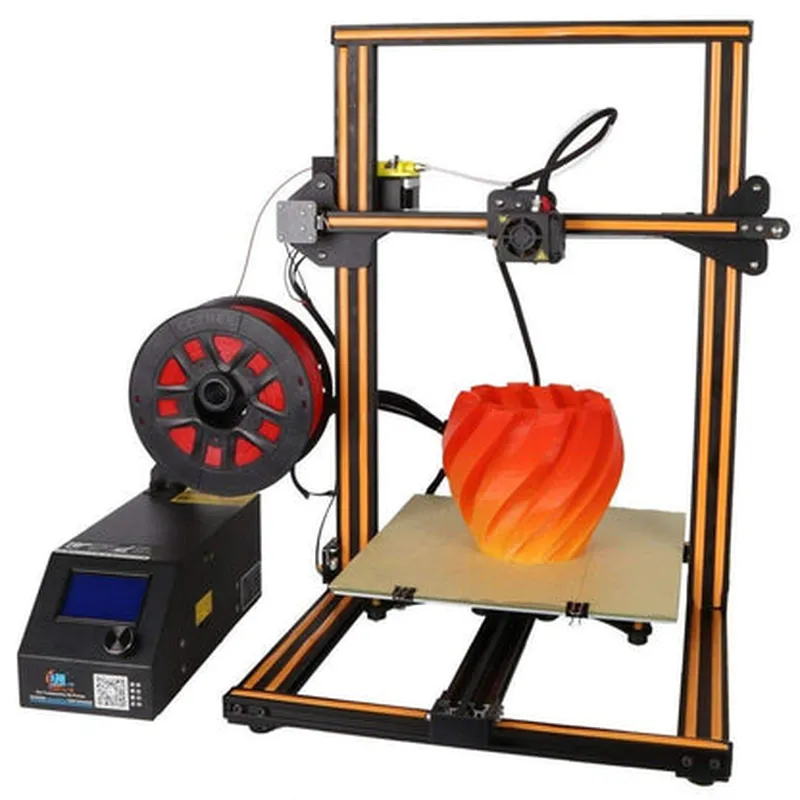
The Creality CR-10S is a popular and affordable 3D printer kit that enables users to create complex objects with high precision and accuracy. This DIY kit provides a comprehensive set of components and tools, allowing users to assemble and customize their 3D printing experience.

Functionality

  • Model Preparation: Users design and slice 3D models using computer-aided design (CAD) software or slicing software.
  • Printing: The 3D printer reads the sliced model data and deposits melted filament (plastic or other materials) through a heated extruder, layer by layer, onto a build plate.
  • Layer Formation: The extruded filament solidifies, forming a single layer. The build plate moves down, and the process is repeated, building up layers to create the final object.
The Creality CR-10S 3D Printer Kit is designed to print three-dimensional objects layer by layer, using fused deposition modeling (FDM) technology. The printer's functionality can be broken down into the following stages
Key Features

  • Large Build Volume: The CR-10S boasts a spacious build volume of 300x300x400mm, allowing users to print larger objects or multiple smaller ones at once.
  • High Print Resolution: The printer achieves print resolutions up to 400 microns, ensuring detailed and precise prints.
  • Dual Extruder Capability: The CR-10S supports dual extrusion, enabling users to print with two different materials or colors, expanding creative possibilities.
  • Heated Bed: The build plate is equipped with a heated bed, which helps improve print adhesion and reduces warping.
  • STL and G-Code File Support: The printer is compatible with popular 3D modeling file formats, making it easy to transfer designs from software to the printer.
  • LCD Display and Controls: The CR-10S features an intuitive LCD display and control panel, allowing users to monitor and adjust print settings, temperatures, and other parameters.
  • Open Frame Design: The printer's open frame design provides easy access for maintenance, upgrades, and customization.
  • Leveling System: The CR-10S incorporates a semi-automatic leveling system, streamlining the printer calibration process.
  • Compact and Portable: Despite its large build volume, the printer is relatively compact and lightweight, making it suitable for home, office, or workshop use.

Print Technology

Fused Deposition Modeling (FDM)

Print Resolution

Up to 400 microns

Layer Thickness

0.1-0.4 mm

Filament Diameter

1.75 mm

Operating System

Microcontroller-based

Connectors

USB, SD Card Slot

Power Consumption

150W

Dimensions

550x520x630mm (assembled)

Weight

approximately 12 kg

Accessories and Optional Upgrades

The Creality CR-10S 3D Printer Kit includes a range of accessories, such as

Power supply

MicroSD card

USB cable

Filament samples

Toolkit

User manual

Optional upgrades and accessories available for the CR-10S include

Additional extruders

Heated chamber enclosures

Print bed adhesion upgrades

Multi-material printing systems

Conclusion

The Creality CR-10S 3D Printer Kit is an excellent choice for hobbyists, students, and professionals seeking an affordable and versatile 3D printing solution. With its large build volume, high print resolution, and dual extruder capability, this kit offers a comprehensive 3D printing experience.

Pin Configuration

  • Creality CR-10S 3D Printer Kit Pinout Documentation
  • The Creality CR-10S 3D Printer Kit comes with a range of electronic components that require proper connection to function correctly. This documentation provides a detailed explanation of each pin on the main board, explaining their purpose and how to connect them.
  • Main Board Pinout:
  • The main board of the Creality CR-10S 3D Printer Kit has several connectors and pin headers that need to be connected to various components. Here's a breakdown of each pin and its corresponding connection:
  • Power Connectors:
  • VIN (Voltage Input): Pin 1 (VCC) and Pin 2 (GND) on the power connector are used to supply power to the main board. Connect the positive wire (VCC) to the power supply's positive terminal, and the negative wire (GND) to the power supply's negative terminal.
  • VOUT (Voltage Output): Pin 3 (VCC) and Pin 4 (GND) on the power connector are used to supply power to the heated bed and other components. Connect the positive wire (VCC) to the heated bed's positive terminal, and the negative wire (GND) to the heated bed's negative terminal.
  • Stepper Motor Connectors:
  • X-Motor: Pins 5-8 on the X-motor connector are used to connect the X-axis stepper motor. Connect the motor wires as follows:
  • + Pin 5: X-motor coil A+
  • + Pin 6: X-motor coil A-
  • + Pin 7: X-motor coil B+
  • + Pin 8: X-motor coil B-
  • Y-Motor: Pins 9-12 on the Y-motor connector are used to connect the Y-axis stepper motor. Connect the motor wires as follows:
  • + Pin 9: Y-motor coil A+
  • + Pin 10: Y-motor coil A-
  • + Pin 11: Y-motor coil B+
  • + Pin 12: Y-motor coil B-
  • Z-Motor: Pins 13-16 on the Z-motor connector are used to connect the Z-axis stepper motor. Connect the motor wires as follows:
  • + Pin 13: Z-motor coil A+
  • + Pin 14: Z-motor coil A-
  • + Pin 15: Z-motor coil B+
  • + Pin 16: Z-motor coil B-
  • Endstop Connectors:
  • X-Endstop: Pins 17-18 on the X-endstop connector are used to connect the X-axis endstop switch. Connect the switch wires as follows:
  • + Pin 17: X-endstop signal (usually the white or yellow wire)
  • + Pin 18: X-endstop GND (usually the black wire)
  • Y-Endstop: Pins 19-20 on the Y-endstop connector are used to connect the Y-axis endstop switch. Connect the switch wires as follows:
  • + Pin 19: Y-endstop signal (usually the white or yellow wire)
  • + Pin 20: Y-endstop GND (usually the black wire)
  • Z-Endstop: Pins 21-22 on the Z-endstop connector are used to connect the Z-axis endstop switch. Connect the switch wires as follows:
  • + Pin 21: Z-endstop signal (usually the white or yellow wire)
  • + Pin 22: Z-endstop GND (usually the black wire)
  • Heated Bed Connector:
  • Heated Bed: Pins 23-24 on the heated bed connector are used to connect the heated bed. Connect the heated bed wires as follows:
  • + Pin 23: Heated bed positive terminal
  • + Pin 24: Heated bed negative terminal
  • Hotend Connector:
  • Hotend: Pins 25-26 on the hotend connector are used to connect the hotend. Connect the hotend wires as follows:
  • + Pin 25: Hotend heating element positive terminal
  • + Pin 26: Hotend heating element negative terminal
  • Fan Connectors:
  • Fan 1: Pins 27-28 on the Fan 1 connector are used to connect the first fan. Connect the fan wires as follows:
  • + Pin 27: Fan 1 positive terminal
  • + Pin 28: Fan 1 negative terminal
  • Fan 2: Pins 29-30 on the Fan 2 connector are used to connect the second fan (if present). Connect the fan wires as follows:
  • + Pin 29: Fan 2 positive terminal
  • + Pin 30: Fan 2 negative terminal
  • USB and Serial Connectors:
  • USB: The USB connector is used to connect the printer to a computer for communication and control.
  • Serial: The serial connector is used to connect external devices, such as a serial LCD screen or a Wi-Fi module.
  • Important Notes:
  • Make sure to connect the wires according to the pinout diagram and the instructions above.
  • Use suitable wire gauges and ensure proper insulation to prevent electrical shorts and damage to the components.
  • Double-check the connections before powering on the printer to avoid damage or electrical shock.
  • By following this pinout documentation, you should be able to successfully connect the components of your Creality CR-10S 3D Printer Kit. If you're unsure or have any doubts, consult the user manual or seek assistance from a professional or the manufacturer's support team.

Code Examples

Creality CR-10S 3D Printer Kit Documentation
Overview
The Creality CR-10S 3D Printer Kit is a popular and affordable 3D printing solution for hobbyists and professionals alike. This kit includes the 3D printer's main components, including the printer body, hotend, extruder, and control board. The CR-10S is compatible with various open-source firmware, allowing users to customize and tailor their printing experience.
Technical Specifications
Print Resolution: 400x400x400 DPI
 Print Speed: 30-150 mm/s
 Layer Thickness: 0.1-0.4 mm
 Hotend Temperature: Up to 300C
 Bed Temperature: Up to 100C
 Connectivity: USB, SD Card
Code Examples
### Example 1: Basic Printing Using Marlin Firmware
In this example, we will use the Marlin firmware to print a simple object using the CR-10S. We will demonstrate how to send G-code commands to the printer using a USB connection.
Marlin Firmware Configuration
Before sending G-code commands, ensure that the Marlin firmware is configured correctly. Set the `BAUDRATE` to 115200 and enable `USB_PRINTING` in the `Configuration.h` file.
G-code Example
Using a serial terminal software (e.g., Serial Monitor in Arduino IDE), send the following G-code commands to print a simple cube:
```c
G28 ; Home all axes
G1 Z0.2 F3000 ; Move to initial Z height
G1 X10 Y10 F3000 ; Move to starting position
G1 F1800 ; Set print speed
G1 X10 Y10 E1 F1800 ; Print a single layer
G4 P100 ; Wait 100ms for layer to solidify
G1 Z0.2 F3000 ; Move to next layer height
G1 X10 Y10 F3000 ; Move to starting position
G1 F1800 ; Set print speed
G1 X10 Y10 E1 F1800 ; Print a single layer
...
```
### Example 2: Automatic Bed Leveling Using OctoPrint
In this example, we will use OctoPrint, a popular 3D printing software, to automate the bed leveling process on the CR-10S.
OctoPrint Configuration
Install and configure OctoPrint on a Raspberry Pi or a computer. Connect the CR-10S to the OctoPrint device via USB.
G-code Script
Create a new G-code script in OctoPrint and add the following commands:
```python
; Home all axes
G28
; Start bed leveling process
G29
; Wait for bed leveling to complete
M400
; Print a test object to verify bed level
G1 F1800
G1 X10 Y10 E1 F1800
G1 X20 Y20 E1 F1800
G1 X30 Y30 E1 F1800
...
```
OctoPrint Plugin
Install the `Bed Leveling` plugin in OctoPrint and configure it to use the G29 command for automated bed leveling.
These examples demonstrate the basic usage of the Creality CR-10S 3D Printer Kit in different contexts. For more advanced usage and customization, refer to the Marlin firmware documentation and OctoPrint documentation.