Thermoelectric Peltier Refrigeration Cooling System DIY Kit With TEC-12706 Peltier


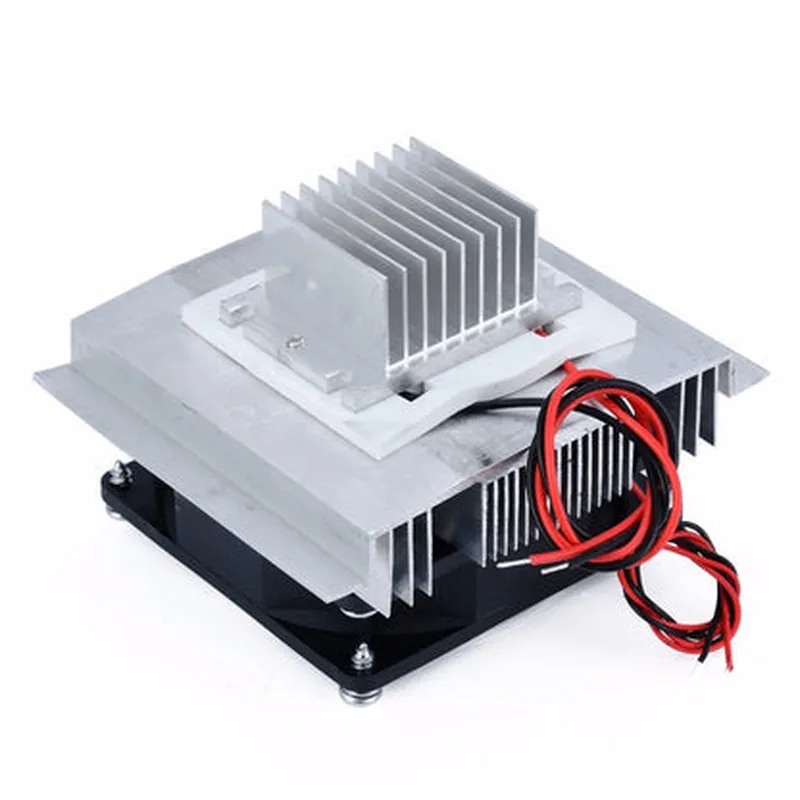
Thermoelectric Peltier Refrigeration Cooling System DIY Kit With TEC-12706 Peltier
The Thermoelectric Peltier Refrigeration Cooling System DIY Kit is a versatile and efficient cooling solution that utilizes the principle of thermoelectricity to cool or heat objects. This kit is centered around the TEC-12706 Peltier plate, a high-performance thermoelectric cooler that can be used in a variety of applications, including electronics cooling, laboratory equipment, and DIY projects.
The Thermoelectric Peltier Refrigeration Cooling System DIY Kit is designed to transfer heat from one side of the Peltier plate to the other, creating a temperature difference between the two sides. When a DC power source is applied, the Peltier plate generates a heat flux, allowing heat to be transferred from the hot side to the cold side. This kit can be used for both cooling and heating applications, depending on the direction of the current flow.
40mm x 40mm x 3.8mm
120C
6A
12V
Up to 127W
Capable of cooling objects to temperatures below ambient
High cooling performance with a temperature difference of up to 60C
Can be used for both cooling and heating applications
Reversible operation allows for precise temperature control
DIY kit allows for easy integration into custom projects and designs
Compact size makes it ideal for applications where space is limited
Kit includes necessary components and accessories for easy assembly
No soldering required for assembly
| Can be used in a variety of applications, including |
+ Electronics cooling
+ Laboratory equipment
+ Medical devices
+ DIY projects
Thermal protection to prevent overheating
Electrical insulation to prevent electrical shock
1 x TEC-12706 Peltier Plate
1 x Heat Sink (Anodized Aluminum)
1 x Fan (DC 5V)
1 x Thermal Interface Material (TIM)
1 x Power Wires (DC Red/Black)
1 x Instructions Manual
-50C to 120C
-50C to 120C
5% to 95% (non-condensing)
Handle the Peltier plate with care to avoid damage
Ensure proper electrical connections to prevent electrical shock
Keep the kit away from water and moisture to prevent damage
Follow proper safety guidelines when working with electrical components
The Thermoelectric Peltier Refrigeration Cooling System DIY Kit comes with a 1-year limited warranty. Technical support is available through the manufacturer's website and email support channel.
By combining high-performance thermoelectric technology with a compact DIY design, this kit offers a unique solution for a wide range of cooling and heating applications. With its ease of use, versatility, and safety features, the Thermoelectric Peltier Refrigeration Cooling System DIY Kit is an ideal choice for both technical professionals and informed hobbyists.
Thermoelectric Peltier Refrigeration Cooling System DIY Kit With TEC-12706 PeltierOverviewThe Thermoelectric Peltier Refrigeration Cooling System DIY Kit With TEC-12706 Peltier is a thermoelectric cooling module designed for refrigeration and cooling applications. It consists of a TEC-12706 Peltier element, a heat sink, and a fan. This kit is suitable for DIY enthusiasts, engineers, and researchers working on projects requiring precise temperature control and cooling.Technical SpecificationsTEC-12706 Peltier Element
+ Maximum Power: 36W
+ Maximum Current: 6A
+ Operating Temperature: -20C to 70C
+ Dimensions: 40mm x 40mm x 3.8mm
Heat Sink
+ Material: Aluminum
+ Dimensions: 60mm x 60mm x 20mm
Fan
+ Voltage: 12V
+ Current: 0.5A
+ Speed: 2500 RPMGetting StartedTo use the Thermoelectric Peltier Refrigeration Cooling System DIY Kit, you will need:A power source (e.g., a power supply or battery)
A controller or microcontroller (e.g., Arduino or Raspberry Pi)
Jumper wires and connectors
A heat source or load to be cooledExample 1: Basic Temperature Control using ArduinoIn this example, we will demonstrate how to use the Thermoelectric Peltier Refrigeration Cooling System DIY Kit to control the temperature of a heat source using an Arduino board.Hardware RequirementsArduino Uno board
Thermoelectric Peltier Refrigeration Cooling System DIY Kit
Heat source (e.g., a resistor or a heater)
Jumper wires and connectorsSoftware RequirementsArduino IDE (version 1.8.x)Code
```c
const int peltierPin = 9; // Peltier element control pin
const int fanPin = 10; // Fan control pin
const int tempPin = A0; // Temperature sensor pinvoid setup() {
pinMode(peltierPin, OUTPUT);
pinMode(fanPin, OUTPUT);
pinMode(tempPin, INPUT);
}void loop() {
int tempValue = analogRead(tempPin);
float temperature = tempValue 5.0 / 1024.0; // Convert analog value to temperature (C)
if (temperature > 25) {
// Turn on the Peltier element and fan when temperature exceeds 25C
digitalWrite(peltierPin, HIGH);
digitalWrite(fanPin, HIGH);
} else {
// Turn off the Peltier element and fan when temperature is below 25C
digitalWrite(peltierPin, LOW);
digitalWrite(fanPin, LOW);
}
delay(1000); // Wait 1 second before taking the next reading
}
```
Example 2: Temperature Monitoring and Cooling using Raspberry PiIn this example, we will demonstrate how to use the Thermoelectric Peltier Refrigeration Cooling System DIY Kit to monitor the temperature of a heat source and control the cooling using a Raspberry Pi.Hardware RequirementsRaspberry Pi (any model)
Thermoelectric Peltier Refrigeration Cooling System DIY Kit
Heat source (e.g., a resistor or a heater)
Jumper wires and connectors
DS18B20 temperature sensor (optional)Software RequirementsRaspbian OS (latest version)
Python 3.xCode
```python
import RPi.GPIO as GPIO
import time# Set up GPIO pins for Peltier element and fan control
GPIO.setmode(GPIO.BCM)
peltier_pin = 17
fan_pin = 23
GPIO.setup(peltier_pin, GPIO.OUT)
GPIO.setup(fan_pin, GPIO.OUT)# Set up temperature sensor (optional)
temp_sensor_pin = 4
temperature = 0try:
while True:
# Read temperature from DS18B20 sensor (if used)
if temp_sensor_pin:
temperature = read_temp(temp_sensor_pin)
# Cool the heat source if temperature exceeds 25C
if temperature > 25:
GPIO.output(peltier_pin, GPIO.HIGH)
GPIO.output(fan_pin, GPIO.HIGH)
else:
GPIO.output(peltier_pin, GPIO.LOW)
GPIO.output(fan_pin, GPIO.LOW)
time.sleep(1) # Wait 1 second before taking the next reading
except KeyboardInterrupt:
GPIO.cleanup()
```
Note: In both examples, the Peltier element and fan are controlled using digital outputs from the microcontroller. The temperature sensor is used to monitor the temperature of the heat source, and the cooling system is activated when the temperature exceeds a setpoint (25C in these examples). The code can be modified to suit specific requirements and interfaces.