

Stufin
Home Quick Cart Profile

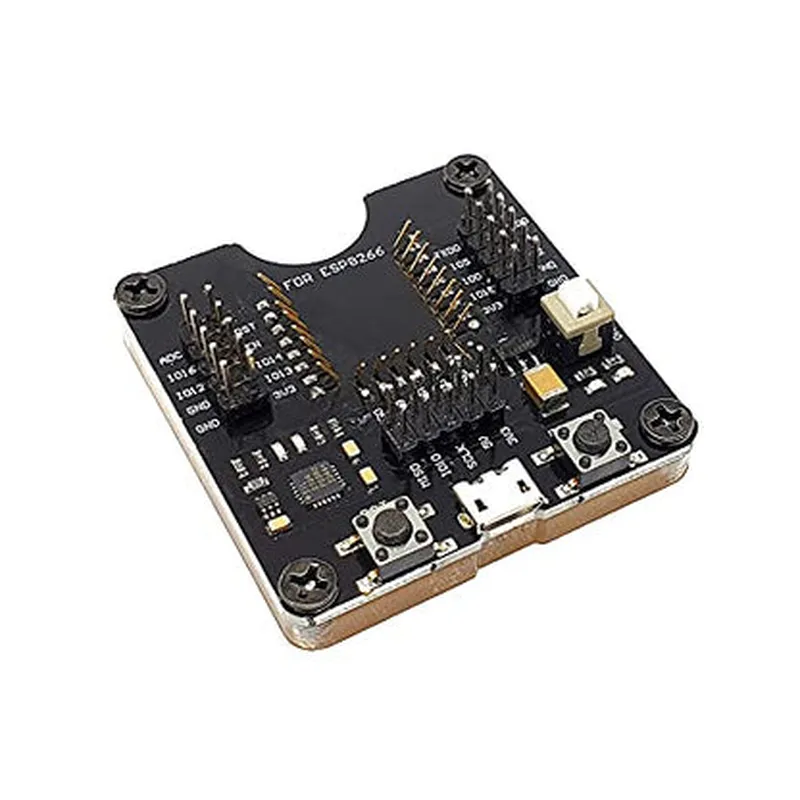
ESP8266 Wroom Downloader

Buy Now on Stufin

Component Name

ESP8266 Wroom Downloader

Overview

The ESP8266 Wroom Downloader is a microcontroller-based development board designed for IoT applications. It is a variant of the popular ESP8266 microcontroller, specifically tailored for programming and updating firmware over-the-air (OTA) using the Wroom Downloader tool. This component is ideal for developers and hobbyists working on IoT projects that require wireless connectivity and seamless firmware updates.

Functionality

  • Firmware Updates: The board allows for wireless OTA updates, enabling users to remotely update the firmware of their IoT devices without the need for physical connectivity.
  • Programming: The board can be programmed using the Wroom Downloader tool, which provides a user-friendly interface for uploading and managing firmware images.
  • Development: The ESP8266 Wroom Downloader serves as a development platform for IoT projects, offering a range of interfaces and peripherals for prototyping and testing.
The ESP8266 Wroom Downloader is primarily used for

Key Features

  • ESP8266 Microcontroller: At the heart of the board lies the ESP8266 microcontroller, a low-power, high-performance SoC (System-on-Chip) with integrated Wi-Fi capabilities.
  • Wroom Downloader Support: The board is specifically designed to work with the Wroom Downloader tool, providing a seamless OTA update experience.
  • USB-UART Bridge: The board features a built-in USB-UART bridge, enabling easy communication with a host computer for programming and debugging.
  • GPIO Pins: The board exposes 14 GPIO pins, allowing users to connect sensors, actuators, and other peripherals to their IoT project.
  • Wi-Fi Connectivity: The ESP8266 Wroom Downloader supports 802.11 b/g/n Wi-Fi connectivity, enabling devices to connect to Wi-Fi networks and access the internet.
  • Low Power Consumption: The board is designed to operate at low power consumption, making it suitable for battery-powered IoT devices.
  • Small Form Factor: The ESP8266 Wroom Downloader has a compact footprint, making it ideal for space-constrained IoT applications.
  • 3.3V Operating Voltage: The board operates at a 3.3V voltage level, making it compatible with a range of low-voltage peripherals and sensors.

Technical Specifications

Microcontroller

ESP8266

Operating Frequency

80 MHz

Flash Memory

4MB

SRAM

96KB

Wi-Fi802.11 b/g/n

GPIO Pins

14

USB-UART BridgeYes

Operating Voltage

3.3V

Power Consumption

<100mA (typical)

Applications

  • Smart Home Automation: Use the board to develop intelligent home automation systems that can be updated wirelessly.
  • Industrial IoT: Leverage the board's wireless connectivity and OTA update capabilities for industrial IoT applications.
  • Wearable Devices: Develop wearable devices that can be easily updated and configured using the Wroom Downloader tool.
  • Robotics: Use the board to create robots that can be wirelessly updated and controlled.
The ESP8266 Wroom Downloader is suitable for a wide range of IoT applications, including

Conclusion

The ESP8266 Wroom Downloader is a powerful and versatile IoT development board that offers a unique combination of wireless connectivity, OTA update capabilities, and a user-friendly programming experience. Its compact form factor, low power consumption, and rich set of features make it an ideal choice for a wide range of IoT applications.

Pin Configuration

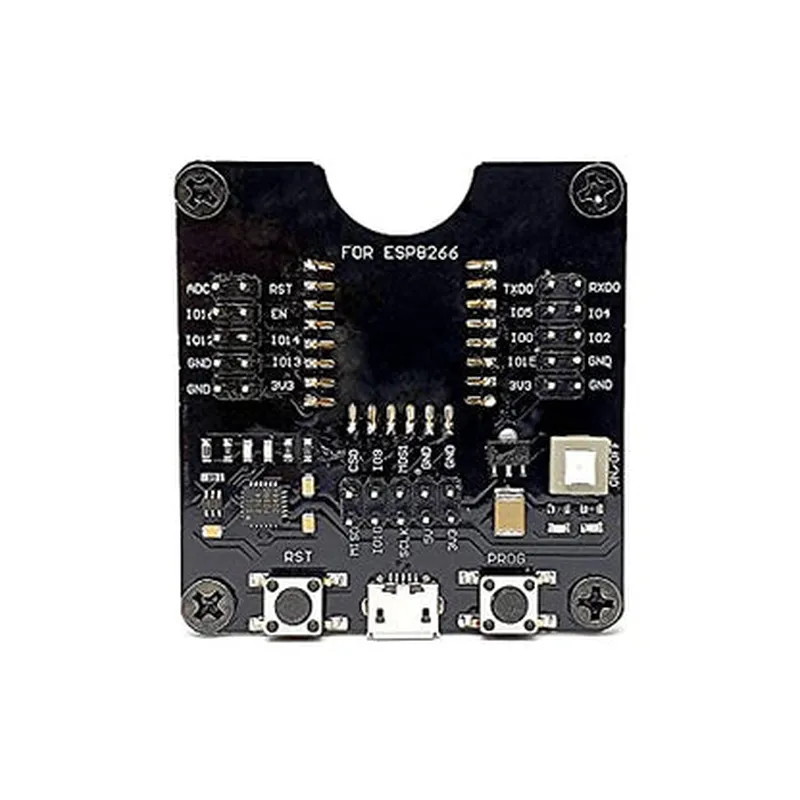
  • ESP8266 Wroom Downloader Pinout
  • The ESP8266 Wroom Downloader is a microcontroller-based development board that enables users to program and debug ESP8266-based IoT projects. The board features a compact design with a 2x10-pin header, providing access to the ESP8266's GPIO pins. Here's a detailed explanation of each pin, categorized into sections for easier understanding:
  • Power Pins
  • 1. VCC (3.3V): This pin provides power to the board and should be connected to a 3.3V power source. Ensure the power supply can provide sufficient current to power the ESP8266 and any connected peripherals.
  • 2. GND: This pin is the ground reference point for the board and should be connected to the ground of your power source.
  • Programming and Debugging Pins
  • 3. RX (Receiving): This pin is used for serial communication and is connected to the RX pin of your programmer or computer's serial interface (e.g., USB-to-TTL serial adapter).
  • 4. TX (Transmitting): This pin is used for serial communication and is connected to the TX pin of your programmer or computer's serial interface (e.g., USB-to-TTL serial adapter).
  • 5. GPIO0: This pin is used for flashing the ESP8266 firmware and should be connected to GND during the flashing process.
  • 6. RST (Reset): This pin is used to reset the ESP8266 and can be connected to a button or a signal from your programmer.
  • General Purpose Input/Output (GPIO) Pins
  • 7. GPIO2: This is a general-purpose input/output pin that can be used for various purposes such as connecting sensors, LEDs, or other peripherals.
  • 8. GPIO15: This is a general-purpose input/output pin that can be used for various purposes such as connecting sensors, LEDs, or other peripherals.
  • 9. GPIO13: This is a general-purpose input/output pin that can be used for various purposes such as connecting sensors, LEDs, or other peripherals.
  • 10. GPIO12: This is a general-purpose input/output pin that can be used for various purposes such as connecting sensors, LEDs, or other peripherals.
  • 11. GPIO14: This is a general-purpose input/output pin that can be used for various purposes such as connecting sensors, LEDs, or other peripherals.
  • 12. GPIO5: This is a general-purpose input/output pin that can be used for various purposes such as connecting sensors, LEDs, or other peripherals.
  • 13. GPIO4: This is a general-purpose input/output pin that can be used for various purposes such as connecting sensors, LEDs, or other peripherals.
  • 14. GPIO16: This is a general-purpose input/output pin that can be used for various purposes such as connecting sensors, LEDs, or other peripherals.
  • Additional Pins
  • 15. EN (Enable): This pin is used to enable the ESP8266 and should be connected to VCC (3.3V) to keep the module enabled.
  • 16. Vin: This pin is used to input external power to the board, which is regulated to 3.3V internally.
  • Important Notes
  • Ensure that the power supply to the board is stable and can provide sufficient current to power the ESP8266 and any connected peripherals.
  • When connecting peripherals to the GPIO pins, ensure that they are properly level-shifted to 3.3V to avoid damaging the ESP8266.
  • Always follow proper grounding and decoupling practices to minimize noise and ensure reliable operation.
  • When connecting the pins, consider the following structure:
  • Power pins (VCC and GND) should be connected first to ensure the board is properly powered.
  • Programming and debugging pins (RX, TX, GPIO0, and RST) should be connected to your programmer or computer's serial interface.
  • GPIO pins should be connected to peripherals, sensors, or other components, taking care to follow proper level-shifting and decoupling practices.
  • Additional pins (EN and Vin) should be connected last, ensuring the board is properly enabled and powered.
  • Remember to consult the ESP8266 datasheet and relevant documentation for specific usage and configuration guidelines for your project.

Code Examples

ESP8266 Wroom Downloader Documentation
Overview
The ESP8266 Wroom Downloader is a programmable flash download tool specifically designed for the ESP8266 Wroom module. This component enables users to download firmware or programs to the ESP8266 Wroom microcontroller using a USB connection.
Features
Supports programming and debugging of ESP8266 Wroom modules
 USB interface for convenient connectivity
 Compatible with Windows, macOS, and Linux platforms
 Simple and intuitive programming interface
Getting Started
To use the ESP8266 Wroom Downloader, follow these steps:
1. Connect the ESP8266 Wroom module to the Downloader using the provided USB cable.
2. Install the necessary drivers and software tools for your operating system (Windows, macOS, or Linux).
3. Open the ESP8266 Wroom Downloader software and select the correct serial port and baud rate for your device.
Code Examples
### Example 1: Basic Blinking LED Using ESP8266 Wroom Downloader (Arduino IDE)
This example demonstrates how to use the ESP8266 Wroom Downloader to program an ESP8266 Wroom module to blink an LED.
Hardware Requirements
ESP8266 Wroom module
 Breadboard and jumper wires
 LED
 1k resistor
Software Requirements
Arduino IDE (version 1.8.x or higher)
Code
```c
const int ledPin = 2; // Pin 2 is the onboard LED pin on the ESP8266 Wroom module
void setup() {
  pinMode(ledPin, OUTPUT);
}
void loop() {
  digitalWrite(ledPin, HIGH); // Turn the LED on
  delay(1000); // Wait for 1 second
  digitalWrite(ledPin, LOW); // Turn the LED off
  delay(1000); // Wait for 1 second
}
```
### Example 2: Uploading a Webpage Using ESP8266 Wroom Downloader (PlatformIO)
This example demonstrates how to use the ESP8266 Wroom Downloader to program an ESP8266 Wroom module to serve a simple web page.
Hardware Requirements
ESP8266 Wroom module
 Breadboard and jumper wires
 Micro-USB cable
Software Requirements
PlatformIO (version 4.x or higher)
Code
```c
#include <WiFi.h>
#include <WiFiClient.h>
const char ssid = "your_wifi_ssid";
const char password = "your_wifi_password";
WiFiServer server(80);
void setup() {
  Serial.begin(115200);
  WiFi.begin(ssid, password);
  while (WiFi.status() != WL_CONNECTED) {
    delay(1000);
    Serial.println("Connecting to WiFi...");
  }
  Serial.println("Connected to WiFi");
  server.begin();
}
void loop() {
  WiFiClient client = server.available();
  if (client) {
    client.println("HTTP/1.1 200 OK");
    client.println("Content-Type: text/html");
    client.println();
    client.println("<html><body><h1>Hello from ESP8266!</h1></body></html>");
    client.stop();
  }
}
```
Note: Make sure to replace "your_wifi_ssid" and "your_wifi_password" with your actual Wi-Fi network credentials.
These examples demonstrate the basic usage of the ESP8266 Wroom Downloader for programming and debugging ESP8266 Wroom modules. The Downloader provides a convenient and easy-to-use interface for transferring firmware and programs to the ESP8266 Wroom microcontroller.