

Stufin
Home Quick Cart Profile

16 Bit I2C 4 Channel ADS1115 Module

Buy Now on Stufin

Component Description

16 Bit I2C 4 Channel ADS1115 Module

Overview

The 16 Bit I2C 4 Channel ADS1115 Module is a highly accurate and versatile analog-to-digital converter (ADC) module designed for a wide range of IoT applications. This module is based on the Texas Instruments ADS1115 chip, a 16-bit, 4-channel, I2C-compatible ADC converter that provides high-resolution measurements with excellent noise rejection and linearity.

Functionality

The ADS1115 Module is designed to convert analog signals from sensors or transducers into digital signals that can be easily read and processed by microcontrollers, single-board computers, or other digital devices. The module features four analog input channels, allowing it to measure multiple parameters simultaneously, such as temperature, pressure, light, or other physical quantities.

The ADS1115 Module operates on the I2C (Inter-Integrated Circuit) protocol, a popular communication standard for IoT devices. This enables easy integration with a wide range of microcontrollers and development boards, including Arduino, Raspberry Pi, and ESP32-based systems.

Key Features

  • High-Resolution Conversion: The ADS1115 Module offers 16-bit resolution, providing a high degree of accuracy and precision in analog-to-digital conversions.
  • 4-Channel Operation: The module features four analog input channels, allowing users to measure multiple parameters simultaneously.
  • I2C Interface: The ADS1115 Module communicates via the I2C protocol, enabling easy integration with a wide range of microcontrollers and development boards.
  • Programmable Gain Amplifier (PGA): The module includes a built-in PGA, which allows users to adjust the gain of the analog input signals to optimize the measurement range and accuracy.
  • High-Speed Conversion: The ADS1115 Module supports conversion rates of up to 860 samples per second (SPS) for fast and efficient data acquisition.
  • Low Power Consumption: The module operates at a low power consumption of 1.5mA (typical), making it suitable for battery-powered IoT applications.
  • Operating Voltage: The ADS1115 Module operates on a supply voltage range of 2.0V to 5.5V, making it compatible with a wide range of power sources.
  • Compact Design: The module features a compact design with a small form factor, enabling easy integration into space-constrained IoT projects.
  • High Accuracy: The ADS1115 Module provides high accuracy measurements, with a maximum error of 0.5% (typical) over the entire operating range.
  • Robust Noise Rejection: The module incorporates advanced noise rejection techniques, ensuring reliable and accurate measurements in noisy environments.

Applications

The 16 Bit I2C 4 Channel ADS1115 Module is well-suited for a wide range of IoT applications, including

Environmental monitoring (temperature, humidity, pressure, etc.)

Industrial automation (process control, monitoring, and logging)

Medical devices (patient monitoring, diagnostic equipment)

IoT sensor networks (smart home, smart city, etc.)

Robotics and unmanned systems (sensing and control)

Pinout and Dimensions

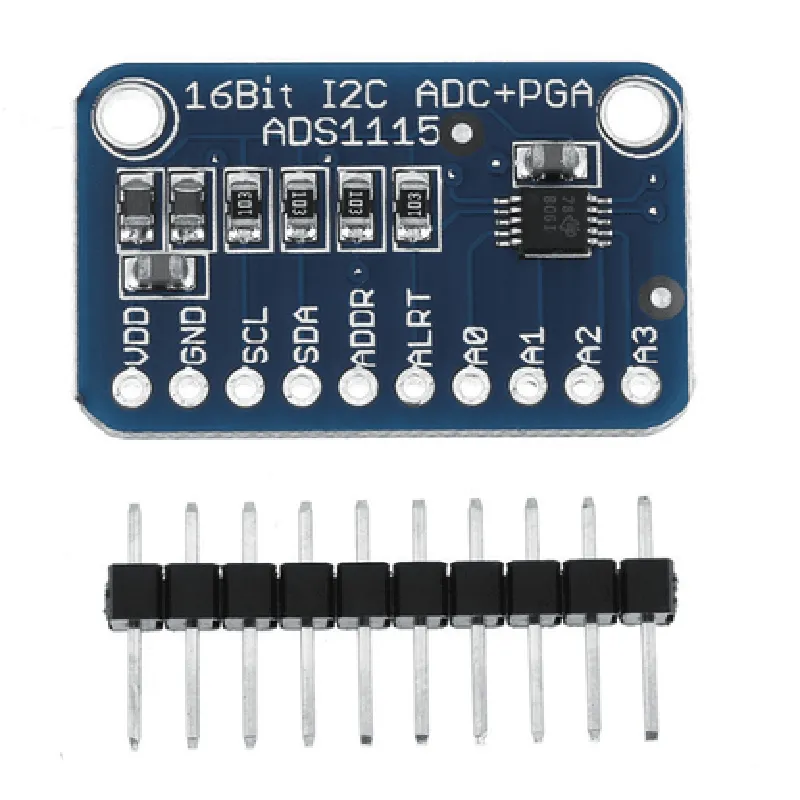
The ADS1115 Module features a standard 7-pin interface, with the following pinout

VCC (Power Supply)

GND (Ground)

SDA (I2C Data)

SCL (I2C Clock)

A0 (Analog Input Channel 0)

A1 (Analog Input Channel 1)

A2 (Analog Input Channel 2)

A3 (Analog Input Channel 3)

The module dimensions are approximately 25mm x 20mm x 10mm (L x W x H).

Pin Configuration

  • 16 Bit I2C 4 Channel ADS1115 Module Pinout
  • The 16 Bit I2C 4 Channel ADS1115 Module is a high-precision analog-to-digital converter (ADC) module featuring four channels, I2C communication, and 16-bit resolution. This module is ideal for various IoT applications, such as environmental monitoring, industrial automation, and healthcare devices. Below is a detailed explanation of each pin, including their functions and connection guidelines.
  • Pinout:
  • 1. VCC (Power Supply)
  • Function: Provides power to the module
  • Connection: Connect to a 3.3V or 5V power supply (depending on the module's rating)
  • Recommended connection: Use a breadboard or PCB track to connect to a power source (e.g., Arduino or Raspberry Pi)
  • 2. GND (Ground)
  • Function: Ground reference for the module
  • Connection: Connect to the ground pin of the power supply or a common ground point
  • Recommended connection: Use a breadboard or PCB track to connect to a ground point (e.g., Arduino or Raspberry Pi)
  • 3. SCL (I2C Clock)
  • Function: I2C clock signal for communication with the microcontroller
  • Connection: Connect to the SCL pin of the microcontroller (e.g., Arduino or Raspberry Pi)
  • Recommended connection: Use a breadboard or PCB track to connect to the SCL pin of the microcontroller
  • 4. SDA (I2C Data)
  • Function: I2C data signal for communication with the microcontroller
  • Connection: Connect to the SDA pin of the microcontroller (e.g., Arduino or Raspberry Pi)
  • Recommended connection: Use a breadboard or PCB track to connect to the SDA pin of the microcontroller
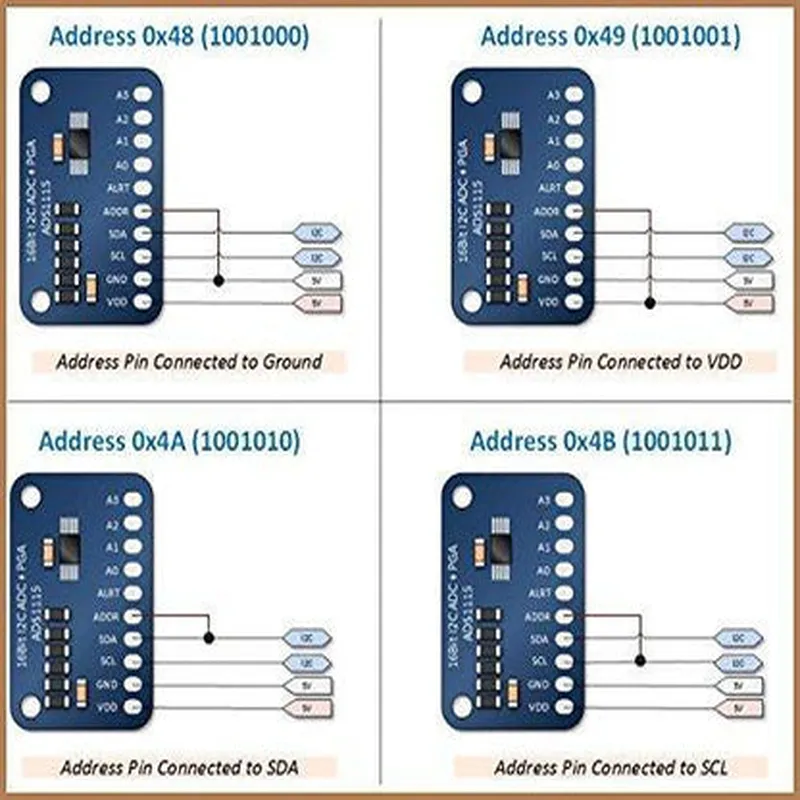
  • 5. ADDR (Address Pin)
  • Function: Allows multiple ADS1115 modules to share the same I2C bus by setting a unique address
  • Connection: Connect to VCC, GND, or leave floating to set the address (see datasheet for addressing scheme)
  • Recommended connection: Use a jumper or a 0 resistor to connect to VCC or GND, or leave floating
  • 6. A0 (Analog Input Channel 0)
  • Function: Analog input channel for measuring voltage levels
  • Connection: Connect to the sensor or voltage source to be measured
  • Recommended connection: Use a breadboard or PCB track to connect to the sensor or voltage source
  • 7. A1 (Analog Input Channel 1)
  • Function: Analog input channel for measuring voltage levels
  • Connection: Connect to the sensor or voltage source to be measured
  • Recommended connection: Use a breadboard or PCB track to connect to the sensor or voltage source
  • 8. A2 (Analog Input Channel 2)
  • Function: Analog input channel for measuring voltage levels
  • Connection: Connect to the sensor or voltage source to be measured
  • Recommended connection: Use a breadboard or PCB track to connect to the sensor or voltage source
  • 9. A3 (Analog Input Channel 3)
  • Function: Analog input channel for measuring voltage levels
  • Connection: Connect to the sensor or voltage source to be measured
  • Recommended connection: Use a breadboard or PCB track to connect to the sensor or voltage source
  • When connecting the pins, ensure that you:
  • Use the correct voltage level for the power supply (3.3V or 5V)
  • Keep the I2C bus connections short and away from noise sources
  • Use a common ground point for the module and microcontroller
  • Refer to the ADS1115 datasheet for specific address settings and configuration
  • By following these guidelines, you can successfully connect and utilize the 16 Bit I2C 4 Channel ADS1115 Module in your IoT projects.

Code Examples

16 Bit I2C 4 Channel ADS1115 Module Documentation
Overview
The 16 Bit I2C 4 Channel ADS1115 Module is a high-precision analog-to-digital converter (ADC) that provides four channels for measuring analog voltages. It features a 16-bit resolution and I2C interface for easy communication with microcontrollers.
Technical Specifications
Resolution: 16 bits
 Channels: 4
 Maximum sampling rate: 860 sps (samples per second)
 Operating voltage: 2.7V to 5.5V
 I2C address: 0x48 (default), configurable to 0x49, 0x4A, or 0x4B
 Dimensions: 25.5 x 18.5 mm
Communication Protocol
The ADS1115 module communicates with microcontrollers using the I2C protocol. It uses the following I2C addresses:
Write address: 0x48 (or configured address) + 0x00
 Read address: 0x48 (or configured address) + 0x01
Code Examples
### Example 1: Basic Analog Voltage Measurement using Arduino
This example demonstrates how to measure an analog voltage using the ADS1115 module with an Arduino board.
```c++
#include <Wire.h>
#define ADS1115_ADDRESS 0x48
void setup() {
  Serial.begin(9600);
  Wire.begin();
}
void loop() {
  int16_t adcValue = readADC(0); // Read channel 0
  float voltage = adcValue  0.0001875; // Convert to voltage (assuming 2.5V reference)
  Serial.print("Voltage: ");
  Serial.print(voltage, 4);
  Serial.println(" V");
  delay(500);
}
int16_t readADC(int channel) {
  Wire.beginTransmission(ADS1115_ADDRESS);
  Wire.write(0x00); // Select channel
  Wire.write(0x00); // Start conversion
  Wire.endTransmission();
  delay(1); // Wait for conversion to complete
  Wire.requestFrom(ADS1115_ADDRESS, 2);
  int16_t adcValue = (Wire.read() << 8) | Wire.read();
  return adcValue;
}
```
### Example 2: Multi-Channel Measurement using Raspberry Pi (Python)
This example demonstrates how to measure analog voltages on multiple channels using the ADS1115 module with a Raspberry Pi.
```python
import smbus
import time
ADS1115_ADDRESS = 0x48
bus = smbus.SMBus(1)
def read_adc(channel):
    bus.write_byte(ADS1115_ADDRESS, 0x00)  # Select channel
    bus.write_byte(ADS1115_ADDRESS, 0x00)  # Start conversion
    time.sleep(0.01)  # Wait for conversion to complete
    data = bus.read_i2c_block_data(ADS1115_ADDRESS, 0x00, 2)
    adc_value = (data[0] << 8) | data[1]
    return adc_value
while True:
    for channel in range(4):
        adc_value = read_adc(channel)
        voltage = adc_value  0.0001875  # Convert to voltage (assuming 2.5V reference)
        print(f"Channel {channel+1}: {voltage:.4f} V")
    time.sleep(1)
```
### Example 3: Configuring the I2C Address using ESP32 (C++)
This example demonstrates how to configure the I2C address of the ADS1115 module using an ESP32 board.
```c++
#include <Wire.h>
#define ADS1115_ADDRESS_DEFAULT 0x48
#define ADS1115_ADDRESS_ALTERNATE 0x49
void setup() {
  Serial.begin(115200);
  Wire.begin();
// Configure the I2C address to 0x49
  Wire.beginTransmission(ADS1115_ADDRESS_DEFAULT);
  Wire.write(0x00); // Pointer register
  Wire.write(0x04); // Config register
  Wire.write(0x80); // Set ADDR pin high
  Wire.endTransmission();
delay(1);
// Verify the new I2C address
  Wire.beginTransmission(ADS1115_ADDRESS_ALTERNATE);
  Wire.write(0x00); // Pointer register
  Wire.endTransmission();
  if (Wire.endTransmission() == 0) {
    Serial.println("I2C address changed to 0x49");
  } else {
    Serial.println("Failed to change I2C address");
  }
}
void loop() {
  // Use the ADS1115 module with the new I2C address
}
```
Note: The above code examples are for illustration purposes only and may require modifications to suit specific application requirements.