Stufin
Home Quick Cart Profile

DIY D2-1 Intelligent Line follower/Tracing Car Kit

Buy Now on Stufin

Component Name

DIY D2-1 Intelligent Line Follower/Tracing Car Kit


Overview

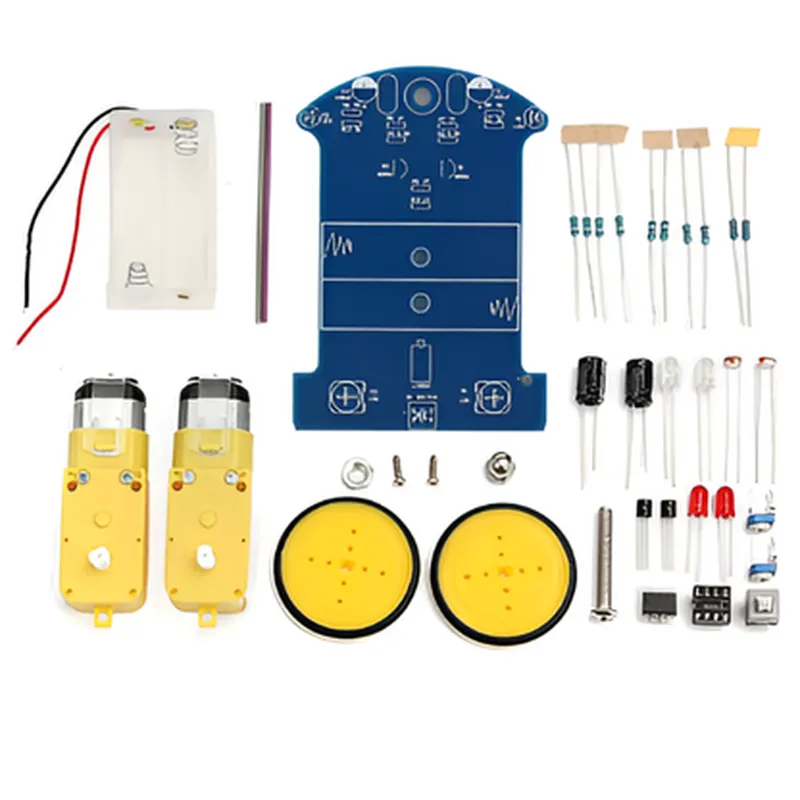
The DIY D2-1 Intelligent Line Follower/Tracing Car Kit is a comprehensive and interactive robotics kit designed for enthusiasts, hobbyists, and students to explore the world of robotics and automation. This kit enables users to build and program a line-following car that can detect and track a specific path, making it an ideal project for learning about robotics, artificial intelligence, and IoT concepts.
Functionality

  • Line Following: The car is equipped with infrared sensors that detect the path and adjust its movement accordingly, allowing it to follow a predetermined line or track.
  • Obstacle Avoidance: The car is equipped with obstacle detection sensors that enable it to detect and avoid obstacles in its path, ensuring smooth navigation.
  • Autonomous Navigation: The car can navigate independently, using its sensors and microcontroller to make decisions and adjust its movement in real-time.
The DIY D2-1 Intelligent Line Follower/Tracing Car Kit is designed to perform the following functions
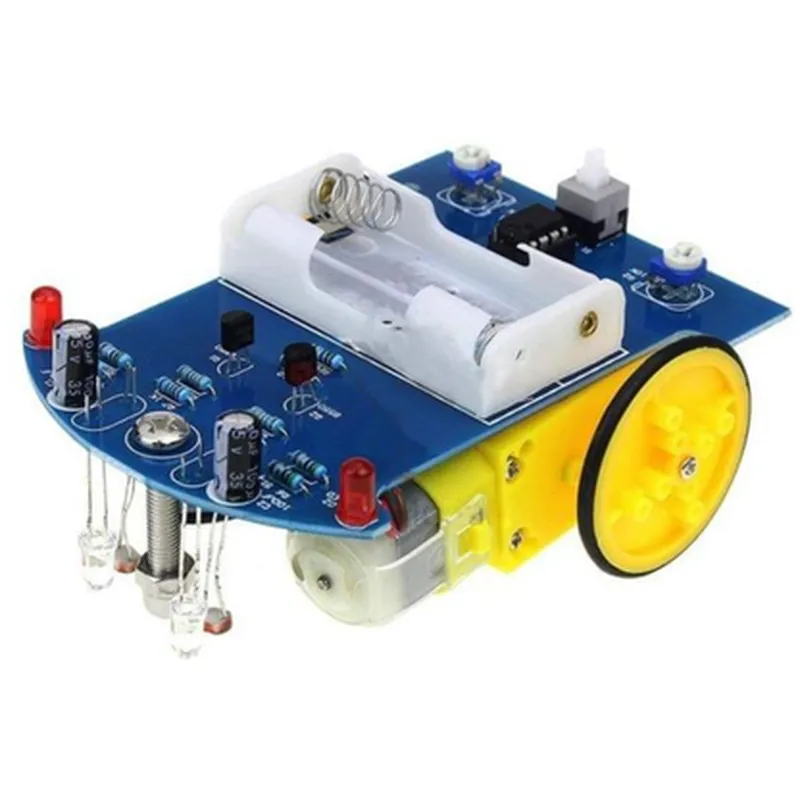
Key Features

  • Microcontroller: The kit is based on the popular Arduino Uno board, which provides a user-friendly platform for programming and development.
  • Infrared Sensors: The kit includes multiple infrared sensors that detect the line and obstacles, providing accurate and reliable navigation.
  • Motor Driver: The kit includes a built-in motor driver that enables the car to move smoothly and efficiently.
  • Power Supply: The kit includes a rechargeable battery pack and a USB interface for convenient charging and programming.
  • Modular Design: The kit's modular design allows for easy assembly and disassembly, making it ideal for prototyping and customization.
  • Programmable: The kit is fully programmable using the Arduino IDE, allowing users to modify and customize the car's behavior.
  • Expandable: The kit is designed to be expandable, allowing users to add additional sensors, modules, and features to enhance its capabilities.

Microcontroller

Arduino Uno

Infrared Sensors

5 x IR Sensors

Motor Driver

L298N Dual H-Bridge Motor Driver

Power Supply

Rechargeable 6V 1000mAh Battery Pack, USB Interface

Dimensions

150 x 100 x 50 mm (Car Body), 70 x 50 x 20 mm (Control Panel)

Weight

approximately 250g (Car Body), 50g (Control Panel)

Operating System

Arduino IDE

Applications

  • Robotics and Automation: Learn about robotics and automation concepts, including sensor integration, motor control, and autonomous navigation.
  • STEM Education: Ideal for students and teachers looking to integrate robotics and programming into their curriculum.
  • Prototyping and Development: Use the kit as a platform for prototyping and developing custom robotics projects.
  • Hobbyists and Enthusiasts: A fun and challenging project for robotics enthusiasts looking to build and program their own line-following car.
The DIY D2-1 Intelligent Line Follower/Tracing Car Kit is suitable for a variety of applications, including

Package Includes

DIY D2-1 Intelligent Line Follower/Tracing Car Kit

Arduino Uno Board

Infrared Sensors (5 x)

Motor Driver (L298N)

Rechargeable Battery Pack (6V 1000mAh)

USB Cable

Assembly Manual

Programming Guide

Pin Configuration

  • DIY D2-1 Intelligent Line Follower/Tracing Car Kit Pinout Documentation
  • The DIY D2-1 Intelligent Line Follower/Tracing Car Kit is a popular IoT component used for building line-following robots and tracing cars. The kit consists of various modules, including a microcontroller, motor drivers, and sensors. This documentation explains the pinout of the main components and provides a step-by-step guide on how to connect them.
  • Microcontroller (STC15F104E)
  • The microcontroller is the brain of the kit, responsible for processing sensor data and controlling the motors.
  • 1. VCC (Pin 1): Power supply pin, connects to a 5V power source.
  • 2. GND (Pin 2): Ground pin, connects to the ground of the power source.
  • 3. RST (Pin 3): Reset pin, used to reset the microcontroller. Typically connected to a push-button or a capacitor.
  • 4. P0.0 (Pin 4): I/O pin, used for serial communication (UART) or as a general-purpose I/O.
  • 5. P0.1 (Pin 5): I/O pin, used for serial communication (UART) or as a general-purpose I/O.
  • 6. P1.0 (Pin 6): I/O pin, used for motor driver control (ENA).
  • 7. P1.1 (Pin 7): I/O pin, used for motor driver control (ENB).
  • 8. P2.0 (Pin 8): I/O pin, used for sensor data input (Left IR sensor).
  • 9. P2.1 (Pin 9): I/O pin, used for sensor data input (Right IR sensor).
  • 10. P2.2 (Pin 10): I/O pin, used for motor driver control (INA).
  • 11. P2.3 (Pin 11): I/O pin, used for motor driver control (INB).
  • Motor Driver (L298N)
  • The motor driver is responsible for controlling the speed and direction of the motors.
  • 1. ENA (Pin 1): Enable pin for motor A, connected to P1.0 of the microcontroller.
  • 2. IN1 (Pin 2): Input pin for motor A, connected to P2.2 of the microcontroller.
  • 3. IN2 (Pin 3): Input pin for motor A, connected to P2.3 of the microcontroller.
  • 4. OUT1 (Pin 4): Output pin for motor A, connects to the motor.
  • 5. OUT2 (Pin 5): Output pin for motor A, connects to the motor.
  • 6. GND (Pin 6): Ground pin, connects to the ground of the power source.
  • 7. VCC (Pin 7): Power supply pin, connects to a 5V power source.
  • 8. ENB (Pin 8): Enable pin for motor B, connected to P1.1 of the microcontroller.
  • 9. IN3 (Pin 9): Input pin for motor B, connected to P2.0 of the microcontroller.
  • 10. IN4 (Pin 10): Input pin for motor B, connected to P2.1 of the microcontroller.
  • 11. OUT3 (Pin 11): Output pin for motor B, connects to the motor.
  • 12. OUT4 (Pin 12): Output pin for motor B, connects to the motor.
  • Infrared (IR) Sensors
  • The IR sensors detect the line and provide input to the microcontroller.
  • 1. VCC (Pin 1): Power supply pin, connects to a 5V power source.
  • 2. GND (Pin 2): Ground pin, connects to the ground of the power source.
  • 3. OUT (Pin 3): Output pin, connects to P2.0 (Left IR sensor) or P2.1 (Right IR sensor) of the microcontroller.
  • Connection Structure:
  • 1. Connect VCC (Pin 1) of the microcontroller to a 5V power source.
  • 2. Connect GND (Pin 2) of the microcontroller to the ground of the power source.
  • 3. Connect RST (Pin 3) of the microcontroller to a push-button or a capacitor.
  • 4. Connect P0.0 (Pin 4) and P0.1 (Pin 5) of the microcontroller to serial communication devices (e.g., USB-TTL serial adapter) if necessary.
  • 5. Connect P1.0 (Pin 6) of the microcontroller to ENA (Pin 1) of the motor driver.
  • 6. Connect P1.1 (Pin 7) of the microcontroller to ENB (Pin 8) of the motor driver.
  • 7. Connect P2.0 (Pin 8) of the microcontroller to OUT (Pin 3) of the Left IR sensor.
  • 8. Connect P2.1 (Pin 9) of the microcontroller to OUT (Pin 3) of the Right IR sensor.
  • 9. Connect P2.2 (Pin 10) of the microcontroller to IN1 (Pin 2) of the motor driver.
  • 10. Connect P2.3 (Pin 11) of the microcontroller to IN2 (Pin 3) of the motor driver.
  • 11. Connect OUT1 (Pin 4) and OUT2 (Pin 5) of the motor driver to the motor.
  • 12. Connect GND (Pin 6) of the motor driver to the ground of the power source.
  • 13. Connect VCC (Pin 7) of the motor driver to a 5V power source.
  • 14. Connect IN3 (Pin 9) and IN4 (Pin 10) of the motor driver to P2.0 (Pin 10) and P2.1 (Pin 11) of the microcontroller, respectively.
  • 15. Connect OUT3 (Pin 11) and OUT4 (Pin 12) of the motor driver to the motor.
  • Important Notes:
  • Ensure proper voltage and current ratings for the power source and motor driver.
  • Use proper heat sinks and thermal management for the motor driver.
  • Calibrate the IR sensors according to the kit's instructions for optimal line detection.
  • Consult the kit's documentation and online resources for specific programming and usage guidelines.
  • By following this pinout documentation and connection structure, you should be able to assemble and use the DIY D2-1 Intelligent Line Follower/Tracing Car Kit effectively.

Code Examples

DIY D2-1 Intelligent Line Follower/Tracing Car Kit Documentation
Overview
The DIY D2-1 Intelligent Line Follower/Tracing Car Kit is a highly integrated and affordable IoT component designed for robotics and automation projects. It allows users to build a line-following robot car that can detect and follow a black line on a white surface. The kit includes an Arduino-compatible microcontroller board, motor driver, sensory modules, and other necessary components.
Technical Specifications
Microcontroller: Arduino-compatible ATmega328P
 Sensor: Infrared reflective sensor ( TCRT5000 )
 Motor Driver: L298N dual H-bridge motor driver
 Power Supply: 6-12V DC
 Communication: Serial communication through USB
Code Examples
### Example 1: Basic Line Follower using Arduino IDE
This example demonstrates how to use the DIY D2-1 Intelligent Line Follower/Tracing Car Kit to follow a black line on a white surface using the Arduino IDE.
```cpp
const int leftMotorForward = 2;  // Pin for left motor forward
const int leftMotorBackward = 3; // Pin for left motor backward
const int rightMotorForward = 4; // Pin for right motor forward
const int rightMotorBackward = 5; // Pin for right motor backward
const int leftSensor = A0;  // Pin for left sensor
const int rightSensor = A1; // Pin for right sensor
void setup() {
  pinMode(leftMotorForward, OUTPUT);
  pinMode(leftMotorBackward, OUTPUT);
  pinMode(rightMotorForward, OUTPUT);
  pinMode(rightMotorBackward, OUTPUT);
}
void loop() {
  int leftValue = analogRead(leftSensor);
  int rightValue = analogRead(rightSensor);
if (leftValue > 500 && rightValue > 500) {
    // Move forward
    digitalWrite(leftMotorForward, HIGH);
    digitalWrite(rightMotorForward, HIGH);
  } else if (leftValue < 500 && rightValue > 500) {
    // Turn right
    digitalWrite(rightMotorForward, HIGH);
    digitalWrite(leftMotorBackward, HIGH);
  } else if (leftValue > 500 && rightValue < 500) {
    // Turn left
    digitalWrite(leftMotorForward, HIGH);
    digitalWrite(rightMotorBackward, HIGH);
  } else {
    // Stop
    digitalWrite(leftMotorForward, LOW);
    digitalWrite(rightMotorForward, LOW);
  }
delay(50);
}
```
### Example 2: Advanced Line Follower with Speed Control using Python and PySerial
This example demonstrates how to use the DIY D2-1 Intelligent Line Follower/Tracing Car Kit with Python and PySerial to follow a black line on a white surface with speed control.
```python
import serial
# Initialize serial communication
ser = serial.Serial('COM3', 9600)  # Replace 'COM3' with your serial port
while True:
    # Read sensor values
    left_value = int(ser.readline().decode().strip())
    right_value = int(ser.readline().decode().strip())
# Calculate motor speeds
    if left_value > 500 and right_value > 500:
        # Move forward
        left_speed = 255
        right_speed = 255
    elif left_value < 500 and right_value > 500:
        # Turn right
        left_speed = 128
        right_speed = 255
    elif left_value > 500 and right_value < 500:
        # Turn left
        left_speed = 255
        right_speed = 128
    else:
        # Stop
        left_speed = 0
        right_speed = 0
# Send motor speed commands
    ser.write(f"L{left_speed}
".encode())
    ser.write(f"R{right_speed}
".encode())
# Wait for 50ms
    time.sleep(0.05)
```
### Example 3: Line Follower with Obstacle Avoidance using Interrupts
This example demonstrates how to use the DIY D2-1 Intelligent Line Follower/Tracing Car Kit with interrupts to follow a black line on a white surface while avoiding obstacles.
```cpp
const int leftMotorForward = 2;  // Pin for left motor forward
const int leftMotorBackward = 3; // Pin for left motor backward
const int rightMotorForward = 4; // Pin for right motor forward
const int rightMotorBackward = 5; // Pin for right motor backward
const int leftSensor = A0;  // Pin for left sensor
const int rightSensor = A1; // Pin for right sensor
const int obstacleSensor = 6;  // Pin for obstacle sensor
volatile bool obstacleDetected = false;
void setup() {
  pinMode(leftMotorForward, OUTPUT);
  pinMode(leftMotorBackward, OUTPUT);
  pinMode(rightMotorForward, OUTPUT);
  pinMode(rightMotorBackward, OUTPUT);
  pinMode(obstacleSensor, INPUT);
attachInterrupt(digitalPinToInterrupt(obstacleSensor), obstacleDetect, RISING);
}
void loop() {
  int leftValue = analogRead(leftSensor);
  int rightValue = analogRead(rightSensor);
if (obstacleDetected) {
    // Avoid obstacle
    digitalWrite(leftMotorForward, LOW);
    digitalWrite(rightMotorForward, LOW);
    delay(500);
    obstacleDetected = false;
  } else {
    if (leftValue > 500 && rightValue > 500) {
      // Move forward
      digitalWrite(leftMotorForward, HIGH);
      digitalWrite(rightMotorForward, HIGH);
    } else if (leftValue < 500 && rightValue > 500) {
      // Turn right
      digitalWrite(rightMotorForward, HIGH);
      digitalWrite(leftMotorBackward, HIGH);
    } else if (leftValue > 500 && rightValue < 500) {
      // Turn left
      digitalWrite(leftMotorForward, HIGH);
      digitalWrite(rightMotorBackward, HIGH);
    } else {
      // Stop
      digitalWrite(leftMotorForward, LOW);
      digitalWrite(rightMotorForward, LOW);
    }
  }
delay(50);
}
void obstacleDetect() {
  obstacleDetected = true;
}
```
These examples demonstrate the capabilities of the DIY D2-1 Intelligent Line Follower/Tracing Car Kit and provide a starting point for various IoT projects.