

Stufin
Home Quick Cart Profile

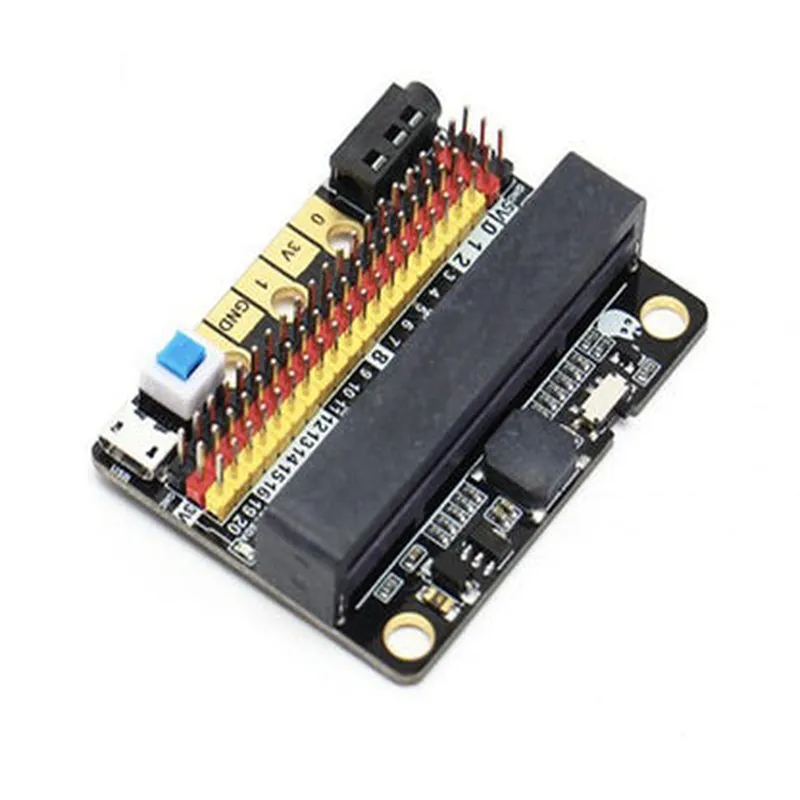
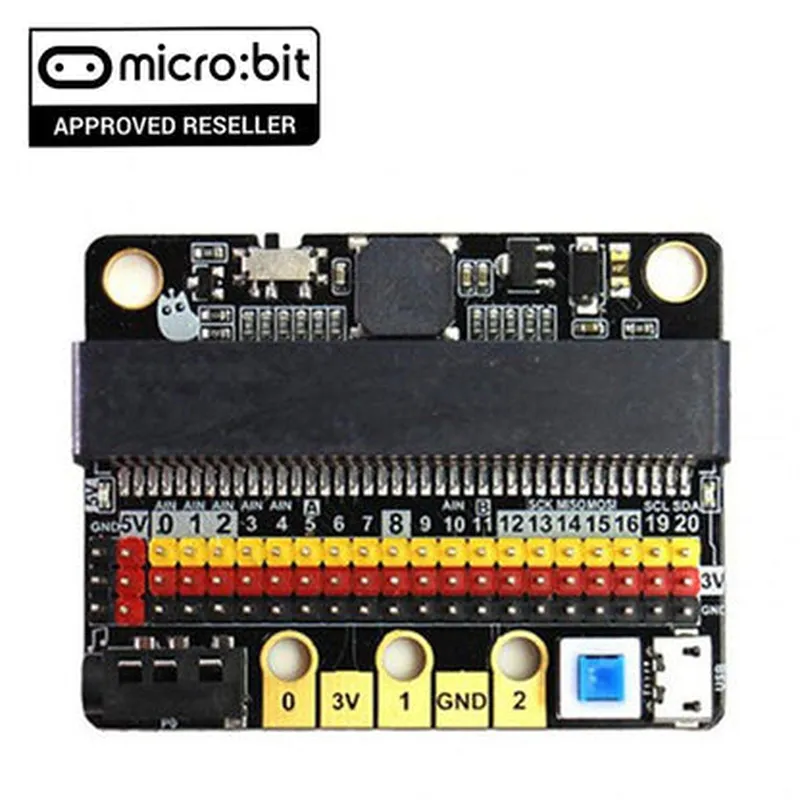
Micro:Bit Expansion Board Robotbit IOBIT V2.0

Buy Now on Stufin

Micro

Bit Expansion Board Robotbit IOBIT V2.0

Overview

The Robotbit IOBIT V2.0 is a microbit expansion board designed to simplify the process of building IoT and robotics projects. This board provides a range of features and interfaces that allow users to easily connect and control various sensors, actuators, and devices, making it an ideal tool for prototyping and development.

Functionality

The Robotbit IOBIT V2.0 acts as a bridge between the microbit board and external devices, enabling users to:

Connect and control various sensors, such as ultrasonic, infrared, and temperature sensors

Drive motors, servos, and other actuators

Interface with displays, such as OLED and LCD screens

Read and write data to SD cards

Communicate with other devices via I2C, UART, and SPI protocols

Power external devices using the onboard voltage regulator

Key Features

  • Micro:bit Compatible: The Robotbit IOBIT V2.0 is specifically designed to work seamlessly with the micro:bit board, providing a secure and reliable connection.
  • Multi-Interface Support: The board features a range of interfaces, including I2C, UART, SPI, and GPIO, allowing users to connect and control various devices and sensors.
  • Motor Driver: The onboard motor driver enables users to control DC motors and servos, making it suitable for robotics and automation projects.
  • Voltage Regulator: The board features a built-in voltage regulator, which provides a stable power supply to external devices, ensuring reliable operation.
  • SD Card Slot: The Robotbit IOBIT V2.0 includes an SD card slot, allowing users to read and write data to SD cards, enabling data logging and storage applications.
  • Breadboard-Friendly: The board features a breadboard-friendly design, making it easy to connect and disconnect components during prototyping and development.
  • Compact Size: The Robotbit IOBIT V2.0 is designed to be compact and lightweight, making it ideal for use in a variety of applications, from robotics to wearables.
  • Easy Programming: The board is compatible with the micro:bit's intuitive programming environment, allowing users to quickly and easily develop and deploy IoT and robotics projects.

Technical Specifications

Dimensions

72 x 54 mm

Operating Voltage

3.3V - 5V

Motor Driver

2 x DC motor or 1 x servo

Interface

I2C, UART, SPI, GPIO

SD Card Slot

Supports up to 32GB SD cards

Voltage Regulator

3.3V or 5V output

Compatible with micro

bit V1.5 and V2.0

Applications

The Robotbit IOBIT V2.0 is suitable for a wide range of applications, including

IoT and robotics projects

Prototyping and development

Educational projects and kits

Wearables and fitness trackers

Home automation systems

Industrial control systems

Conclusion

The Robotbit IOBIT V2.0 is a versatile and feature-rich expansion board that provides a convenient and reliable way to connect and control various devices and sensors. Its compact size, easy programming, and compatibility with the microbit make it an ideal tool for IoT and robotics enthusiasts, educators, and professionals.

Pin Configuration

  • Micro: Bit Expansion Board Robotbit IOBIT V2.0 Pinout Description
  • The Robotbit IOBIT V2.0 is an expansion board designed for the Micro:Bit, providing additional input/output pins and features to enhance the capabilities of the Micro:Bit. This document provides a detailed description of each pin on the Robotbit IOBIT V2.0, explaining their functions and how to connect them.
  • Pinout Diagram:
  • Here is the pinout diagram of the Robotbit IOBIT V2.0:
  • ```
  • +---------------+
  • | |
  • | Micro:Bit |
  • | |
  • +---------------+
  • |
  • |
  • v
  • +---------------+
  • | |
  • | Robotbit IOBIT |
  • | V2.0 |
  • | |
  • +---------------+
  • |
  • |
  • v
  • +---------------+
  • | |
  • | Pin Functions |
  • | |
  • +---------------+
  • ```
  • Pin Descriptions:
  • 1. GND (Ground)
  • Function: Ground pin for the expansion board.
  • Connection: Connect to a common ground point in your circuit or robot.
  • 2. VCC (Power)
  • Function: Power pin for the expansion board.
  • Connection: Connect to a power source (e.g., battery or power supply) that matches the Micro:Bit's power requirements.
  • 3. SCL (I2C Clock)
  • Function: I2C clock pin for communicating with I2C devices.
  • Connection: Connect to the SCL pin of an I2C device (e.g., sensor, display, or module).
  • 4. SDA (I2C Data)
  • Function: I2C data pin for communicating with I2C devices.
  • Connection: Connect to the SDA pin of an I2C device (e.g., sensor, display, or module).
  • 5. RX (UART Receive)
  • Function: UART receive pin for serial communication.
  • Connection: Connect to the TX pin of a serial device (e.g., Bluetooth module, GPS module, or serial display).
  • 6. TX (UART Transmit)
  • Function: UART transmit pin for serial communication.
  • Connection: Connect to the RX pin of a serial device (e.g., Bluetooth module, GPS module, or serial display).
  • 7. INT (Interrupt)
  • Function: Interrupt pin for triggering events or interrupts.
  • Connection: Connect to an interrupt pin of a device or a button/switch that triggers an interrupt.
  • 8. AIN1 (Analog Input 1)
  • Function: Analog input pin for reading analog signals (e.g., sensor data).
  • Connection: Connect to an analog output pin of a sensor or device.
  • 9. AIN2 (Analog Input 2)
  • Function: Analog input pin for reading analog signals (e.g., sensor data).
  • Connection: Connect to an analog output pin of a sensor or device.
  • 10. D0-D13 (Digital I/O)
  • Function: Digital input/output pins for controlling devices or reading digital signals.
  • Connection: Connect to digital devices, sensors, or modules (e.g., LEDs, buttons, relays, or motor drivers).
  • 11. Motor A/B (Motor Control)
  • Function: Motor control pins for driving DC motors.
  • Connection: Connect to a motor driver (e.g., L293D or DRV8833) to control DC motors.
  • 12. Servo (Servo Control)
  • Function: Servo control pin for controlling servo motors.
  • Connection: Connect to a servo motor to control its position or angle.
  • 13. BUZZER (Buzzer)
  • Function: Buzzer pin for generating sounds or alerts.
  • Connection: Connect to a buzzer or speaker to produce sound.
  • 14. I2C Grove (I2C Grove Connector)
  • Function: I2C Grove connector for connecting I2C devices.
  • Connection: Connect I2C devices or modules (e.g., sensors, displays, or modules) using a Grove cable.
  • Connecting the Pins:
  • When connecting the pins, ensure that you:
  • Use the correct pinouts for your devices or modules.
  • Match the voltage levels of the devices or modules to the Micro:Bit's power requirements.
  • Use appropriate connectors, wires, or cables for secure connections.
  • Avoid mixing analog and digital signals on the same pin.
  • Consult the datasheets of your devices or modules for specific connection instructions.
  • By understanding the pin functions and connections, you can unlock the full potential of the Robotbit IOBIT V2.0 and create innovative IoT projects with the Micro:Bit.

Code Examples

Micro:Bit Expansion Board Robotbit IOBIT V2.0 Documentation
Overview
The Robotbit IOBIT V2.0 is an expansion board designed for the micro:bit, a popular microcontroller board for education and prototyping. This expansion board provides additional features and interfaces to enhance the capabilities of the micro:bit, making it suitable for robotics, IoT, and other applications. The IOBIT V2.0 board offers a range of peripherals, including motor drivers, servo interfaces, and I/O ports.
Key Features
Compatible with micro:bit V1.5 and V2.0
 Dual-channel motor drivers for DC motors
 4-channel servo interfaces for RC servos
 12 digital I/O ports
 4 analog I/O ports
 I2C and UART interfaces
 Power supply and battery management system
Getting Started
To use the Robotbit IOBIT V2.0 with the micro:bit, follow these steps:
1. Connect the micro:bit to the IOBIT V2.0 board using the provided pin headers.
2. Ensure the micro:bit is properly powered using a battery or USB cable.
3. Install the necessary libraries and software using the micro:bit's online editor or a compatible IDE (e.g., MakeCode, Python).
Examples
### Example 1: Motor Control using MicroPython
In this example, we'll demonstrate how to control a DC motor connected to the Robotbit IOBIT V2.0 using MicroPython.
```python
import microbit
import robotbit
# Initialize the motor driver
robotbit.init_motors()
# Set the motor speed (0-100)
robotbit.set_motor_speed(0, 50)  # Motor 0, 50% speed
robotbit.set_motor_speed(1, 75)  # Motor 1, 75% speed
# Run the motors for 2 seconds
microbit.sleep(2000)
# Stop the motors
robotbit.stop_motors()
```
### Example 2: Servo Control using Blockly
In this example, we'll demonstrate how to control an RC servo connected to the Robotbit IOBIT V2.0 using Blockly.
[ Blockly Code ]
Initialize the servo interface
 Set servo 0 to 90 degrees
 Wait for 2 seconds
 Set servo 0 to 0 degrees
 Wait for 2 seconds
 Repeat indefinitely
### Example 3: Reading Analog Sensors using MakeCode
In this example, we'll demonstrate how to read data from an analog sensor connected to the Robotbit IOBIT V2.0 using MakeCode.
[ MakeCode Blocks ]
Initialize the analog I/O interface
 Read analog value from pin 0
 Display the value on the micro:bit's LED display
 Wait for 1 second and repeat indefinitely
Additional Resources
Robotbit IOBIT V2.0 datasheet: [insert link]
 micro:bit documentation: [insert link]
 MicroPython documentation: [insert link]
 Blockly and MakeCode tutorials: [insert links]
Troubleshooting
Ensure the micro:bit is properly connected to the Robotbit IOBIT V2.0 board.
 Verify the power supply and battery management system are functioning correctly.
 Check the motor and servo connections for correctness.
 Refer to the documentation and examples provided for troubleshooting guidance.
By following these examples and guidelines, you can unlock the full potential of the Robotbit IOBIT V2.0 and micro:bit combination, enabling you to build innovative IoT and robotics projects.