Stufin
Home Quick Cart Profile

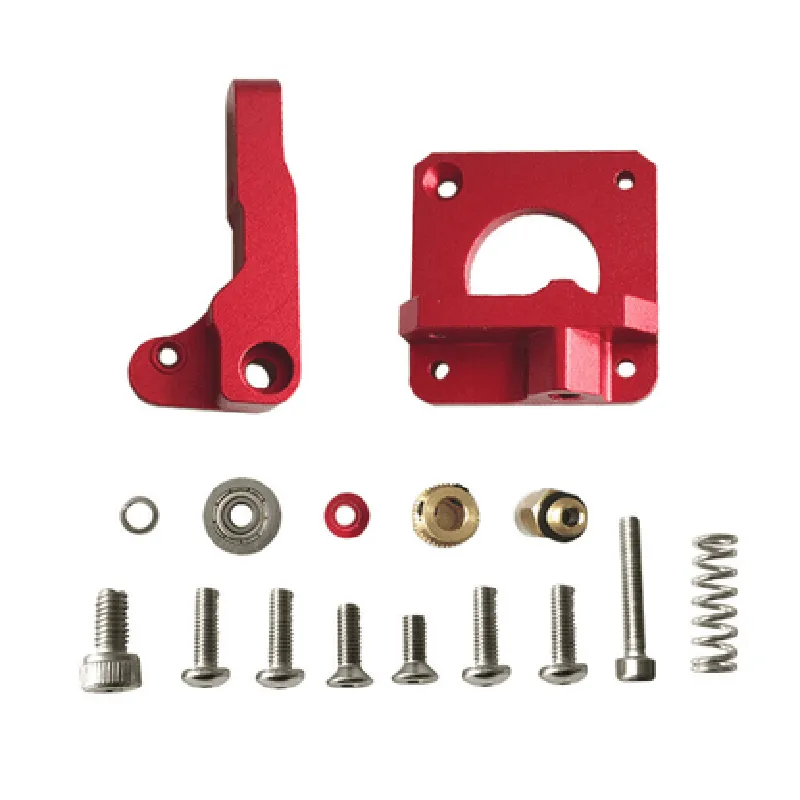
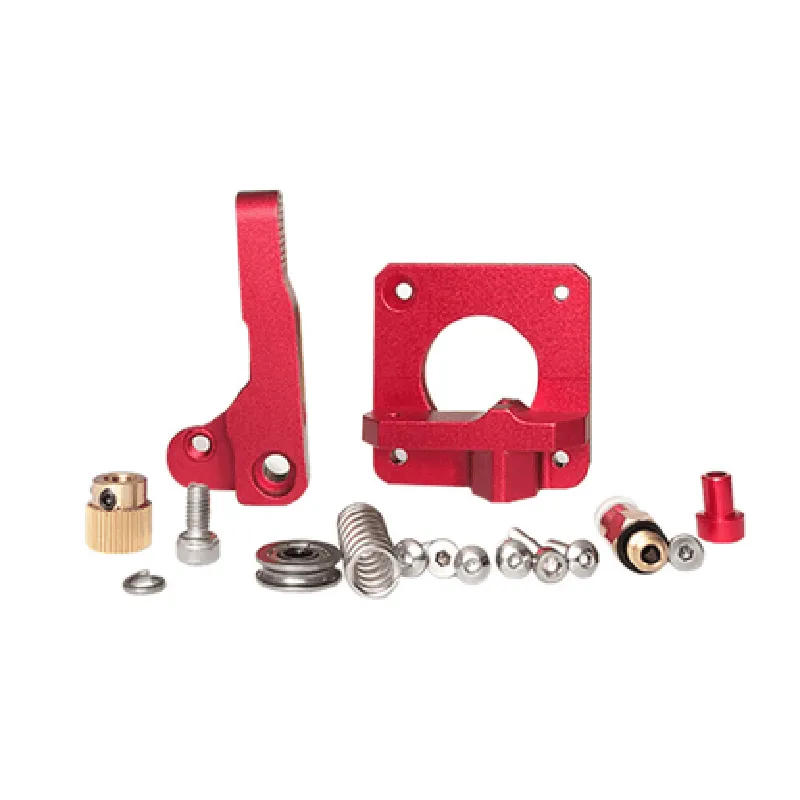
Extruder Kit Left Side Upgraded Red MK8 All Metal Bowden for 1.75mm Filament

Buy Now on Stufin

Material

Aluminum alloy and stainless steel


Filament diameter

1.75mm

Extruder type

Bowden-style

Mounting type

Left-side

Temperature range

Up to 300C (572F)

Compatibility

Compatible with most 3D printers that use 1.75mm filament

Dimensions

60mm x 40mm x 20mm (L x W x H)

Conclusion

The Extruder Kit Left Side Upgraded Red MK8 All Metal Bowden for 1.75mm Filament is a high-performance extruder solution designed for 3D printing enthusiasts and professionals. Its all-metal construction, Bowden-style design, and upgraded Red MK8 features make it an ideal choice for precise and reliable filament feeding, ensuring consistent and high-quality prints.

Pin Configuration

  • Extruder Kit Left Side Upgraded Red MK8 All Metal Bowden for 1.75mm Filament Pinout Documentation
  • The Extruder Kit Left Side Upgraded Red MK8 All Metal Bowden for 1.75mm Filament is a high-performance 3D printing extruder kit designed for precise and reliable filament feeding. The kit features a robust all-metal construction and is compatible with 1.75mm filament. This documentation provides a detailed explanation of the pins on the extruder kit, their functions, and a step-by-step guide on how to connect them.
  • Pinout Diagram:
  • The extruder kit has a total of 12 pins, divided into three connectors: JST-XH, JST-PH, and JST-SH. The pinout diagram is as follows:
  • JST-XH Connector (4-pin):
  • 1. VIN (Red Wire)
  • Function: Power supply voltage input (typically 12V or 24V)
  • Connection: Connect to the positive terminal of the power supply
  • 2. GND (Black Wire)
  • Function: Ground connection
  • Connection: Connect to the negative terminal of the power supply or the printer's ground
  • 3. DIR (Yellow Wire)
  • Function: Direction signal input for the stepper motor
  • Connection: Connect to the direction signal output of the printer's mainboard or motor controller
  • 4. ENA (White Wire)
  • Function: Enable signal input for the stepper motor
  • Connection: Connect to the enable signal output of the printer's mainboard or motor controller
  • JST-PH Connector (4-pin):
  • 1. STEP (Blue Wire)
  • Function: Step signal input for the stepper motor
  • Connection: Connect to the step signal output of the printer's mainboard or motor controller
  • 2. MOSI (Green Wire)
  • Function: Not used in this extruder kit
  • Connection: Leave unconnected
  • 3. MISO (Orange Wire)
  • Function: Not used in this extruder kit
  • Connection: Leave unconnected
  • 4. SCK (Grey Wire)
  • Function: Not used in this extruder kit
  • Connection: Leave unconnected
  • JST-SH Connector (4-pin):
  • 1. THERM (Brown Wire)
  • Function: Thermistor input for hotend temperature sensing
  • Connection: Connect to the thermistor output of the hotend
  • 2. FAN (Purple Wire)
  • Function: Fan control signal output
  • Connection: Connect to the fan input of the printer's mainboard or fan controller
  • 3. HEATER (Red Wire)
  • Function: Heater control signal output
  • Connection: Connect to the heater input of the printer's mainboard or heater controller
  • 4. Reserved (No Wire)
  • Function: Not used in this extruder kit
  • Connection: Leave unconnected
  • Connection Structure:
  • To connect the pins, follow this step-by-step guide:
  • 1. Connect the JST-XH connector to the power supply:
  • VIN (Red Wire) to the positive terminal of the power supply
  • GND (Black Wire) to the negative terminal of the power supply or the printer's ground
  • 2. Connect the JST-XH connector to the printer's mainboard or motor controller:
  • DIR (Yellow Wire) to the direction signal output
  • ENA (White Wire) to the enable signal output
  • 3. Connect the JST-PH connector to the printer's mainboard or motor controller:
  • STEP (Blue Wire) to the step signal output
  • 4. Connect the JST-SH connector to the hotend and fan:
  • THERM (Brown Wire) to the thermistor output of the hotend
  • FAN (Purple Wire) to the fan input of the printer's mainboard or fan controller
  • HEATER (Red Wire) to the heater input of the printer's mainboard or heater controller
  • Important Notes:
  • Ensure proper polarity when connecting the power supply to the extruder kit to avoid damage.
  • Consult the printer's mainboard or motor controller documentation for specific connection details.
  • Verify the thermistor type and connector type used in the hotend to ensure correct connection.
  • Follow proper wiring and insulation practices to prevent electrical shorts or fires.
  • By following this documentation, you should be able to properly connect the Extruder Kit Left Side Upgraded Red MK8 All Metal Bowden for 1.75mm Filament to your 3D printer's mainboard, motor controller, power supply, and hotend.

Code Examples

Extruder Kit Left Side Upgraded Red MK8 All Metal Bowden for 1.75mm Filament
Overview
The Extruder Kit Left Side Upgraded Red MK8 All Metal Bowden is a high-performance extruder designed for 3D printing applications that utilize 1.75mm filament. This upgraded extruder features an all-metal Bowden design, providing improved durability and reliability compared to traditional plastic or hybrid models.
Technical Specifications
Compatible Filament Diameter: 1.75mm
 Extruder Type: Bowden
 Material: All-Metal
 Color: Red
 MK8 Compatibility: Yes
 Heat Sink Material: Aluminum
 Nozzle Diameter: 0.4mm (default), interchangeable with other sizes
 Temperature Range: Up to 300C (572F)
Wiring and Connections
The extruder kit comes with a standard JST-XH connector for thermistor and heater cartridge connections. The recommended wiring configuration is as follows:
Thermistor: Connect the thermistor wires to the corresponding pins on the mainboard's thermistor connector (typically labeled as TH0 or TH1).
 Heater Cartridge: Connect the heater cartridge wires to the corresponding pins on the mainboard's heater connector (typically labeled as HE0 or HE1).
Code Examples
### Example 1: Marlin Firmware Configuration
In this example, we will configure the extruder settings in Marlin firmware to work with the upgraded Red MK8 All Metal Bowden extruder.
```c
// Configuration.h (excerpt)
#define EXTRUDER_COUNT 1
#define EXTRUDER0_HOTEND_OFFSET { 0, 0, 0 }
#define EXTRUDER0_MAX_TEMP 300
#define EXTRUDER0_MIN_TEMP 150
#define EXTRUDER0_STEPS_PER_MM 92.5
#define EXTRUDER0_MAX_FEEDRATE 50
#define EXTRUDER0_ACCELERATION 1000
#define TEMP_SENSOR_0 1  // Thermistor type (1 = 100k thermistor)
#define HEATER_0 1       // Heater type (1 = 30W heater cartridge)
```
### Example 2: Simplify3D Printer Profile
In this example, we will create a printer profile in Simplify3D to utilize the upgraded extruder.
```xml
<!-- Printer Profile (excerpt) -->
<extruder>
  <id>0</id>
  <name>Red MK8 Bowden</name>
  <description>Upgraded Red MK8 All Metal Bowden extruder</description>
  <filament_diameter>1.75</filament_diameter>
  <nozzle_diameter>0.4</nozzle_diameter>
  <temperature>
    <hotend>
      <temp_range_min>150</temp_range_min>
      <temp_range_max>300</temp_range_max>
      <temp_default>210</temp_default>
    </hotend>
  </temperature>
  <retraction>
    <speed>30</speed>
    <distance>1.5</distance>
  </retraction>
</extruder>
```
These code examples demonstrate how to configure the upgraded Red MK8 All Metal Bowden extruder in Marlin firmware and Simplify3D printer profiles. The provided settings can be adjusted according to specific printer requirements and application needs.