4 Pin Push in Conductor



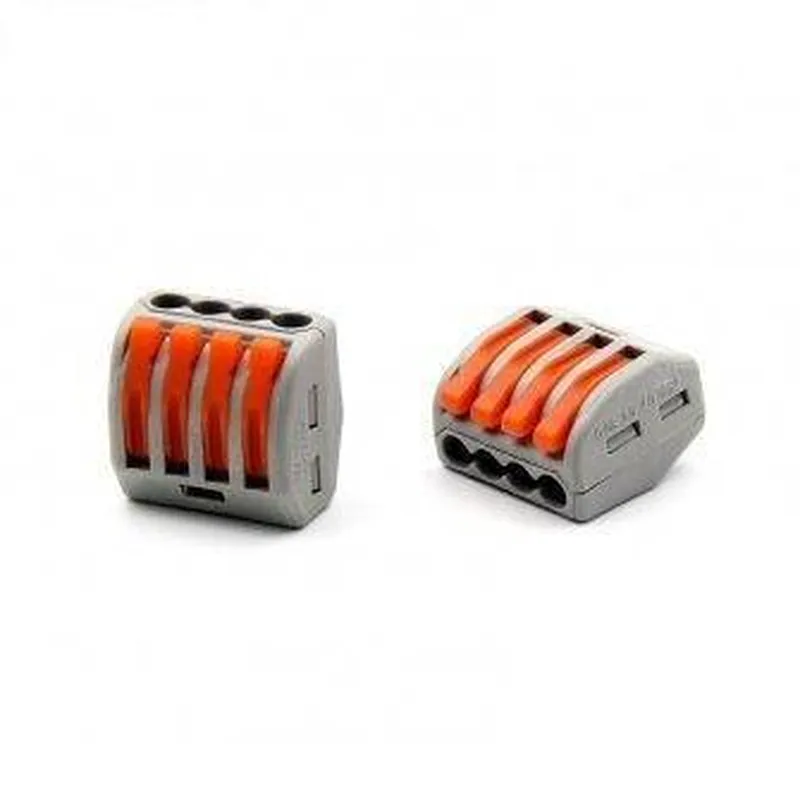
4 Pin Push in Conductor
The 4 Pin Push in Conductor is a type of electrical connector specifically designed for IoT applications. It is a compact, versatile, and reliable component that enables secure and efficient connections between devices, sensors, and other IoT modules.
The primary function of the 4 Pin Push in Conductor is to provide a reliable and convenient way to connect and disconnect devices, sensors, and other IoT modules. This component allows for the secure connection of four individual wires, making it an ideal solution for IoT applications that require multiple signal transmissions.
The Push in Conductor works by allowing individual wires to be pushed into the connector, securely holding them in place with a spring-loaded mechanism. This design ensures a reliable connection, minimizing the risk of wire damage or disconnection.
| ### Physical Characteristics |
The 4 Pin Push in Conductor features a compact, space-saving design that minimizes footprint and promotes ease of installation in IoT devices.
The component's housing is constructed from high-quality, impact-resistant materials that provide excellent protection against environmental factors and physical stress.
| ### Connection Characteristics | |
| 4 Pin Configuration | The connector features four individual pins, each capable of accommodating a single wire. |
| Push-in Mechanism | The spring-loaded mechanism securely holds wires in place, ensuring a reliable connection. |
The component is designed to accommodate a range of wire sizes, making it suitable for various IoT applications.
| ### Electrical Characteristics |
The 4 Pin Push in Conductor is rated for operating voltages up to 24V DC.
The component is designed to handle currents up to 2A per pin.
| ### Other Features |
The Push in Conductor is designed for easy installation, with a simple push-in mechanism that eliminates the need for complicated wiring or soldering.
The component is reusable, allowing for quick and easy disconnection and reconnection of devices and sensors.
| The 4 Pin Push in Conductor is suitable for a wide range of IoT applications, including |
Ideal for connecting sensors to microcontrollers, gateways, or other IoT devices.
Suitable for connecting IoT devices, such as actuators, displays, and communication modules.
The Push in Conductor is an excellent choice for prototyping and development projects, allowing for rapid connection and disconnection of components.
The 4 Pin Push in Conductor is a versatile, reliable, and convenient component that simplifies IoT device connectivity. Its compact design, durable construction, and easy installation make it an excellent choice for a wide range of IoT applications.
4 Pin Push in Conductor DocumentationOverviewThe 4 Pin Push in Conductor is a type of connector used in Internet of Things (IoT) projects to connect and disconnect wires easily. It features a compact design with four pins and a push-in mechanism that allows for secure and reliable connections.PinoutThe 4 Pin Push in Conductor has the following pinout:| Pin # | Function |
| --- | --- |
| 1 | Signal/Power |
| 2 | Signal/Power |
| 3 | Ground |
| 4 | Ground |Code Examples### Example 1: Connecting a Sensor to a MicrocontrollerIn this example, we'll use the 4 Pin Push in Conductor to connect a temperature sensor to a microcontroller, such as the Arduino Uno.Hardware Requirements4 Pin Push in Conductor
Arduino Uno
Temperature sensor (e.g., DS18B20)
Jumper wiresCode
```c
const int sensorPin = A0; // Analog input pin for temperature sensorvoid setup() {
Serial.begin(9600);
}void loop() {
int reading = analogRead(sensorPin);
float temperature = reading 0.5; // Convert analog reading to temperature (Celsius)
Serial.print("Temperature: ");
Serial.print(temperature);
Serial.println(" C");
delay(1000);
}
```
Connection1. Connect the VCC pin of the temperature sensor to Pin 1 of the 4 Pin Push in Conductor.
2. Connect the GND pin of the temperature sensor to Pin 3 of the 4 Pin Push in Conductor.
3. Connect Pin 2 of the 4 Pin Push in Conductor to Analog Input Pin A0 on the Arduino Uno.
4. Connect Pin 4 of the 4 Pin Push in Conductor to GND on the Arduino Uno.### Example 2: Connecting an Actuator to a Raspberry PiIn this example, we'll use the 4 Pin Push in Conductor to connect a relay module to a Raspberry Pi, allowing us to control an external device (e.g., a lamp).Hardware Requirements4 Pin Push in Conductor
Raspberry Pi
Relay module (e.g., SRD-05VDC-SL-C)
Jumper wiresCode
```python
import RPi.GPIO as GPIO
import time# Set up GPIO mode
GPIO.setmode(GPIO.BCM)# Define the relay pin
relay_pin = 17# Set up the relay pin as an output
GPIO.setup(relay_pin, GPIO.OUT)try:
while True:
# Turn the relay on
GPIO.output(relay_pin, GPIO.HIGH)
print("Relay on")
time.sleep(2)
# Turn the relay off
GPIO.output(relay_pin, GPIO.LOW)
print("Relay off")
time.sleep(2)
except KeyboardInterrupt:
GPIO.cleanup()
```
Connection1. Connect the VCC pin of the relay module to Pin 1 of the 4 Pin Push in Conductor.
2. Connect the GND pin of the relay module to Pin 3 of the 4 Pin Push in Conductor.
3. Connect Pin 2 of the 4 Pin Push in Conductor to GPIO Pin 17 on the Raspberry Pi.
4. Connect Pin 4 of the 4 Pin Push in Conductor to GND on the Raspberry Pi.These examples demonstrate how to use the 4 Pin Push in Conductor to connect sensors and actuators to microcontrollers and single-board computers. The push-in mechanism ensures secure connections, making it ideal for IoT projects that require reliability and ease of use.