Single Cell Lithium Battery Boost Power Module Board


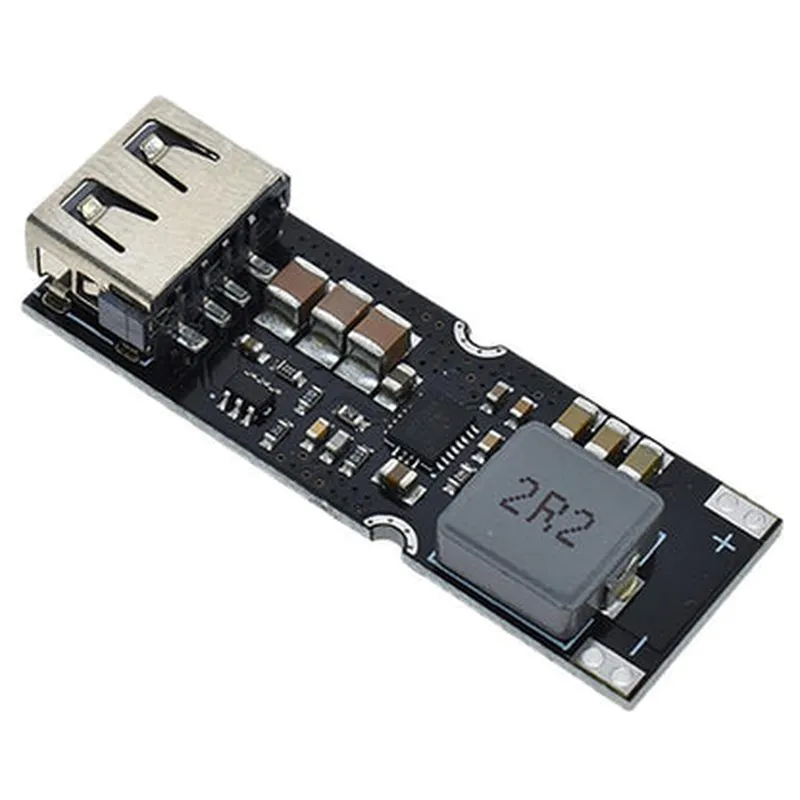
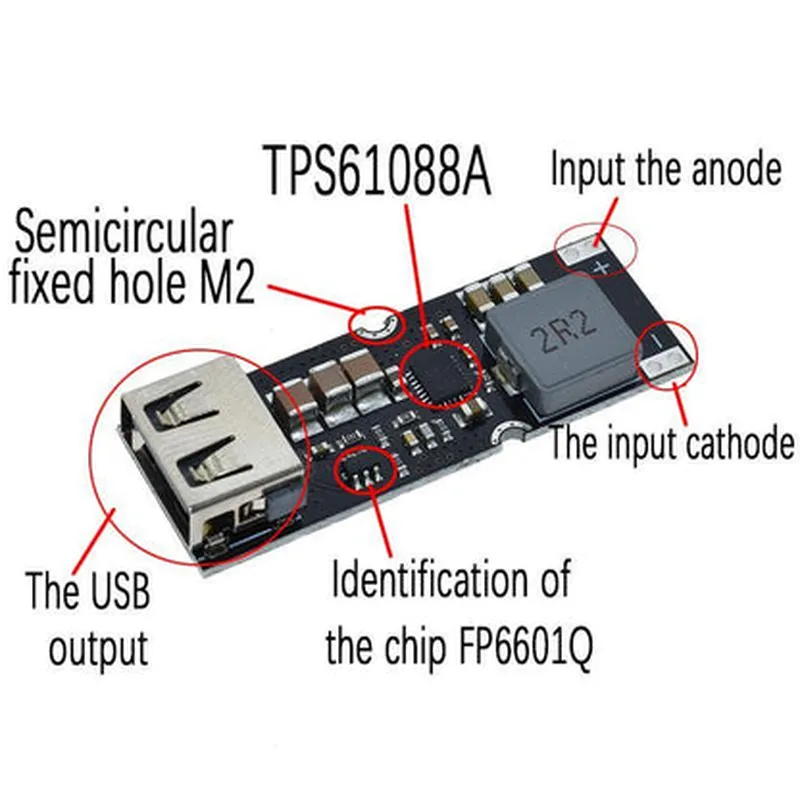
Single Cell Lithium Battery Boost Power Module Board
The Single Cell Lithium Battery Boost Power Module Board is a compact, high-efficiency power management module designed to boost the voltage of a single-cell lithium-ion battery to a stable output voltage, making it an ideal solution for IoT projects, wearable devices, and portable electronics.
The module's primary function is to take an input voltage from a single-cell lithium-ion battery (typically between 3.0V and 4.2V) and boost it to a regulated output voltage of 5.0V, 3.3V, or 2.5V (selectable via jumper or pin selection). This allows devices designed to operate at higher voltages to be powered from a single-cell lithium-ion battery, ensuring efficient power management and prolonging battery life.
| Parameter | Value | Units |
| --- | --- | --- |
| Input Voltage | 3.0 - 4.2 | V |
| Output Voltage | 5.0, 3.3, or 2.5 (selectable) | V |
| Efficiency | up to 95 | % |
| Output Current | up to 1.2 | A |
| Quiescent Current | <1 | mA |
| Operating Temperature | -40 to +85 | C |
| Storage Temperature | -40 to +125 | C |
| The module's pinout typically consists of the following |
Input voltage from the single-cell lithium-ion battery
Regulated output voltage
Ground pin
Enable pin (optional, used to turn the module on or off)
Please note that the exact pinout and interface may vary depending on the specific module and manufacturer. Always refer to the datasheet and manufacturer's documentation for specific details and guidelines.
Single Cell Lithium Battery Boost Power Module Board DocumentationOverviewThe Single Cell Lithium Battery Boost Power Module Board is a compact and efficient power management solution designed for IoT devices and other battery-powered applications. This module board features a high-performance boost converter that can step up the voltage of a single cell lithium-ion battery (e.g., 3.7V) to a stable output voltage, making it suitable for powering devices that require higher voltages (e.g., 5V or 12V).Key FeaturesInput voltage range: 2.5V to 4.5V
Output voltage adjustable: 5V, 6V, 9V, 12V (via jumper selection)
Maximum output current: 2A
High efficiency: up to 90%
Small footprint: 20mm x 15mm
Low quiescent current: 2mAPinoutsIN (+) and IN (-): Input voltage connections for the lithium-ion battery
OUT (+) and OUT (-): Output voltage connections for the powered device
EN (Enable): Active-high enable pin to turn the module on/off
VIN_SEL: Voltage selection jumper pins (5V, 6V, 9V, 12V)Example 1: Basic Usage with ArduinoIn this example, we will demonstrate how to use the Single Cell Lithium Battery Boost Power Module Board with an Arduino Uno board to power a 5V device.Hardware RequirementsArduino Uno board
Single Cell Lithium Battery Boost Power Module Board
Lithium-ion battery (e.g., 3.7V, 1000mAh)
Breadboard and jumper wires
5V device (e.g., LED strip, sensor module)Code```c++
const int enablePin = 2; // Connect EN pin to digital pin 2 on Arduinovoid setup() {
pinMode(enablePin, OUTPUT);
digitalWrite(enablePin, HIGH); // Turn on the boost converter
}void loop() {
// Your code here...
}
```Example 2: Voltage Selection with Raspberry PiIn this example, we will demonstrate how to use the Single Cell Lithium Battery Boost Power Module Board with a Raspberry Pi board to power a 12V device.Hardware RequirementsRaspberry Pi board
Single Cell Lithium Battery Boost Power Module Board
Lithium-ion battery (e.g., 3.7V, 1000mAh)
Breadboard and jumper wires
12V device (e.g., motor, relay module)Code```python
import RPi.GPIO as GPIOGPIO.setmode(GPIO.BCM)
enable_pin = 17 # Connect EN pin to GPIO 17 on Raspberry PiGPIO.setup(enable_pin, GPIO.OUT)
GPIO.output(enable_pin, GPIO.HIGH) # Turn on the boost converter# Set the output voltage to 12V using the VIN_SEL jumper pins
vin_sel_pins = [23, 24] # Connect VIN_SEL pins to GPIO 23 and 24 on Raspberry Pi
GPIO.setup(vin_sel_pins, GPIO.OUT)
GPIO.output(vin_sel_pins, (GPIO.HIGH, GPIO.LOW)) # Select 12V output# Your code here...
```Example 3: Automatic Power-On with ESP32In this example, we will demonstrate how to use the Single Cell Lithium Battery Boost Power Module Board with an ESP32 board to automatically power on a 9V device when the battery voltage is above a certain threshold.Hardware RequirementsESP32 board
Single Cell Lithium Battery Boost Power Module Board
Lithium-ion battery (e.g., 3.7V, 1000mAh)
Breadboard and jumper wires
9V device (e.g., audio amplifier, sensor module)Code```c++
const int batteryPin = A0; // Connect battery voltage to analog pin A0 on ESP32
const int enablePin = 12; // Connect EN pin to digital pin 12 on ESP32void setup() {
pinMode(enablePin, OUTPUT);
digitalWrite(enablePin, LOW); // Turn off the boost converter initially
}void loop() {
int batteryVoltage = analogRead(batteryPin);
float batteryLevel = (batteryVoltage 3.3) / 4095;if (batteryLevel > 3.5) {
digitalWrite(enablePin, HIGH); // Turn on the boost converter when battery voltage is above 3.5V
} else {
digitalWrite(enablePin, LOW); // Turn off the boost converter when battery voltage is below 3.5V
}delay(1000);
}
```These examples demonstrate the basic usage of the Single Cell Lithium Battery Boost Power Module Board in various contexts. Please refer to the component's datasheet and your microcontroller's documentation for more detailed information on pinouts, voltage selection, and power management.