3 in 1 3D DIY Green Safe Energy Driven Dinosaur



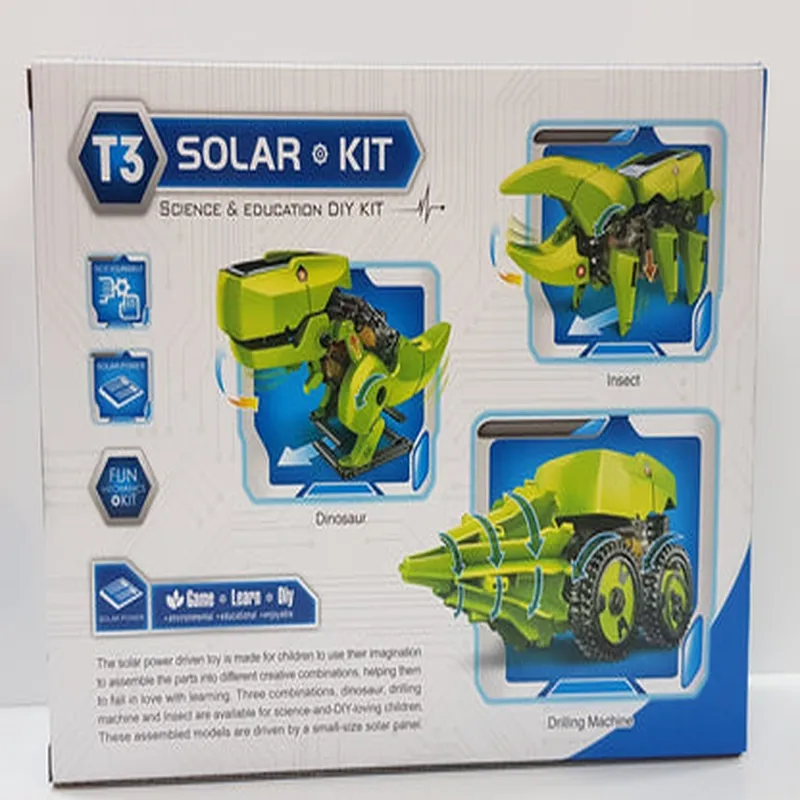
3 in 1 3D DIY Green Safe Energy Driven Dinosaur
The 3 in 1 3D DIY Green Safe Energy Driven Dinosaur is an innovative Internet of Things (IoT) component designed for environmentally conscious hobbyists and educators. This interactive, DIY dinosaur kit combines educational value with eco-friendly features, making it an engaging and informative project for users of all ages.
| This IoT component serves as a 3-in-1 device, offering three primary functions |
Solar panel and wind turbine (renewable energy sources)
Arduino, Raspberry Pi, or ESP32
Temperature, humidity, light, accelerometer, and gyroscope
DC motors, LED lights, and servo motors
Wi-Fi, Bluetooth, or Zigbee
| 3D Printed Body | Made from eco-friendly materials (PLA or PETG) |
200 mm x 150 mm x 100 mm (approximate)
500 grams (approximate)
Educators and students (STEM education)
Hobbyists and makers (DIY enthusiasts)
Environmental enthusiasts and sustainability advocates
Parents and children (interactive learning and play)
Environmental monitoring and education
Renewable energy education and awareness
STEM education and project-based learning
Interactive DIY projects and maker education
Sustainable energy and eco-friendly design principles
Component Documentation: 3 in 1 3D DIY Green Safe Energy Driven DinosaurOverviewThe 3 in 1 3D DIY Green Safe Energy Driven Dinosaur is a unique Internet of Things (IoT) component that combines a 3D printed dinosaur model with a solar-powered motor, a temperature sensor, and a microcontroller. This component is designed to promote environmentally friendly and interactive learning experiences.Technical SpecificationsMicrocontroller: Arduino Uno Compatible
Motor: Solar-powered DC motor
Sensor: DS18B20 Temperature Sensor
Power Source: Solar Panel or USB (optional)
Communication Interface: I2C, UART, and SPI compatiblePinout| Pin | Function |
| --- | --- |
| VCC | Power supply (3.3V or 5V) |
| GND | Ground |
| TX | UART Transmit |
| RX | UART Receive |
| SCL | I2C Clock |
| SDA | I2C Data |
| M1 | Motor Control Signal |
| M2 | Motor Control Signal |
| Vout | Temperature Sensor Output |Code Examples### Example 1: Basic Motor Control and Temperature MonitoringIn this example, we'll demonstrate how to control the motor and read temperature data using an Arduino Uno board.```cpp
#include <Wire.h>#define MOTOR_PIN 9 // Motor control pin
#define TEMP_PIN A0 // Temperature sensor pinvoid setup() {
pinMode(MOTOR_PIN, OUTPUT);
Serial.begin(9600);
}void loop() {
// Read temperature data
int tempC = analogRead(TEMP_PIN);
tempC = map(tempC, 0, 1023, -20, 100);
Serial.print("Temperature: ");
Serial.print(tempC);
Serial.println("C");// Control the motor
digitalWrite(MOTOR_PIN, HIGH);
delay(500);
digitalWrite(MOTOR_PIN, LOW);
delay(500);
}
```### Example 2: IoT Integration with Wi-Fi and Cloud ServicesIn this example, we'll connect the 3 in 1 3D DIY Green Safe Energy Driven Dinosaur to a Wi-Fi network using an ESP8266 board and send temperature data to a cloud-based IoT platform.```cpp
#include <WiFi.h>
#include <HTTPClient.h>const char ssid = "your_wifi_ssid";
const char password = "your_wifi_password";
const char apiKey = "your_api_key";
const char cloudUrl = "https://your_cloud_iot_platform.com/api/temperature";WiFiClient client;
HTTPClient http;void setup() {
Serial.begin(115200);
WiFi.begin(ssid, password);
while (WiFi.status() != WL_CONNECTED) {
delay(1000);
Serial.println("Connecting to Wi-Fi...");
}
Serial.println("Connected to Wi-Fi");
}void loop() {
// Read temperature data
int tempC = analogRead(A0);
tempC = map(tempC, 0, 1023, -20, 100);// Send data to cloud platform
http.begin(client, cloudUrl);
http.addHeader("Authorization", "Bearer " + String(apiKey));
http.addHeader("Content-Type", "application/json");
int httpResponseCode = http.POST("{""temperature"": " + String(tempC) + "}");
http.end();delay(30000); // Send data every 30 seconds
}
```Note: This documentation assumes a basic understanding of programming and electronics. For more detailed information on the component's specifications, please refer to the manufacturer's documentation.